
1. Pengenalan
Thank you for choosing the TrueLife FitScale W7 BT Smart Scale. This manual provides essential information for the safe and effective use of your new smart scale. Please read it thoroughly before first use and keep it for future reference. The FitScale W7 BT is designed to help you monitor your body composition, including weight, and track your progress through its Bluetooth connectivity and companion application.
This scale supports up to 8 user profiles, allowing multiple individuals to track their personal health data independently.
2. Maklumat Keselamatan
- Jangan gunakan peranti ini jika anda mempunyai perentak jantung atau peranti perubatan dalaman yang lain.
- Jangan gunakan peranti ini jika anda hamil.
- Always place the scale on a hard, flat surface for accurate measurements. Avoid carpets or soft flooring.
- The scale's surface can be slippery when wet. Ensure the surface is dry before stepping on.
- Jangan melompat ke atas penimbang atau menggunakannya untuk tujuan selain menimbang.
- Jauhkan bateri daripada kanak-kanak. Jika tertelan, dapatkan rawatan perubatan segera.
- Buang bateri terpakai mengikut peraturan tempatan.
- Jangan cuba membuka atau membaiki penimbang sendiri. Hubungi khidmat pelanggan jika timbul masalah.
3. Kandungan Pakej
Pastikan semua item ada dan dalam keadaan baik semasa membongkar:
- TrueLife FitScale W7 BT Smart Scale
- Bateri 1 x 12V
- Manual Pengguna (dokumen ini)
4. Persediaan
4.1. Pemasangan Bateri
The TrueLife FitScale W7 BT uses one 12V battery. The battery is included in the package.
- Balikkan penimbang untuk mengakses petak bateri di bahagian bawah.
- Buka penutup petak bateri.
- Insert the 12V battery, ensuring the polarity (+ and -) matches the indicators inside the compartment.
- Tutup penutup petak bateri dengan selamat.
4.2. Penempatan Skala
Place the scale on a hard, flat, and stable surface. Uneven or soft surfaces (like carpets) can affect measurement accuracy.
4.3. Muat Turun Apl dan Berpasangan Bluetooth
To utilize the smart features and body composition analysis, download the official TrueLife companion app from your smartphone's app store (iOS or Android).
- Download and install the TrueLife app on your smartphone.
- Dayakan Bluetooth pada telefon pintar anda.
- Open the TrueLife app and follow the on-screen instructions to create your user profile.
- Step onto the scale briefly to activate it. The scale will automatically attempt to pair with the app via Bluetooth. Confirm the pairing within the app if prompted.
Note: Ensure your phone is within range of the scale during pairing and measurement synchronization.
5. Arahan Operasi
5.1. Penentukuran Awal
Before first use or after moving the scale, perform an initial calibration:
- Gently step on the scale until the display lights up, then step off immediately.
- The display will show "0.0" or similar, indicating it's ready for use.
5.2. Mengambil Pengukuran
For accurate body composition analysis, ensure your feet are bare and clean.
- Step onto the scale with bare feet, positioning them evenly on the electrodes (metal pads).
- Stand still until your weight is displayed and stabilized.
- If connected to the app, your data (weight and body composition metrics) will automatically synchronize to your profile.
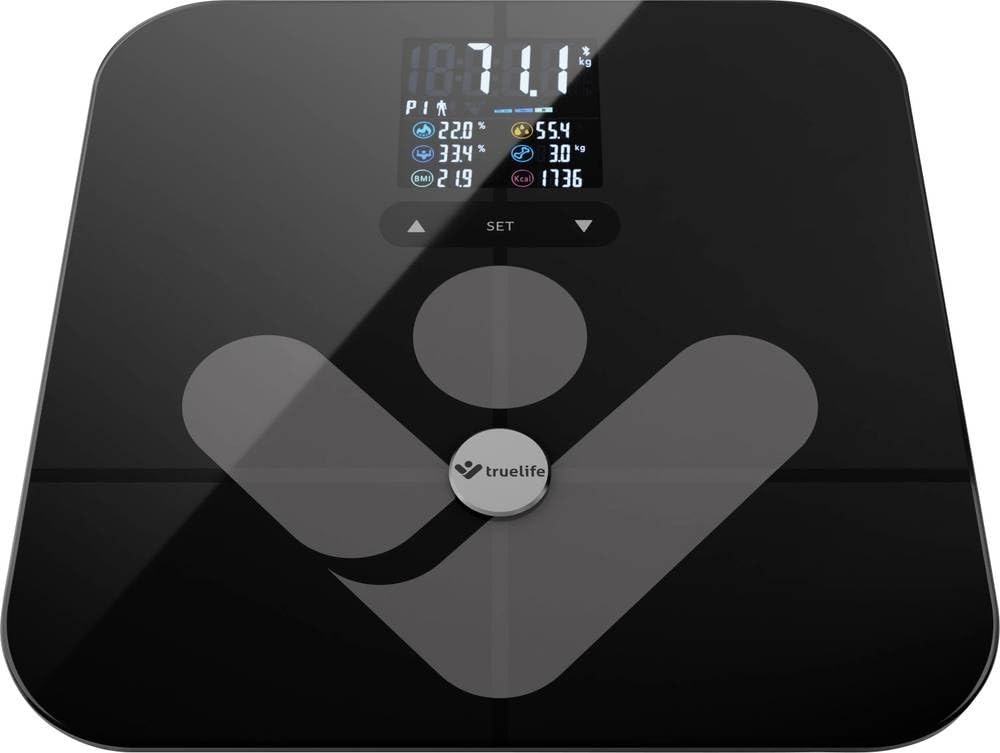
Image: TrueLife FitScale W7 BT Smart Scale. This image shows the sleek black glass surface of the scale with a digital display.
5.3. Managing User Profiles
Skala menyokong sehingga 8 pengguna profiles. Each user should create their profile within the TrueLife app. The scale will automatically recognize the user based on their weight and body composition data once a profile ditubuhkan.
- Membuat Profile: Open the app, navigate to the user management section, and add a new user. Enter personal details such as age, height, and gender for accurate body composition calculations.
- Pengecaman Automatik: When a registered user steps on the scale, the app will identify them and record the measurement to their specific profile.
6. Penyelenggaraan
6.1. Pembersihan
To keep your scale in optimal condition:
- Lap permukaan dengan lembut, damp kain.
- Jangan gunakan pembersih yang kasar atau rendam kerak di dalam air.
- Pastikan penimbang kering sebelum penyimpanan atau penggunaan seterusnya.
6.2. Penyimpanan
Simpan penimbang di tempat yang sejuk dan kering, jauh daripada cahaya matahari langsung dan suhu yang melampau.
6.3. Penggantian Bateri
When the display shows a "Lo" indicator, it's time to replace the battery. Follow the steps in section 4.1 for battery installation.
7. Penyelesaian masalah
| Masalah | Kemungkinan Punca | Penyelesaian |
|---|---|---|
| No display / Scale won't turn on | Bateri mati atau tidak dipasang dengan betul. | Check battery polarity or replace the 12V battery. |
| "Lo" dipaparkan | Kuasa bateri rendah. | Ganti bateri 12V. |
| "Err" displayed | Overload (weight exceeds 180 kg) or measurement error. | Ensure weight is within limits. Step off and on again. Ensure scale is on a flat surface. |
| Bacaan tidak tepat | Scale on uneven surface, not calibrated, or feet not properly placed. | Place on a hard, flat surface. Perform initial calibration (Section 5.1). Ensure bare feet are centered on electrodes. |
| Isu sambungan Bluetooth | Bluetooth off, app not open, or scale not activated. | Ensure Bluetooth is enabled on your phone. Open the TrueLife app. Step on the scale to activate it. Try restarting both the scale (by removing/reinserting battery) and your phone. |
| Body composition data not showing | Feet not bare, not making good contact with electrodes, or profile not set up in app. | Ensure bare, clean feet are making full contact with the metal electrodes. Verify your profile is complete in the TrueLife app. |
8. Spesifikasi
| model: | TLFSW7BTB |
| Jenama: | Kehidupan sebenar |
| Dimensi: | 35 x 34 x 4 cm |
| Berat: | 1.8 kg |
| Kapasiti Berat Maksimum: | 180 Kilogram |
| Jenis Paparan: | LCD |
| Bahan: | kaca |
| Sumber Kuasa: | 1 x Bateri 12V (termasuk) |
| Ciri Khas: | Body Composition Analysis, Bluetooth Connectivity, Up to 8 User Profiles |
9. Waranti dan Sokongan
9.1. Maklumat Waranti
TrueLife products are covered by a manufacturer's warranty. For specific warranty terms and conditions, please refer to the warranty card included with your product or visit the official TrueLife website. Keep your proof of purchase for warranty claims. Information regarding spare parts availability is not provided in this manual; please consult the manufacturer's weblaman web atau peruncit anda.
9.2. Sokongan Pelanggan
If you encounter any issues or have questions regarding your TrueLife FitScale W7 BT, please contact TrueLife customer support or your retailer. Contact details can typically be found on the TrueLife official webtapak atau pada pembungkusan produk anda.