
OIEXI 666186954140
OIEXI UHD 4K Video Camera Camcorder Instruction Manual
Model: 666186954140
pengenalan
This manual provides comprehensive instructions for the operation and maintenance of your OIEXI UHD 4K Video Camera Camcorder. Designed for ease of use, this camcorder features 4K Ultra HD video recording, 64MP photo capabilities, 18X digital zoom, a 4.0-inch rotating touchscreen, and various advanced functions to capture high-quality visuals. Please read this manual thoroughly before using the device to ensure optimal performance and longevity.

Figure 1: OIEXI UHD 4K Video Camera Camcorder and Included Accessories.
Produk Selesaiview dan Komponen
Familiarize yourself with the various parts of your camcorder to ensure proper operation.

Figure 2: Detailed diagram of the camcorder's components.
- 1. Handle Charging Port: For charging the camera via the handle.
- 2. Bateri: Main power source for the camcorder.
- 3. Video Button: Memulakan dan menghentikan rakaman video.
- 4. Photo Button: Menangkap imej pegun.
- 5. Confirmation Button/Control Wheel: Menavigasi menu dan mengesahkan pilihan.
- 6. DISP Button: Toggles display information on/off.
- 7. USB Interface/Camera Charging Port: Connects to computer or charger.
- 8. MIC Interface: Connects external microphone.
- 9. HDMI Interface: Connects to external display.
- 10. Kanta: Komponen optik utama untuk menangkap imej.
- 11. Butang Kuasa: Turns the camcorder on/off.
- 12. Butang Menu: Accesses the camcorder's settings menu.
- 13. Butang Mod: Switches between different operating modes (e.g., video, photo, playback).
- 14. Playback Button: Memasuki mod main balik untukview media yang dirakam.
- 15. Slot Kad SD: Masukkan kad SD anda di sini.
- 16. Penceramah: Untuk main balik audio.
- 17. Internal Hot Shoe: For attaching accessories like the external microphone.
- 18. Handle Video/Photo Button: Alternative buttons on the handle for recording video or taking photos.
- 19. Handle Digital Zoom: Controls digital zoom from the handle.
- 20. Camera Zoom: Controls optical/digital zoom.
- 21. Camera Hot Shoe: For attaching accessories.
Persediaan
1. Mengecas Bateri
Before first use, fully charge the included Lithium Ion battery. The 4500mAh battery provides over 3 hours of continuous use. You can also record while charging.
- Masukkan bateri ke dalam petak bateri.
- Connect the USB cable to the camera's charging port (7) or the handle charging port (1) and then to the charger.
- Pasangkan pengecas ke soket kuasa. Penunjuk pengecasan akan menunjukkan status pengecasan.

Figure 3: Battery charging and SD card insertion.
2. Memasukkan Kad SD
This camcorder supports SD cards up to 256GB. A 64GB SD card is included for immediate use.
- Locate the SD card slot (15) on the camcorder.
- Masukkan kad SD dengan kenalan logam menghadap ke bawah sehingga ia klik pada tempatnya.
3. Memasang Aksesori
- Mikrofon Luaran: Connect the external microphone to the MIC Interface (8) for improved audio clarity and noise reduction.
- Tudung Lensa: Attach the lens hood to the front of the lens (10) to protect it from damage and reduce glare, improving photo color and contrast.
- Handheld Stabilizer: For low-angle shots and improved video stability, attach the camcorder to the included handheld stabilizer. The stabilizer also features zoom and shooting buttons for convenience.
Arahan Operasi
1. Hidupkan/Mati Kuasa
Press the Power Button (11) to turn the camcorder on or off.
2. Basic Recording (Video & Photo)
- Rakaman Video: Press the Video Button (3) or the Handle Video Button (18) to start recording. Press again to stop.
- Tangkapan Foto: Press the Photo Button (4) or the Handle Photo Button (18) to take a still picture.
- Zum: Use the Camera Zoom (20) or Handle Digital Zoom (19) controls to adjust the 18X digital zoom.
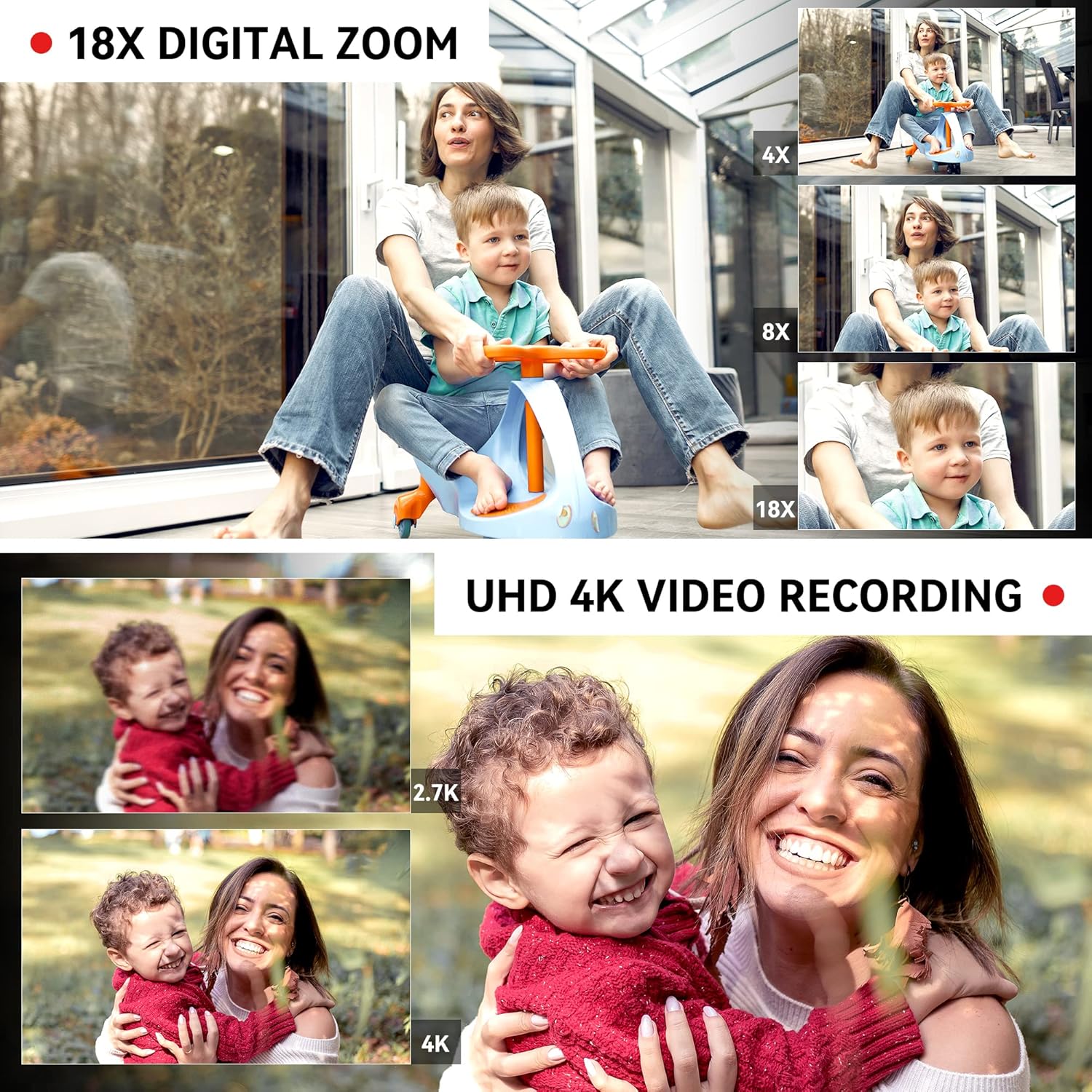
Figure 4: Demonstrating 18X Digital Zoom and 4K video quality.
3. Touchscreen and Menu Navigation
The 4.0-inch 270-degree rotating touchscreen allows for easy navigation. Use the Confirmation Button/Control Wheel (5) or touch the screen directly to select options and adjust settings via the Menu Button (12).
Video 1: This video demonstrates the camcorder's physical features, including the rotating screen, and shows the menu interface for selecting multiple shooting modes and adjusting focus. It also illustrates the wireless connection feature.
4. Multiple Shooting Modes
Press the Mode Button (13) to switch between various shooting modes, including:
- Fungsi Jeda: Temporarily stop and resume recording within the same file.
- Masa berlalu: Capture images at set intervals to create a time-lapse video.
- Pergerakan Perlahan: Record video at a higher frame rate for slow-motion playback.
- Penggambaran berterusan: Ambil beberapa gambar secara berturut-turut.
- Pemasa Kendiri: Tetapkan masa tunda sebelum mengambil foto.
- Rakaman Gelung: Rekod secara berterusan, tulis ganti yang tertua files apabila kad memori penuh.

Figure 5: Visual representation of different shooting modes available.
5. Pelarasan Fokus
The camcorder supports both manual and auto-focus. Adjust focus as needed for sharp images and videos.
6. Connectivity and File Pemindahan
- Sambungan Tanpa Wayar (Wi-Fi): Use the "XDV PRO" app on your smartphone to remotely control the camcorder and transfer videos and photos. No internet connection is required for direct file transfer between the camera and phone via Wi-Fi.
- USB Connection (Webcam/Mass Storage): Connect the camcorder to a computer using the USB cable. You can select "Webcam" for live streaming or video calls, or "Mass Storage" to transfer files terus ke komputer anda.
- Output HDMI: Connect the camcorder to a TV or monitor using the HDMI cable (9) for a larger viewpengalaman dalam.

Figure 6: Connecting the camcorder to a computer and selecting modes.

Figure 7: Remote and Wi-Fi control options.
7. Alat Kawalan Jauh
The included 2.4G wireless remote control allows you to easily control shooting functions from up to 65 feet away.
Penyelenggaraan
- Pembersihan: Use the provided wiping cloth to gently clean the lens and screen. Avoid using harsh chemicals.
- Storan: When not in use, store the camcorder in the included camera bag in a cool, dry place away from direct sunlight and extreme temperatures.
- Penjagaan Bateri: Untuk memanjangkan hayat bateri, elakkan daripada menyahcas sepenuhnya bateri dengan kerap. Mengecasnya dengan kerap, walaupun tidak digunakan untuk tempoh yang lama.
- Pengurusan Kad SD: Buat sandaran anda secara berkala files and format the SD card in the camera to maintain optimal performance.
Menyelesaikan masalah
| Masalah | Kemungkinan Punca | Penyelesaian |
|---|---|---|
| Camcorder tidak dihidupkan. | Bateri tidak dicas atau tidak dimasukkan dengan betul. | Ensure the battery is fully charged and properly inserted. Try charging the battery for at least 30 minutes before attempting to power on again. |
| SD card not recognized or files corrupted. | SD card not inserted correctly, incompatible, or corrupted. | Reinsert the SD card. Ensure it is a compatible SDXC card (up to 256GB). Try formatting the SD card within the camera (this will erase all data). If issues persist, try a different SD card. |
| Kualiti bunyi yang buruk. | Internal microphone limitations or external microphone not connected/charged. | Ensure the external microphone is securely connected to the MIC interface (8). If using an external microphone, ensure its battery is charged (if applicable). For optimal sound, use the external microphone. |
| Video recording stops or files are split/corrupted during long recordings. | SD card speed is too slow or card is faulty. | Use a high-speed SD card (Class 10 or higher, U3 recommended for 4K). Format the SD card regularly. If the problem persists, try a different, high-quality SD card. |
| Cannot connect to phone via Wi-Fi. | Tetapan Wi-Fi atau isu apl yang salah. | Ensure Wi-Fi is enabled on the camcorder and your phone. Check that you have the correct "XDV PRO" app installed. Restart both devices and try again. |
Spesifikasi
| Ciri | Perincian |
|---|---|
| Jenama | OIEXI |
| Nombor Model | 666186954140 |
| Resolusi Tangkapan Video | 4K Ultra HD (60FPS) |
| Resolusi Foto | Sehingga 64 Megapiksel |
| Zum Digital | 18X |
| Saiz Skrin | 4.0 Inches (270° Rotating Touchscreen) |
| Jenis Sensor | 1/2" CMOS Sensor |
| Jenis Bateri | Litium Ion (4500mAh) |
| Media Storan | SD Card (up to 256GB, 64GB included) |
| Ketersambungan | Wi-Fi, USB, HDMI |
| Ciri Khas | Built-In Light, Microphone Input, Remote Control, Time Lapse, Touchscreen, Pause Function, Slow Motion, Continuous Shooting, Self-Timer, Anti-Shake |
| Dimensi | 7.09 x 3.92 x 3.14 inci |
| Berat badan | 3.45 paun |

Figure 8: Camcorder dimensions and weight.
Apa yang ada dalam Kotak
Your OIEXI UHD 4K Video Camera Camcorder package includes the following items:
- 1 x Camcorder
- 1 x Bateri
- 1 x Pengecas
- Kad SD 1 x 64GB
- 1 x Handheld Stabilizer
- 1 x Camera Bag
- 1 x Manual Arahan
- 1 x Wiping Cloth
- 1 x Alat Kawalan Jauh
- 2 x Remote Control Batteries
- 1 x Kabel USB
- 1 x Kabel HDMI
- 1 x Mikrofon Luaran
- 1 x Lens Hood

Rajah 9: Semua aksesori disertakan dalam pakej.
Waranti dan Sokongan
Untuk maklumat waranti dan sokongan pelanggan, sila rujuk dokumentasi yang diberikan bersama pembelian anda atau hubungi terus penjual. Simpan bukti pembelian anda untuk sebarang tuntutan waranti.