
1. Pengenalan
This manual provides detailed instructions for the assembly, operation, and maintenance of your SEDETA L Shaped Desk. This versatile desk features a power outlet, LED lighting, a keyboard tray, storage shelves, a pegboard, and a headphone hook, designed to enhance your home office or gaming setup.

Imej 1.1: Selesaiview of the SEDETA L Shaped Desk in a 94.5-inch configuration.
2. Maklumat Keselamatan
Please read and understand all safety instructions before assembling or using this desk. Failure to follow these instructions may result in injury or damage to the product.
- This desk requires assembly and includes electrical components. Always follow safety guidelines when assembling and using the desk, especially when handling electrical parts.
- Ensure proper weight distribution when using storage features to maintain stability.
- Sentiasa cabut plag meja daripada sumber kuasa apabila tidak digunakan atau sebelum membersihkan.
- Do not over-tighten screws during assembly, as this may damage the wood. Tighten until snug, then stop.
3. Persediaan dan Pemasangan
Assembly of the SEDETA L Shaped Desk typically requires two people. Detailed assembly instructions are included in the product packaging. Follow the step-by-step guide provided to ensure correct and safe assembly.
3.1. Desk Configuration
The desk offers a reversible design, allowing it to be configured as a 67-inch corner desk or a 94.5-inch long office desk. The top hutch can also be placed on the left or right side to suit your needs.
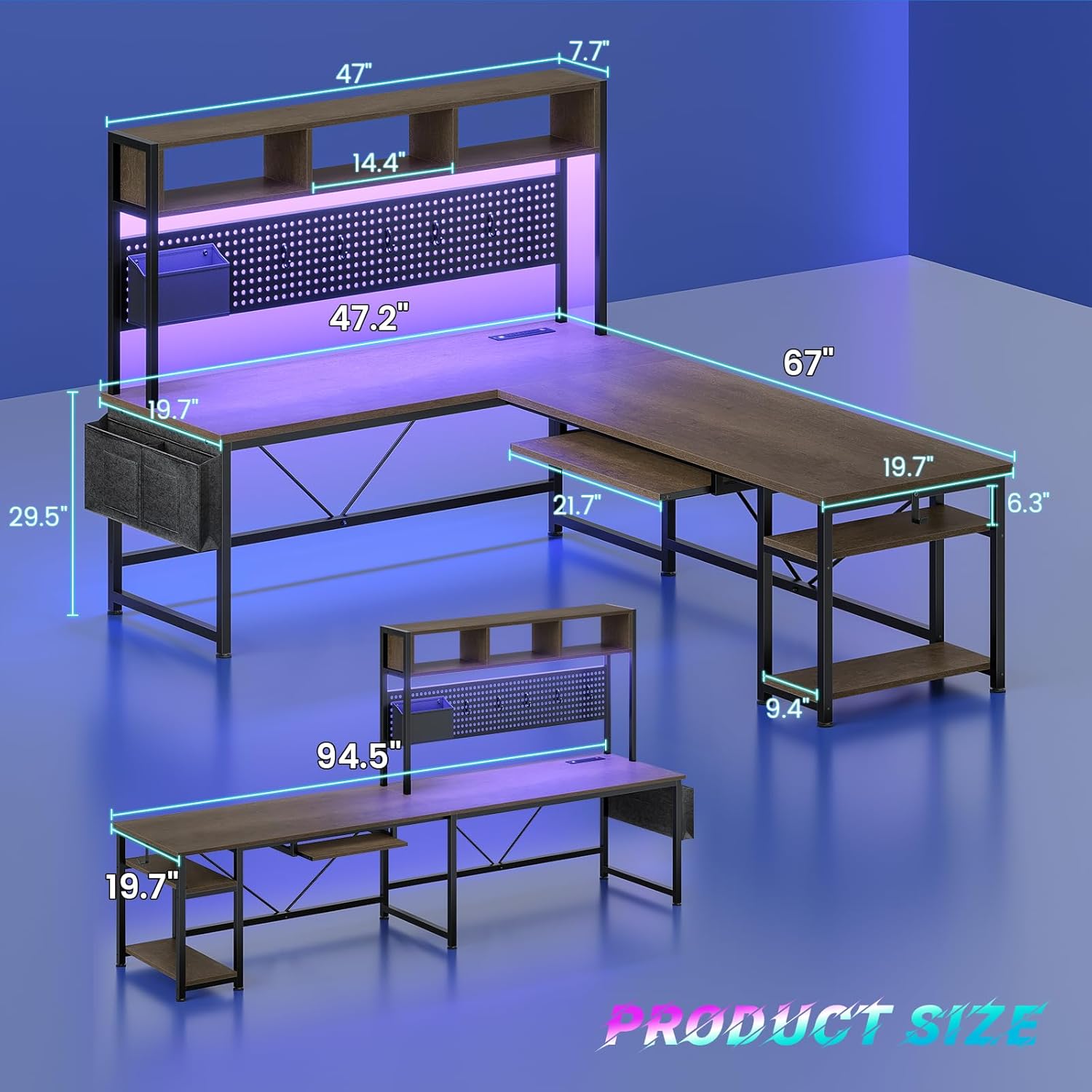
Image 3.1: Product dimensions and reversible configurations.

Image 3.2: Various reversible desk configurations.
3.2. Petua Perhimpunan
- Lay out all parts and hardware before beginning assembly to ensure everything is present.
- Do not overtighten screws. Tighten them just enough to secure the components firmly.
- Consider having a second person assist with holding larger components during assembly for easier and safer construction.
Video 3.1: Tamatview of the SEDETA L Shaped Desk, highlighting its features and potential setup.
4. Arahan Operasi
4.1. Built-in Power Outlet
The desk includes a charging station with 4 AC outlets and 2 USB ports, providing power for up to 6 devices simultaneously. An on/off switch allows for convenient and safe power control.

Image 4.1: Detail of the built-in power outlet with USB ports.
4.2. Sistem Pencahayaan LED
The integrated RGB LED lighting system offers over 60,000 colors and 29 flashing modes. Control the lights via a remote control or a dedicated app. The lights also feature a music sync function with a built-in sensitivity-adjustable microphone, allowing the light color to change with sound and music rhythms.

Image 4.2: Features of the LED lighting system.
4.3. Dulang Papan Kekunci
A pull-out keyboard tray is included, ideal for storing your keyboard and mouse, freeing up valuable desk space. The tray measures approximately 21.7 inches wide and 10.5 inches deep.

Image 4.3: Detail of the keyboard tray.
4.4. Ciri-ciri Penyimpanan
Meja menyediakan ample storage with a pegboard, two-tier storage shelves, a storage bag, and a headphone hook. These features help keep your workspace organized and clutter-free.
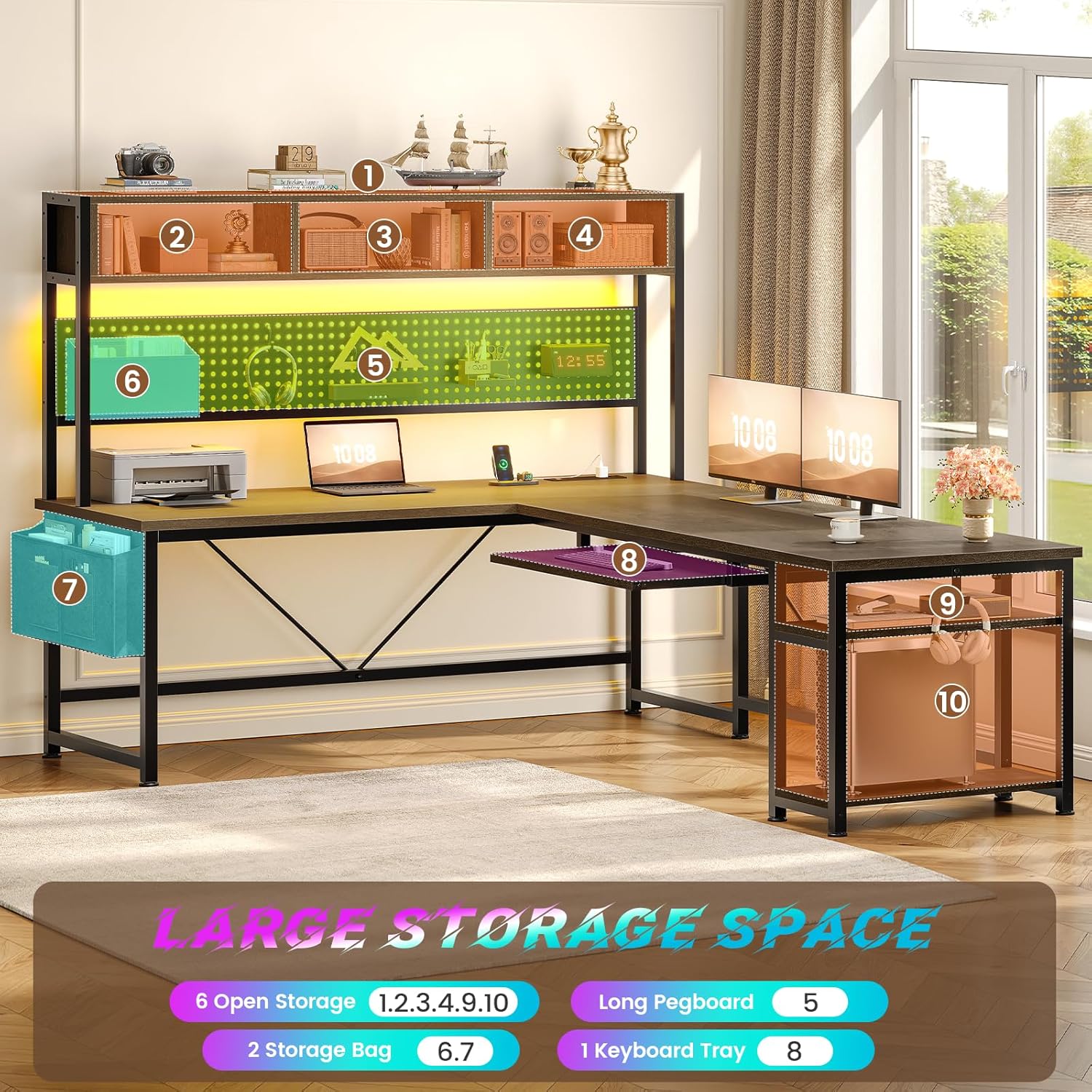
Imej 4.4: Selesaiview of the desk's storage features.

Image 4.5: Detail of the pegboard and storage bag.
Video 4.1: Demonstration of the desk as a workstation, highlighting the power and USB outlets.
5. Penyelenggaraan
To maintain the appearance and longevity of your desk, follow these simple maintenance guidelines:
- Lap permukaan dengan kerap dengan lembut, damp kain. Elakkan bahan kimia yang keras atau pembersih yang kasar.
- Ensure all screws and connections remain tight. Periodically check and tighten any loose fasteners.
- Keep the desk away from direct sunlight and extreme temperature changes to prevent material damage.
6. Penyelesaian masalah
6.1. LED Lights Not Responding to App
If the LED lights are not connecting to the app, try controlling them with the inline controller. The app may be generic and require specific pairing instructions not always provided. The inline controller offers basic color and mode selection, including a sound-reactive mode.
6.2. Desk Feels Flimsy
If the desk feels unstable, ensure all assembly screws are properly tightened. Recheck all connections, especially those supporting the main desk sections. Proper placement against a wall or in a corner can also enhance stability.
6.3. Keyboard Tray Space
The keyboard tray has specific dimensions (approximately 21.7 inches wide and 10.5 inches deep). If your keyboard and mouse setup exceeds this, consider alternative desk arrangements or a more compact keyboard/mouse combination.
7. Spesifikasi
| Ciri | Perincian |
|---|---|
| Jenama | SEDETA |
| Nombor Model | walnut brown office desk |
| bentuk | Bentuk-L (Boleh Diterbalikkan) |
| Dimensi Produk | 19.7"D x 67"W x 57"H (L-shape) / 94.5"W (straight) |
| warna | Coklat Walnut |
| Jenis Bahan | Kayu Kejuruteraan |
| Berat Barang | 66 paun |
| Outlet Kuasa | 4 AC Outlets & 2 USB Ports, On/Off Switch |
| Lampu LED | RGB, App/Remote Control, Music Sync |
| Dulang Papan Kekunci | Included (21.7"W x 10.5"D approx.) |
| Penyimpanan | Pegboard, 2-tier shelves, storage bag, headphone hook |
| Perhimpunan Diperlukan | Ya (Disyorkan 2 orang) |
8. Waranti dan Sokongan
SEDETA provides professional after-sales customer service. If your office desk arrives damaged, scratched, or with missing parts, please contact our customer support team. We aim to address your concerns within 24 hours.
For support, please refer to the contact information provided in your product packaging or visit the official SEDETA webtapak.