
1. Arahan Keselamatan Penting
Please read and understand all instructions thoroughly before installation and operation. Failure to follow these instructions may result in serious injury or property damage. Keep this manual for future reference.
- Keselamatan Umum: This gate opener is designed for sliding gates. Do not use it for other purposes.
- Pemasangan: Installation must be performed by qualified personnel. Ensure all electrical connections comply with local codes and regulations.
- Pengesanan Halangan: The system includes infrared sensors for obstacle detection. Regularly test these sensors to ensure proper function.
- Kanak-kanak dan Haiwan Kesayangan: Keep children and pets away from the gate area, especially during operation. Do not allow children to play with the gate opener or its controls.
- Keluaran Manual: Familiarize yourself with the manual release mechanism for emergency situations or power outages.
- Penyelenggaraan: Lakukan penyelenggaraan berkala seperti yang diterangkan dalam manual ini untuk memastikan operasi yang selamat dan andal.
- Perlindungan Terlalu Panas: The motor is equipped with overheat protection. If the motor stops due to overheating, allow it to cool down before resuming operation.
2. Kandungan Pakej
Sahkan bahawa semua komponen yang disenaraikan di bawah terdapat di dalam pakej anda. Jika terdapat sebarang barang yang hilang atau rosak, sila hubungi khidmat pelanggan.
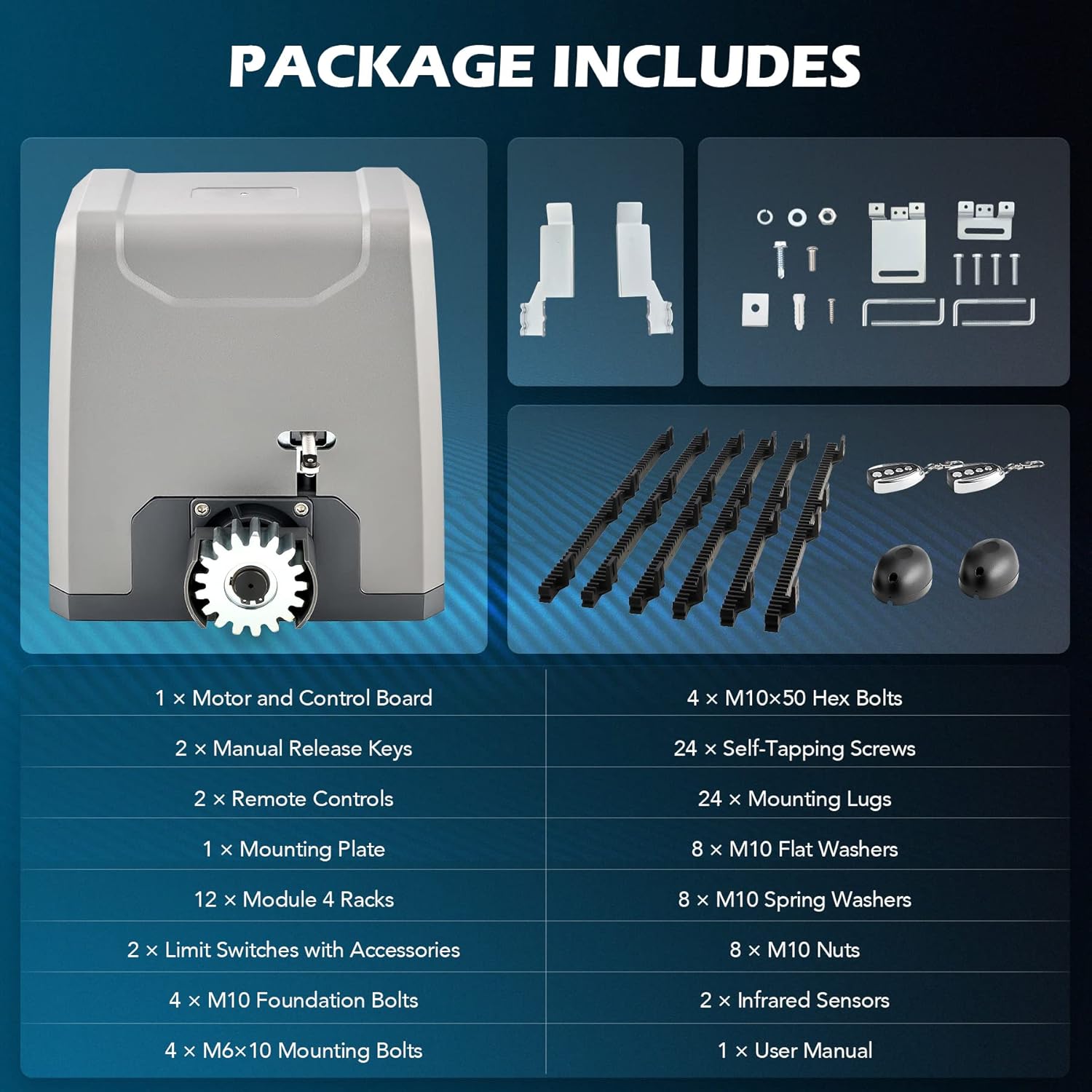
Image: All components included in the CO-Z Sliding Gate Opener kit.
- 1 x Motor and Control Board
- 2 x Kekunci Pelepas Manual
- 2 x Alat Kawalan Jauh
- 1 x Plat Pemasangan
- 12 x Module 4 Racks (Nylon Gear Racks)
- 2 x Limit Switches with Accessories
- 4 x M10 Foundation Bolts
- 4 x M6x10 Mounting Bolts
- 4 x M10x50 Hex Bolts
- 24 x Skru Mengetuk Sendiri
- 24 x Mounting Lugs
- 8 x Pencuci Rata M10
- 8 x Pencuci Spring M10
- 8 x M10 Kacang
- 2 x Penderia Inframerah
- 1 x Manual Pengguna (dokumen ini)
3. Spesifikasi
| Input Voltage | 230V / 50Hz |
| Kuasa Dinilai | 550 W |
| Tork | 32 Nm |
| Max. Gate Width | 12.2 m |
| Maks. Berat Pintu | 1500 kg |
| Gate Speed Range | 11-13 m/min. |
| Julat Kawalan Jauh | 30 m |
| Rintangan Cuaca | IP44 |
| Kawalan Jauh Maks. Disokong | 40 |
| Maks. Tahap Kebisingan | 56 dB |
| Julat Suhu | -20 hingga 70 °C |
| Gear Rack Material | nilon |
| Dimensi Produk | 27.1 x 22.8 x 28 cm |
| Nombor Model Item | RA3301 |

Image: Technical diagram showing product specifications and dimensions.
4. Persediaan dan Pemasangan
This section outlines the general steps for installing your CO-Z Automatic Sliding Gate Opener. For detailed diagrams and specific wiring instructions, please refer to the included installation guide.
4.1 Penyediaan Tapak
- Ensure the gate slides smoothly and is properly aligned.
- Clear any obstructions along the gate's path.
- Prepare a stable, level concrete pad or foundation for mounting the opener unit.
4.2 Mounting the Opener Unit
- Position the mounting plate on the prepared foundation, ensuring it is level and correctly aligned with the gate.
- Mark the drilling points for the M10 foundation bolts.
- Drill holes and secure the mounting plate using the foundation bolts, washers, and nuts.
- Mount the gate opener unit onto the secured mounting plate using the M6x10 mounting bolts.

Image: The CO-Z sliding gate opener unit installed on a concrete base.
4.3 Installing the Gear Racks
Attach the nylon gear racks to the bottom edge of your sliding gate. Ensure the racks are level and maintain a small clearance (approx. 1-2mm) from the opener's drive gear to allow for smooth operation and prevent binding.

Image: Two black nylon gear racks with mounting brackets, used for gate movement.
4.4 Electrical Connections and Sensors
- Connect the power supply to the control board according to the wiring diagram in the detailed manual.
- Install the infrared sensors on opposite sides of the gate opening, ensuring they are aligned and free from obstructions. These sensors detect obstacles and prevent the gate from closing.
- Connect the limit switches to the control board. These switches define the open and closed positions of the gate.

Imej: Jarak dekat view of the gate opener's control board with various wiring terminals.
5. Arahan Operasi
Your CO-Z gate opener offers various modes of operation for convenience and security.
5.1 Operasi Kawalan Jauh
- Pembukaan/Penutup: Press the designated button on your remote control to open or close the gate. A single press will initiate the movement.
- Berhenti: Press the same button again during gate movement to stop the gate at any desired position.
- Julat: The remote control has an operating range of up to 30 meters. Ensure a clear line of sight for optimal performance.
- Memadankan Alat Jauh: Refer to the detailed manual for instructions on pairing additional remote controls (up to 40 supported).

Image: Two remote controls with multiple buttons for operating the gate opener.
5.2 Automatic Closing Function
The gate opener can be programmed to close automatically after a set delay (e.g., 15, 30, or 45 seconds). Consult the control board programming section in your detailed manual to enable and configure this feature.
5.3 Pedestrian Mode
This mode allows the gate to open partially, providing enough space for pedestrian access without fully opening the gate. This feature can be activated via a dedicated remote button or programmed through the control board.
5.4 Keluaran Manual
Sekiranya berlaku kuasa outage or system malfunction, the gate can be operated manually. Locate the manual release key slot on the opener unit, insert the key, and turn it to disengage the motor. This allows you to push the gate open or closed by hand.

Image: Close-up of the manual release mechanism on the gate opener, showing the key slot.
6. Penyelenggaraan
Regular maintenance ensures the longevity and safe operation of your gate opener.
- Bulanan:
- Inspect the gate's movement for any signs of friction or binding. Lubricate gate rollers and hinges if necessary.
- Clean the infrared sensors to ensure they are free from dirt, dust, or spiderwebs.
- Test the obstacle detection system by placing an object in the gate's path during closing. The gate should stop and reverse.
- Suku tahunan:
- Check all mounting bolts and screws for tightness.
- Inspect the gear racks for wear or damage. Replace if necessary.
- Verify that the manual release mechanism functions correctly.
- Setiap tahun:
- Have a qualified technician inspect the electrical connections and motor for any signs of wear or corrosion.
7. Penyelesaian masalah
Bahagian ini menyediakan penyelesaian kepada isu biasa yang mungkin anda hadapi. Untuk masalah yang lebih kompleks, sila hubungi khidmat pelanggan.
| Masalah | Kemungkinan Punca | Penyelesaian |
|---|---|---|
| Pintu tidak bertindak balas terhadap alat kawalan jauh. |
|
|
| Pintu berhenti atau berundur tanpa diduga. |
|
|
| Motor berjalan tetapi pintu pagar tidak bergerak. |
|
|
| Gate opens/closes only partially. |
|
|
8. Waranti dan Sokongan
CO-Z products are designed for durability and performance. This product comes with a standard manufacturer's warranty against defects in materials and workmanship. Please refer to your purchase documentation or the CO-Z official webtapak untuk terma dan syarat waranti tertentu.
For technical assistance, troubleshooting not covered in this manual, or to inquire about replacement parts, please contact CO-Z customer support:
- Webtapak: Visit the official CO-Z weblaman web untuk Soalan Lazim dan maklumat hubungan sokongan.
- e-mel: Refer to your product packaging or the CO-Z weblaman web untuk emel khidmat pelanggan.
- telefon: Refer to your product packaging or the CO-Z weblaman web untuk nombor telefon khidmat pelanggan.
When contacting support, please have your product model number (RA3301) and purchase date available.