
pengenalan
The Phinistec S7 HiFi MP3 Player is a portable digital audio player designed for high-resolution audio playback. Featuring a dual DAC ESS9018 chip and Qualcomm CSR Bluetooth, it delivers lossless sound quality and versatile connectivity options. Its elegant design includes a full touchscreen and a durable metal body with a glass back. This manual provides comprehensive instructions for setting up, operating, and maintaining your S7 player.
Apa yang ada dalam Kotak
- 1 x Phinistec S7 HiFi Music Player
- 1 x Manual Pengguna
- 1 x Kad Micro SD 64GB
- 1 x Extra Protective Film
- 1 x Type C Data Cable
Produk Selesaiview
Familiarize yourself with the physical components and interfaces of your Phinistec S7 player.

Rajah 1: Depan dan belakang view of the Phinistec S7 HiFi MP3 Player, showcasing its sleek design and golden volume wheel.
Rajah 2: Terperinci view of the player's side buttons, USB-C charging/data port, and Micro SD card slot.

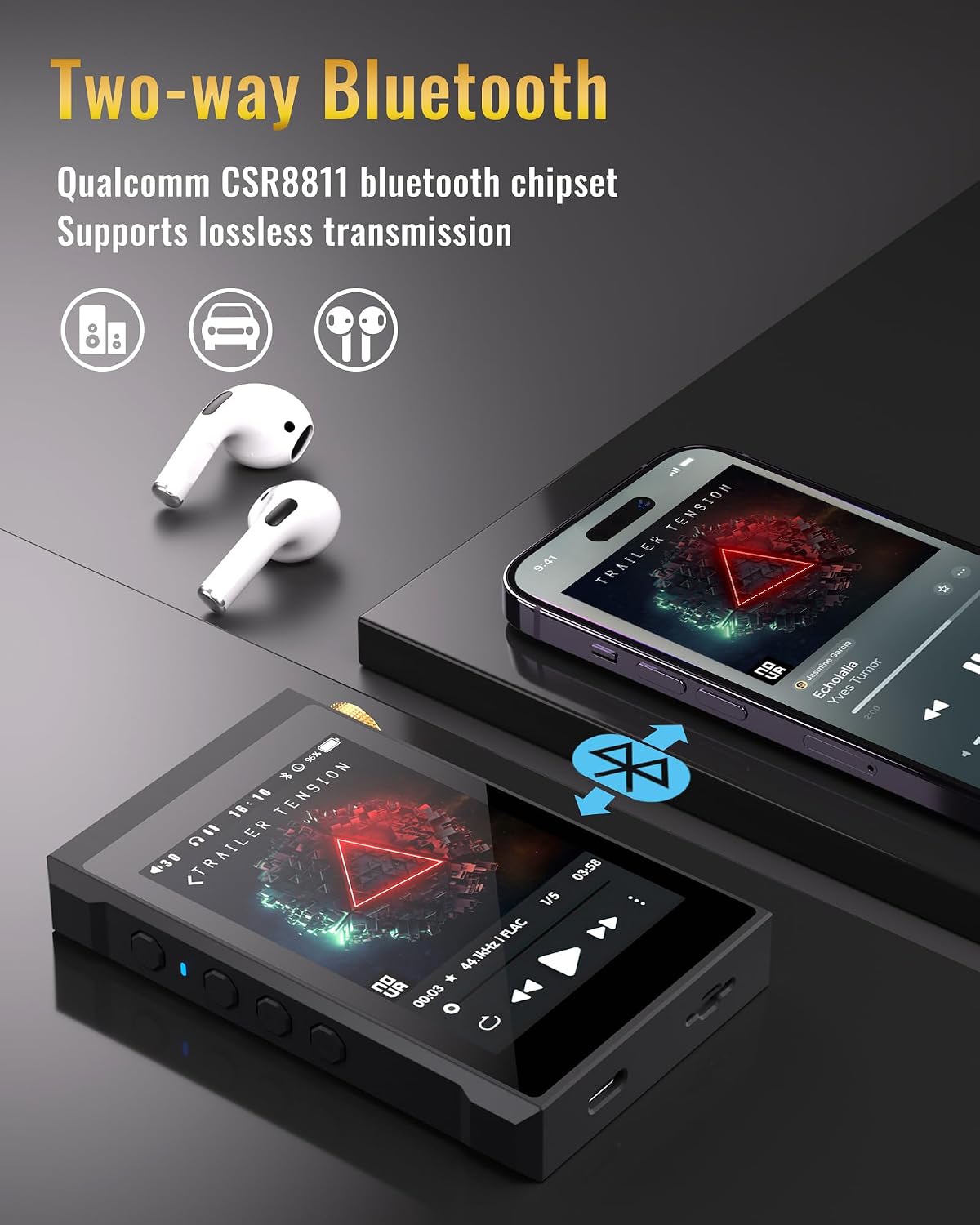
Rajah 3: Illustration of the two-way Bluetooth functionality, allowing connection to headphones or acting as a Bluetooth receiver for a smartphone.

Rajah 4: The player connected to a laptop, highlighting its USB DAC output capability for enhanced audio from a computer or mobile phone.

Rajah 5: Visual representation of the built-in 2200mAh battery, providing up to 12 hours of playback.

Rajah 6: Screen display emphasizing the HiFi Lossless Sound capabilities, including 3.5-inch full touch, DSD64/128/256 hard-decoding, Dual DAC ESS9018 chip, Qualcomm CSR Bluetooth, USB DAC support, and 3.5mm/2.5mm outputs.
Video Produk Rasmi
Video 1: An official product video from Phinistec showcasing the S7 HiFi Music Player with Bluetooth 5.0, highlighting its features and design.
Persediaan
1. Mengecas Peranti
Connect the included Type-C data cable to the USB-C port on the bottom of the player and plug the other end into a USB power adapter (not included) or a computer's USB port. The battery indicator on the screen will show charging status. A full charge typically takes approximately 3-4 hours.
2. Memasukkan Kad SD Mikro
The Phinistec S7 supports Micro SD cards up to 512GB (a 64GB card is included). Locate the Micro SD card slot on the side of the player. Gently insert the Micro SD card with the gold contacts facing down until it clicks into place. To remove, push the card in slightly until it springs out.
3. Memindahkan Muzik Files
Connect the player to your computer using the Type-C data cable. The player will appear as a removable disk. Drag and drop your music files (e.g., DSD, FLAC, WAV, MP3) into the appropriate folders on the Micro SD card. The player supports various audio formats including DSD256, FLAC, WAV, MP3, APE, WMA, AIFF, AAC, and OGG.
Arahan Operasi
1. Hidupkan/Mati Kuasa
Press and hold the power button on the side of the device to turn it on or off. A short press will turn the screen on/off.
2. Navigasi
The Phinistec S7 features a 3.5-inch full touchscreen for intuitive navigation. Swipe left/right or tap icons to access different menus such as "My Music," "Folder," "Bluetooth Settings," "Play Settings," and "System Settings."
3. Main balik Muzik
From the main menu, select "My Music" or "Folder" to browse your audio files. Tap on a song to begin playback. Use the on-screen controls for play/pause, skip track, and repeat. The physical volume wheel on the side allows for precise volume adjustments.
4. Sambungan Bluetooth
Go to "Bluetooth Settings" from the main menu. Turn on Bluetooth and search for available devices. Select your Bluetooth headphones or speaker to pair. The S7 supports 2-way Bluetooth, allowing it to transmit audio to Bluetooth devices or receive audio from a smartphone.
Ciri-ciri Utama
- Native DSD256 Support: Equipped with dual DAC ESS9018K2M chips, the S7 supports hard decoding of DSD music files up to DSD256, offering a high-fidelity audio experience.
- 2-Way Qualcomm CSR Bluetooth: Features Qualcomm CSR Bluetooth for stable and lossless wireless audio transmission. It can function as both a Bluetooth transmitter (to headphones/speakers) and a receiver (from a smartphone).
- USB DAC Functionality: Connect the player to a PC or mobile phone via USB to use it as an external DAC, enhancing the audio output quality of your connected device.
- Reka Bentuk Elegan: Boasts a 3.5-inch full touchscreen display, a durable metal body, and a stylish glass back. The metal scrolling volume wheel provides smooth and precise control.
- Storan Boleh Dikembangkan: Supports Micro SD cards up to 512GB, providing ample space for a vast music library.
- Hayat Bateri yang Panjang: The 2200mAh Li-polymer battery offers up to 12 hours of continuous high-resolution audio playback.
Penyelenggaraan
- Pastikan peranti kering. Elakkan pendedahan kepada kelembapan atau cecair.
- Bersihkan skrin dan badan dengan kain lembut dan kering. Jangan gunakan pembersih atau pelarut yang kasar.
- Avoid extreme temperatures. Store the player in a cool, dry place.
- Protect the screen with the included protective film to prevent scratches.
Menyelesaikan masalah
| Masalah | Kemungkinan Punca | Penyelesaian |
|---|---|---|
| Peranti tidak dihidupkan. | Bateri lemah; sistem rosak. | Cas peranti selama sekurang-kurangnya 30 minit. Jika tidak responsif, tekan dan tahan butang kuasa selama 10-15 saat untuk memaksa peranti dimulakan semula. |
| Tiada keluaran bunyi. | Kelantangan terlalu rendah; fon kepala tidak disambungkan dengan betul; audio rosak file. | Increase volume. Ensure headphones are fully plugged into the correct port (3.5mm or 2.5mm). Try playing a different audio file. |
| Isu sambungan Bluetooth. | Device not in pairing mode; interference; out of range. | Ensure Bluetooth is enabled on both devices and the S7 is in pairing mode. Move closer to the Bluetooth device. Restart both devices. |
| Kad SD mikro tidak dikenali. | Card not inserted correctly; incompatible format; corrupted card. | Reinsert the card. Ensure it is formatted to FAT32 or EXFAT. Try a different Micro SD card. |
Spesifikasi
| Ciri | Perincian |
|---|---|
| Nama Model | S7 |
| Jenama | Phinistec |
| Saiz Skrin | 3.5 Inci |
| Cip DAC | Dual ESS9018K2M |
| Sokongan DSD | Native DSD256 (Hard Decoding) |
| Max SampKadar ling | 24bit/384KHZ |
| Versi Bluetooth | Qualcomm CSR Bluetooth (2-Way) |
| Kapasiti Penyimpanan Memori | 32 GB (Internal) + up to 512GB Micro SD |
| Bateri | 2200mAh Li-polimer |
| Masa Bermain | Up to 12 hours (actual time depends on settings) |
| Teknologi Ketersambungan | Bluetooth, USB-C |
| Peranti Serasi | Windows XP/Vista, Win7/8.1, Win10, Mac OS 10, Linux 2.4.2 or above |
| Berat Barang | 14 auns |
| warna | Hitam |
Waranti dan Sokongan
For detailed warranty information and customer support, please refer to the official Phinistec website or contact their customer service. A digital version of this user manual is also available for download:
Muat turun Manual Pengguna (PDF)
You can also visit the official Phinistec store on Amazon for more product information and support: Phinistec Amazon Store