
JRD Car FM Transmitter
JRD Car FM Transmitter User Manual
Model: JRD Car FM Transmitter
1. Pengenalan
Terima kasih kerana membeliasing the JRD Car FM Transmitter. This device allows you to stream audio from your Bluetooth-enabled devices to your car's FM radio, make hands-free calls, and charge your mobile devices. Please read this manual carefully before use to ensure optimal performance and safety.
2. Maklumat Keselamatan
This section outlines important safety precautions. Please adhere to these guidelines to prevent damage to the device or injury.
- Jangan dedahkan peranti kepada suhu yang melampau, cahaya matahari langsung atau lembapan.
- Jangan buka atau ubah suai peranti. Ini akan membatalkan jaminan dan boleh menyebabkan kerosakan.
- Pastikan peranti dipasang dengan kukuh pada soket pemetik api kereta.
- Avoid operating the device in a manner that distracts you from driving.
- General safety warnings may apply, including handling batteries with care, avoiding water and heat, and not using the product while driving unless legal and safe to do so.
3. Produk Lebihview
The JRD Car FM Transmitter is designed for convenience and versatility. It features multiple ports and controls for seamless operation.

Depan view of the JRD Car FM Transmitter, showing the display and control buttons.

The JRD Car FM Transmitter plugged into a car's cigarette lighter socket, displaying the frequency.

Detailed diagram of the JRD Car FM Transmitter with labels for each button and port, including U disk socket, 1A charging port, 3.1A charging port, PD charging port, Frequency LED display, microphone, colorful dazzling lights, TF card socket, LED light button, Multi-function button, Previous song, Next song, and Frequency adjustment key.
Ciri-ciri Utama:
- Upgraded Bluetooth 5.0 for stable connection and faster data transmission.
- PD3.0 Type-C (20W) and QC3.0 USB (18W) ports for fast charging.
- Additional 5V/1A USB port for music playback via USB disk.
- Supports music playback from Bluetooth, TF card, and USB disk.
- Built-in noise-cancelling microphone for clear hands-free calls.
- Supports A2DP and MP3/WMA/FLAC/AAC/WAV audio formats.
- Memory function for frequency, track, volume, and power-off restart.
4. Kandungan Pakej
Selepas membuka bungkusan, sila sahkan bahawa semua item ada dan dalam keadaan baik:
- 1 x JRD Car FM Transmitter
- 1 x Manual Pengguna (dokumen ini)
5. Arahan Persediaan
Follow these steps to set up your JRD Car FM Transmitter:
- Masukkan Pemancar: Plug the JRD Car FM Transmitter firmly into your vehicle's 12V/24V cigarette lighter socket. The LED display will light up, indicating it is powered on.
The transmitter inserted into the car's power outlet.
- Tune Your Car Radio: Turn on your car's FM radio and find an empty, unused frequency. This should be a frequency with only static, no active radio station. Frequencies between 87.5 MHz and 108.0 MHz are typically used.
- Match Transmitter Frequency:
- Press the "CH" button on the transmitter. The frequency display will start blinking.
- Use the "Previous Song" (K) and "Next Song" (I) buttons to adjust the transmitter's frequency to match the blank frequency you found on your car radio.
- Once matched, wait a few seconds for the frequency to stop blinking, or press the "CH" button again to confirm.
- Pasangkan dengan Bluetooth:
- Dayakan Bluetooth pada peranti mudah alih anda.
- Cari untuk available Bluetooth devices and select "JRD" (or similar name) from the list.
- Once connected, the transmitter will indicate successful pairing (e.g., a voice prompt or stable Bluetooth icon on the display).

The transmitter connected wirelessly to a smartphone, ready for audio streaming.
6. Arahan Operasi
6.1 Main balik Muzik
The JRD Car FM Transmitter supports three modes for music playback:
- Mod Bluetooth: After successful Bluetooth pairing, open your music player on your phone. Audio will be transmitted to your car's FM radio.
- Mod Cakera USB: Insert a USB flash drive (U Disk) containing MP3/WMA/FLAC/AAC/WAV audio files into the 5V/1A USB port. The transmitter will automatically detect and play music from the USB disk.
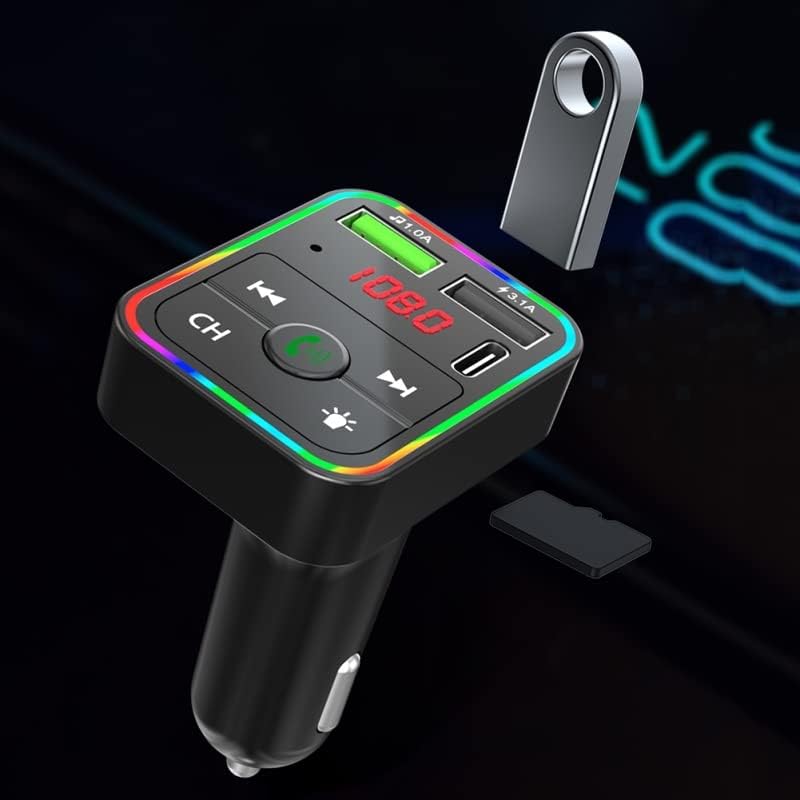
The transmitter showing the USB disk and TF card slots.
- Mod Kad TF: Insert a TF (microSD) card containing MP3/WMA/FLAC/AAC/WAV audio files into the TF card slot. The transmitter will automatically detect and play music from the TF card.
6.2 Fungsi Panggilan
When connected via Bluetooth, you can manage calls using the multi-function button (phone icon) on the transmitter:
- Jawab/Tamatkan Panggilan: Tekan sebentar butang berbilang fungsi.
- Tolak Panggilan: Tekan lama butang berbilang fungsi.
- Dail Semula Nombor Terakhir: Tekan dua kali butang berbilang fungsi.
6.3 Mengecas Peranti
The transmitter features multiple charging ports:
- PD3.0 Type-C Port: Provides up to 20W fast charging for compatible devices.
- Port USB QC3.0: Provides up to 18W fast charging for compatible devices.
- Port USB 5V/1A: Standard charging port, also used for USB disk music playback.

The transmitter highlighting its dual USB charging capabilities.
6.4 Kawalan Lampu LED
The transmitter features colorful dazzling lights. Short press the LED light button (sun icon) to cycle through different light modes or turn them off.
7. Penyelenggaraan
To ensure the longevity and optimal performance of your JRD Car FM Transmitter, follow these maintenance guidelines:
- Keep the device clean by wiping it with a soft, dry cloth. Do not use liquid cleaners or aerosols.
- Elakkan daripada mendedahkan peranti kepada suhu yang melampau, kelembapan atau cahaya matahari langsung.
- Simpan peranti di tempat yang sejuk dan kering apabila tidak digunakan untuk tempoh yang lama.
- Ensure the cigarette lighter socket is clean and free of debris for a secure connection.
8. Penyelesaian masalah
If you encounter issues with your JRD Car FM Transmitter, refer to the following common problems and solutions:
| Masalah | Kemungkinan Punca | Penyelesaian |
|---|---|---|
| Tiada kuasa/paparan dimatikan | Loose connection; Car cigarette lighter fuse blown; Vehicle power off. | Ensure the transmitter is firmly plugged in. Check your car's fuse box for the cigarette lighter fuse. Ensure the car's ignition is on. |
| Kualiti audio statik atau lemah | FM frequency interference; Transmitter/radio frequency mismatch; Volume too low. | Find a clearer, unused FM frequency on your car radio and match the transmitter to it. Increase the volume on both the transmitter and your car radio. Avoid frequencies used by strong local radio stations. |
| Bluetooth tidak bersambung | Bluetooth not enabled on phone; Transmitter not in pairing mode; Incorrect device selected. | Ensure Bluetooth is enabled on your phone. Restart the transmitter and your phone. Cari untuk "JRD" in your phone's Bluetooth settings and try pairing again. |
| Cannot play music from USB disk/TF card | Tidak disokong file format; rosak files; USB disk/TF card not inserted correctly. | Pastikan audio files are in MP3, WMA, FLAC, AAC, or WAV format. Check if the USB disk/TF card is inserted fully and correctly. Try another USB disk/TF card. |
| Pengecasan lambat atau tidak berfungsi | Cable issue; Device not compatible with fast charging; Port used for music playback. | Use a high-quality charging cable. Ensure your device supports PD3.0 or QC3.0 for fast charging. Note that the 5V/1A port is primarily for music playback and standard charging. |
9. Spesifikasi
Detailed technical specifications for the JRD Car FM Transmitter:
- model: JRD Car FM Transmitter
- Versi Bluetooth: 5.0
- Julat Frekuensi FM: 87.5 - 108.0 MHz
- Input Voltage: 12V-24V
- USB Output 1 (QC3.0): 5V/3A, 9V/2A, 12V/1.5A (Maks 18W)
- USB Output 2 (PD3.0 Type-C): 5V/3A, 9V/2.22A, 12V/1.67A (Maks 20W)
- USB Output 3 (U Disk/Charging): 5V/1A
- Format Audio yang Disokong: MP3, WMA, FLAC, AAC, WAV
- Teknologi Ketersambungan: Bluetooth, USB
- Berat Barang: 4.6 auns
- Dimensi Pakej: 5.12 x 4.76 x 1.73 inci
10. Waranti dan Sokongan
Produk ini disertakan dengan waranti pengeluar standard. Untuk terma dan syarat waranti tertentu, sila rujuk dokumentasi yang diberikan bersama pembelian anda atau hubungi terus penjual.
For technical support, troubleshooting assistance, or inquiries regarding your JRD Car FM Transmitter, please contact the seller or manufacturer through the platform where you purchased the product. Please have your purchase details and model number ready when contacting support.
Ask a question about this manual
Ask about setup, troubleshooting, compatibility, parts, safety, or missing instructions. Manuals+ will review the question and use this page’s manual context to help answer it.