
6711A20111K
Manual Pengguna
AC A/C Remote Control for LG/Goldstar Air Conditioner
pengenalan
This manual provides comprehensive instructions for the setup, operation, and maintenance of your new Generic AC A/C Remote Control, model 6711A20111K. This remote is designed as a replacement for various LG and Goldstar air conditioner models, including 6711A20111K, 6711A90023E, 6711A20010A, and 6711A20111F. Please read this manual thoroughly before use to ensure proper functionality and longevity of your device.
Persediaan dan Pemasangan Bateri
Before using the remote control, batteries must be installed correctly.
Jenis Bateri:
- Memerlukan bateri AAA.
Langkah Pemasangan:
- Cari petak bateri di belakang alat kawalan jauh.
- Luncurkan penutup bateri ke bawah untuk membukanya.
- Masukkan dua bateri AAA baharu, pastikan terminal positif (+) dan negatif (-) sejajar dengan tanda di dalam petak.
- Luncurkan penutup bateri ke tempat semula sehingga ia berbunyi dengan selamat.
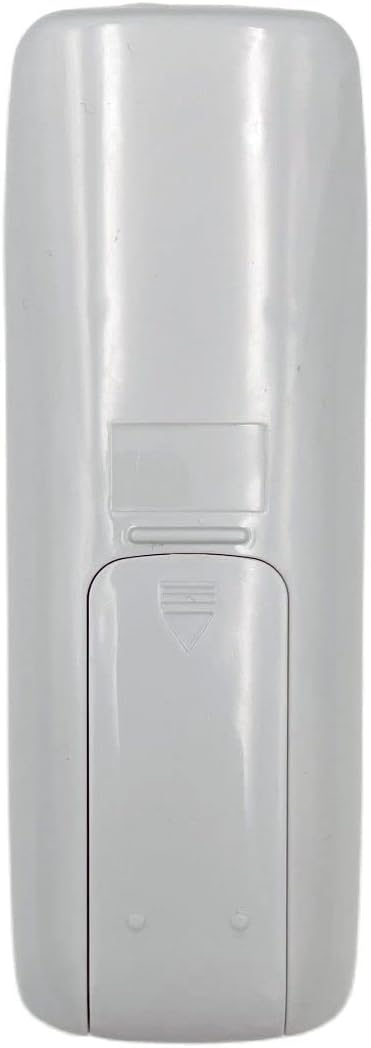
Image: Back of the remote control with the battery cover. This view helps identify the battery compartment for installation.
Penting: If the remote is not working after battery installation, try rolling the batteries inside the compartment to ensure good contact with the springs. Ensure the remote is compatible with your specific LG or Goldstar air conditioner model. This remote typically does not require programming as it is a direct replacement for the specified models.
Arahan Operasi
This remote control operates via infrared (IR) technology. Ensure there is a clear line of sight between the remote and the air conditioner's IR receiver.

Imej: Depan view of the remote control. The LCD screen displays temperature and mode, while various buttons control functions.
Fungsi Utama:
| Butang / Petunjuk | Fungsi |
|---|---|
| Butang Kuasa (Blue oval button) | Menghidupkan atau MATI penghawa dingin. |
| Suhu Naik/Turun (Grey arrow buttons) | Melaraskan tetapan suhu yang dikehendaki. |
| Butang Mod (Button with sun/water drop/fan icons) | Cycles through operating modes (e.g., Cool, Dry, Fan, Heat). |
| Butang Kelajuan Kipas (Button with fan icon) | Melaraskan kelajuan kipas (cth, Rendah, Sederhana, Tinggi, Auto). |
| Butang Swing (Button with oscillating arrows) | Mengawal fungsi ayunan louver. |
| Butang Pemasa (Button with clock icon) | Menetapkan pemasa HIDUP/MATI untuk penghawa dingin. |
| ECONO Button | Activates or deactivates economy mode for energy saving. |
| Paparan LCD | Shows current temperature, operating mode, fan speed, and other settings. |
For specific advanced functions or programming, refer to your air conditioner's original operating manual, as this remote is a replacement and may not support all features of every compatible unit.
Penyelenggaraan
Penyelenggaraan yang betul memastikan jangka hayat dan pengendalian alat kawalan jauh anda yang boleh dipercayai.
- Pembersihan: Wipe the remote control with a soft, dry cloth. Do not use liquid cleaners, abrasive cleaners, or chemical solvents, as these can damage the surface or internal components.
- Penggantian Bateri: Gantikan bateri apabila julat alat kawalan jauh berkurangan atau paparan menjadi malap. Sentiasa gantikan kedua-dua bateri pada masa yang sama dengan yang baharu daripada jenis yang sama.
- Storan: If the remote control will not be used for an extended period, remove the batteries to prevent leakage and potential damage to the remote. Store in a cool, dry place.
- Elakkan Titisan: Protect the remote from physical impact. Dropping the remote can damage internal circuitry or the LCD screen.
Menyelesaikan masalah
Jika anda mengalami masalah dengan alat kawalan jauh anda, rujuk masalah dan penyelesaian biasa berikut:
| Masalah | Kemungkinan Punca & Penyelesaian |
|---|---|
| Remote not working / No response from AC unit. |
|
| Remote range is reduced. |
|
| Paparan LCD malap atau kosong. |
|
If the problem persists after attempting these solutions, contact customer support or refer to the original air conditioner manual for further assistance.
Spesifikasi
| Ciri | Perincian |
|---|---|
| Nombor Model | 6711A20111K, 6711A90023E, 6711A20010A, 6711A20111F |
| Jenama | Generik |
| Keserasian | LG/Goldstar Air Conditioners |
| Teknologi Ketersambungan | Inframerah (IR) |
| Jenis Pengawal | Kawalan Butang |
| Ciri Khas | Universal (as a replacement for specified models) |
| Jenis Bateri | AAA (2 diperlukan) |
| Pengeluar | DAVITU |
| Tarikh Tersedia Pertama | 25 April 2023 |
Maklumat Waranti
This product is typically covered by a standard return policy. For specific warranty details, please refer to the seller's policy at the point of purchase. The buybox winner indicates a return policy of 30 days for refund/replacement.
For issues related to defects in materials or workmanship, please contact the seller directly within the specified return period.
Sokongan Pelanggan
For further assistance, technical support, or inquiries regarding your Generic AC A/C Remote Control, please contact the seller directly through the platform where the purchase was made.
Penjual: DAVITU
When contacting support, please provide your order number and the model number of your remote control (6711A20111K).
Ask a question about this manual
Ask about setup, troubleshooting, compatibility, parts, safety, or missing instructions. Manuals+ will review the question and use this page’s manual context to help answer it.