1. Produk Lebihview
The COMHOMA LED Gaming Desk CD55 is a versatile L-shaped computer desk designed for both gaming and work environments. It features integrated USB charging ports, AC outlets, LED lighting, a monitor stand, and ample storage with multiple shelves and hooks. This manual provides detailed instructions for assembly, operation, and maintenance to ensure optimal use and longevity of your desk.
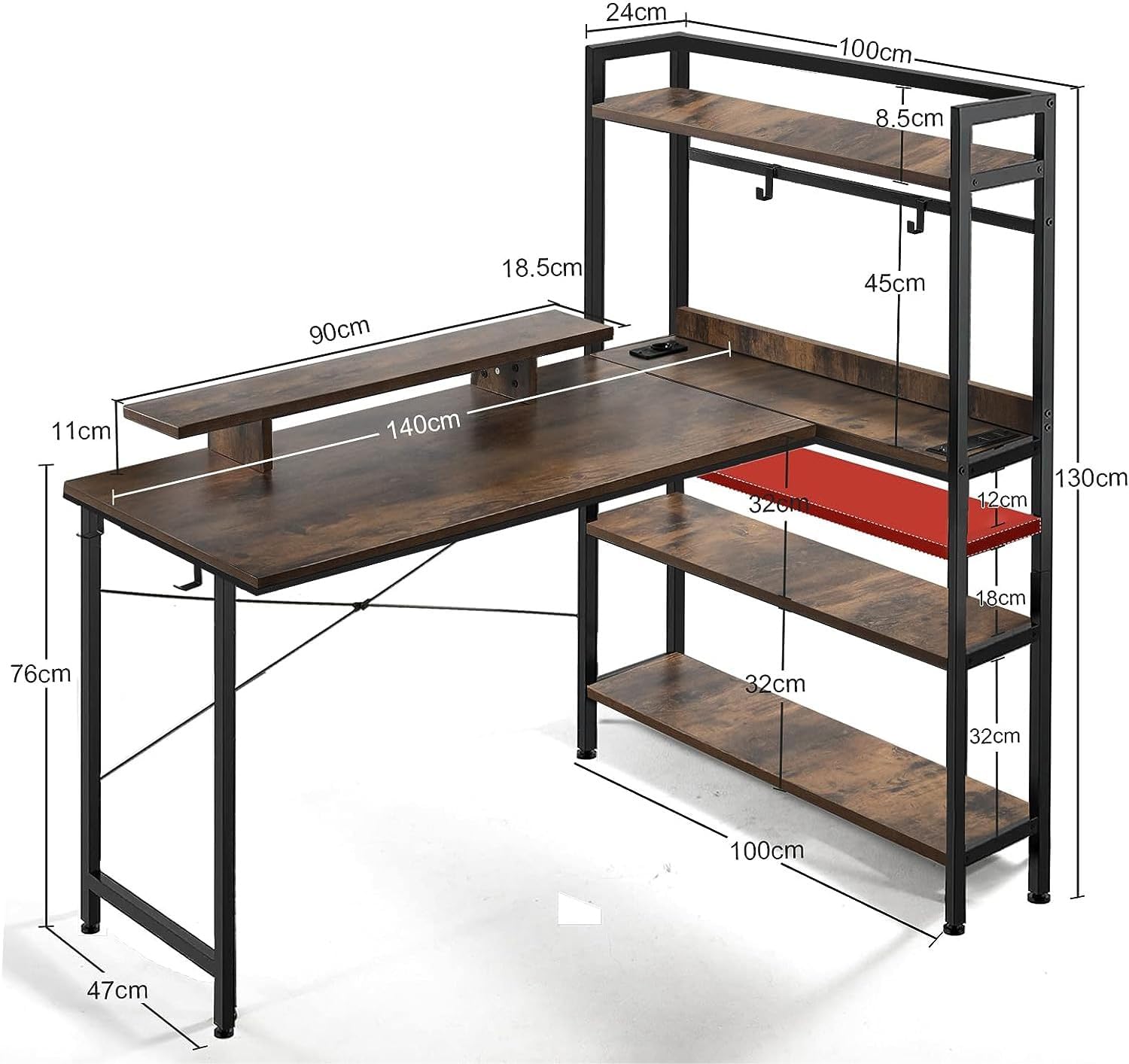
Rajah 1: Berakhirview of the COMHOMA LED Gaming Desk CD55 with key dimensions. The desk measures approximately 140 cm in length, 60 cm in width, and 70 cm in height, with additional shelving providing extra storage and display space.
2. Amaran Keselamatan
- Assemble the desk carefully, ensuring all connections are secure.
- Anchor the desk securely to prevent tipping, especially considering its L-shaped design.
- Do not overtighten screws during assembly, as this may damage the materials.
- When moving the assembled desk, push or pull from the shelving section to avoid stressing the main desk structure.
- Ensure all electrical connections (USB ports, AC outlets) are properly installed and used with compatible devices to prevent electrical hazards.
3. Package Contents and Assembly Overview
Before beginning assembly, verify that all components listed in the packaging are present and undamaged. Refer to the included assembly instructions for a complete list of parts and hardware. The video below provides a comprehensive guide to unboxing and the entire assembly process.
Video 1: Unboxing and detailed assembly guide for the COMHOMA LED Gaming Desk CD55. This video covers checking package contents, installing the frame, power module, side panels, monitor stand, and LED strips.
4. Perhimpunan Langkah demi Langkah
Follow these step-by-step instructions for assembling your COMHOMA LED Gaming Desk CD55. It is recommended to have a clear workspace and to refer to the included diagram for part identification. For visual guidance, refer to Video 1 dalam Bahagian 3.
4.1 Pemasangan Bingkai
- Begin by connecting the main frame components. Ensure all pieces are oriented correctly as per the diagrams.
- Attach the two shelves above the desk. Pay close attention to the left and right mirror symmetrical placement. The installation should consider positive and negative directions as indicated in the detailed instructions.
4.2 Pemasangan Modul Kuasa
- Install the integrated power module, which includes USB charging ports and AC outlets, into its designated slot on the desk surface.
- Secure the power module from underneath the desk using the provided screws.
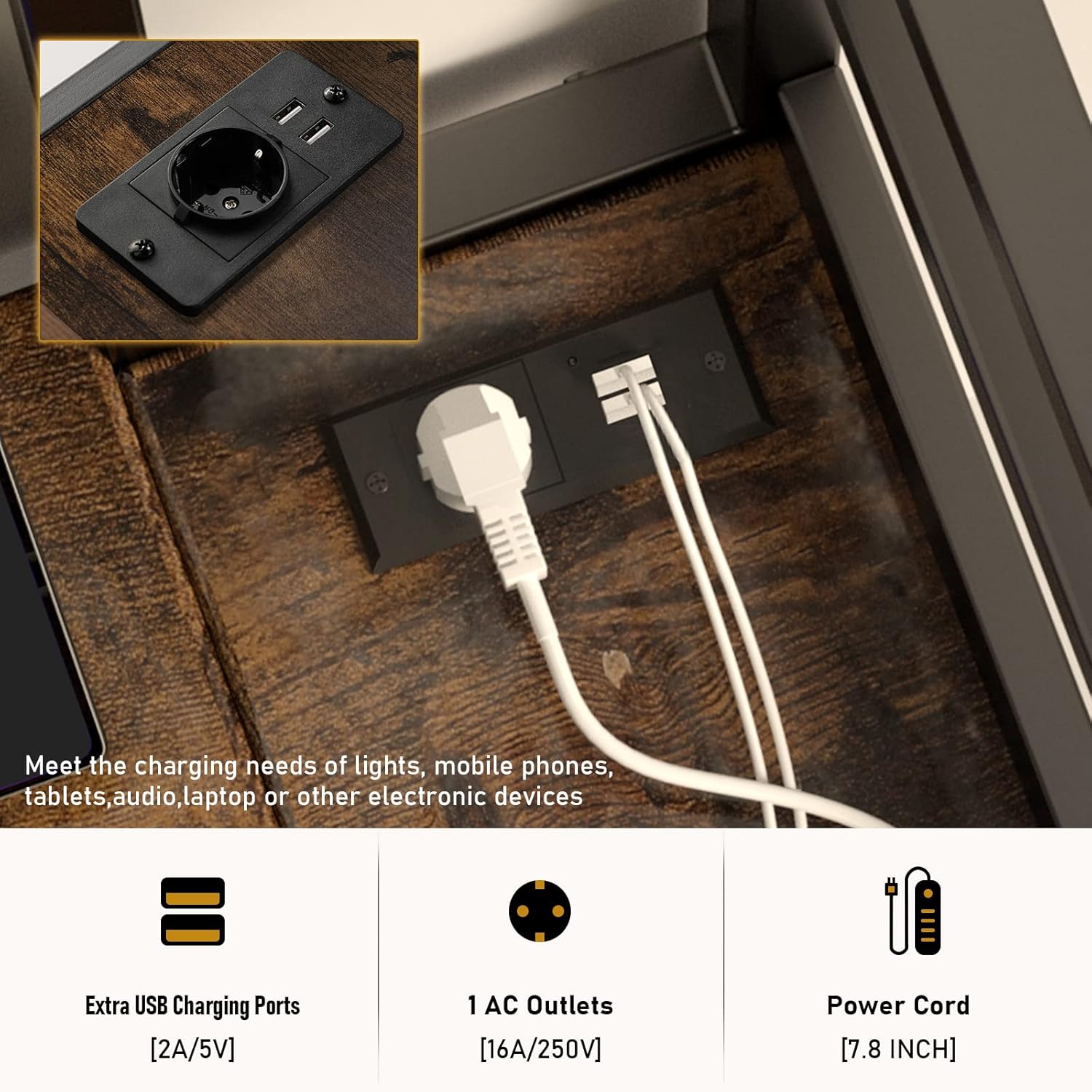
Rajah 2: jarak dekat view of the integrated power module featuring USB charging ports and AC outlets, designed for convenient device charging directly from the desk.
4.3 Side Panel and Monitor Stand Assembly
- Attach the side panels to the desk to prevent items from falling off.
- Assemble the monitor stand by securing its components.
- Place the assembled monitor stand onto the main desk surface and secure it from underneath.

Rajah 3: The monitor stand elevates your screen for improved ergonomics, and a practical hook is included for hanging headphones or other accessories.

Rajah 4: Illustrates the benefit of the monitor stand in promoting a correct and comfortable sitting posture, reducing strain on the neck and back.
4.4 Pemasangan Jalur LED
- Carefully attach the LED light strip to the designated areas of the desk.
- Connect the LED strip to the power source.

Rajah 5: The desk features RGB LED strips with 12 static colors and a music-controlled RGB mode, adjustable via a smart remote for personalized ambiance.
5. Ciri dan Operasi
- USB Charging Ports and AC Outlets: The desk includes 1 AC outlet (16A/250V) and 2 USB charging ports (2A/5V) for convenient power access for your phone, laptop, speakers, headphones, and other electronic devices. Simply plug your devices into the integrated ports.
- Spacious Desktop and Storage: The 55-inch desktop provides ample workspace. Four side shelves offer significant storage for books, decorations, and other items. Four additional iron hooks are provided for organizing smaller items like headphones or bags.
- Reka Bentuk Boleh Balik: The L-shaped configuration can be set up on either the right or left side to suit your personal preference and room layout. The height of the open shelves is adjustable.
- Pencahayaan LED: The integrated LED lights offer 9 static colors and an RGB music controller, creating an engaging atmosphere for gaming or work. Use the provided remote control or a compatible app to change colors, adjust brightness, and select lighting modes.
- Stand Monitor: The elevated monitor stand helps maintain an ergonomic viewing height, improving sitting posture and reducing neck strain.

Rajah 6: The desk offers multiple tiers of storage shelves and additional space under the monitor riser, along with two hanging hooks for accessories.
6. Penyelenggaraan
To keep your COMHOMA LED Gaming Desk in excellent condition, follow these maintenance guidelines:
- Pembersihan: Lap permukaan meja dengan lembut, damp kain. Elakkan bahan kimia yang keras atau pembersih kasar yang boleh merosakkan kemasan.
- Tumpahan: Immediately clean up any spills to prevent water damage or stains. The desk materials are designed to resist dampness, but prompt cleaning is always recommended.
- Pengikat: Periksa semua skru dan pengikat secara berkala untuk memastikan ia kekal ketat. Ketatkan semula jika perlu untuk mengekalkan kestabilan.
- Komponen Elektrik: Ensure the USB ports and AC outlets are free from dust and debris. Do not attempt to repair electrical components yourself; contact qualified personnel if issues arise.

Rajah 7: The desk is constructed from safe and reliable materials designed to resist dampness and deformation, ensuring durability over time. It also highlights the various LED light modes available.
7. Penyelesaian masalah
If you encounter any issues with your COMHOMA LED Gaming Desk, refer to the following common troubleshooting tips:
- Ketidakstabilan Meja: If the desk feels wobbly, check that all screws are securely tightened. Ensure the desk is placed on a flat, even surface. Adjust the leveling feet if present.
- Lampu LED Tidak Berfungsi: Verify that the LED strip is properly connected to its power source and that the power outlet is functional. Check the remote control battery. If using the app, ensure Bluetooth is enabled and the app is correctly paired.
- USB Ports/AC Outlets Not Functioning: Confirm the main power cord for the desk's integrated power module is securely plugged into a working wall outlet. Test with different devices to rule out device-specific issues.
- Bahagian yang hilang: If any parts are missing upon unboxing, contact COMHOMA customer support immediately with your purchase details.
8. Spesifikasi
| Atribut | Perincian |
|---|---|
| Jenama | COMHOMA |
| Nombor Model | CD55 |
| warna | coklat |
| Dimensi Produk (L x W x H) | 140 x 60 x 70 cm (55 x 23.6 x 27.5 inci) |
| Ciri-ciri | Reversible L-shape, Integrated USB Charging Ports (2x 2A/5V), AC Outlets (1x 16A/250V), LED Lights (9 static colors, RGB music controller), Monitor Stand, 4-Tier Storage Shelves, Hanging Hooks |
| bahan | Alloy Steel (Base), Metal (Top Type) |
| Gaya | moden |
| Berat Barang | 28.0 kg |
9. Final Product Showcase
Once fully assembled, your COMHOMA LED Gaming Desk CD55 will provide a functional and aesthetically pleasing workspace. The integrated LED lights can be customized to match your mood or environment.
Video 2: A showcase of the fully assembled COMHOMA LED Gaming Desk CD55, demonstrating its L-shaped configuration, storage capabilities, and the dynamic effects of its customizable LED lighting system.
10. Waranti dan Sokongan
For warranty information, technical support, or to order replacement parts, please contact COMHOMA customer service through their official website or the retailer where the product was purchased. Please have your model number (CD55) and purchase date available when contacting support.