
Singer C7225
Singer C7225 Computerized Sewing Machine User Manual
Model: C7225
pengenalan
Thank you for choosing the Singer C7225 Computerized Sewing Machine. This manual provides comprehensive instructions for the safe operation, setup, maintenance, and troubleshooting of your new sewing machine. Please read this manual thoroughly before using the machine to ensure proper function and to maximize your sewing experience.
The Singer C7225 is designed for a wide range of sewing projects, offering advanced features and ease of use for both beginners and experienced sewers.
Arahan Keselamatan Penting
Apabila menggunakan perkakas elektrik, langkah berjaga-jaga keselamatan asas hendaklah sentiasa dipatuhi, termasuk yang berikut:
- Sentiasa cabut plag mesin jahit dari soket elektrik sebaik sahaja selepas menggunakan dan sebelum membersihkan, menanggalkan penutup atau membuat sebarang pelarasan servis pengguna.
- Jangan biarkan digunakan sebagai mainan. Perhatian rapi diperlukan apabila perkakas ini digunakan oleh atau berhampiran kanak-kanak.
- Gunakan perkakas ini hanya untuk kegunaan yang dimaksudkan seperti yang diterangkan dalam manual ini. Gunakan hanya lampiran yang disyorkan oleh pengilang seperti yang terkandung dalam manual ini.
- Jangan sekali-kali mengoperasikan alat ini jika ia mempunyai kabel atau palam yang rusak, jika tidak berfungsi dengan baik, jika telah jatuh atau rosak, atau jatuh ke air.
- Never operate the appliance with any air openings blocked. Keep ventilation openings of the sewing machine and foot controller free from the accumulation of lint, dust, and loose cloth.
- Jauhkan jari dari semua bahagian yang bergerak. Penjagaan khas diperlukan di sekitar jarum mesin jahit.
- Sentiasa gunakan plat jarum yang betul. Plat yang salah boleh menyebabkan jarum patah.
- Jangan tarik atau tolak fabrik semasa menjahit. Ini boleh memesongkan jarum sehingga menyebabkan ia patah.
- Matikan mesin jahit apabila membuat sebarang pelarasan pada kawasan jarum, seperti memasukkan benang ke dalam jarum, menukar jarum, memasukkan benang ke dalam gelendong atau menukar kaki penekan.
- Always unplug the sewing machine from the electrical outlet when removing the covers, lubricating, or when making any other user servicing adjustments mentioned in the instruction manual.
Produk Selesaiview
Familiarize yourself with the main components of your Singer C7225 sewing machine.

Rajah 1: Depan view of the Singer C7225 sewing machine, showcasing the main body, needle area, and control panel with various stitch patterns.

Rajah 2: sebelah view of the Singer C7225, highlighting the handwheel and the power input port at the rear.
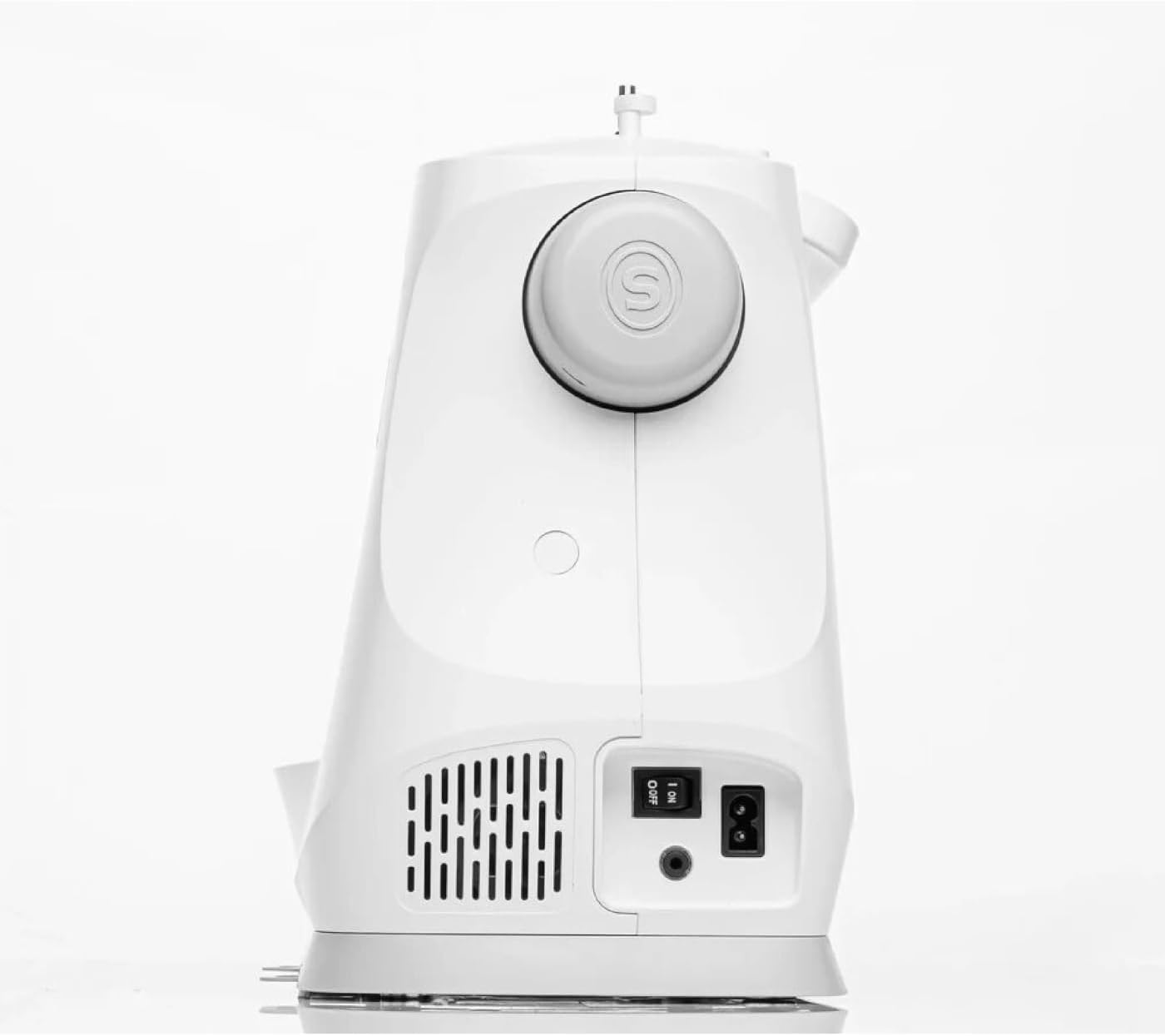
Rajah 3: belakang view of the Singer C7225, showing the power switch and power cord connection point.

Rajah 4: Muka dekat view of the Singer C7225, focusing on the needle, presser foot, and bobbin area.
Komponen Utama:
- Plat Jarum: The metal plate under the needle, often with seam allowance guides.
- Kaki Penekan: Holds the fabric firmly against the feed dogs while sewing.
- Memberi makan anjing: Teeth-like mechanisms that move the fabric under the presser foot.
- Bobbin Case: Holds the bobbin, which supplies the lower thread.
- Thread Guides: Paths for the upper thread to follow from the spool to the needle.
- Dail Ketegangan: Melaraskan ketegangan benang atas.
- roda tangan: Menaikkan dan menurunkan jarum secara manual.
- Control Panel/LCD Screen: For selecting stitches, adjusting settings, and viewmaklumat.
- Foot Controller Port: Where the foot pedal is connected.
- Suis kuasa: Menghidupkan dan mematikan mesin.
Persediaan
1. Membongkar dan Meletakkan:
- Carefully remove the machine from its packaging. Retain all packaging materials for future storage or transport.
- Place the machine on a stable, flat surface with adequate lighting. Ensure there is enough space around the machine for fabric handling.
2. Sambungan Kuasa:
- Locate the power cord and foot controller.
- Insert the foot controller plug into the foot controller port on the machine.
- Insert the power cord plug into the power input port on the machine.
- Pasangkan hujung kord kuasa yang satu lagi ke dalam soket elektrik yang sesuai.
- Turn on the power switch, usually located on the side or rear of the machine. The LCD screen should illuminate.
3. Winding the Bobbin:
- Letakkan gelendong benang pada pin gelendong.
- Follow the bobbin winding path indicated by the arrows on the machine.
- Place an empty bobbin onto the bobbin winding spindle.
- Tolak gelendong penggulungan gelendong ke kanan.
- Tekan pengawal kaki atau butang mula/henti untuk mula menggulung. Berhenti apabila gelendong penuh.
- Potong benang dan keluarkan gelendong.
4. Inserting the Bobbin:
- Buka plat penutup gelendong.
- Masukkan gelendong lilit ke dalam bekas gelendong, pastikan benang terurai ke arah yang betul (biasanya lawan arah jam).
- Guide the thread through the tension spring and into the thread guide slot.
- Gantikan plat penutup gelendong.
5. Threading the Upper Thread:
- Naikkan pengangkat kaki penekan.
- Letakkan gelendong benang pada pin gelendong.
- Ikut laluan penguliran bernombor yang ditunjukkan pada mesin, pastikan benang melalui semua panduan dan tuil pengambil.
- Thread the needle from front to back using the automatic needle threader if available, or manually.
- Tarik kira-kira 6 inci benang melalui lubang jarum.
6. Bringing Up the Bobbin Thread:
- Hold the upper thread lightly.
- Pusingkan roda tangan ke arah anda untuk menurunkan jarum ke dalam plat jarum dan kemudian angkat semula.
- The upper thread will catch the bobbin thread, forming a loop. Pull the loop up through the needle plate opening.
- Pull both upper and bobbin threads under the presser foot and towards the back of the machine.
Arahan Operasi
1. Selecting a Stitch:
- Hidupkan mesin.
- Use the stitch selection buttons or dial on the control panel to choose your desired stitch. The selected stitch will be displayed on the LCD screen.
- The C7225 offers a wide variety of utility, decorative, and alphanumeric stitches.
2. Adjusting Stitch Settings:
- Panjang Jahitan: Adjust the length of each stitch using the dedicated buttons. Longer stitches are for basting or thicker fabrics, shorter for fine details.
- Lebar Jahitan: Adjust the width for zigzag or decorative stitches.
- Ketegangan Benang: The machine typically sets tension automatically, but manual adjustment may be needed for specific fabrics or threads. Refer to the tension dial.
- Kedudukan Jarum: Adjust the needle position (left, center, right) for certain techniques like topstitching or zipper insertion.
3. Starting to Sew:
- Letakkan fabrik di bawah kaki penekan, sejajarkan tepi dengan panduan jahitan pada plat jarum.
- Turunkan kaki penekan.
- Press the foot controller gently or press the Start/Stop button to begin sewing.
- Guide the fabric gently with both hands, but do not push or pull it. Allow the feed dogs to move the fabric.
- To reverse stitch (for securing seams), press and hold the reverse button.
- When finished, press the Start/Stop button or release the foot controller.
- Naikkan jarum ke kedudukan tertinggi menggunakan roda tangan.
- Naikkan kaki penekan.
- Pull the fabric towards the back and cut the threads using the thread cutter on the machine.
4. Changing Needles and Presser Feet:
- Changing Needles: Always turn off the machine before changing the needle. Loosen the needle clamp screw, remove the old needle, insert the new needle with the flat side facing the back, and tighten the screw. Use the correct needle type and size for your fabric.
- Menukar Kaki Penekan: Raise the presser foot lifter. Press the release button on the back of the presser foot holder to detach the current foot. Position the new presser foot under the holder and lower the presser foot lifter until it snaps into place.
Penyelenggaraan
Penyelenggaraan yang kerap memastikan jangka hayat dan prestasi optimum mesin jahit anda.
1. Pembersihan:
- Selepas Setiap Penggunaan: Gunakan berus kecil untuk menghilangkan habuk dan kotoran dari kawasan gelendong dan di bawah plat jarum.
- secara kerap: Remove the needle plate and clean the feed dogs and bobbin case area thoroughly. A small vacuum attachment can be helpful.
- Luaran: Lap bahagian luar mesin dengan lembut, damp kain. Jangan gunakan bahan kimia yang keras.
2. Oiling:
The Singer C7225 is largely self-lubricating. Refer to the full instruction manual for specific oiling points if necessary. Over-oiling can cause issues.
3. Storan:
When not in use, cover the machine with a dust cover to protect it from dust and debris. Store in a dry, cool place.
Menyelesaikan masalah
Bahagian ini menangani isu biasa yang mungkin anda hadapi. Untuk masalah yang lebih kompleks, hubungi sokongan pelanggan.
| Masalah | Kemungkinan Punca | Penyelesaian |
|---|---|---|
| Machine not sewing / No power | Power cord not plugged in; Power switch off; Foot controller not connected. | Check all power connections; Turn on power switch; Ensure foot controller is securely plugged in. |
| Jahitan yang dilangkau | Incorrect needle; Needle bent or dull; Machine not threaded correctly; Incorrect tension. | Change needle to correct type/size; Replace bent/dull needle; Re-thread machine completely; Adjust tension. |
| Pemutusan benang | Improper threading; Thread tension too tight; Needle bent or wrong size; Poor quality thread. | Re-thread machine; Loosen upper tension; Replace needle; Use good quality thread. |
| Fabrik tidak menyusu | Presser foot not lowered; Feed dogs lowered; Lint under needle plate. | Lower presser foot; Raise feed dogs; Clean under needle plate. |
| Bobbin thread tangling | Bobbin incorrectly inserted; Bobbin case dirty; Upper tension too loose. | Re-insert bobbin correctly; Clean bobbin case; Tighten upper tension. |
Spesifikasi
| Ciri | Perincian |
|---|---|
| Jenama | Penyanyi |
| Model | C7225 |
| warna | putih |
| bahan | besi |
| Berat badan | 8 Kilogram |
| Dimensi (L x W x H) | 20P x 28l x 22H centimeters (Approximate) |
| Sumber Kuasa | Kabel Elektrik |
| taip | Mesin Jahit Berkomputer |
| Spare Parts Availability (EU) | 2 Tahun |
Waranti dan Sokongan
Maklumat Waranti: The Singer C7225 sewing machine comes with a manufacturer's warranty. Please refer to the warranty card included with your purchase for specific terms, conditions, and duration. Keep your proof of purchase for warranty claims.
Sokongan Pelanggan: For technical assistance, spare parts, or service, please contact Singer customer support. Contact details can typically be found on the Singer official webtapak atau pada kad jaminan.
Sumber Dalam Talian: Visit the official Singer website for additional resources, including FAQs, video tutorials, and updated information about your C7225 model.
Ask a question about this manual
Ask about setup, troubleshooting, compatibility, parts, safety, or missing instructions. Manuals+ will review the question and use this page’s manual context to help answer it.