
1. Produk Lebihview
The ApisQueen BI-Directional 100A Electronic Speed Controller (ESC) with 5.5V 5A BEC is designed for use with underwater thrusters and motors. It features a powerful, high-performance MCU and firmware optimized for underwater applications, ensuring excellent compatibility and rapid throttle adjustment response.
This ESC is nano-waterproof and splash-proof, suitable for environments where water exposure is common, but it should not be submerged for extended periods.

Imej: Depan view of the ApisQueen BI-Directional 100A ESC.
2. Ciri-ciri Utama
- Nano Waterproof & Splash-Proof: Designed for use in wet conditions, though not for prolonged submersion. Utilizes a powerful, high-performance MCU.
- Optimized Firmware: Specifically developed for underwater thrusters, ensuring excellent compatibility and performance.
- Rapid Throttle Response: Programmed for quick throttle adjustment, crucial for dynamic applications.
- Adaptive Firmware: Balances system stability and battery life, offering ease of use.
- 50 Hz Throttling Signal: Supports a refresh rate of 50 Hz for throttling signals. Note: Throttle signals >=500Hz are considered non-standard.
3. Spesifikasi
| Atribut | Nilai |
|---|---|
| Jenama | ApisQueen |
| Nama Model | 100A ESC |
| Nombor Model | Thunder-120-01 |
| Voltage | 5.5 Volts (BEC output) |
| bahan | Komposit |
| Berat Barang | 3.7 Auns |
| Komponen yang Disertakan | 100A ESC x 1 |
| GTIN / UPC | 714684860798 |

Imej: Terperinci view of the ESC with key parameters labeled.
4. Persediaan dan Pendawaian
Follow these steps to correctly set up your ApisQueen 100A ESC with a thruster and remote control system.
- Hidupkan Alat Kawalan Jauh: Ensure your remote control is powered on first. A beep indicates successful activation.
- Connect Thruster to ESC: Connect the thruster's motor wires to the corresponding output wires of the ESC.
- Connect ESC Receiver to Remote Control Receiver: Insert the ESC's signal wire into the first channel (throttle) of your remote control receiver.
- Connect ESC to Battery: Connect the ESC's power input to your battery. Upon connection, the thruster will emit a "bi-bi-bi" sound, indicating it is in working condition.

Image: Wiring diagram showing connections between battery, receiver, ESC, and thruster/motor. Ensure all connections are well insulated to avoid short circuits and leakage.
Sediakan Video Demonstrasi
Video: This video demonstrates the step-by-step connection process for the ApisQueen 100A ESC with a U5 thruster, remote control, receiver, and battery. It shows how to power on the remote, connect the thruster to the ESC, connect the ESC receiver to the remote control receiver, and finally connect the ESC to the battery, confirming operational status with an audible signal.
5. Operasi
Once the ESC is properly connected and powered, you can operate your thruster using the remote control.
Kawalan Pendikit
The ESC supports Pulse-Width Modulation (PWM) for throttle control. The PWM signal indicates the proportion of the high-level duration to the whole signal period. For example, 2ms for the whole PWM period, 1.5ms stop, 1-2ms forward, and 1-1.5ms reverse. A PWM of 75% (1.5ms) stops the motor, while 100% (2ms) rotates it forward, and 50% (1ms) rotates it in reverse. You can adjust the motor rotation speed by varying the duty cycle of the PWM. When the PWM gradually changes from 75% to 50%, the motor will keep reversing and accelerating from stop until the reverse rotation reaches its maximum. Similarly, when the PWM gradually changes from 75% to 100%, the motor continuously accelerates from stop to forward until the forward rotation reaches its maximum value. The effective range for PWM is 50% to 100%.
The frequency of the PWM signal can be 50Hz, 100Hz, 200Hz, or 500Hz. A higher frequency results in smoother motor operation but may increase ESC temperature. Select the appropriate value based on your application.
Pelarasan Arah
When using a sensorless motor, if you need to change the motor's spin direction, you can either swap any two of the three motor wires or adjust the direction setting via the ESC's programming interface.
Video Demonstrasi Operasi
Video: This video demonstrates the forward and backward operation of the thruster using the remote control after successful setup. It shows the thruster propeller spinning in both directions in response to remote control input.
6. Fungsi Pelindung
The ApisQueen 100A ESC incorporates several protective functions to ensure safe and reliable operation:
- Perlindungan Permulaan: If the motor does not start properly within three seconds after the throttle is increased, the ESC will shut down the power output. To restart, the throttle rocker must be returned to its lowest point. This protection addresses issues like poor contact, motor wire problems, or propeller obstruction.
- Perlindungan lebihan beban: When the load becomes excessively heavy, the ESC cuts off power. The throttle must be reset to zero for normal operation. If the motor and ESC are out of step, the ESC will automatically attempt to restart.
- Perlindungan Kehilangan Isyarat Throttle: If the ESC detects a loss of throttle remote control signal for more than 0.32 seconds, it will immediately switch off the output to prevent further damage from a continuously rotating propeller. Output is restored once the signal is re-established.
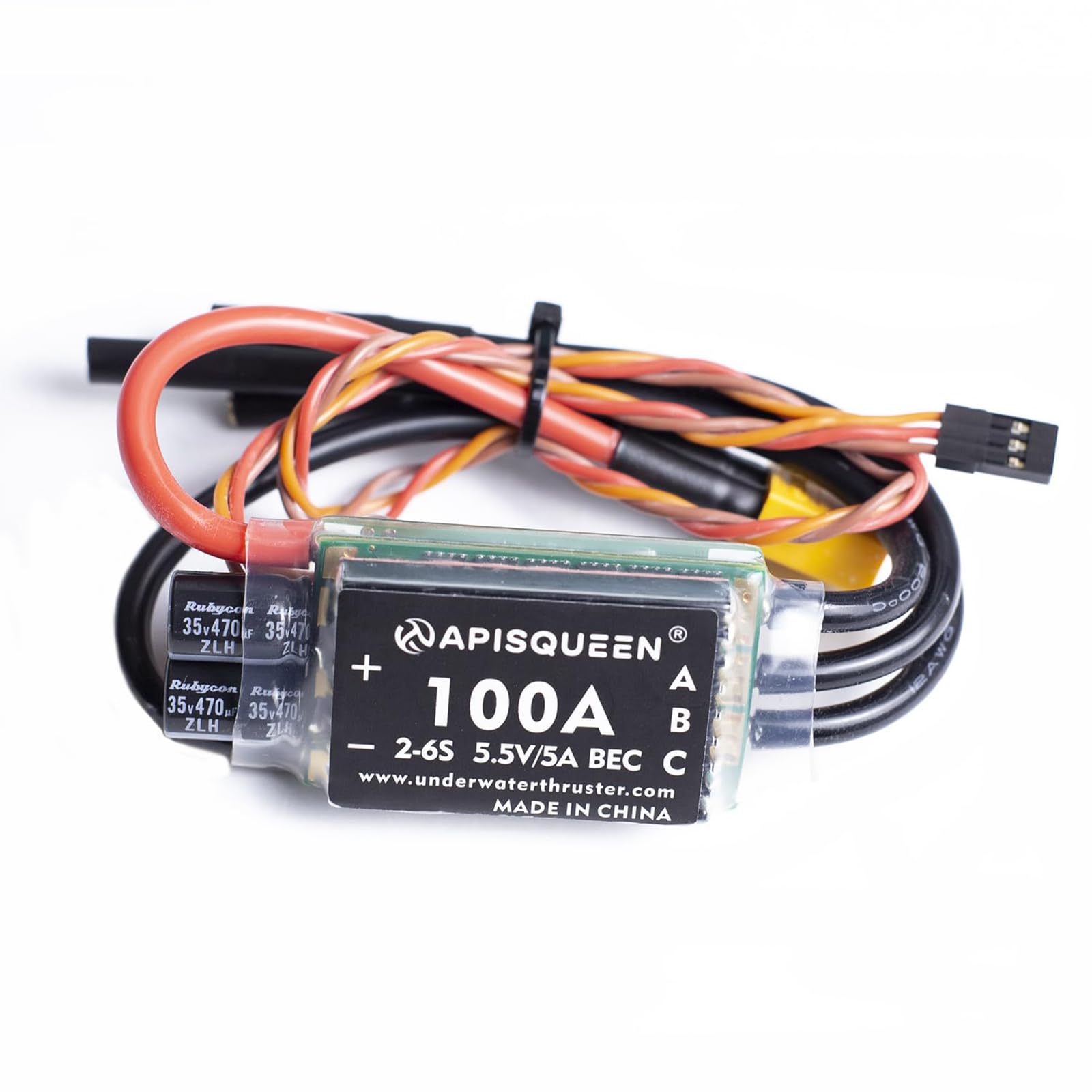
Image: Diagram illustrating the three major protective functions of the ESC.
7. Advanced Parameter Adjustment (Optional)
For professional users or specific applications, the ApisQueen 100A ESC supports parameter adjustment via assistant software. General users are recommended to use the factory default parameters.
To access advanced settings, you will need the ESC USB assistant software and a program cable (male JR to male JR) to connect the ESC to a computer.
Software Download and Connection:
- Download the assistant software from: ApisQueen_tool.zip
- If your computer does not detect the COM port, download and install the CH340 or CH341 driver.
- Connect the ESC signal cable to the USB assistant, then connect the USB assistant to your computer.
- Hidupkan ESC.
- Open the assistant software, select the correct COM port, and click "Connect". Confirm the connection is successful.
- Click "Readpara" to read the current parameters, then modify as needed and click "Writepara" to save.

Image: Screenshot of the ApisQueen ESC assistant software interface for parameter adjustment.
Parameter Boleh Laras:
- Mod Jalankan: Options include Forward/Brake (racing mode), FWD/Brake/Reverse (training mode), FWD/Reverse (crawler mode), and Forward only.
- Vol. Rendahtage Perlindungan: Set protection level (No protect, SLOW-DOWN, CUT-OFF).
- Jenis Bateri: Select LIHV, LIPO, NIMH, or LIFE for correct cell detection.
- Sel Voltage: Set cutoff protection voltage per cell (e.g., 2.9-3.5V for LiPo/LiHV, 2.2-2.8V for LiFe). No low voltage protection for NiMH.
- ESC Thermal Protect: Set temperature threshold to prevent ESC overheating.
- Kekerapan PWM: Adjust for motor smoothness and ESC temperature (higher frequency = smoother, hotter).
- Min Power: (Description not provided in source).
- Arah: Change motor spin direction for sensorless motors.
- BEC Voltage: (Description not provided in source).
- SyncRectify: ON for fast stop response, OFF for smooth natural stop.
- Max Reverse Strength: Sets backward full speed percentage relative to forward full speed.
- Max Brake Strength: Sets the maximum brake strength grade.
- Brake Rate: Controls brake response speed (lower = slower, higher = faster).
- Brake Frequency: Lower frequency results in harder brake force; higher frequency results in smoother brake force.
- Motor Rev Rate: Adjusts switching rate in reverse (bigger value = faster change).
- Throttle Rate: Controls throttle acceleration (lower = slower, higher = faster).
8. Penyelenggaraan dan Penjagaan
- Pendedahan Air: The ESC is nano-waterproof and splash-proof. Avoid prolonged submersion in water to prevent damage.
- Sambungan: Regularly inspect all wiring and connectors for secure fit and signs of wear or corrosion. Ensure proper insulation to prevent short circuits.
- Storan: Store the ESC in a dry, cool environment away from direct sunlight and extreme temperatures.
- Pembersihan: If exposed to saltwater or dirt, gently clean the ESC with fresh water and allow it to dry completely before next use.
Water Resistance Demonstration Video
Video: This video demonstrates the splash-proof nature of the ApisQueen 100A ESC by placing it in a shallow container of water while operating a connected thruster. It highlights that the ESC is designed to withstand splashes but should not be soaked for extended periods.
9. Penyelesaian masalah
- Motor Tidak Bermula: If the motor fails to start within three seconds of throttle input, ensure the throttle rocker is at its lowest point before attempting to restart. Check for loose connections, motor wire issues, or propeller obstructions.
- Sudden Power Cut-off: This may indicate an overload condition. Reduce the load on the motor and reset the throttle to zero before resuming operation. The ESC may attempt an automatic restart if the motor and ESC are out of sync.
- Unresponsive Throttle: If the ESC loses the remote control signal for more than 0.32 seconds, it will stop output. Verify remote control battery and signal integrity. Output will resume once the signal is restored.
- Terlalu panas: If the ESC becomes excessively hot, check for proper ventilation and ensure the load on the motor is not too high. Consider adjusting the PWM frequency if using advanced settings.
10. Waranti dan Sokongan
Specific warranty details are not provided within this manual. For warranty information, technical support, or further inquiries, please contact ApisQueen customer service or visit the official ApisQueen store: