
pengenalan
The CICRE Y60 TWS Bluetooth Earbuds are designed for high-quality audio enjoyment and active lifestyles. Featuring advanced Bluetooth 5.1 technology, AI Voice Assistant, and noise reduction capabilities, these earbuds provide a seamless and immersive listening experience. Their compact and comfortable design makes them ideal for everyday use, sports, and travel.
This manual provides detailed instructions on how to set up, operate, and maintain your Y60 TWS earbuds to ensure optimal performance and longevity.
Ciri-ciri Utama
- Audio Berkualiti Tinggi: Clear, crisp audio with noise reduction technology, suitable for music, calls, and various activities.
- Kesambungan Bluetooth 5.1: Ensures easy pairing and stable wireless connection with smartphones and other devices.
- Pembantu Suara AI: Hands-free control for managing calls, music, and other tasks.
- Multicolor Breathing Light: A unique visual feature that adds style to your listening experience.
- Padat & Mudah Alih: Small and lightweight design for easy transport and comfortable wear.
- Sweatproof Construction (IPX4): Durable design resistant to sweat and light rain, ideal for sports and gym use.
Apa yang ada dalam Kotak
Upon opening your Y60 TWS Earbuds package, you should find the following items:
- CICRE Y60 TWS Earbuds
- Stesen Pengecasan (Kes Pengecasan)
- Kabel Pengecasan
- Kes Pelindung
- Manual Pengguna (dokumen ini)

Image: The CICRE Y60 TWS Earbuds nestled in their open charging case, showcasing the distinctive green breathing light around the base.
Panduan Persediaan
1. Mengecas Fon Telinga dan Sarung
Sebelum penggunaan pertama, pastikan kedua-dua fon telinga dan bekas pengecas dicas sepenuhnya.
- Letakkan fon telinga ke dalam bekas pengecas, pastikan ia diletakkan dengan betul.
- Connect the charging cable to the charging port on the case and plug the other end into a USB power source (e.g., computer, wall adapter).
- The indicator lights on the case and earbuds will show charging status. Once fully charged, the lights may change color or turn off.
2. Berpasangan dengan Peranti Anda
The Y60 TWS earbuds support both binaural (both earbuds) and monaural (single earbud) modes.
- Initial Pairing (Binaural Mode):
- Buka bekas pengecas. Fon telinga akan dihidupkan secara automatik dan memasuki mod berpasangan.
- On your smartphone or Bluetooth-enabled device, go to Bluetooth settings and turn Bluetooth on.
- Cari untuk "Y60 TWS" (or similar) in the list of available devices and select it to connect.
- Once connected, you will hear a confirmation sound, and the earbuds' indicator lights may change.
- Mod Monaural:
- Simply take out one earbud from the charging case. It will automatically power on and attempt to connect to the last paired device.
- If not connected, follow the initial pairing steps for that single earbud.
The earbuds will automatically reconnect to the last paired device when taken out of the case, provided Bluetooth is enabled on your device.

Image: An illustration detailing the "Single or Double Share Good Sound Quality" feature, showing how to use the earbuds in both binaural (stereo) and monaural (single earbud) modes with accompanying diagrams.
Arahan Operasi
Kawalan Sentuh
The Y60 TWS earbuds feature touch-sensitive controls for easy management of audio and calls.
| Tindakan | Fungsi |
|---|---|
| Ketik Tunggal (Earbud Kiri/Kanan) | Main/Jeda Muzik, Jawab/Tamatkan Panggilan |
| Dwiketik (Earbud Kiri) | Trek Sebelumnya |
| Dwiketik (Earbud Kanan) | Trek Seterusnya |
| Ketik Tiga Kali (Earbud Kiri/Kanan) | Aktifkan Pembantu Suara |
| Tekan Lama (Earbud Kiri/Kanan) | Tolak Panggilan |
Pembantu Suara AI
Your Y60 TWS earbuds are equipped with an AI Voice Assistant for convenient hands-free control. Triple tap either earbud to activate your device's voice assistant (e.g., Siri, Google Assistant). You can then use voice commands to make calls, send messages, check weather, and more.
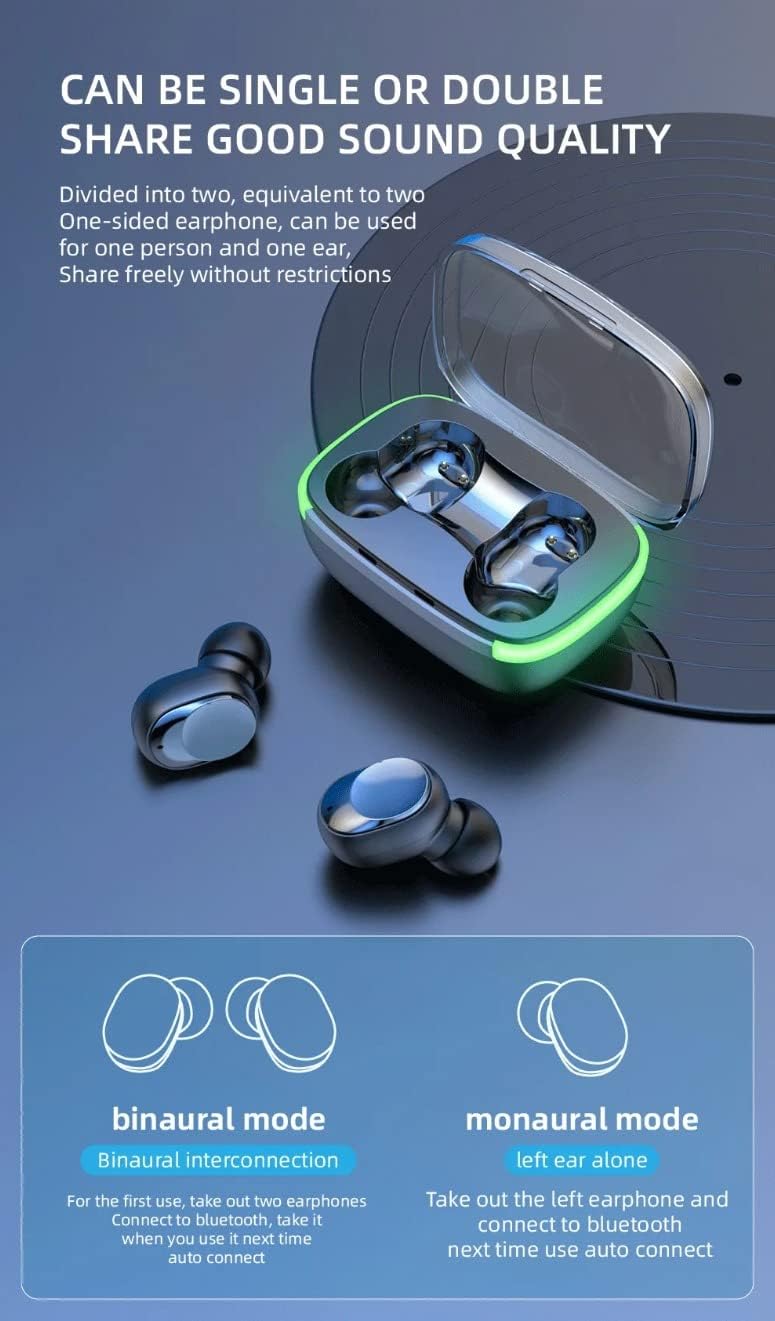
Image: A man wearing the Y60 TWS earbuds, demonstrating their comfortable and secure fit, with text emphasizing "Comfortable to Wear Without Falling."
Penyelenggaraan dan Penjagaan
Penyelenggaraan yang betul memastikan jangka hayat dan prestasi optimum fon telinga anda.
- Pembersihan: Bersihkan fon telinga dan bekas pengecas dengan kerap menggunakan kain yang lembut, kering dan tidak berbulu. Jangan gunakan pembersih atau pelarut yang melelas.
- Storan: Apabila tidak digunakan, sentiasa simpan fon telinga dalam bekas pengecasnya untuk melindunginya daripada habuk, kotoran dan kerosakan.
- Tahan Air: The earbuds are IPX4 sweatproof. Avoid submerging them in water or exposing them to heavy rain. Dry them thoroughly if they get wet from sweat or light splashes.
- Suhu: Elakkan daripada mendedahkan fon telinga kepada suhu yang melampau (panas atau sejuk) atau kelembapan yang tinggi.

Image: The Y60 TWS earbuds and their charging case are shown with water droplets, emphasizing their IPX4 deep waterproof rating, which protects against sweat and rain.
Menyelesaikan masalah
If you encounter any issues with your Y60 TWS earbuds, try the following troubleshooting steps:
- Fon telinga tidak berpasangan/bersambung:
- Pastikan kedua-dua fon telinga dicas.
- Matikan dan hidupkan Bluetooth pada peranti anda.
- Forget "Y60 TWS" from your device's Bluetooth list and try pairing again.
- Letakkan fon telinga kembali ke dalam bekas, tutup penutup, tunggu beberapa saat, kemudian buka untuk menetapkan semula.
- Hanya satu fon telinga berfungsi:
- Pastikan kedua-dua fon telinga dicas.
- Place both earbuds back into the charging case, close the lid, and then open it again. This often forces them to re-sync.
- If the issue persists, try resetting the earbuds and re-pairing.
- Tiada bunyi atau kelantangan rendah:
- Semak tahap kelantangan pada kedua-dua peranti anda dan fon telinga.
- Pastikan fon telinga disambungkan dengan betul ke peranti anda.
- Bersihkan sebarang serpihan daripada pembesar suara fon telinga.
- Isu pengecasan:
- Pastikan kabel pengecasan disambungkan dengan selamat pada kedua-dua bekas dan sumber kuasa.
- Cuba kabel pengecasan atau penyesuai kuasa yang berbeza.
- Bersihkan sesentuh pengecasan pada kedua-dua fon telinga dan sarung.
Spesifikasi
| Ciri | Perincian |
|---|---|
| Nama Model | Y60 TWS Bluetooth 5.1 Noise Cancelling Earbuds |
| Teknologi Ketersambungan | Wayarles (Bluetooth 5.1) |
| Kawalan Bunyi | Pembatalan Bunyi Aktif |
| Jenis Kawalan | Kawalan Suara, Kawalan Sentuhan |
| Penempatan Telinga | Di Telinga |
| Faktor Bentuk | Di Telinga |
| bahan | Plastik, Getah |
| Julat Kekerapan | 20 Hz - 20,000 Hz |
| Berat Barang | 2.39 auns |
| Dimensi Pakej | 5.5 x 3 x 1.25 inci |
| Bateri | 1 bateri Polimer Litium (termasuk) |
| Pengeluar | Shenzhen Lanxingxin Technology Co,. Ltd. |
| UPC | 197644093021 |

Image: A detailed graphic highlighting the "Custom Gaming Bluetooth 5.1" chip, emphasizing stable transmission and easier connection for an enhanced audio experience.
Video Produk Rasmi
Video: Tayangan video produk rasmicasing the key features and design of the CICRE Y60 TWS Bluetooth Earbuds, including AI Voice Assistant, noise cancellation, and multicolor breathing light.
Waranti dan Sokongan
For information regarding warranty coverage, technical support, or service inquiries, please refer to the product packaging or contact the manufacturer directly. Contact details are typically provided on the product box or the manufacturer's official webtapak.