
1. Pengenalan
This manual provides comprehensive instructions for the Maxcom Fit FW55 Aurum Pro Smartwatch. It covers essential information regarding product setup, operation, maintenance, and troubleshooting to ensure optimal performance and user experience. Please read this manual carefully before using your device.
2. Kandungan Pakej
Sila sahkan bahawa semua item yang disenaraikan di bawah terdapat dalam pakej produk anda:
- Maxcom Fit FW55 Aurum Pro Smartwatch
- Kabel Pengecasan
- Manual Pengguna (dokumen ini)
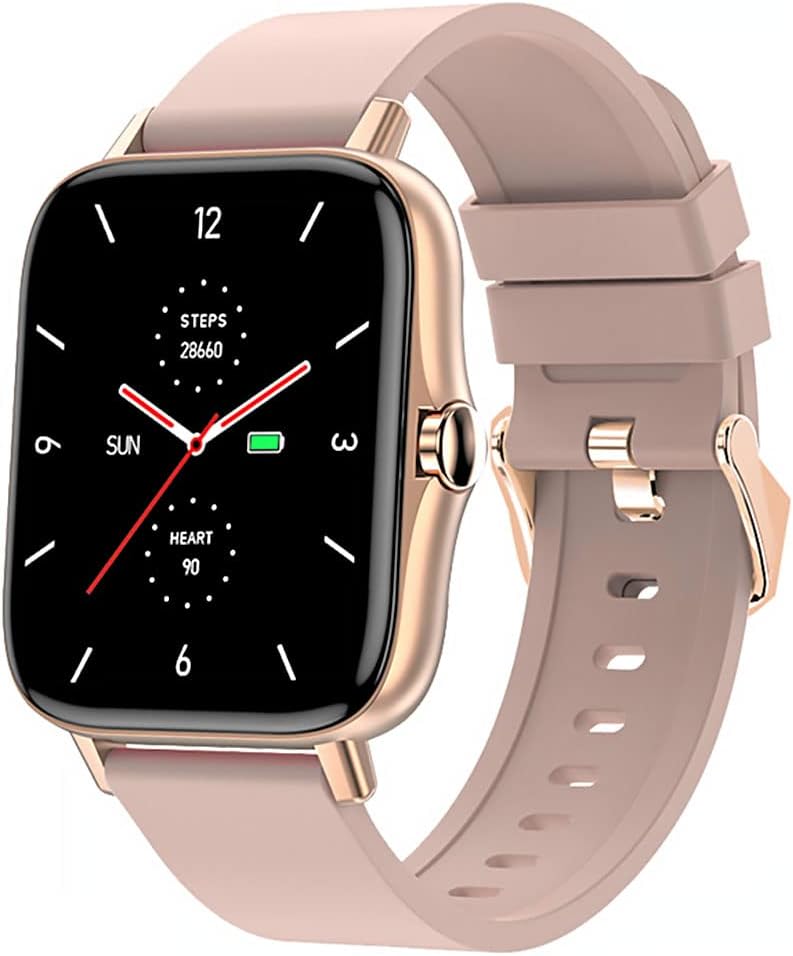
Image 1: Maxcom Fit FW55 Aurum Pro Smartwatch with a pink silicone band. The watch face displays steps, heart rate, and time.
3. Persediaan
3.1. Mengecas Jam Pintar
Before initial use, fully charge your Maxcom Fit FW55 Aurum Pro Smartwatch. Connect the provided charging cable to the charging port on the back of the smartwatch and plug the other end into a standard USB power adapter (not included) or a computer's USB port. The watch display will indicate charging status.
- Pastikan pin pengecas bersih dan sejajar dengan betul dengan sentuhan pengecasan jam tangan.
- Pengecasan penuh biasanya mengambil masa lebih kurang 2 jam.
3.2. Berpasangan dengan Telefon Pintar Anda
To unlock the full functionality of your smartwatch, you need to pair it with your smartphone via Bluetooth.
- Muat turun Apl: Cari untuk the official Maxcom Fit application in your smartphone's app store (iOS App Store or Google Play Store) and install it.
- Dayakan Bluetooth: Pastikan Bluetooth didayakan pada telefon pintar anda.
- Buka Apl: Launch the Maxcom Fit application on your smartphone.
- Tambah Peranti: Follow the in-app instructions to add a new device. Select "FW55 Aurum Pro" from the list of available devices.
- Sahkan Gandingan: A pairing request may appear on both your smartphone and the smartwatch. Confirm the pairing on both devices.
Once successfully paired, the smartwatch will synchronize data with your phone, and you can customize settings through the app.
4. Mengendalikan Jam Pintar
4.1. Hidupkan/Mati Kuasa
- Hidupkan kuasa: Press and hold the side button for a few seconds until the Maxcom logo appears.
- Matikan: From the watch face, swipe down to access quick settings, or navigate to the 'Settings' menu. Select 'Power Off' and confirm. Alternatively, press and hold the side button and select 'Power Off'.
4.2. Navigasi Asas
- Skrin Sentuh: The FW55 Aurum Pro features a 1.7-inch touch screen for intuitive interaction.
- Leret ke atas/bawah: Scroll through notifications, menus, or quick settings.
- Leret Kiri/Kanan: Access different widgets or main functions (e.g., heart rate, activity data).
- Ketik: Pilih item atau sahkan tindakan.
- Butang Sisi: Press to return to the watch face or wake the screen. A long press may access power options.
4.3. Ciri-ciri Utama
The Maxcom Fit FW55 Aurum Pro Smartwatch offers a range of features to support your daily activities and health monitoring:
- Penjejakan Aktiviti: Monitors steps taken, distance covered, and calories burned.
- Pemantauan Denyut Jantung: Menyediakan data kadar denyutan jantung masa nyata.
- Pemantauan Tidur: Mengesan corak dan kualiti tidur.
- Pemberitahuan: Receives alerts for calls, messages, and app notifications from your paired smartphone.
- GPS: Integrated GPS for accurate outdoor activity tracking.
- Muka Jam Boleh Disesuaikan: Personalize your watch face through the companion app.

Image 2: Maxcom Fit FW55 Aurum Pro Smartwatch featuring a gold metal mesh band. The watch face displays digital time, steps, and heart rate.
5. Penyelenggaraan
Penjagaan dan penyelenggaraan yang betul akan memanjangkan jangka hayat jam tangan pintar anda.
- Pembersihan: Regularly wipe the watch screen and body with a soft, dry, lint-free cloth. For stubborn dirt, slightly dampen kain dengan air. Elakkan menggunakan bahan kimia yang keras atau bahan yang melelas.
- Penjagaan Tali: Clean the watch strap according to its material. Silicone straps can be washed with mild soap and water. Metal straps may require specific cleaning agents.
- Elakkan Keadaan Melampau: Do not expose the smartwatch to extreme temperatures, direct sunlight for prolonged periods, or corrosive liquids.
- Tahan Air: While the watch may have some water resistance, it is not suitable for diving or high-pressure water activities. Refer to the product specifications for detailed water resistance ratings.
6. Penyelesaian masalah
If you encounter issues with your Maxcom Fit FW55 Aurum Pro Smartwatch, try the following solutions:
- Tonton tidak dihidupkan: Pastikan jam tangan dicas sepenuhnya. Sambungkannya ke pengecas selama sekurang-kurangnya 30 minit.
- Tidak boleh berpasangan dengan telefon pintar:
- Pastikan Bluetooth didayakan pada telefon dan jam tangan anda.
- Pastikan jam tangan berada dalam julat Bluetooth telefon anda.
- Mulakan semula kedua-dua telefon anda dan jam tangan pintar.
- Cuba nyahpasang dan pasang semula peranti melalui aplikasi.
- Data tidak tepat (langkah, kadar denyutan jantung):
- Pastikan jam tangan dipakai dengan kemas di pergelangan tangan anda, kira-kira satu jari lebar di atas tulang pergelangan tangan anda.
- Bersihkan penderia di belakang jam tangan.
- Update the companion app to the latest version.
- Pemberitahuan tidak diterima:
- Check notification settings in the Maxcom Fit app.
- Ensure your phone's notification permissions are granted to the app.
- Verify that the watch is successfully paired and connected to your phone.
If problems persist, consult the Maxcom support webtapak atau hubungi perkhidmatan pelanggan.
7. Spesifikasi
Below are the technical specifications for the Maxcom Fit FW55 Aurum Pro Smartwatch:
| Ciri | Perincian |
|---|---|
| Jenama | Maxcom |
| Nombor Model | FW55 Aurum Pro |
| Saiz Skrin | 1.7 Inci |
| Teknologi Ketersambungan | Bluetooth |
| Standard Komunikasi Tanpa Wayar | Bluetooth |
| Peranti Serasi | Telefon pintar |
| GPS | GPS bersepadu |
| bentuk | Segi empat |
| Khalayak Sasaran | Adult Unisex |
| Komponen yang Disertakan | Pengecas |

Imej 3: Depan view of the Maxcom Fit FW55 Aurum Pro Smartwatch with a pink silicone band, highlighting the square display.
8. Waranti dan Sokongan
For warranty information and customer support, please refer to the documentation included with your purchase or visit the official Maxcom webtapak. Simpan bukti pembelian anda untuk tuntutan waranti.
For technical assistance or further inquiries, please contact Maxcom customer service through their official channels.