
ZOUKAI BT-X
ZOUKAI BT-X Earhooks Sports Headphones User Manual
Model: BT-X | Brand: ZOUKAI
1. Pengenalan
Thank you for choosing the ZOUKAI BT-X Earhooks Sports Headphones. These open-ear Bluetooth headphones are designed for comfort, stability, and high-quality audio, making them ideal for sports and daily use. Featuring Bluetooth 5.3 for stable connectivity, a long-lasting battery, and a unique night running mode, the BT-X provides an immersive listening experience while keeping you aware of your surroundings. Please read this manual carefully to ensure proper use and maintenance of your new headphones.
2. Apa yang ada di dalam Kotak
Your ZOUKAI BT-X Earhooks Sports Headphones package includes the following items:
- Kabel Pengecas USB-C
- Manual Pengguna (dokumen ini)
- Sarung Pengecas Tanpa Wayar
3. Produk Lebihview
The ZOUKAI BT-X headphones combine innovative design with advanced technology to deliver a superior audio experience. Key features include:
- Comfortable Open-Ear Design: Soft ear pads and an ear-hanging wearing method ensure a painless fit, allowing you to enjoy music without discomfort while maintaining situational awareness.
- Night Running Mode: Unique transparent earhooks with bright lights enhance your visibility and safety during nighttime outdoor activities.
- Jangka Hayat Bateri: Enjoy up to 15 hours of continuous music playback on a single charge. The charging case provides multiple additional charges, extending total usage time significantly.
- Kesambungan Bluetooth 5.3: Advanced Bluetooth 5.3 chip ensures smooth transmission and a stable connection within a 10-meter range, compatible with a wide range of Bluetooth-enabled smartphones and devices.
- Sports-Ready Durability: The ear-hook style provides a stable fit, preventing accidental falls during intense workouts. IPX5 sweat-proof and waterproof functionality protects the earphones from sweat damage.
- Clear Calls and Immersive Sound: Built-in 4 noise-cancelling microphones ensure crisp, clear calls. The 28mm dynamic speakers deliver HiFi sound quality with powerful bass for an immersive audio experience.

Figure 3.1: ZOUKAI BT-X Earhooks Sports Headphones and Charging Case. The image shows the white charging case open, revealing one earhook headphone placed inside and the other removed, showcasing reka bentuknya.
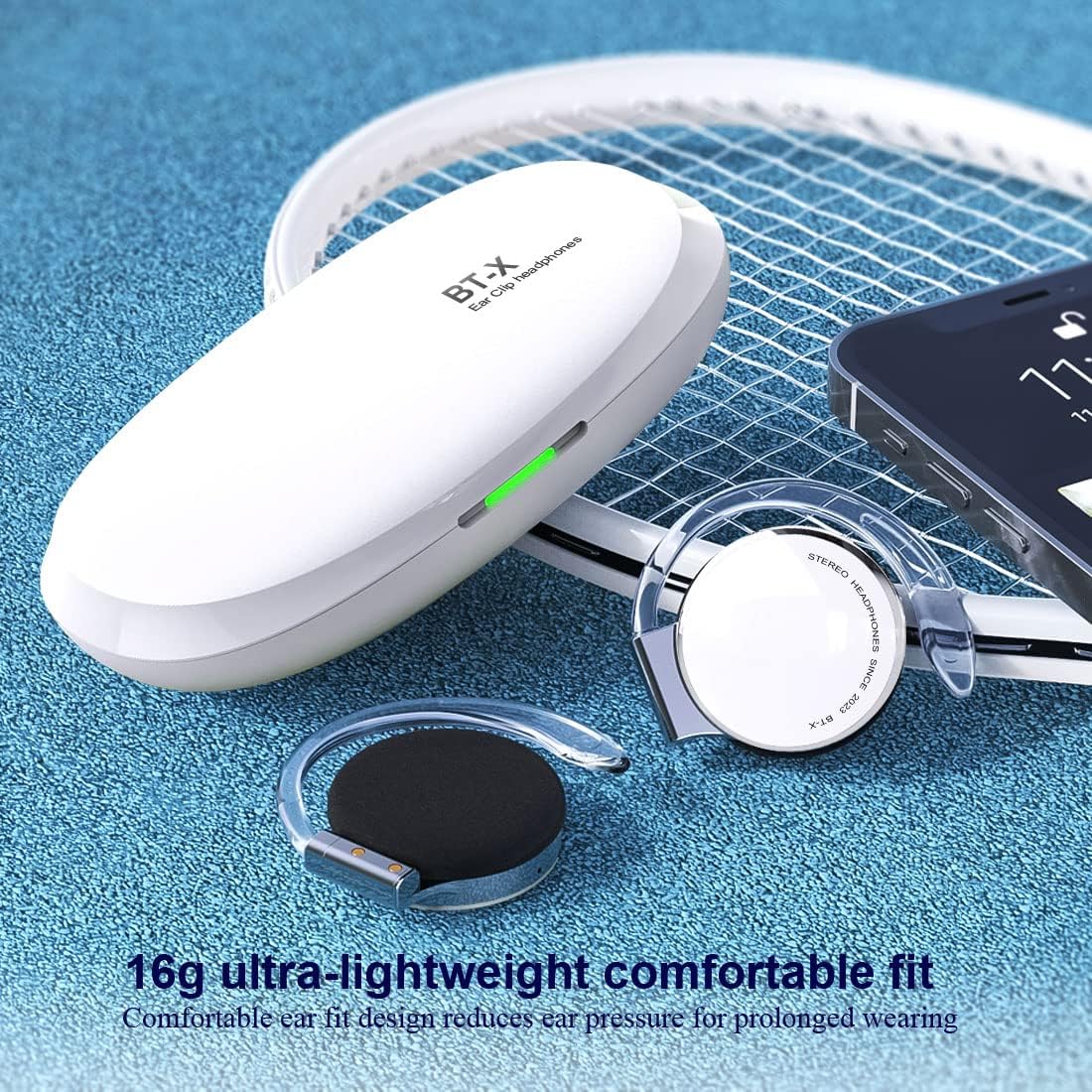
Figure 3.2: ZOUKAI BT-X Earhooks Sports Headphones with charging case and phone, highlighting lightweight fit. The image emphasizes the 16g ultra-lightweight design for comfortable prolonged wearing.

Figure 3.3: ZOUKAI BT-X Earhooks Sports Headphones in charging case next to a laptop and smartphone, illustrating broad compatibility. This image highlights the Bluetooth 5.3 for instant connection with various devices.

Figure 3.4: Person wearing ZOUKAI BT-X Earhooks Sports Headphones with glowing earhooks for night running mode. The image demonstrates the LED sports warning light for enhanced safety during nighttime exercise.

Figure 3.5: ZOUKAI BT-X Earhooks Sports Headphones on a surface, emphasizing 4 noise-cancelling microphones and HD calling. This image highlights the features for business, office, sports, and music use.

Figure 3.6: Person wearing ZOUKAI BT-X Earhooks Sports Headphones, with a graphic illustrating ENC + CVC noise reduction technology. The image shows the effect of noise reduction on sound waves, indicating clearer audio.

Figure 3.7: ZOUKAI BT-X Earhooks Sports Headphones and charging case on a laptop keyboard, highlighting USB-C charging and 28mm speakers. This image emphasizes the audio quality and charging convenience.

Figure 3.8: Person wearing ZOUKAI BT-X Earhooks Sports Headphones during a workout, demonstrating secure fit and clear calls. The image highlights the durability and stable fit even during intense physical activity.
4. Persediaan
4.1 Pengecasan Awal
- Place both headphones into the charging case.
- Sambungkan kabel pengecas USB-C ke port pengecasan pada sarung dan sumber kuasa.
- Lampu penunjuk pada bekas akan menunjukkan status pengecasan. Pengecasan penuh mengambil masa kira-kira 2 jam.
4.2 Berpasangan dengan Peranti Anda
- Pastikan fon kepala dicas.
- Open the charging case. The headphones will automatically enter pairing mode, indicated by a flashing light on the headphones.
- Pada peranti anda (telefon pintar, tablet, komputer riba), pergi ke tetapan Bluetooth dan hidupkan Bluetooth.
- Cari untuk available devices and select "BT-X" from the list.
- Once connected, the headphone indicator light will stop flashing. You are now ready to use your headphones.
4.3 Attaching/Detaching Earhooks
The earhooks are designed to be detachable for convenience. Refer to the video below for a visual guide on how to properly attach and detach the earhooks from your ZOUKAI BT-X headphones.
Video 4.1: Demonstration of attaching and detaching the earhooks from the ZOUKAI BT-X headphones. This video provides a clear visual instruction for assembling and disassembling the earhook components.
5. Arahan Operasi
5.1 Hidupkan/Mati Kuasa
- Hidupkan kuasa: Open the charging case, and the headphones will automatically power on.
- Matikan: Place the headphones back into the charging case and close the lid. They will automatically power off and begin charging.
5.2 Main balik Muzik
- Main/Jeda: Tap the touch control area on either headphone once.
- Lagu Seterusnya: Double-tap the right headphone.
- Trek Sebelumnya: Ketik dua kali pada fon kepala kiri.
- Kelantangan: Triple-tap the right headphone.
- Perlahankan suara: Triple-tap the left headphone.
5.3 Pengurusan Panggilan
- Jawab/Tamatkan Panggilan: Tap the touch control area on either headphone once.
- Tolak Panggilan: Press and hold the touch control area on either headphone for 2 seconds.
- Aktifkan Pembantu Suara: Press and hold the touch control area on either headphone for 3 seconds (when not on a call).
5.4 Night Running Mode
- To activate the LED lights on the earhooks for night running, refer to the specific instructions in the quick start guide included with your product, as activation methods may vary.
6. Penyelenggaraan
To ensure the longevity and optimal performance of your ZOUKAI BT-X headphones, follow these maintenance guidelines:
- Pembersihan: Use a soft, dry, lint-free cloth to clean the headphones and charging case. Do not use abrasive cleaners, alcohol, or chemical solvents.
- Tahan Air: The headphones are IPX5 sweat-proof and waterproof. While they can withstand sweat and light splashes, do not submerge them in water or expose them to heavy rain. Dry them thoroughly after exposure to moisture.
- Storan: Apabila tidak digunakan, simpan fon kepala dalam bekas pengecasnya untuk melindunginya daripada habuk dan kerosakan. Simpan di tempat yang sejuk dan kering jauh dari suhu yang melampau.
- Penjagaan Bateri: Untuk menjimatkan hayat bateri, cas fon kepala secara berkala, walaupun tidak digunakan dengan kerap. Elakkan daripada mencas bateri sepenuhnya untuk tempoh yang lama.
7. Penyelesaian masalah
If you encounter any issues with your ZOUKAI BT-X headphones, please refer to the following common solutions:
| Masalah | Penyelesaian yang Mungkin |
|---|---|
| Fon kepala tidak dapat dihidupkan | Ensure the headphones are fully charged. Place them in the charging case and connect the case to a power source. |
| Tidak boleh berpasangan dengan peranti | Make sure Bluetooth is enabled on your device. Ensure headphones are in pairing mode (flashing light). Try forgetting the device in your Bluetooth settings and re-pairing. Ensure headphones are within 10 meters of the device. |
| Tiada suara atau kelantangan rendah | Check the volume level on both the headphones and your connected device. Ensure headphones are properly connected. Try playing different audio sources. |
| Call quality issues (muffled sound, cannot be heard) | Ensure the microphones are not obstructed. Check network signal strength on your phone. Try disconnecting and reconnecting the headphones. |
| Headphones frequently disconnect | Ensure no obstacles are between the headphones and your device. Move closer to your device. Check for interference from other wireless devices. |
Jika masalah berterusan selepas mencuba penyelesaian ini, sila hubungi sokongan pelanggan.
8. Spesifikasi
| Ciri | Perincian |
|---|---|
| Nama Model | BT-X |
| Teknologi Ketersambungan | Wayarles (Bluetooth) |
| Versi Bluetooth | 5.3 |
| Julat Bluetooth | 10 Meters (without obstacles) |
| Hayat Bateri | Up to 15 Hours (continuous playback) |
| Masa Mengecas | lebih kurang 2 Jam |
| Bentuk alat dengar | Earhook |
| Penempatan Telinga | Buka Telinga |
| Tahap Ketahanan Air | IPX5 (Sweat-proof, Waterproof) |
| Mikrofon | 4 Noise-Cancelling Microphones |
| Saiz Pembesar Suara | Ø28mm Dynamic Speaker |
| Jenis Kawalan | Sentuh, Kawalan Kelantangan |
| Berat Barang | 0.56 Auns (lebih kurang 16g) |
| bahan | plastik |
| UPC | 768399354974 |
9. Waranti dan Sokongan
ZOUKAI products are designed and manufactured to the highest quality standards. This product is covered by a limited warranty from the date of purchase. For detailed warranty information, including terms and conditions, please refer to the warranty card included in your product packaging or visit the official ZOUKAI webtapak.
If you require technical support, have questions about product functionality, or need assistance with troubleshooting, please contact ZOUKAI customer service through the contact information provided on our website or in your product documentation. Please have your model number (BT-X) and proof of purchase ready when contacting support.
Ask a question about this manual
Ask about setup, troubleshooting, compatibility, parts, safety, or missing instructions. Manuals+ will review the question and use this page’s manual context to help answer it.