
roborock S8 Pro Ultra and Dyad Pro
roborock S8 Pro Ultra Robot Vacuum & Dyad Pro Vacuum Cleaner Bundle User Manual
Panduan komprehensif anda untuk persediaan, operasi dan penyelenggaraan.
1. Produk Lebihview
This manual provides detailed instructions for the roborock S8 Pro Ultra Robot Vacuum with RockDock Ultra System and the roborock Dyad Pro Wet and Dry Vacuum Cleaner. These devices are designed to provide efficient floor cleaning solutions for various household needs.

Image 1.1: The roborock S8 Pro Ultra Robot Vacuum with its RockDock Ultra and the roborock Dyad Pro Wet and Dry Vacuum Cleaner.
Ciri-ciri Utama
- roborock S8 Pro Ultra: Features the RockDock Ultra System for self-washing, self-refilling, self-emptying, self-drying, and self-cleaning. Equipped with DuoRoller Riser Brush, Upgraded VibraRise 2.0 Mopping System, Reactive 3D Obstacle Avoidance, and 6000Pa suction power.
- roborock Dyad Pro: Utilizes DyadPower for wet and dry messes, offering improved edge-to-edge cleaning and 17000Pa suction. Includes a dual water-tank design, bi-directional self-cleaning brushes, hot air drying, auto cleaning solution dispenser, and adaptive cleaning with DirTect.
2. Persediaan
2.1 roborock S8 Pro Ultra Robot Vacuum
- Membongkar: Carefully remove all components from the packaging. Ensure all protective films and packing materials are removed from the robot and the RockDock Ultra.
- Dock Placement: Place the RockDock Ultra on a hard, level surface against a wall, ensuring adequate space around it for the robot to maneuver. Avoid placing it near stairs or in high-traffic areas.
- Sambungan Kuasa: Connect the power cable to the RockDock Ultra and plug it into a wall outlet.
- Tangki Air: Fill the clean water tank with clean water and ensure the dirty water tank is empty and correctly installed.
- Caj Permulaan: Place the robot onto the RockDock Ultra to charge fully before first use. The indicator lights will show charging status.
- Sambungan Apl: Download the roborock app from your device's app store. Follow the in-app instructions to connect your robot vacuum to your home Wi-Fi network and complete the initial setup, including mapping your home.
2.2 roborock Dyad Pro Wet and Dry Vacuum Cleaner
- Perhimpunan: Assemble the handle to the main body of the vacuum cleaner according to the quick start guide.
- mengecas: Place the Dyad Pro on its charging dock and connect the power adapter. Allow it to charge completely before initial use.
- Tangki Air: Fill the clean water tank with water and, if desired, add the recommended cleaning solution. Ensure the dirty water tank is empty.
3. Arahan Operasi
3.1 roborock S8 Pro Ultra Robot Vacuum
The S8 Pro Ultra offers automated cleaning with advanced navigation and self-maintenance features.
Video 3.1: Tamatview of the Roborock S8 Pro Ultra robot vacuum's features and operation.
- Memulakan Pembersihan: Use the roborock app to start, pause, or stop cleaning. You can also press the power button on the robot.
- Pemetaan: The robot uses PreciSense LiDAR Navigation to create an accurate map of your home, optimizing cleaning routes.
- Mengelakkan halangan: Reactive 3D Obstacle Avoidance technology helps the robot identify and bypass common household objects, preventing entanglement or collisions.
- Kaedah Pembersihan: Select various cleaning modes (e.g., vacuum-only, mop-only, vacuum & mop) via the app. The DuoRoller Riser Brush and VibraRise 2.0 Mopping System adapt to different surfaces.
- Penggalak Permaidani: The robot automatically detects carpets and adjusts suction power. The mop lifts automatically when a carpet is detected to prevent wetting.
- RockDock Ultra Functions: The dock handles self-washing of the mop, self-refilling of the robot's water tank, self-emptying of the dustbin, self-drying of the mop and dock, and self-cleaning of the dock base.
- Kawalan Apl: Customize cleaning settings, set no-go zones, virtual walls, and schedule cleanings through the roborock app.
- Kawalan Suara: Integrate with Amazon Alexa, Google Home, or Siri Shortcuts for hands-free operation.
Video 3.2: Demonstration of the S8 Pro Ultra's Reactive 3D Obstacle Avoidance system.
Video 3.3: Explaining the Dual Brush and Dual Sonic Cleaning features of the Roborock S8 Pro Ultra.
Video 3.4: Demonstrating the convenient all-in-one features of the S8 Pro Ultra's RockDock Ultra.
3.2 roborock Dyad Pro Wet and Dry Vacuum Cleaner
The Dyad Pro is designed for effective wet and dry mess cleanup.
Video 3.5: Tamatview of the Roborock Dyad Pro's capabilities for wet and dry cleaning.
- Hidupkan/Mati Kuasa: Tekan butang kuasa untuk menghidupkan atau mematikan vakum.
- Pembersihan: Push the vacuum forward to clean. The DyadPower system with 17000Pa suction effectively removes wet and dry debris.
- Edge-to-Edge Cleaning: The design allows for cleaning close to walls and edges.
- Adaptive Cleaning: The DirTect system automatically adjusts cleaning power and water flow based on the detected dirt level.
- Self-Cleaning & Drying: After use, place the Dyad Pro on its dock for automatic roller self-cleaning and hot air drying to prevent odors.
- Makluman Suara: The vacuum provides voice alerts for status updates and maintenance reminders.
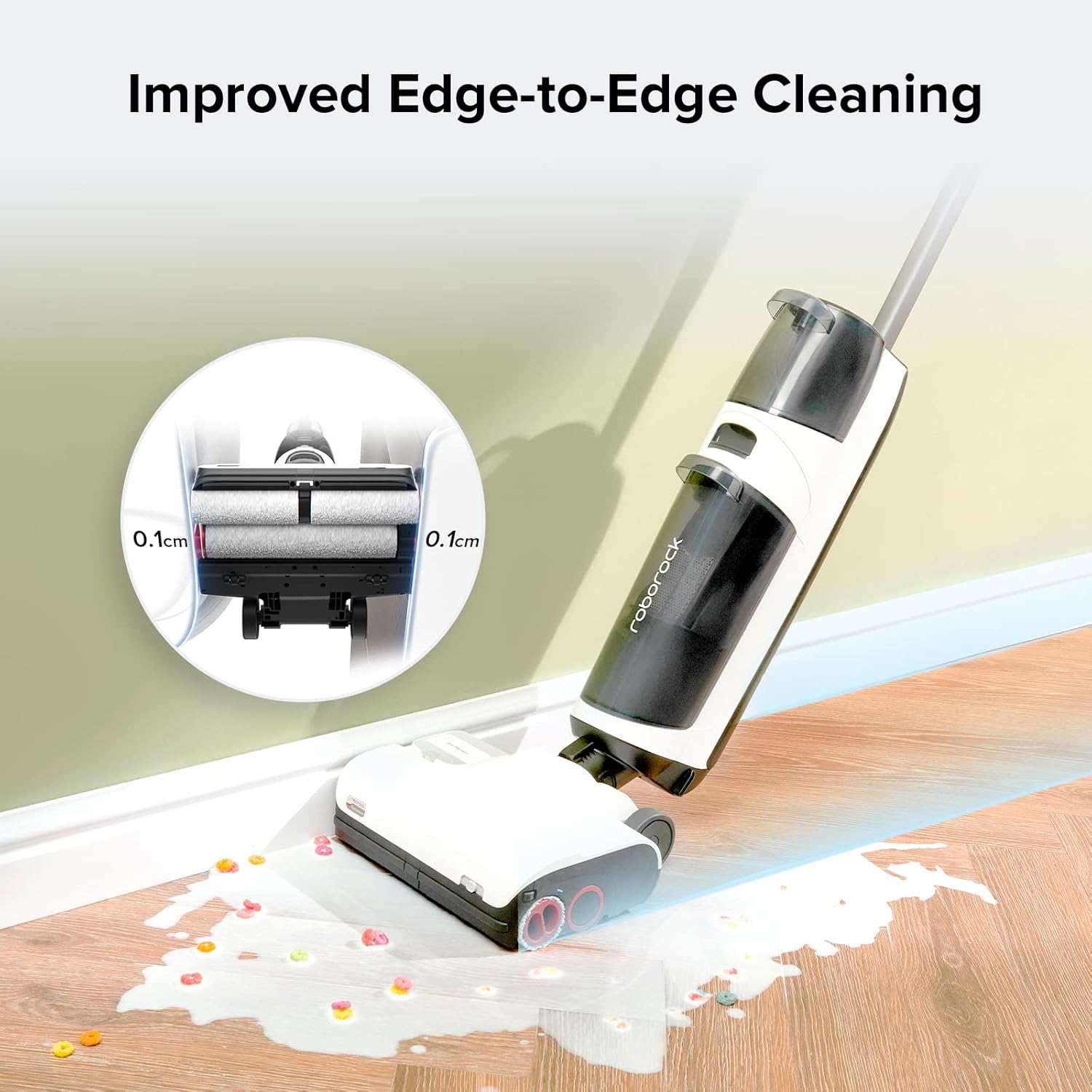
Image 3.1: The roborock Dyad Pro cleaning close to a wall, showcasing its improved edge-to-edge cleaning capability.
4. Penyelenggaraan
4.1 roborock S8 Pro Ultra Robot Vacuum
- Tong sampah: The RockDock Ultra automatically empties the robot's dustbin. Check the dock's dustbag periodically and replace it when full (up to 7 weeks of use).
- Tangki Air: Regularly empty the dirty water tank and refill the clean water tank on the RockDock Ultra.
- Mop & Brushes: The RockDock Ultra performs self-washing and self-drying of the mop. Periodically inspect the DuoRoller brushes for tangled hair and remove as needed.
- Penderia: Wipe the robot's sensors (including Reactive 3D Obstacle Avoidance sensors and LiDAR) with a soft, dry cloth to ensure optimal performance.
4.2 roborock Dyad Pro Wet and Dry Vacuum Cleaner
- Tangki Air: Empty the dirty water tank after each use and refill the clean water tank as needed.
- Penggelek: The self-cleaning function on the dock cleans the rollers. For deeper cleaning, remove and rinse the rollers under running water. Ensure they are dry before reinstallation.
- Penapis: Clean the filter regularly. Refer to the app or product guide for specific filter maintenance instructions.
5. Penyelesaian masalah
If you encounter issues, refer to the following common troubleshooting steps. For more detailed solutions, consult the roborock app or the official roborock support webtapak.
- Robot tidak mengecas: Ensure the RockDock Ultra is plugged in and the robot is correctly docked. Clean the charging contacts on both the robot and the dock.
- Robot kerap tersekat: Check for small objects, cables, or loose rugs that might be obstructing the robot. Utilize the app to set no-go zones or virtual walls around problem areas.
- Poor cleaning performance (Robot): Clean the main brushes, side brush, and mop. Ensure water tanks are filled and the dustbin is not full.
- Poor cleaning performance (Dyad Pro): Ensure clean water tank is filled and dirty water tank is empty. Clean the rollers and filter. Check for blockages in the suction path.
- Isu sambungan apl: Ensure your Wi-Fi network is stable and the robot/Dyad Pro is within range. Restart your router, the device, and the app.
- Bunyi luar biasa: Check for foreign objects caught in the brushes or wheels of either device.
6. Spesifikasi
| Ciri | Perincian |
|---|---|
| Jenama | roborock |
| Nama Model | S8 Pro Ultra & Dyad Pro |
| Ciri Khas | Cordless (Dyad Pro) |
| warna | putih |
| Dimensi Produk | 28.9"L x 20.31"W x 19.06"H |
| Komponen yang Disertakan | Robot Vakum |
| Jenis Penapis | Cakera |
| Battery Life (Robot) | 180 minit |
| Battery Life (Dyad Pro) | 43 minit |
| Sumber Kuasa | Dikuasakan Bateri |
| Peranti Serasi | Amazon Echo |
| Faktor Bentuk | Robotik |
| Berat Barang | 66.3 paun |
| Pengeluar | roborock |
| Nombor model item | S8 Pro Ultra and Dyad Pro |
7. Waranti dan Sokongan
For warranty information, product registration, and technical support, please visit the official roborock website or contact roborock customer service. Keep your purchase receipt for warranty claims.
Sokongan dalam talian: www.roborock.com
Perkhidmatan Pelanggan: Refer to your product packaging or the roborock webtapak untuk maklumat hubungan serantau.
Ask a question about this manual
Ask about setup, troubleshooting, compatibility, parts, safety, or missing instructions. Manuals+ will review the question and use this page’s manual context to help answer it.