pengenalan
This manual provides instructions for the Generic replacement remote control, designed for compatibility with Pioneer VSX-322-K, VSX-827, VSX-827-K, and VSX-527-K AV receivers. This remote functions as a direct replacement and does not require programming. Please note that while it supports primary functions, some advanced or specific features of your original remote may not be replicated.
Persediaan
Pemasangan Bateri
- Cari petak bateri di belakang alat kawalan jauh.
- Luncurkan penutup bateri ke bawah untuk membukanya.
- Masukkan dua (2) bateri AAA, pastikan kekutuban (+ dan -) yang betul seperti yang ditunjukkan di dalam petak.
- Close the battery cover by sliding it upwards until it securely clicks into place.
The back of the remote control, illustrating the battery compartment where two AAA batteries are to be inserted.
Arahan Operasi
This replacement remote control requires no programming. Once batteries are installed, it is ready for use with compatible Pioneer AV receivers.
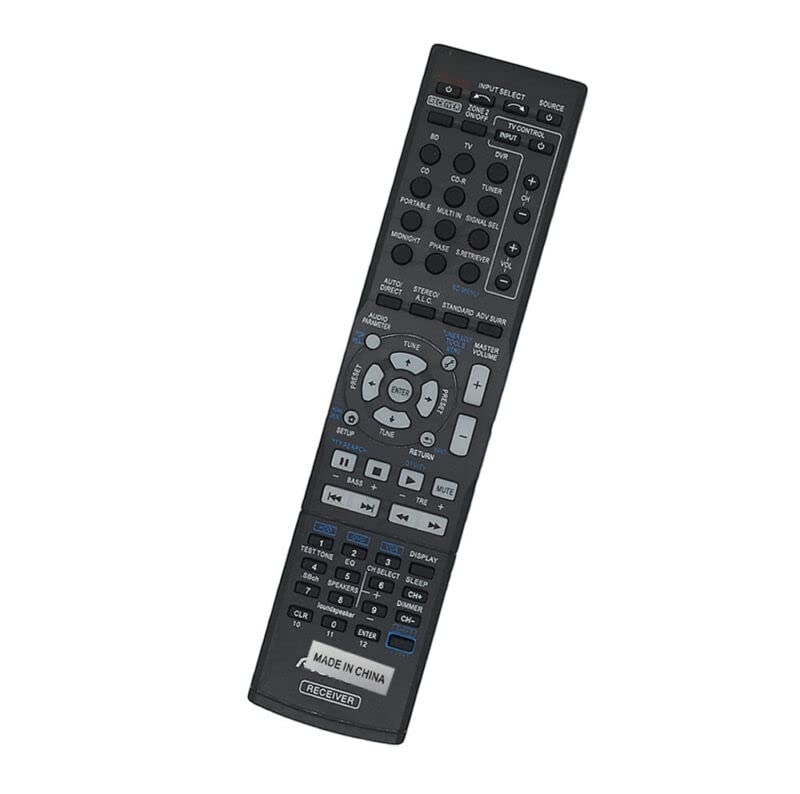
Bahagian hadapan view of the remote control, displaying the layout and labels of all functional buttons for operating an AV receiver.
Fungsi Butang
- Power/Input Selection:
- RECEIVER ON/OFF: Powers the AV receiver on or off.
- PILIH INPUT: Berkitar melalui sumber input yang tersedia.
- SUMBER: Selects the audio/video source.
- TV CONTROL INPUT: Controls TV input.
- ZONE 2 ON/OFF: Powers Zone 2 on or off.
- TV, CD, CD-R, DVR, TUNER, PORTABLE, MULTI IN, SIGNAL SEL: Direct input selection buttons.
- Kawalan Kelantangan:
- MASTER VOLUME + / -: Increases or decreases master volume.
- MATI: Membisukan atau menyahredamkan output audio.
- Navigasi dan Menu:
- PENYEDIAAN: Accesses the receiver's setup menu.
- MASUK: Mengesahkan pilihan dalam menu.
- PRESET + / -: Navigates through radio presets or other stored settings.
- TUNE + / -: Melaraskan penalaan radio.
- Butang Arah (Atas, Bawah, Kiri, Kanan): Digunakan untuk navigasi menu.
- KEMBALI: Kembali ke menu atau skrin sebelumnya.
- Pelarasan Audio:
- AUDIO PARAMETER: Accesses audio parameter settings.
- AUTO DIRECT: Activates Auto Direct sound mode.
- STEREO: Activates Stereo sound mode.
- ALC: Activates Automatic Level Control.
- STANDARD: Activates Standard sound mode.
- ADV SURR: Activates Advanced Surround sound mode.
- BASS + / -: Melaraskan tahap bass.
- TRE + / -: Melaraskan tahap treble.
- MIDNIGHT: Activates Midnight listening mode.
- FASA: Adjusts phase settings.
- RETRIEVER: Activates sound retriever function.
- Numeric Keypad and Other Functions:
- 0-9, 10, 11, 12: Numeric input for channels or settings.
- CLR: Clears numeric input.
- TONA UJIAN: Activates test tone for speaker setup.
- EQ: Mengakses tetapan penyama.
- SBch SPEAKERS: Selects surround back speakers.
- CH SELECT: Pemilihan saluran.
- TIDUR: Menetapkan pemasa tidur.
- DISPLAY: Changes display mode.
- DIMMER: Melaraskan kecerahan paparan.
- CH+ / CH-: Menukar saluran.
- Pembesar suara: Toggles loudspeaker function.
Penyelenggaraan
Penggantian Bateri
Replace batteries when the remote's operational range decreases or it becomes unresponsive. Always use two new AAA batteries. To prevent damage, do not mix old and new batteries or different types of batteries.
Pembersihan
Wipe the remote control with a soft, dry cloth. Avoid using liquid cleaners, solvents, or abrasive materials, as these can damage the remote's surface or internal components.
Penyimpanan
If the remote control will not be used for an extended period, remove the batteries to prevent potential leakage and damage to the device.
Menyelesaikan masalah
- Jauh tidak bertindak balas:
- Periksa sama ada bateri dimasukkan dengan polariti yang betul.
- Gantikan bateri dengan yang baru.
- Ensure there are no physical obstructions between the remote control and the AV receiver's infrared (IR) sensor.
- Verify the remote is pointed directly at the receiver's IR sensor.
- Beberapa fungsi tidak berfungsi:
- This is a replacement remote. Some advanced or highly specific functions of your original remote may not be supported. This is not indicative of a defective product.
- Ensure the correct input source is selected on your AV receiver for the desired function.
Spesifikasi
| Sumber Kuasa | 2 x bateri AAA (tidak termasuk) |
| bahan | Plastik ABS |
| Komunikasi | Inframerah (IR) |
| Peranti Serasi | Pioneer VSX-322-K, VSX-827, VSX-827-K, VSX-527-K AV Receivers. Also compatible with DVD/Blu-ray Player, Home Theater, Set Top Box, Stereo System, Television (for basic functions if compatible). |
| Peranti yang Disokong Maks | 1 (as a dedicated replacement) |
| warna | Black (or white, depending on received product) |
Waranti dan Sokongan
Waranti
Warranty information for this product is not provided in the available data. Please refer to your purchase documentation or contact the seller directly for details regarding warranty coverage.
Sokongan
For further assistance or specific operational questions not covered in this manual, please contact the seller from whom you purchased this remote control. You may also refer to the original product manual for your Pioneer AV receiver model for detailed information on its functions.


