
Brifit b1850db1-f513-4344-b364-c231e9e7bc32
Brifit Mini Digital Indoor Thermometer Hygrometer User Manual
Model: b1850db1-f513-4344-b364-c231e9e7bc32
1. Pengenalan
This manual provides instructions for the Brifit Mini Digital Indoor Thermometer Hygrometer. This device is designed to accurately monitor indoor temperature and humidity, helping you maintain a comfortable and healthy environment. It also features a clock display and a comfort indicator.

Imej 1.1: Depan view of the Brifit Mini Digital Indoor Thermometer Hygrometer, displaying time, temperature, humidity, and a comfort indicator.
2. Ciri-ciri Produk
- Penderia Ketepatan Tinggi: Accurately monitors temperature and humidity changes with a temperature range of -10°C to +60°C (14°F to 140°F) and humidity range of 10% RH to 99% RH.
- Paparan Pelbagai fungsi: Shows temperature, humidity, date, and time. Supports 12-hour or 24-hour time format.
- Penunjuk Keselesaan: Features a unique smiley indicator to display environmental comfort levels (Dry, Comfortable, Wet).
- Skrin LCD yang jelas: Equipped with a 3.2-inch LCD for easy readability of digital values.
- Pelbagai Pilihan Peletakan: Can be placed on a table using its stand, mounted on a wall with adhesive tape, or hung using integrated holes.
- Padat dan Mudah Alih: Lightweight design allows for easy placement in various indoor environments.

Image 2.1: The device shown in a home environment, highlighting its functions: Thermometer, Time, Hygrometer, Date, Comfort Indicator, °C/°F Selector, 12/24H Switch, and CR2032 Battery.
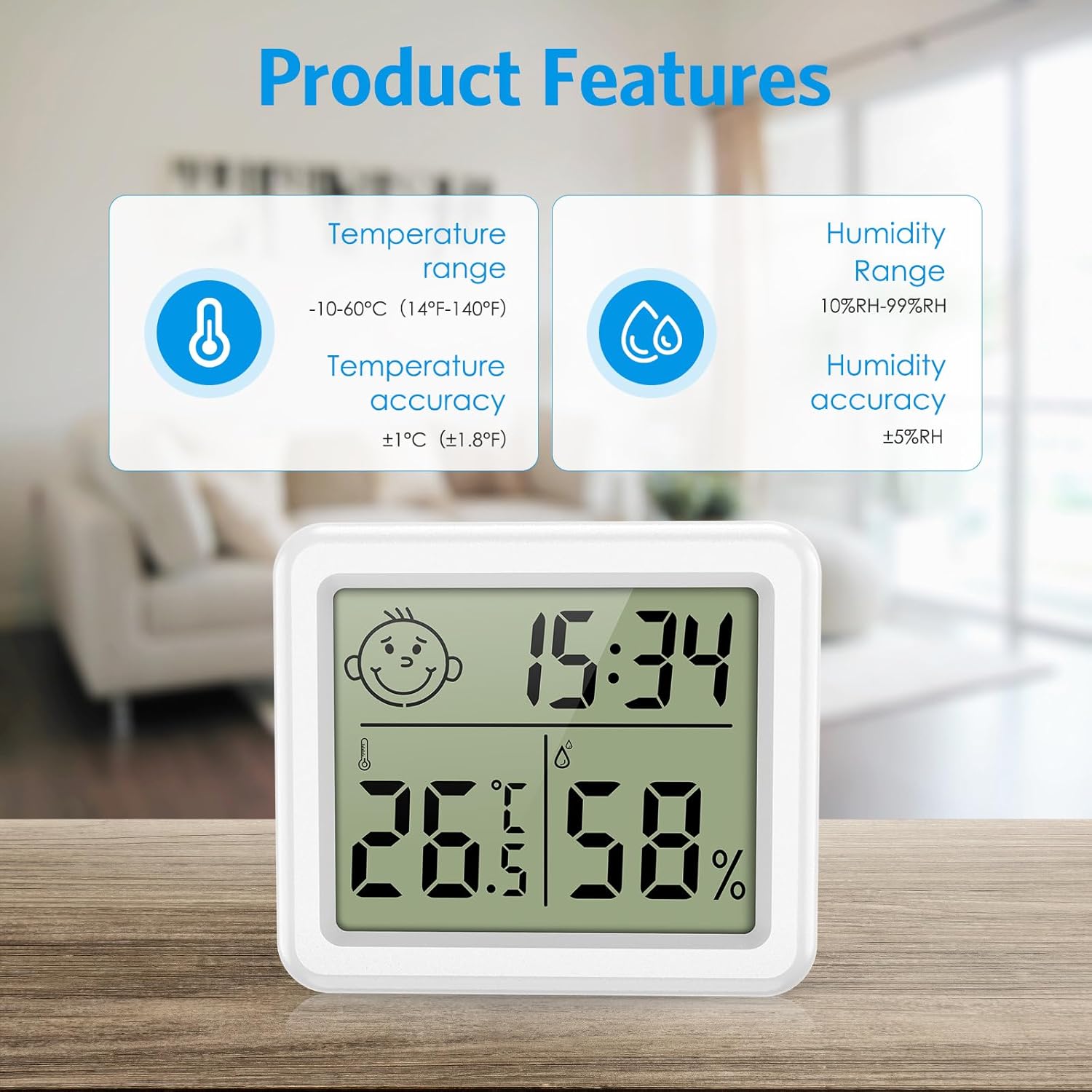
Imej 2.2: Terperinci view of product features, including temperature range (-10-60°C / 14-140°F) with ±1°C accuracy, and humidity range (10%RH-99%RH) with ±5%RH accuracy.
3. Kandungan Pakej
Sila semak pakej untuk item berikut:
- Brifit Mini Digital Indoor Thermometer Hygrometer (1 unit)
- Bateri CR2032 (dipasang atau disertakan secara berasingan)
- Manual Pengguna (dokumen ini)
4. Persediaan
4.1 Pemasangan Bateri
- Cari petak bateri di bahagian belakang peranti.
- Open the battery cover by rotating it counter-clockwise or sliding it open, depending on the design.
- Insert one CR2032 battery, ensuring the positive (+) side faces upwards.
- Close the battery cover securely. The device should power on automatically.
4.2 Penempatan Awal
The device offers multiple placement options:
- Atas meja: Extend the integrated stand on the back of the device to place it on any flat surface.
- Pemasangan Dinding: Use the hanging hole on the back to mount it on a nail or screw, or use double-sided adhesive tape (not included) for a flat surface.

Image 4.1: Illustration of various placement methods: hanging on the wall, standing on a table, and using wall stickers.
5. Arahan Operasi
5.1 Hidupkan/Mati Kuasa
The device powers on automatically upon battery installation. There is no manual power off button; remove the battery to power off.
5.2 Pemilihan Unit Suhu (°C/°F)
Press the "°C/°F" button located on the back of the device to switch between Celsius and Fahrenheit temperature units.
5.3 Penetapan Masa dan Tarikh
- Press and hold the "MODE" button on the back of the device for approximately 3 seconds to enter time setting mode. The hour digit will flash.
- Press the "ADJ" button to adjust the hour.
- Press "MODE" again to move to minute setting. Press "ADJ" to adjust minutes.
- Continue pressing "MODE" to cycle through year, month, and day settings, adjusting each with the "ADJ" button.
- After setting the date, press "MODE" one more time to exit the setting mode.
5.4 12/24 Hour Format Switch
While in normal display mode (not setting mode), press the "ADJ" button to toggle between 12-hour and 24-hour time formats.
5.5 Comfort Level Indicator
The device displays a smiley icon to indicate the comfort level based on humidity:
- kering: Kelembapan di bawah 39%
- Keselesaan: Kelembapan antara 40% dan 70%
- basah: Kelembapan melebihi 70%
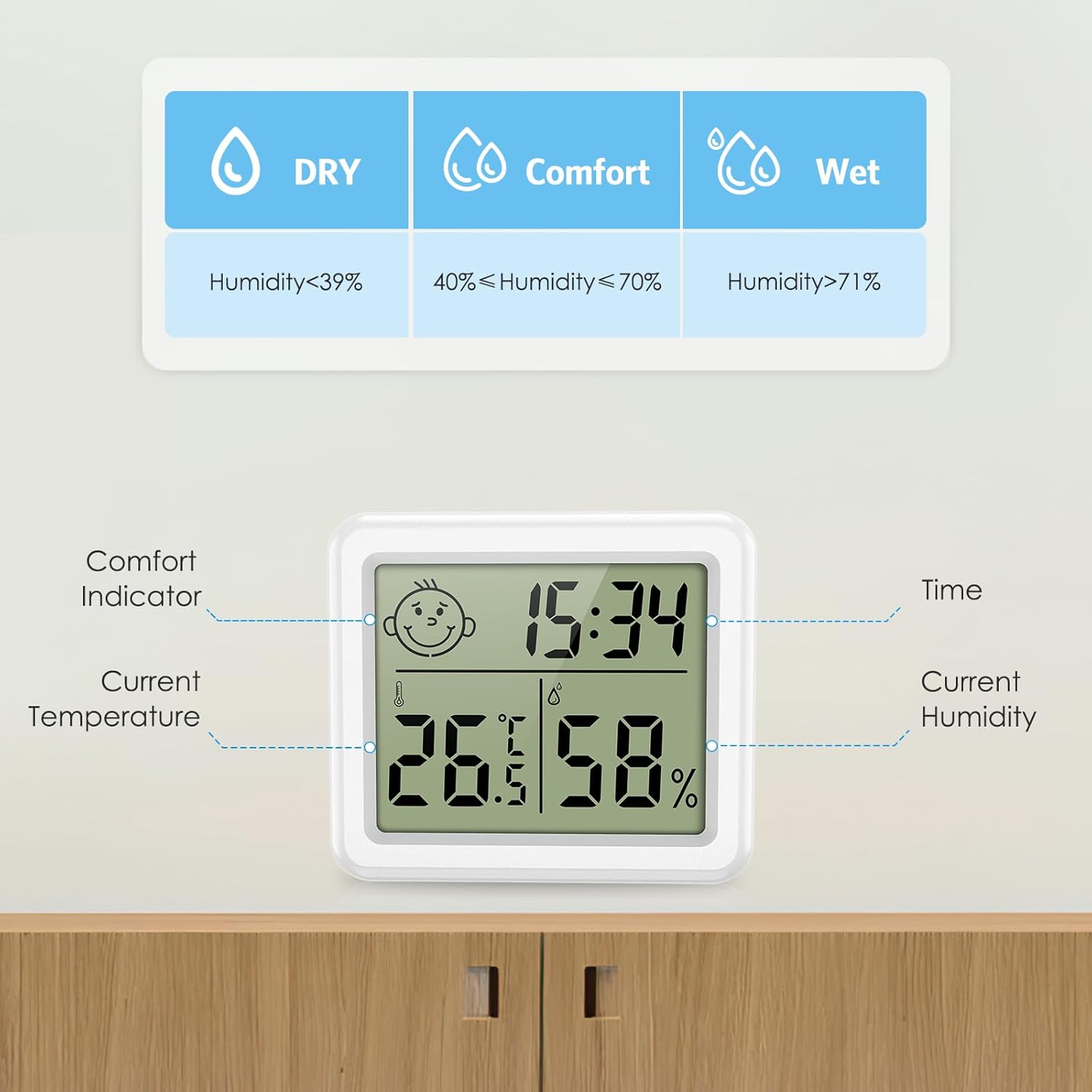
Image 5.1: Explanation of the comfort indicator, showing Dry, Comfort, and Wet conditions based on humidity percentages.
6. Penyelenggaraan
6.1 Penggantian Bateri
When the display becomes dim or unresponsive, it is time to replace the CR2032 battery. Follow the battery installation steps in Section 4.1.
6.2 Pembersihan
Lap peranti dengan kain lembut dan kering. Jangan gunakan pembersih yang melelas atau rendam peranti di dalam air.
6.3 Penyimpanan
If storing the device for an extended period, remove the battery to prevent leakage and damage.
7. Penyelesaian masalah
| Masalah | Kemungkinan Punca | Penyelesaian |
|---|---|---|
| Tiada paparan atau paparan malap. | Bateri mati atau tidak dipasang dengan betul. | Replace the CR2032 battery or ensure it is installed correctly with the positive (+) side facing up. |
| Bacaan suhu/kelembapan tidak tepat. | Device placed near heat/cold sources or in direct sunlight/drafts. | Relocate the device to a central area away from extreme temperature or humidity fluctuations. Allow 30 minutes for readings to stabilize. |
| Time/Date not setting correctly. | Incorrect button sequence or not holding "MODE" long enough. | Refer to Section 5.3 for detailed time and date setting instructions. Ensure "MODE" is held for 3 seconds to enter setting mode. |
8. Spesifikasi
| Ciri | Perincian |
|---|---|
| Nombor Model | b1850db1-f513-4344-b364-c231e9e7bc32 |
| Julat Suhu | -10°C hingga +60°C (14°F hingga 140°F) |
| Ketepatan Suhu | ±1.0°C (±1.8°F) |
| Julat Kelembapan | 10% RH hingga 99% RH |
| Ketepatan Kelembapan | ±5% RH |
| Jenis Paparan | LCD Digital |
| Saiz Skrin | 3.2 inci |
| Sumber Kuasa | 1 x Bateri CR2032 |
| Masa Tindak Balas | 10 saat |
| Dimensi | Approx. 80mm (W) x 70mm (H) x 10mm (D) / 3.15in (W) x 2.75in (H) x 0.4in (D) |
| Berat badan | 60 gram |

Image 8.1: Size comparison of the device, showing its compact dimensions (3.15 inches width, 2.75 inches height, 0.4 inches depth).
9. Waranti dan Sokongan
9.1 Maklumat Waranti
Brifit products typically come with a standard manufacturer's warranty. Please refer to the product packaging or the seller's information for specific warranty terms and duration. Keep your purchase receipt as proof of purchase for warranty claims.
9.2 Sokongan Pelanggan
For any questions, technical assistance, or warranty claims, please contact Brifit customer support through the retailer where you purchased the product or visit the official Brifit webtapak untuk maklumat hubungan.
Ask a question about this manual
Ask about setup, troubleshooting, compatibility, parts, safety, or missing instructions. Manuals+ will review the question and use this page’s manual context to help answer it.