
1. Pengenalan
This manual provides detailed instructions for the installation, operation, and maintenance of the PeakDo Wireless HDMI Transmitter and Receiver P3 S. This device is designed to wirelessly transmit uncompressed 1080P Full HD video and digital audio with zero latency, making it ideal for various applications including gaming, home entertainment, and professional presentations. The P3 S model features a USB-C port on the receiver for compatibility with AR smart glasses and portable monitors, in addition to standard HDMI output.

Figure 1: PeakDo Wireless HDMI Transmitter (left) and Receiver (right).
2. Produk Lebihview
2.1 Ciri-ciri Utama
- Wireless AR Smart Glasses Setup: Features a Type-C port on the Receiver for direct connection to AR smart glasses (e.g., XREAL Air, Rokid Max/Air, RayNeo, VITURE One) and portable monitors, enabling cable-free AR experiences.
- Uncompressed FHD Video & Digital Audio: Transmits 1080P Full HD video and digital audio without compression, ensuring high-quality output.
- Zero Latency Transmission: Provides 0 latency for real-time applications such as live sports, synchronized gaming, and interactive meetings.
- Operasi Pasang dan Main: Requires no Wi-Fi connection or app installation for setup.
- Keserasian Luas: Transmitter (TX) connects to PC, Laptop, Xbox, PlayStation, Nintendo Switch, TV Box. Receiver (RX) connects to TVs, monitors, projectors via HDMI, and AR smart glasses/portable monitors via USB-C.
- Julat penghantaran: Effective wireless transmission up to 100 feet (approximately 30 meters).
2.2 Kandungan Pakej
Sila sahkan bahawa semua item terdapat dalam pakej:
- PeakDo Wireless HDMI Transmitter (TX)
- PeakDo Wireless HDMI Receiver (RX)
- Kabel Kuasa USB
- Manual Pengguna (dokumen ini)
3. Arahan Persediaan
3.1 Menyambungkan Pemancar (TX)
- Connect the HDMI end of the Transmitter (TX) to the HDMI output port of your source device (e.g., PC, laptop, game console, TV box).
- Connect the USB power cable to the TX unit and plug the other end into a USB power source (e.g., a USB port on your source device, a USB wall adapter). Ensure the TX receives at least 5V 2A power supply.

Figure 2: Compatible input (TX) and output (RX) devices.
3.2 Menyambungkan Penerima (RX)
- Penting: First, connect the USB power cable to the RX unit and plug the other end into a USB power source (e.g., a USB wall adapter). Ensure the RX receives at least 5V 2A power supply. The RX unit requires sufficient power to function correctly.
- For HDMI displays (TV, Monitor, Projector): Connect an HDMI cable from the HDMI output port of the Receiver (RX) to the HDMI input port of your display device.
- For AR Smart Glasses or Portable Monitors: Connect a USB-C cable from the Type-C port on the Receiver (RX) to the USB-C input port of your AR smart glasses or portable monitor.
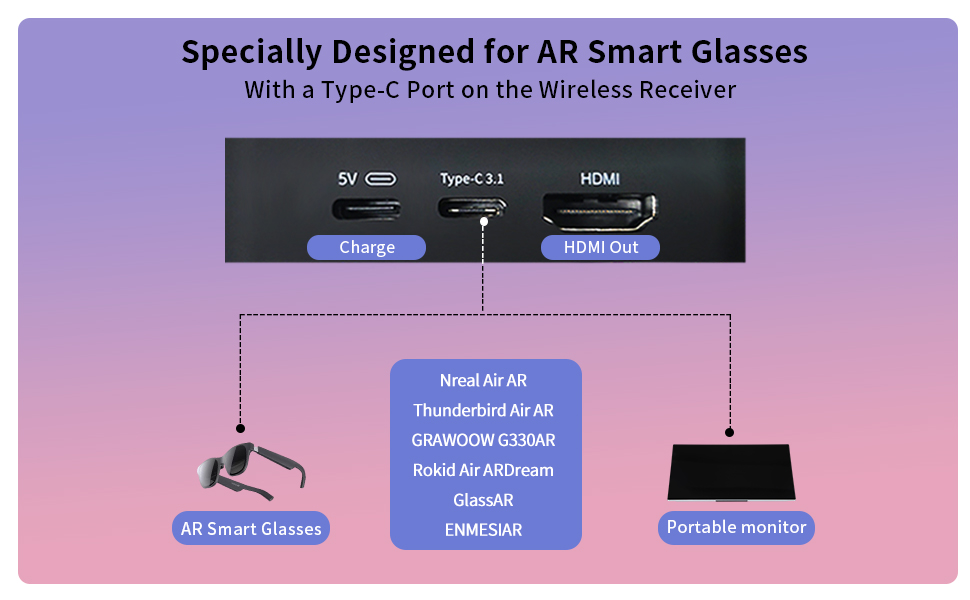
Figure 3: Receiver ports (5V power, Type-C 3.1, HDMI) and AR glasses compatibility.
Nota: For certain AR glasses like Nreal, you may need to upgrade their firmware for optimal compatibility. Refer to your AR glasses manufacturer's instructions for firmware updates.
4. Arahan Operasi
4.1 Menghidupkan dan Memasang
Once both the Transmitter (TX) and Receiver (RX) units are connected to their respective power sources and devices, they will automatically power on and attempt to pair. The system is designed for plug-and-play operation, requiring no manual pairing steps or software installation.

Figure 4: Plug and Play setup in a meeting environment.
4.2 Senario Penggunaan
- Permainan: Experience zero-latency gaming on a large screen or through AR glasses.
- Hiburan di rumah: Stream movies, TV shows, or other media from your PC or TV box to any display.
- Presentations/Meetings: Share content wirelessly from your laptop to a projector or large monitor in a conference room.
- AR Experiences: Connect directly to compatible AR smart glasses for immersive gaming or productivity.
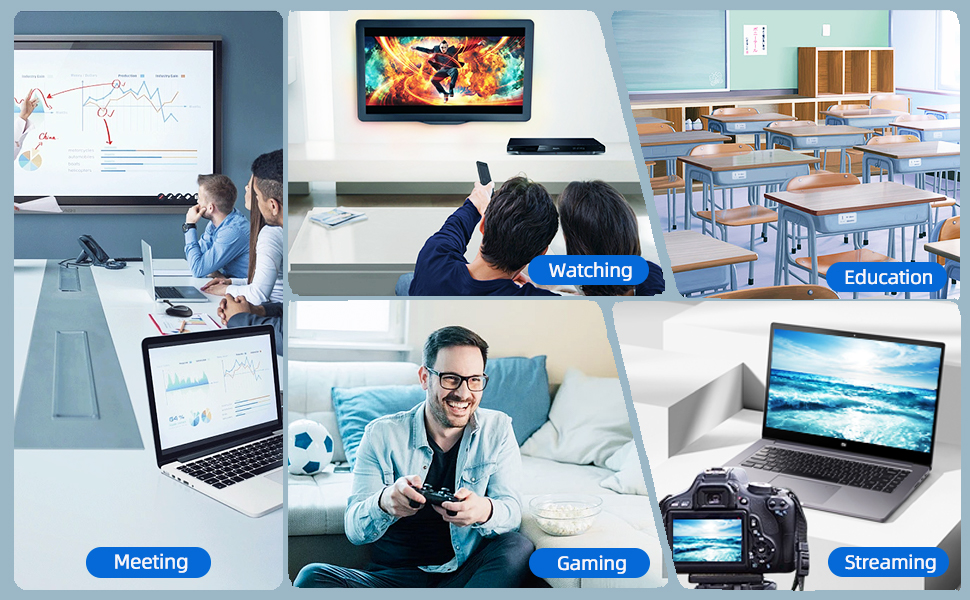
Figure 5: Diverse applications of the PeakDo Wireless HDMI system.

Gambar 6: Cthample of a wireless AR gaming setup.
5. Penyelenggaraan
The PeakDo Wireless HDMI Transmitter and Receiver P3 S requires minimal maintenance.
- Pembersihan: Use a soft, dry cloth to clean the exterior of the units. Do not use liquid cleaners or aerosols.
- Storan: Apabila tidak digunakan untuk tempoh yang lama, simpan peranti di tempat yang sejuk dan kering jauh dari cahaya matahari langsung dan suhu yang melampau.
- Bekalan Kuasa: Always ensure both TX and RX units receive adequate power (5V 2A) from a stable power source.
6. Penyelesaian masalah
6.1 Tiada Isyarat / Skrin Hitam
- Semak Kuasa: Ensure both the Transmitter (TX) and Receiver (RX) units are properly powered. The RX unit specifically requires sufficient power (5V 2A) and should be powered first before connecting the HDMI/USB-C cable to the display.
- Sambungan Kabel: Verify that all HDMI and USB-C cables are securely connected to their respective ports on the devices and displays.
- Source Device Output: Confirm that your source device (PC, game console) is outputting video correctly. Try connecting the source device directly to the display with a cable to rule out issues with the source.
- Input Paparan: Ensure your display (TV, monitor, projector, AR glasses) is set to the correct input source (e.g., HDMI 1, USB-C).
- Mulakan semula Peranti: Disconnect power from both TX and RX units, then reconnect. Also, restart your source device and display.
6.2 Intermittent Signal / Flickering
- Jarak dan Halangan: Reduce the distance between the TX and RX units. Ensure there are no significant physical obstructions (walls, large furniture) between them that could interfere with the wireless signal.
- Gangguan: Keep the units away from other wireless devices (e.g., Wi-Fi routers, cordless phones, microwave ovens) that operate on similar frequencies.
- Bekalan Kuasa: Ensure stable and sufficient power supply to both units. Fluctuations in power can affect signal stability.
6.3 Tiada Audio
- Tetapan Audio Sumber: Check the audio output settings on your source device to ensure audio is being sent via HDMI.
- Display Audio: Verify that the audio on your display device (TV, monitor, AR glasses) is not muted and the volume is turned up.
- Integriti Kabel: Ensure the HDMI or USB-C cable connecting the RX to the display is not damaged.
6.4 AR Glasses Compatibility Issues
- Kemas kini Firmware: As mentioned in the setup, some AR glasses (e.g., Nreal) may require a firmware update to work correctly with external video sources. Consult your AR glasses manufacturer's support.
- Power to RX: Ensure the RX unit is adequately powered, especially when connecting to power-hungry AR glasses.
- Kabel USB-C: Use a high-quality USB-C cable that supports video transmission.
7. Spesifikasi
| Ciri | Penerangan |
|---|---|
| Nombor Model | P3 S |
| Pengekodan Video | YUV422 or RGB444 (uncompressed 1080P) |
| Sokongan Resolusi | Sehingga 1080P HD Penuh |
| Latensi | 0 Latensi |
| Teknologi Ketersambungan | Wireless (Millimeter Wave) |
| Julat Penghantaran | Sehingga 100 kaki (lebih kurang 30 meter) |
| Compatible Transmitter Devices | PC, Laptop, Xbox, PS4, PS5, Switch, PS3, TV Box, etc. |
| Compatible Receiver Devices | TV, Monitor, Projector (via HDMI); AR Smart Glasses, Portable Monitor (via USB-C) |
| Jumlah Port HDMI | 1 (on Receiver) |
| Jenis Penyambung | HDMI, Micro USB (for power), USB-C (on Receiver) |
| Mod Keluaran Audio | Mono (Digital Audio) |
| Konfigurasi Saluran Bunyi Sekeliling | 2.0 |
| Bekalan Kuasa | 5V 2A (for both TX and RX units) |
| Berat Barang | 1.08 paun (lebih kurang 0.49 kg) |
| Dimensi Pakej | 6.73 x 5.83 x 2.48 inci (lebih kurang 17.1 x 14.8 x 6.3 cm) |
8. Waranti dan Sokongan
For warranty information and technical support, please refer to the official PeakDo webtapak atau hubungi perkhidmatan pelanggan mereka secara langsung. Simpan resit pembelian anda untuk tuntutan waranti.
- Pengeluar: PeakDo
- Tarikh Mula-mula Tersedia: 16 Mac 2023
- Pelanggan Reviews: 3.3 out of 5 stars (based on 6 ratings at time of data extraction)