
1. Pengenalan
This manual provides detailed instructions for the setup, operation, maintenance, and troubleshooting of your Cosmic Byte ARES Wired Controller for PC. Designed for an enhanced gaming experience, this controller features Hall Effect joysticks and triggers, dual vibration, and customizable Turbo functions.
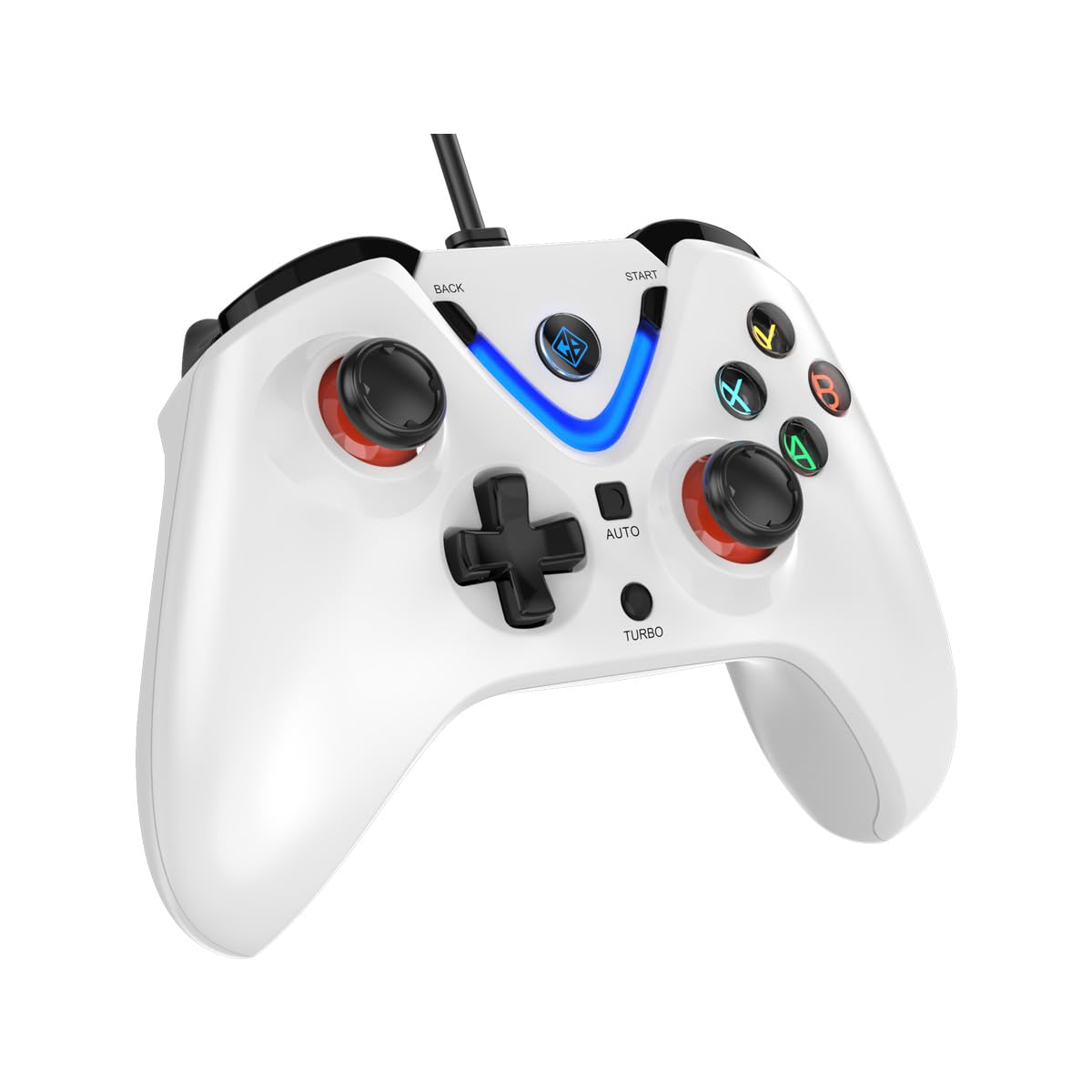
Image 1: The Cosmic Byte ARES Wired Controller in white, showcasinreka bentuk ergonomiknya.
2. Arahan Persediaan
2.1 Menyambung ke PC
- Pastikan PC anda dihidupkan.
- Cari port USB yang tersedia pada komputer anda.
- Plug the USB connector of the Cosmic Byte ARES Wired Controller into the USB port.
- Sistem pengendalian akan mengesan dan memasang pemacu yang diperlukan secara automatik. Proses ini mungkin mengambil masa beberapa saat.
- Once installation is complete, the controller is ready for use.

Image 2: The controller connected via its wired USB connection, ensuring fast response.
3. Arahan Operasi
3.1 Kawalan Asas
The Cosmic Byte ARES controller features standard gamepad layouts, including:
- Left and Right Analog Joysticks: Untuk pergerakan yang tepat dan kawalan kamera.
- D-Pad: Untuk input arah, selalunya digunakan dalam menu atau untuk tindakan permainan tertentu.
- Butang Tindakan (A, B, X, Y): For primary game interactions.
- Shoulder Buttons (L1, R1) and Triggers (L2, R2): For various in-game functions like shooting, aiming, or accelerating.
- Start and Back Buttons: For pausing games, accessing menus, or specific in-game commands.
- Butang Turbo: For activating rapid-fire functions.
- Butang Auto: For activating automatic rapid-fire functions.
3.2 Kayu Ria dan Pencetus Kesan Hall
The controller is equipped with Hall Effect joysticks and triggers, which use magnetic sensors instead of physical contacts. This technology provides:
- Ketepatan yang Dipertingkatkan: More accurate and responsive input.
- Increased Durability: Reduces wear and tear, preventing stick drift over time.
- Operasi lancar: Consistent and linear response for triggers, allowing for nuanced control in games.

Imej 3: Satu meletup view illustrating the Hall Effect joystick mechanism and the Hall Effect triggers.
3.3 Maklum Balas Dwi Getaran
The controller features dual vibration motors that provide tactile feedback during gameplay, enhancing immersion by simulating in-game events such as impacts, explosions, or engine rumbling.
3.4 Backlit LED Buttons
The action buttons (A, B, X, Y) and the central V-shaped indicator feature LED backlighting, providing visibility in low-light conditions and adding to the controller's aesthetic.

Image 4: The controller with its LED buttons illuminated and visual representation of vibration effects.
3.5 Turbo and Auto Turbo Functions
The Turbo and Auto Turbo functions allow for rapid, repeated input of a button press without continuously pressing the button.
- Mengaktifkan Turbo: Press and hold the desired action button (e.g., A) and then press the Turbo button. The button will now rapidly repeat its input as long as you hold it down.
- Activating Auto Turbo: Press and hold the desired action button (e.g., A) and then press the Auto button. The button will now rapidly repeat its input automatically without needing to be held down.
- Deactivating Turbo/Auto Turbo: To deactivate, repeat the activation steps for the specific button, or press the Jelas button (if available) or disconnect and reconnect the controller.

Image 5: Close-up of the controller showing the Turbo and Auto function buttons.
4. Penyelenggaraan
- Pembersihan: Gunakan kain lembut dan kering untuk membersihkan pengawal. Untuk kotoran degil, gunakan sedikit kainamp cloth can be used, ensuring no liquid enters the controller. Avoid harsh chemicals or abrasive cleaners.
- Storan: Simpan pengawal di tempat yang sejuk dan kering jauh dari cahaya matahari langsung dan suhu yang melampau. Elakkan meletakkan objek berat pada pengawal.
- Penjagaan Kabel: Do not sharply bend or pull the USB cable. Always grasp the plug when disconnecting from the PC.
5. Penyelesaian masalah
- Pengawal Tidak Dikenali:
- Ensure the USB cable is securely connected to both the controller and the PC.
- Cuba pasangkan pengawal ke port USB yang berbeza.
- Mulakan semula komputer anda.
- Check Device Manager on Windows to see if the controller is listed and if there are any driver issues.
- Butang/Kayu Bedik Tidak Memberi Respons:
- Verify the controller is recognized by your PC (see above).
- Test the controller in a different game or a controller testing utility to rule out game-specific issues.
- Pastikan tiada peranti input lain yang mengganggu.
- Getaran Tidak Berfungsi:
- Semak tetapan dalam permainan untuk memastikan maklum balas getaran diaktifkan.
- Some games may not support vibration or may have limited vibration effects.
6. Spesifikasi
| Ciri | Perincian |
|---|---|
| Jenama | Bait Kosmik |
| Nama Model | Ares |
| Peranti Serasi | PC |
| Jenis Pengawal | Pad permainan |
| Teknologi Ketersambungan | USB |
| Ciri-ciri Produk | Ergonomik |
| Kuantiti Butang | 16 |
| Platform Perkakasan | PC |
| Jenis Sumber Kuasa | Elektrik Bertali, Kabel USB |
| Berat Barang | 220 Gram |
| Dimensi Item | 6 x 10 x 4 Sentimeter |
| warna | putih |
| Negara Asal | China |

Image 6: A comparison table highlighting features of different ARES controller models.
7. Waranti dan Sokongan
7.1 Maklumat Waranti
The Cosmic Byte ARES Wired Controller comes with a Waranti 1 Tahun Terhadap Kecacatan Pembuatan dari tarikh pembelian. Sila simpan bukti pembelian anda untuk tuntutan waranti.
7.2 Maklumat Hubungan Pengilang
For support, service, or warranty inquiries, please contact:
Bait KosmikPrakash Warehousing, S. No.163, Hissa No 1-2-3-4-5A-5B/2/1,
Phursungi, Pune 412308, Maharashtra, India
For further assistance, please visit the official Cosmic Byte webtapak atau hubungi perkhidmatan pelanggan mereka.