
AWEI S1 Ultra
Manual Pengguna Fon Telinga Tanpa Wayar AWEI S1 Ultra
Model: S1 Ultra
Brand: AWEI
1. Panduan Persediaan
1.1 Kandungan Pakej
Sebelum anda mula, sila sahkan bahawa semua barang disertakan dalam pakej anda:
- AWEI S1 Ultra Wireless Earbuds
- Kes Pengecasan
- Kabel Pengecas USB-C
- Manual Pengguna
- S/M/L Eartips
1.2 Initial Charging & Protective Film Removal
Upon first use, ensure the earbuds are fully charged. It is crucial to remove the blue insulation film from the charging contacts on the earbuds before placing them in the charging case. Failure to do so will prevent charging.

Remove the protective film from the earbud charging contacts before first use.
Place both earbuds into the charging case. The indicator lights on the earbuds will illuminate to confirm charging. Connect the USB-C cable to the charging case and a power source. A full charge for the earbuds takes approximately 1.5 hours, and the charging case takes 1 hour.

The charging case provides up to 24 hours of total playtime, with 6 hours on a single earbud charge.
1.3 Berpasangan Bluetooth
The AWEI S1 Ultra earbuds utilize advanced Bluetooth 5.3 technology for stable and efficient connection.
- Pastikan fon telinga dicas dan diletakkan di dalam bekas pengecasan.
- Buka penutup bekas pengecasan. Fon telinga akan memasuki mod berpasangan secara automatik.
- Pada peranti anda (telefon pintar, tablet, dll.), navigasi ke tetapan Bluetooth.
- Cari untuk "AWEI S1 Ultra" in the list of available devices.
- Select "AWEI S1 Ultra" to connect. A voice prompt will confirm successful pairing.
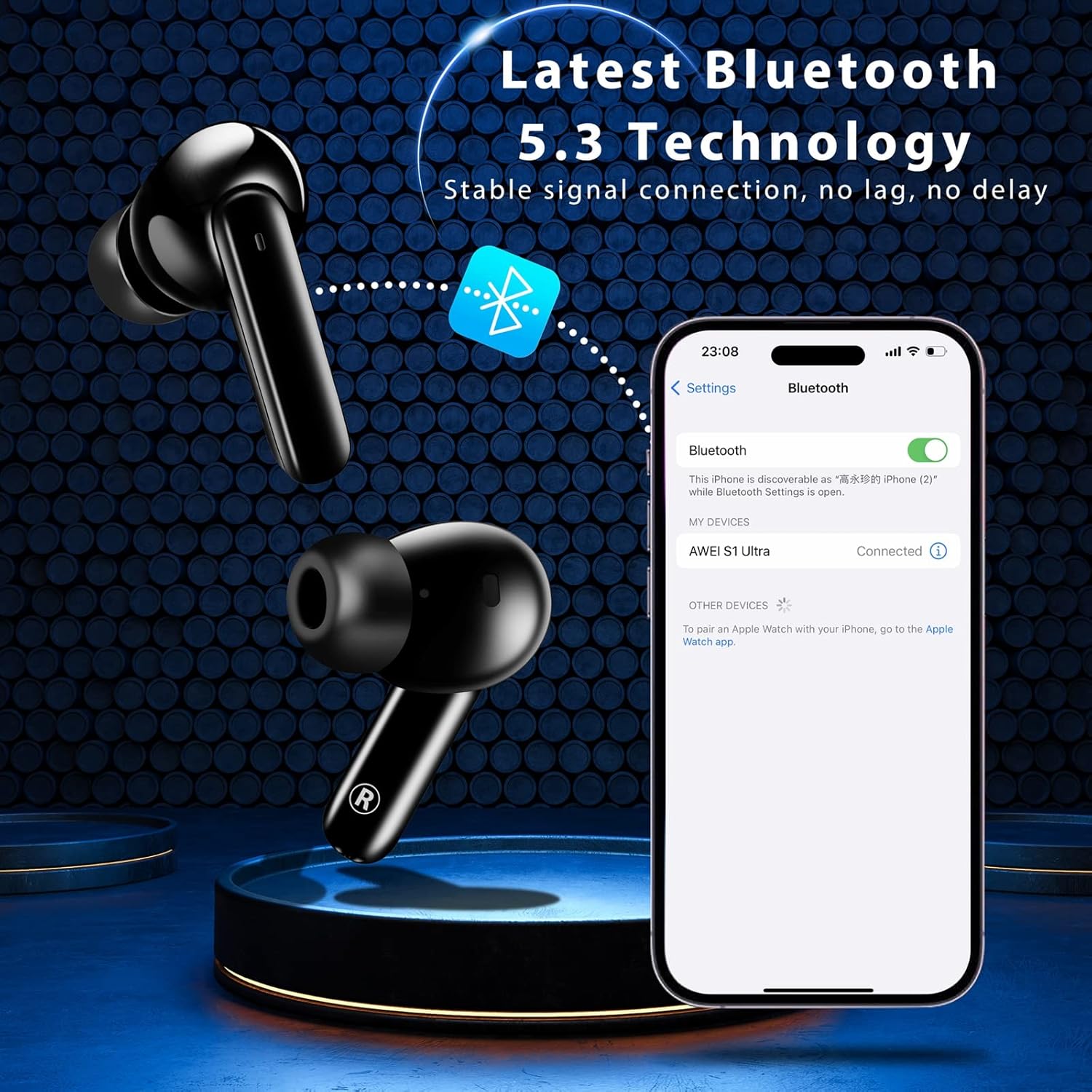
Pairing the earbuds with your device via Bluetooth 5.3.
2. Arahan Operasi
2.1 Kawalan Sentuh Pintar
The AWEI S1 Ultra earbuds feature intuitive touch controls for managing calls, music, and voice assistant functions.
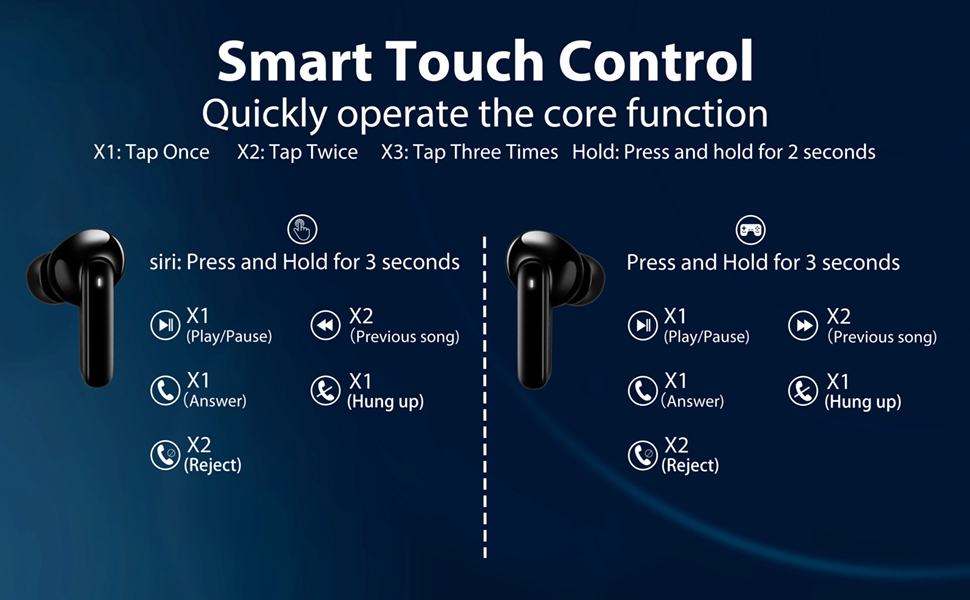
Refer to this diagram for detailed touch control commands.
- Main/Jeda: Tap once (X1) on either L/R earbud.
- Lagu Sebelumnya: Tap twice (X2) on the Left earbud.
- Lagu Seterusnya: Tap twice (X2) on the Right earbud.
- Kelantangan: Long press the Right earbud for 2 seconds.
- Perlahankan suara: Long press the Left earbud for 2 seconds.
- Pembantu Suara: Long press the Left earbud for 3 seconds.
- Mod Permainan Hidup/Mati: Tap three times (X3) on either L/R earbud.
2.2 Pengurusan Panggilan
Manage your calls directly from the earbuds:
- Jawab Panggilan: Tap once (X1) on either L/R earbud.
- Panggilan Tutup: Tap once (X1) on either L/R earbud during a call.
- Tolak Panggilan: Long press either L/R earbud for 2 seconds.
This video demonstrates how to answer, hang up, and reject calls using the earbud touch controls.
2.3 Music and Game Dual-Mode
The earbuds offer a dual-mode function to optimize your audio experience for either music or gaming. In Game Mode, the earbuds provide low latency for improved audio-video synchronization, which is beneficial for gaming where precise sound cues are important.
3. Penyelenggaraan
3.1 Rintangan Air (IPX7)
The AWEI S1 Ultra earbuds feature an IPX7 waterproof nano-coating, providing protection against heavy rain and sweat. This makes them suitable for intense workouts and various weather conditions. However, they are not designed for swimming or prolonged submersion.

IPX7 rating ensures protection against sweat and splashes.
3.2 Pembersihan
Regularly clean your earbuds and charging case to maintain optimal performance and hygiene. Use a soft, dry, lint-free cloth. Avoid using abrasive materials, solvents, or aerosol sprays.
3.3 Eartip Selection and Replacement
The earbuds come with S/M/L eartips to ensure a comfortable and secure fit. Experiment with different sizes to find the best seal for your ears, which is crucial for optimal sound quality and noise isolation.

Choose the eartip size that provides the best fit and comfort.
4. Penyelesaian masalah
4.1 Isu Ketersambungan
If your earbuds are not connecting to your device:
- Ensure the earbuds are fully charged and the protective film has been removed from the charging contacts.
- Verify Bluetooth is enabled on your device and the earbuds are in pairing mode (open case lid).
- Try forgetting "AWEI S1 Ultra" from your device's Bluetooth list and re-pairing.
- Bergerak lebih dekat ke peranti anda untuk memastikan anda berada dalam julat Bluetooth 10 meter.
4.2 Masalah Pengecasan
If your earbuds or charging case are not charging:
- Confirm the blue protective film has been removed from the earbud charging contacts.
- Check that the USB-C cable is securely connected to both the case and the power source.
- Cuba gunakan kabel USB-C atau penyesuai kuasa yang berbeza.
- Ensure the charging contacts on both the earbuds and the case are clean and free of debris.
4.3 Isu Kualiti Bunyi
If you experience intermittent sound or poor audio quality:
- Ensure the earbuds are properly seated in your ears and you are using the correct eartip size for a good seal.
- Semak gangguan daripada peranti wayarles lain.
- Pasangkan semula fon telinga dengan peranti anda.
4.4 Touch Control Sensitivity
If the touch controls are too sensitive or unresponsive:
- Pastikan jari anda bersih dan kering apabila menggunakan kawalan sentuh.
- Practice the touch gestures as per the diagram in Section 2.1. Some users may require a brief period to adapt to the sensitivity.
5. Spesifikasi
| Ciri | Perincian |
|---|---|
| Nama Model | S1 Ultra Earbud |
| Teknologi Ketersambungan | Bluetooth 5.3 |
| Jenis Pemacu Audio | Pemandu Dinamik |
| Saiz Pemacu Audio | 13 Milimeter |
| Hayat Bateri (Earbud) | 6 Jam (cas sekali) |
| Jumlah Masa Main (dengan Kes) | 24 Jam |
| Masa Pengecasan (Earbud) | 1.5 Jam |
| Masa Pengecasan (Kes) | 1 Jam |
| Tahap Ketahanan Air | IPX7 |
| Julat Bluetooth | 10 Meter |
| Jenis Kawalan | Kawalan Sentuh |
| Berat Barang | 170 Gram (6 auns) |
| bahan | plastik |
| warna | Hitam |
6. Waranti & Sokongan
For warranty information, product support, or to explore other AWEI products, please visit the official AWEI store or contact their customer service directly.
Ask a question about this manual
Ask about setup, troubleshooting, compatibility, parts, safety, or missing instructions. Manuals+ will review the question and use this page’s manual context to help answer it.