
T60
T60 Matrice 30 Drone Spotlight Kit User Manual
Model: T60 | Jenama: Generik
pengenalan
This manual provides comprehensive instructions for the safe and effective use of the JZ T60 Matrice 30 Drone Spotlight Kit. This spotlight is specifically designed for integration with DJI M30 series aircraft, offering powerful illumination capabilities for various applications including search, commercial work, and photography.
The T60 spotlight features dual optical lenses, a controllable gimbal, and a quick-release mounting system, ensuring ease of use and optimal performance. Please read this manual thoroughly before operating the device.
Produk Selesaiview

This image displays the T60 spotlight unit from a side angle, highlighting its cylindrical body, cooling fins, and the integrated quick-release mounting bracket. The power cable is visible, designed for connection to the DJI M30 aircraft.
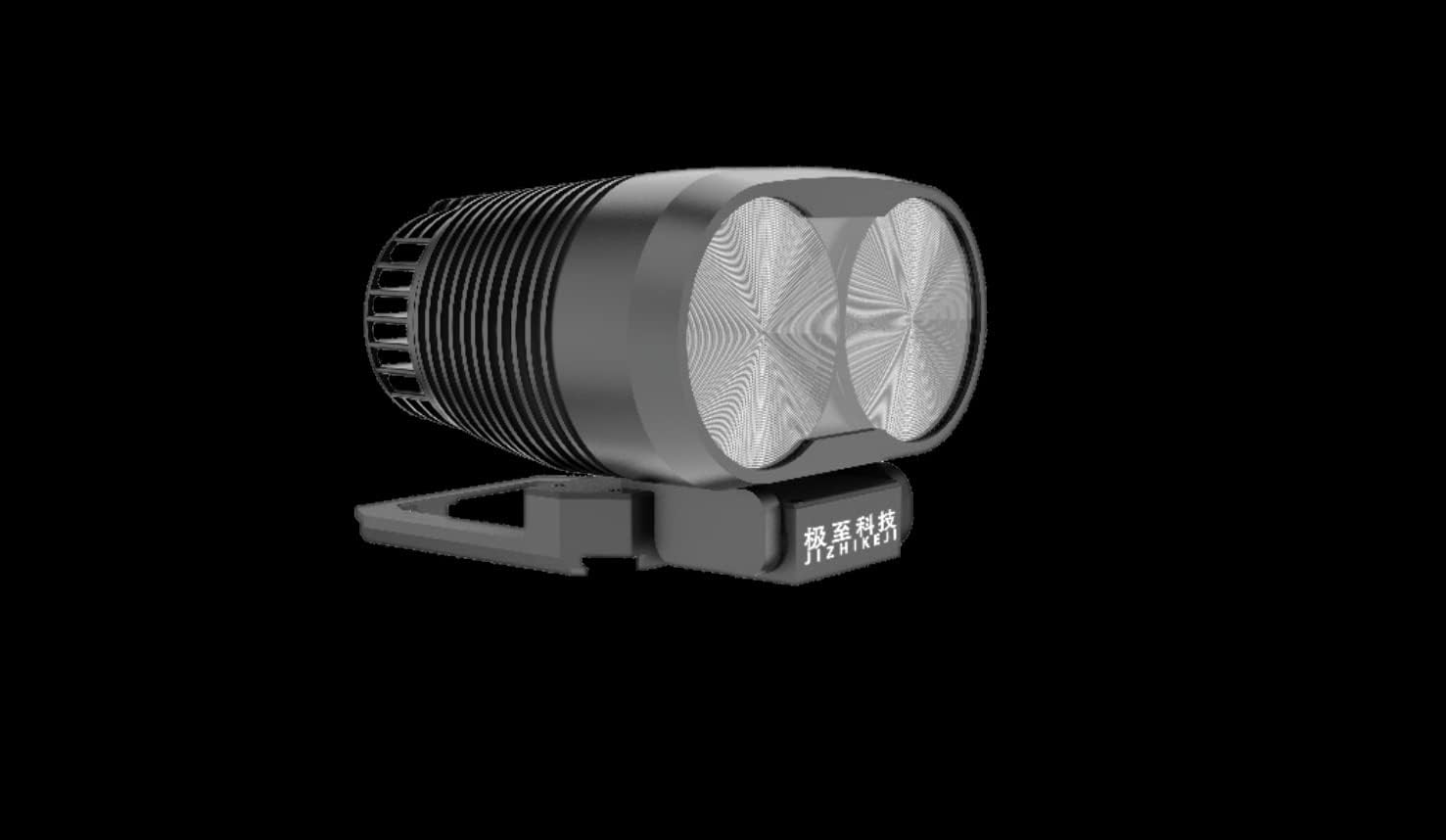
This image provides a direct front view of the T60 spotlight, emphasizing its two distinct optical lenses. These lenses are crucial for emitting a uniform 16-degree light column, enhancing illumination distance and area coverage.
Ciri-ciri Utama:
- Dual Optical Lenses: Equipped with two sets of optical lenses for focused and uniform light output.
- Extended Illumination Range: Capable of illuminating distances over 150 meters with a 50m exploration area.
- Pemasangan Pelepasan Pantas: Features a standard quick-release bracket for rapid deployment and removal.
- Controllable Gimbal: Light angle is controllable via a built-in gimbal, which can be synced with the drone's camera in the DJI App.
- DJI Pilot App Support: Compatible with DJI Pilot versions 1 and 2 for brightness adjustment and multiple lighting modes.
- Output Kecerahan Tinggi: Menyampaikan 8000 lumen untuk pencahayaan yang berkuasa.
- Reka bentuk ringan: Engineered to not exceed the M30's maximum takeoff weight, ensuring minimal impact on flight dynamics.
- Pembinaan Tahan Lama: Waterproof and dustproof design for reliable operation in various environments.
Persediaan
Kandungan Pakej:
Before proceeding with installation, ensure all components are present and undamaged.
- JZ T60 Spotlight Unit
- Pendakap Pelekap Lepasan Pantas
- Manual Arahan (dokumen ini)
Installation onto DJI M30 Aircraft:
- Sediakan Pesawat: Ensure your DJI Matrice 30 aircraft is powered off and the propellers are removed or secured to prevent accidental rotation.
- Pasang Pendakap Pelekap: Locate the designated accessory port on the DJI M30 aircraft. Align the T60's quick-release mounting bracket with this port. Gently push until you hear a click, indicating it is securely latched.

Figure 3: The T60 spotlight securely mounted on a DJI Matrice 30 drone. This image illustrates the T60 spotlight attached to the underside of a DJI Matrice 30 drone. It demonstrates the correct orientation and fit of the spotlight with the drone's body, ready for operation.
- Sambungkan Kabel Kuasa: Connect the power cable from the T60 spotlight to the corresponding power output port on the DJI M30 aircraft. Ensure the connection is firm and secure.
- Sahkan Pemasangan: Gently tug on the spotlight to ensure it is firmly attached and does not wobble. Check that the power cable is not obstructing any moving parts or sensors.
Arahan Operasi
Powering On and Initializing:
- Dron Hidupkan Kuasa: Power on your DJI Matrice 30 aircraft according to its manufacturer's instructions.
- Launch DJI Pilot App: Open the DJI Pilot application on your remote controller. Ensure the drone and spotlight are recognized and connected.
- Spotlight Activation: Within the DJI Pilot app, navigate to the payload control interface. The T60 spotlight should appear as an available accessory. Activate the spotlight from this interface.
Controlling the Spotlight:
- Pelarasan Kecerahan: Use the sliders or controls within the DJI Pilot app to adjust the brightness of the T60 spotlight. Multiple brightness settings are available.
- Mod Pencahayaan: Select from various lighting modes offered by the T60 spotlight through the DJI Pilot app.
- Kawalan Gimbal: The T60's built-in gimbal allows for adjustment of the light angle. This can be synced with the drone's camera view, enabling precise targeting of the illuminated area. Use the gimbal controls within the DJI Pilot app to adjust the light direction.

Figure 4: The T60 spotlight illuminating an area during night flight operations. This image shows a DJI Matrice 30 drone in flight at night, with the T60 spotlight actively illuminating the area below. The bright, focused beam demonstrates the spotlight's effectiveness in low-light conditions.

Figure 5: Aerial view of the T60 spotlight's illumination pattern on the ground. This image provides an overhead perspective of the T60 spotlight's beam projected onto the ground. It illustrates the uniform and concentrated light pattern, highlighting the effective coverage area for observation or search tasks.
For detailed control options and advanced settings, refer to the DJI Pilot application's user guide.
Penyelenggaraan
- Pembersihan: Regularly clean the lenses and exterior of the spotlight with a soft, lint-free cloth. For stubborn dirt, use a small amount of lens cleaning solution. Avoid abrasive materials or harsh chemicals.
- Pemeriksaan: Periodically inspect the mounting bracket and power cable for any signs of wear, damage, or loose connections. Ensure the gimbal mechanism moves smoothly.
- Storan: When not in use, store the T60 spotlight in a cool, dry place, away from direct sunlight and extreme temperatures. It is recommended to detach it from the drone for long-term storage.
- Kalis Air/Habuk: While the unit is designed to be waterproof and dustproof (IP4X), avoid submerging it in water or exposing it to excessive dust for prolonged periods.
Menyelesaikan masalah
| Masalah | Kemungkinan Punca | Penyelesaian |
|---|---|---|
| Lampu sorot tidak menyala. |
|
|
| Gimbal control is unresponsive. |
|
|
| Keluaran cahaya malap atau tidak konsisten. |
|
|
Jika anda menghadapi masalah yang tidak disenaraikan di sini atau jika penyelesaian yang dicadangkan tidak menyelesaikan masalah, sila hubungi sokongan pelanggan.
Spesifikasi
The following table details the technical specifications of the JZ T60 Matrice 30 Drone Spotlight Kit.

This image presents a table outlining the key technical specifications of the T60 spotlight, including product name, electrical interface, size, weight, degree of protection, supported models, power consumption, lighting modes, angles, distances, and operating temperatures.
| Parameter | Nilai |
|---|---|
| Nama Produk | JZ_T60 |
| Antara Muka Elektrik | DJI SkyPort V2 |
| Dimensi (L x W x H) | 90 x 72 x 62 mm (lebih kurang 4"P x 1"L x 2"T) |
| Berat badan | 190g (lebih kurang 5.3 auns) |
| Darjah Perlindungan | IP4X |
| Model yang Disokong | Matrice 30 series |
| Penggunaan Kuasa Maks | 60W |
| Mod Lampu | Combined lighting |
| Sudut Pencahayaan | 16° uniform light column |
| Jarak Pencahayaan | >150m |
| Lighting Area (at 50m) | 150m² |
| Central Illuminance (at 50m) | 44LU |
| Kawalan Gimbal | 0 to 75° (±5°) Controllable Gimbal |
| Mod Pemasangan | Fit standard quick release bracket |
| Suhu Bekerja | -10°C hingga 50°C |
| Suhu Penyimpanan | -20°C hingga 60°C |
| Keluaran Lumen | 8000 Lumen |

This image visually summarizes the T60 spotlight's performance capabilities: 8000 Lumens (Light flow), 1400m² (Lighting area), 16° (Uniform light column), and 150m (Lighting distance). These metrics highlight the powerful and focused illumination provided by the unit.
Waranti dan Sokongan
For warranty information and technical support, please refer to the documentation provided at the time of purchase or contact the manufacturer directly. Keep your proof of purchase for warranty claims.
Manufacturer: JZI
UPC: 744365389287
Model: T60
Ask a question about this manual
Ask about setup, troubleshooting, compatibility, parts, safety, or missing instructions. Manuals+ will review the question and use this page’s manual context to help answer it.