
pengenalan
This manual provides detailed instructions for the installation, operation, and maintenance of your ASHATA 4-inch 1080P Car Dash Camera DVR. Please read this manual thoroughly before using the device to ensure proper functionality and to prevent damage. Keep this manual for future reference.
Produk Selesaiview
The ASHATA Car Dash Camera is a high-definition driving recorder designed to capture video footage of your journeys. It features a 4-inch display, 1080P resolution, a 170° wide-angle lens, G-Sensor for collision detection, WDR (Wide Dynamic Range) for improved image quality, loop recording, motion detection, and parking monitoring capabilities.
Ciri-ciri Utama:
- Rakaman HD Penuh 1080P: Tangkap video yang jelas footage at 1920x1080 resolution.
- Kanta Sudut Lebar 170°: Menyediakan yang luas view jalan di hadapan.
- 3-Camera System: Includes a front camera, an in-car camera, and a rear-view camera for comprehensive coverage.
- G-Sensor (Penderia Graviti): Automatically detects sudden movements or collisions and locks the current video file untuk mengelakkan penulisan ganti.
- Rakaman Gelung: Merekod secara berterusan dengan menulis ganti yang tertua tidak dikunci files when the memory card is full, ensuring uninterrupted recording.
- Pengesanan Pergerakan: Automatically starts recording if movement is detected in front of the DVR when parked.
- Pemantauan Tempat Letak Kereta: Activates recording if the vehicle is shaken or impacted while parked.
- Teknologi WDR: Enhances video quality in varying light conditions.
- Paparan 4-inci: Allows for real-time viewing and playback of recorded footage.
Komponen Produk:
Familiarize yourself with the various parts of your dash camera:
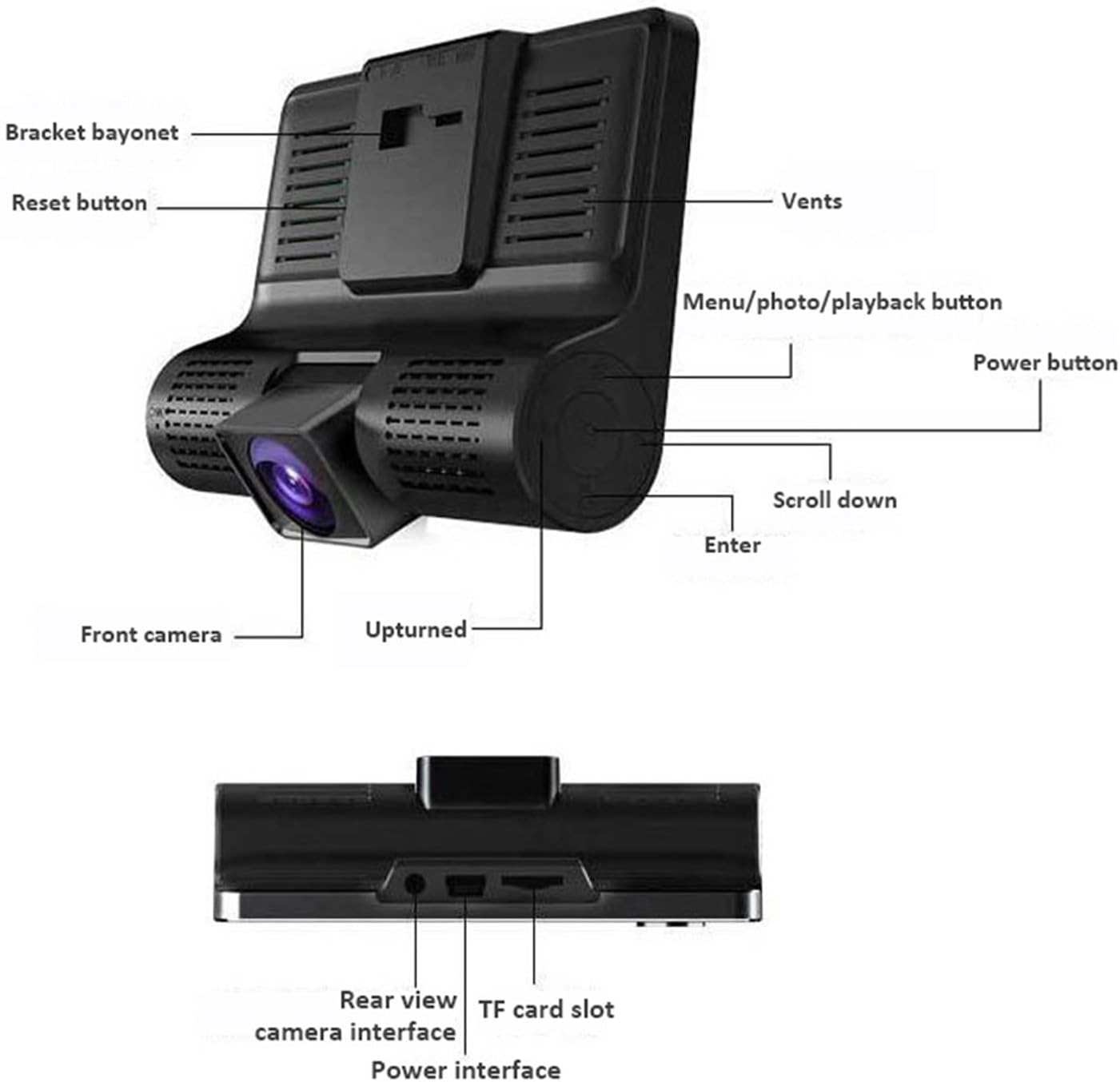
Penerangan Imej: A detailed diagram of the ASHATA dash camera, highlighting its various components including the bracket bayonet, reset button, vents, menu/photo/playback button, power button, scroll down button, enter button, front camera, and the upturned indicator. The bottom view menunjukkan bahagian belakang view camera interface, TF card slot, and power interface.

Penerangan Imej: Satu lagi view of the ASHATA dash camera, labeling the 4.0-inch IPS display screen, inside camera, navigation buttons (up, down, OK), power button, holder slot, reset button, louver, rear camera interface, power interface, TF slot, and front camera.
Persediaan
Kandungan Pakej:

Penerangan Imej: The complete ASHATA dash camera kit, showing the main dash camera unit, a suction cup mount, a car power adapter, a rear camera, and various connecting cables.
Sebelum pemasangan, pastikan semua komponen ada:
- Main Dash Camera Unit
- Mount Piala Sedutan
- Pengecas Kereta
- Kamera Belakang
- Kabel Kamera Belakang
- Manual Pengguna (dokumen ini)
Langkah Pemasangan:
- Masukkan Kad TF: Insert a Class 10 or higher TF (microSD) card (up to 32GB, not included) into the TF card slot on the side of the dash camera. Ensure it is inserted correctly until it clicks into place.
- Mount the Dash Camera: Attach the suction cup mount to the windshield, preferably behind the rearview cermin, memastikan ia tidak menghalang anda view. Securely attach the main dash camera unit to the mount.
- Sambungkan Kuasa: Plug the car charger into your vehicle's cigarette lighter socket. Connect the other end of the charger cable to the power interface on the dash camera. Route the cable neatly along the windshield trim to avoid interference.
- Pasang Kamera Belakang (Pilihan): If using the rear camera, mount it on the rear windshield or near the license plate. Connect the rear camera cable to the rear camera interface on the main unit. Route the cable carefully to the back of the vehicle.
- Laraskan Sudut Kamera: Power on the vehicle. The dash camera should automatically turn on and begin recording. Adjust the front camera lens angle to ensure it captures the road ahead clearly. Adjust the rear camera angle if installed.
Arahan Operasi
Operasi asas:
- Hidupkan/Mati Kuasa: The camera typically powers on automatically when the vehicle starts and powers off when the ignition is turned off. You can manually power it on/off by pressing and holding the Butang kuasa.
- Mula/Hentikan Rakaman: Once powered on, the camera will automatically start loop recording. A red dot or recording icon on the screen indicates active recording. Press the butang OK to manually start or stop recording.
- Tukar Kamera Views: Semasa rakaman, tekan butang Butang atas / bawah to cycle through different camera views (front, in-car, rear, picture-in-picture combinations).
- Navigasi Menu: Tekan ke Menu/Mode/Playback button to enter the menu settings. Use the Butang atas / bawah to navigate through options and the butang OK to select. Press the Menu/Mode/Playback button sekali lagi untuk keluar dari menu.
Ciri Lanjutan:
The dash camera includes several advanced features to enhance your driving safety and recording experience:
- Rakaman Gelung: This feature ensures continuous recording. When the memory card is full, the camera automatically overwrites the oldest unlocked video files. You can set the loop recording duration (e.g., 1, 3, 5 minutes) in the settings.

Penerangan Imej: This image illustrates two key features: G-sensor based collision detection, where a collision automatically locks video files, and loop recording, which ensures continuous recording by overwriting old files.
- Sensor-G (Pengesanan Perlanggaran): The built-in G-Sensor detects sudden acceleration, braking, or impacts. When triggered, it automatically locks the current video segment, preventing it from being overwritten by loop recording. The sensitivity of the G-Sensor can be adjusted in the settings.
- Pengesanan Pergerakan: When enabled in the settings, the camera will automatically start recording if it detects movement in its field of view while the vehicle is parked. This is useful for monitoring your vehicle when you are away.
- Pemantauan Tempat Letak Kereta: If the camera detects a shake or impact to the vehicle while parked and the ignition is off, it will automatically power on and record a short video segment. This feature requires a continuous power supply or the camera's internal battery to be charged.

Penerangan Imej: A composite image explaining four features: Cyclic Recording (loop recording), G-Sensor (locking footage during impact), Moving Detection (recording when motion is detected), and Parking Monitoring (recording if the car is disturbed while parked).
Main balik:
Kepada view recorded videos or photos:
- Stop recording by pressing the butang OK if it's currently recording.
- Tekan ke Menu/Mode/Playback button repeatedly until you enter playback mode.
- Gunakan Butang atas / bawah to navigate through your recorded files.
- Tekan ke butang OK to play a selected video or view gambar.
- Tekan ke Menu/Mode/Playback button untuk keluar dari mod main balik.
Penyelenggaraan
- Membersihkan Lensa: Regularly clean the camera lenses with a soft, lint-free cloth to ensure clear video quality. Avoid using abrasive cleaners.
- Membersihkan Skrin: Use a soft, dry cloth to clean the display screen.
- Pengurusan Kad Memori: It is recommended to format the TF card periodically (e.g., once a month) through the camera's settings menu to maintain optimal performance and prevent data corruption. Back up any important files sebelum memformat.
- Suhu Operasi: Avoid exposing the dash camera to extreme temperatures for extended periods, as this can affect battery life and device performance.
Menyelesaikan masalah
If you encounter issues with your ASHATA Dash Camera, refer to the following common problems and solutions:
- Kamera tidak dihidupkan:
- Ensure the car charger is properly connected to both the camera and the vehicle's power outlet.
- Check if the vehicle's cigarette lighter socket is functioning.
- The internal battery might be depleted. Charge the camera for a few hours.
- Camera not recording:
- Check if a TF card is inserted and properly seated.
- Ensure the TF card is not full. Format the card if necessary (back up important files pertama).
- Verify that loop recording is enabled in the settings.
- The TF card might be faulty or too slow. Use a Class 10 or higher TF card.
- Video footage is blurry or unclear:
- Bersihkan lensa kamera dengan kain lembut.
- Pastikan filem pelindung telah dikeluarkan daripada kanta.
- Periksa sama ada cermin depan bersih di tempat kamera dipasang.
- G-Sensor is too sensitive or not sensitive enough:
- Adjust the G-Sensor sensitivity level in the camera's settings menu.
- Camera freezes or malfunctions:
- Tekan ke Butang set semula (usually a small pinhole, refer to the product overview image for location) using a thin object like a paperclip.
- Update the firmware if a new version is available (check the manufacturer's webtapak).
Spesifikasi
| Ciri | Spesifikasi |
|---|---|
| Jenama | ASHATA |
| Nombor Model | ASHATAbigdpv1h4x |
| Skrin Paparan | Paparan IPS 4.0 inci |
| Resolusi Video | 1080P (1920x1080) |
| Sudut Kanta | 170 Degrees (Ultra Wide Angle) |
| Sokongan Kad Memori | TF Card, up to 32GB (Class 10 or higher recommended) |
| G-Sensor | ya |
| Rakaman Gelung | ya |
| Pengesanan Pergerakan | ya |
| Monitor Tempat Letak Kereta | ya |
| WDR | ya |
| Bateri Termasuk | ya |
| Kedudukan Bahagian Auto | Belakang, Depan |
Waranti dan Sokongan
Specific warranty information for the ASHATA 4-inch 1080P Car Dash Camera DVR is not provided in the product data. For warranty details, technical support, or customer service inquiries, please refer to the official ASHATA webtapak atau hubungi peruncit anda secara terus.