
pengenalan
This manual provides comprehensive instructions for the installation, operation, and maintenance of your Dilwe CPU Water Cooling Pump. Please read this manual thoroughly before using the product to ensure proper function and longevity. This pump is designed for use in desktop computer water cooling systems, offering efficient heat dissipation for your CPU.
Produk Selesaiview dan Ciri
The Dilwe CPU Water Cooling Pump is engineered for optimal performance and reliability in computer liquid cooling setups. Key features include:
- G1/4 Threaded Pipe: Utilizes universal G1/4 threaded pipe connections for broad compatibility with various water cooling components.
- Operasi Bunyi Rendah: Designed with a fan mechanism that ensures quiet performance, enhancing the user experience without excessive noise.
- Pembinaan Tahan Lama: Manufactured from high-quality aluminum alloy and ABS material, providing a robust and aesthetically pleasing design with extended service life.
- Keserasian Luas: Compatible with nearly all standard water cooling system configurations, making it a versatile choice for PC builders.
- D Port + 4Pin Interface: Features a D port and 4-pin interface for power and control, ensuring high accuracy and seamless integration with your existing equipment.

Rajah 1: Utama view of the Dilwe CPU Water Cooling Pump, showcasinreka bentuk padat dan komponen bersepadunya.

Rajah 2: sebelah view of the pump, revealing its internal structure and the clear reservoir for coolant visibility.
Spesifikasi
| Jenis Item | CPU Cooling Pump |
| bahan | Aluminium Alloy, ABS |
| Skop | Komputer |
| Nilai Semasa | 0.8A ± 10% |
| Kuasa Dinilai | 10W |
| Dinilai Voltage | 12V |
| Ketua Pam | Approx. 4 Meters / 13.1ft |
| Pump Waterflow | 600L/J |
| Jenis Penyambung Kuasa | 4-Pin |
| Kaedah Penyejukan | air |
| Peranti Serasi | Desktop |
| Nombor Model | Dilwe907qpra5w4 |
Kandungan Pakej
Selepas membuka bungkusan, sila sahkan bahawa semua komponen ada dan tidak rosak:
- 1 x Dilwe CPU Cooling Pump
- (Additional accessories such as mounting hardware, tubing, or fittings may be included depending on the specific kit. Refer to your product packaging for a complete list.)
Persediaan dan Pemasangan
Proper installation is crucial for the performance and safety of your water cooling system. It is recommended to consult a professional if you are unsure about any steps.
- Sediakan Sistem Anda: Ensure your computer is powered off and unplugged from the wall outlet. Open your computer case to access the CPU area and existing cooling components.
- Pasang Pam: Identify a suitable mounting location within your PC case. The pump can be mounted horizontally or vertically. Secure the pump using appropriate screws or brackets (not included unless part of a larger kit). Ensure it is stable and does not obstruct other components or airflow.
- Sambungkan Tiub: Connect the G1/4 threaded fittings to the pump's inlet and outlet ports. Ensure all connections are tight to prevent leaks. Route the tubing to your CPU water block and radiator, ensuring there are no kinks or sharp bends that could restrict flow.
- Fill the Loop: Before powering on, fill your water cooling loop with a compatible coolant. Use a funnel to carefully pour coolant into the reservoir (if applicable) or the highest point of your loop. Bleed air from the system by gently tilting the case and running the pump intermittently (with only the pump powered, not the entire PC) until no more air bubbles are visible.
- Sambungkan Kuasa: Connect the D port and 4-pin power connectors from the pump to your power supply unit (PSU) and motherboard, respectively. Ensure secure connections.
- Ujian Kebocoran: Before closing your case, perform a thorough leak test. Power on only the pump (if possible, using a dedicated PSU or jumper) and let it run for several hours, checking all fittings and connections for any signs of leaks. Place paper towels under connections to easily spot drips.
- Perhimpunan Akhir: Once the leak test is complete and no leaks are detected, close your computer case.

Rajah 3: Illustrates the process of installing the water cooling pump within a desktop computer case, showing the integration with other PC components.
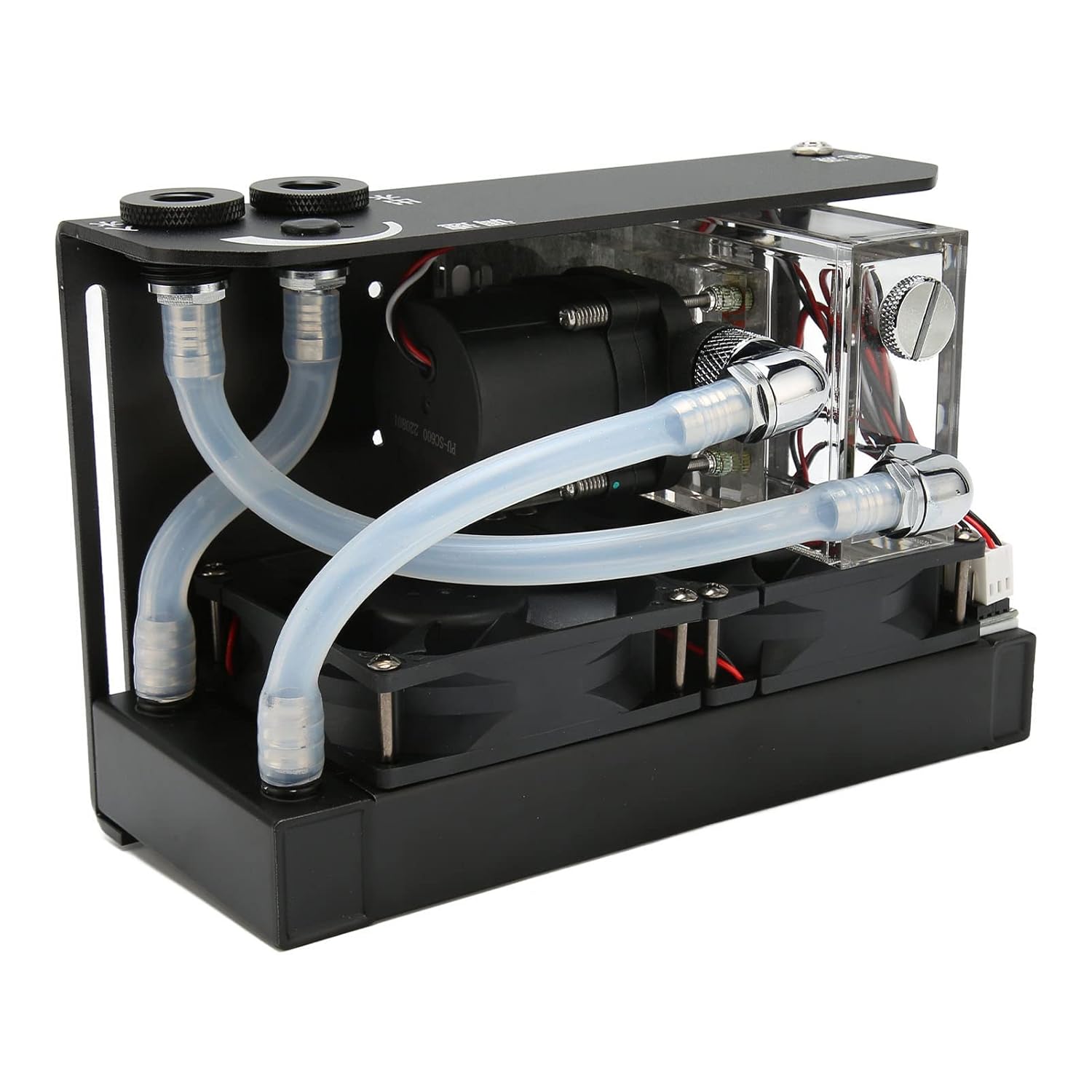
Rajah 4: A atas-bawah view of the pump, highlighting the G1/4 threaded inlet and outlet ports where tubing will be connected.

Rajah 5: This image displays the front panel of the pump, indicating the power input and control interfaces (D port and 4-pin connections).
Arahan Operasi
Once installed, the Dilwe CPU Water Cooling Pump operates as an integral part of your liquid cooling system. Its operation is largely automatic once the system is powered on.
- Hidupkan kuasa: With the pump properly connected to your PSU and motherboard, power on your computer. The pump will begin circulating coolant through the loop.
- Pemantauan: It is advisable to monitor your CPU temperatures using software utilities to ensure the cooling system is functioning effectively.
- Kadar Aliran: The pump provides a waterflow of 600L/H, ensuring efficient coolant circulation for optimal heat transfer.
- Tahap Bunyi: The pump is designed for low-noise operation. If you notice unusual noises, refer to the Troubleshooting section.
Penyelenggaraan
Regular maintenance helps ensure the longevity and optimal performance of your water cooling pump and entire system.
- Penggantian Bahan Penyejuk: It is recommended to replace the coolant in your loop every 6-12 months, or as recommended by your coolant manufacturer, to prevent buildup and maintain cooling efficiency.
- Siram Sistem: When replacing coolant, consider flushing the entire loop with distilled water or a dedicated cleaning solution to remove any accumulated debris or residue.
- Penyingkiran habuk: Periodically clean dust from the pump's exterior and any associated radiators or fans to ensure proper airflow and prevent overheating. Use compressed air or a soft brush.
- Inspect Tubing and Fittings: Regularly inspect all tubing and fittings for signs of wear, cracks, or leaks. Address any issues promptly to prevent damage to your computer components.
Menyelesaikan masalah
If you encounter issues with your Dilwe CPU Water Cooling Pump, refer to the following common problems and solutions:
| Masalah | Kemungkinan Punca | Penyelesaian |
|---|---|---|
| Pump not starting/no flow |
|
|
| Suhu CPU yang tinggi |
|
|
| Bunyi luar biasa dari pam |
|
|
| Kebocoran penyejuk |
|
|
Waranti dan Sokongan
Dilwe products are manufactured to high quality standards. For specific warranty information regarding your CPU Water Cooling Pump, please refer to the warranty card included with your purchase or visit the official Dilwe website. For technical support or inquiries, please contact Dilwe customer service through their official channels.
Pengeluar: Dilwe
Nombor Model: Dilwe907qpra5w4
Tarikh Mula-mula Tersedia: 9 Mac 2023
Untuk maklumat lanjut, lawati Dilwe Store on Amazon.