
ZOUKAI F3
ZOUKAI Bone Conduction Bluetooth 5.3 Open Ear Clip Headphones User Manual
Model: F3
1. Pengenalan
Thank you for choosing the ZOUKAI Bone Conduction Bluetooth 5.3 Open Ear Clip Headphones. This manual provides essential information for the proper use, setup, and maintenance of your new headset. Please read it thoroughly before use to ensure optimal performance and longevity.
2. Produk Lebihview
2.1 Ciri-ciri Utama
- Reka Bentuk Telinga Terbuka: Allows you to enjoy audio while remaining aware of your surroundings, enhancing safety during outdoor activities.
- Teknologi Pengaliran Tulang: Delivers sound through vibrations to your cheekbones, bypassing the eardrum.
- Kesambungan Bluetooth 5.3: Ensures stable and efficient wireless connection with compatible devices.
- Comfortable Ear Clip Design: Lightweight (4.5g per earbud) and ergonomic for pain-free, secure wearing, even with glasses.
- Berpasangan automatik: Simplifies connection after initial setup.
- Kawalan Intuitif: Easy single-hand operation for music playback, calls, and voice assistant.
- Pengurangan Bunyi ENC: Enhances call clarity.
- Reka bentuk kalis air: Suitable for use during exercise and in wet conditions.
- Hayat Bateri yang Panjang: Up to 72 hours music time (with charging case), 30 days standby, 1 hour fast charging.
2.2 Kandungan Pakej
The ZOUKAI Bone Conduction Bluetooth 5.3 Open Ear Clip Headphones package includes:
- ZOUKAI Bone Conduction Bluetooth 5.3 Open Ear Clip Headphones (Left and Right Earbuds)
- Kes Pengecasan
- Kabel Pengecasan
- Manual Pengguna (dokumen ini)
2.3 Rajah Produk

Image: ZOUKAI Bone Conduction Bluetooth 5.3 Open Ear Clip Headphones with their charging case. The earbuds are white and have an open-ear clip design. The charging case is also white with a green indicator light.
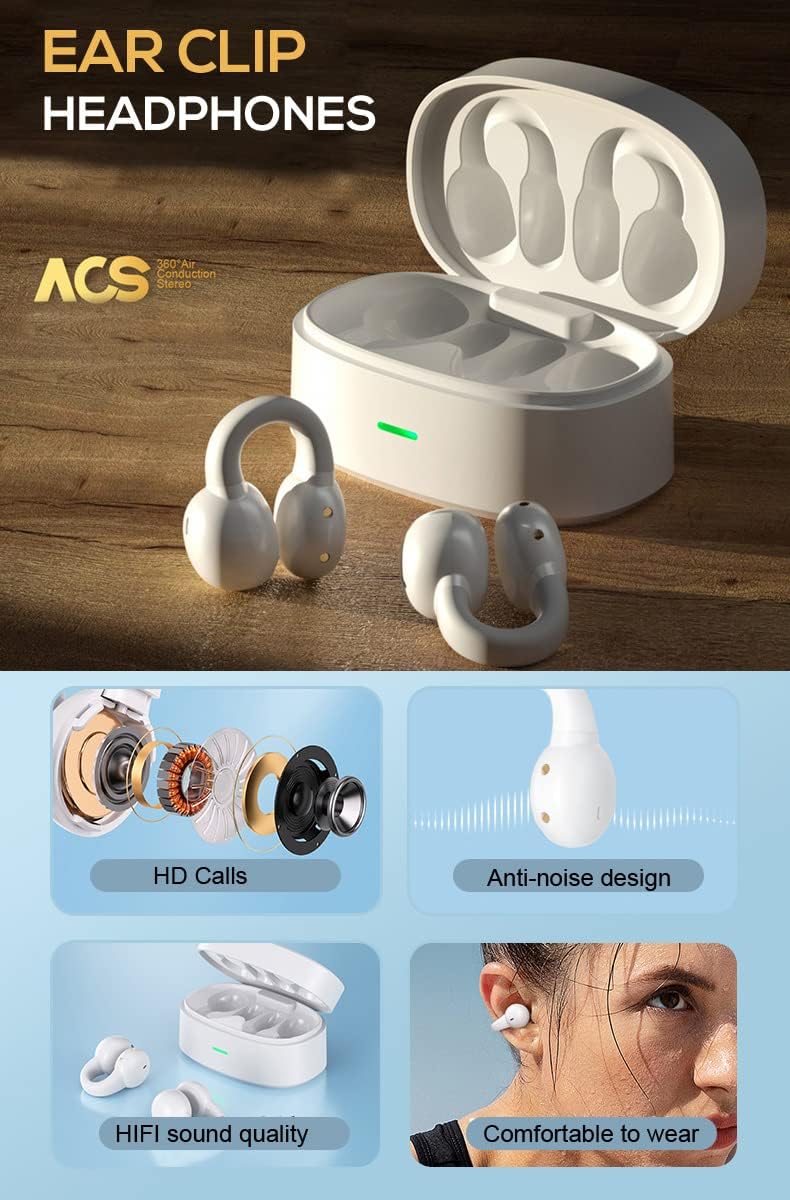
Image: A detailed diagram showing the internal components of the ZOUKAI ear clip headphones, including the bone conduction driver, coil, and other sound elements. Also shows the headphones in their charging case.
3. Persediaan
3.1 Pengecasan Awal
Before first use, ensure the headphones and charging case are fully charged. Connect the provided charging cable to the charging case and a compatible USB power source. The indicator light on the case will show charging status.
- Caj penuh mengambil masa lebih kurang 1 jam.
- The charging case provides multiple charges for the earbuds.

Image: An illustration highlighting the long battery life of the ZOUKAI headphones, showing 72 hours music time, 30 days standby time, and 1 hour fast charging, with the charging case and earbuds in the background.
3.2 Berpasangan dengan Peranti Bluetooth
- Pastikan fon kepala dicas dan di dalam bekas pengecasan.
- Open the lid of the charging case. The headphones will automatically enter pairing mode.
- Pada peranti anda (telefon pintar, tablet, komputer riba), pergi ke tetapan Bluetooth dan hidupkan Bluetooth.
- Cari untuk available devices. Select "ZOUKAI F3" (or similar name) from the list.
- Once connected, the headphones will indicate successful pairing (e.g., a voice prompt or indicator light change).
Note: After the first successful pairing, the headphones will automatically connect to the last paired device when the charging case lid is opened, provided Bluetooth is enabled on the device.

Image: An illustration demonstrating the broad compatibility of the ZOUKAI headphones with Bluetooth 5.3 enabled devices, including smartphones and tablets. It also shows the ear clip design being comfortable even for users wearing glasses.
4. Arahan Operasi
4.1 Memakai Fon Kepala
Gently clip the headphones onto your earlobe. The open-ear design ensures comfort and allows ambient sound awareness. Adjust for a secure and comfortable fit.

Image: A man wearing the white ZOUKAI ear clip headphones, demonstrating their comfortable and discreet fit.

Image: Close-up illustrations showing how the ZOUKAI ear clip headphones are worn, highlighting their secure and comfortable placement on the earlobe for sports and daily use.
4.2 Basic Controls (Touch Sensitive)
The headphones feature touch controls for easy operation:
| Tindakan | Fungsi |
|---|---|
| Ketik Tunggal | Main/Jeda Muzik, Jawab/Tamatkan Panggilan |
| Dwiketik (Earbud Kiri) | Kelantangan Kurang |
| Dwiketik (Earbud Kanan) | Kelantangan Naik |
| Ketik Tiga Kali (Earbud Kiri) | Lagu Sebelumnya |
| Ketik Tiga Kali (Earbud Kanan) | Lagu Seterusnya |
| Tekan lama (2 saat) | Tolak Panggilan, Aktifkan Pembantu Suara |
5. Penyelenggaraan
5.1 Pembersihan
Regular cleaning helps maintain the performance and hygiene of your headphones.
- Lap fon telinga dan bekas pengecas dengan kain lembut, kering dan tidak berbulu.
- Untuk kotoran degil, sedikit dampen kain dengan air. Elakkan menggunakan bahan kimia yang keras atau bahan yang melelas.
- Do not submerge the headphones or charging case in water, despite their waterproof rating, to prevent damage to charging contacts or internal components.
5.2 Penyimpanan
When not in use, store the headphones in their charging case to protect them from dust, dirt, and physical damage.
- Simpan di tempat yang sejuk, kering, jauh dari suhu yang melampau dan cahaya matahari langsung.
- Elakkan menyimpan di persekitaran yang sangat lembap.
5.3 Penjagaan Bateri
- Charge the headphones regularly, even if not used frequently, to prolong battery life.
- Elakkan daripada menghabiskan bateri sepenuhnya sebelum mengecas semula.
- Gunakan hanya kabel pengecasan yang disediakan atau setara yang diperakui.
6. Penyelesaian masalah
If you encounter issues with your ZOUKAI headphones, refer to the following common solutions:
| Masalah | Kemungkinan Punca / Penyelesaian |
|---|---|
| Fon kepala tidak boleh dihidupkan. | Battery is low. Place headphones in the charging case and charge fully. |
| Tidak boleh berpasangan dengan peranti. |
|
| Tiada bunyi atau kelantangan rendah. |
|
| Intermittent connection / audio drops. |
|
| Mikrofon tidak berfungsi semasa panggilan. |
|
7. Spesifikasi
| Ciri | Perincian |
|---|---|
| Nama Model | F3 |
| Teknologi Ketersambungan | Wayarles (Bluetooth) |
| Versi Bluetooth | 5.3 |
| Jenis Pemacu Audio | Pemacu Pengaliran Tulang |
| Penempatan Telinga | Buka Telinga |
| Faktor Bentuk | Ear-Clip |
| Jenis Kawalan | Volume Control, Voice Control, Noise Control (Touch) |
| Kawalan Bunyi | Pembatalan Bunyi Aktif (ENC untuk panggilan) |
| Tahap Ketahanan Air | Kalis air |
| Julat Kekerapan | 20 Hz hingga 20,000 Hz |
| bahan | plastik |
| Berat Barang | 4.2 auns (jumlah pakej) |
| warna | putih |
| Komponen yang Disertakan | kabel |
| Pengeluar | ZOUKAI |
| UPC | 768399192675 |
8. Waranti dan Sokongan
For warranty information and customer support, please refer to the purchase platform or contact ZOUKAI customer service directly. Keep your proof of purchase for warranty claims.
Sokongan dalam talian: Visit the official ZOUKAI weblaman web atau halaman produk di laman web peruncit webtapak untuk Soalan Lazim dan sumber sokongan tambahan.
Ask a question about this manual
Ask about setup, troubleshooting, compatibility, parts, safety, or missing instructions. Manuals+ will review the question and use this page’s manual context to help answer it.