
1. Pengenalan
This manual provides detailed instructions for the assembly, installation, operation, and maintenance of your AMANSON H07 ATX Mid Tower PC Case. Please read this manual thoroughly before beginning installation to ensure proper setup and safe operation. Keep this manual for future reference.

Figure 1.1: AMANSON H07 ATX Mid Tower PC Case with illuminated internal components.
2. Maklumat Keselamatan
- Sentiasa putuskan sambungan bekalan kuasa dari soket dinding sebelum melakukan sebarang pemasangan atau penyelenggaraan di dalam bekas PC.
- Kendalikan semua komponen dengan berhati-hati untuk mengelakkan kerosakan.
- Pakai tali pergelangan tangan anti-statik untuk mengelakkan kerosakan akibat nyahcas elektrostatik (ESD) pada komponen elektronik yang sensitif.
- Jauhkan bahagian kecil dan bahan pembungkusan daripada kanak-kanak.
- Ensure proper ventilation around the PC case to prevent overheating.
3. Kandungan Pakej
Sahkan bahawa semua item terdapat dalam pakej:
- AMANSON H07 ATX Mid Tower PC Case
- Kotak Aksesori (skru, pengikat, pengikat kabel, dll.)
- Manual Pengguna (dokumen ini)
4. Komponen Lebihview
The AMANSON H07 PC case features a panoramic design with tempered glass panels for full visibility of your internal components. It supports various motherboard sizes and extensive cooling configurations.

Figure 4.1: Top I/O Panel with power button, USB 3.0, USB 2.0, and audio ports.
The top I/O panel includes:
- Butang Kuasa
- Butang Tetapkan Semula
- 2x Port USB 2.0
- 1x Port USB 3.0
- Bicu Masuk/Keluar Audio
5. Persediaan & Pemasangan
5.1. Menyediakan Kes
The AMANSON H07 features tool-less hinged tempered glass side panels for easy access. Gently open the side panel by pulling it from the rear edge. The panels can also be removed by lifting them off their hinges for full access during installation.

Figure 5.1: Hinged tempered glass side panel for easy access.
5.2. Pemasangan Papan Induk
The H07 supports E-ATX, ATX, Micro-ATX, and ITX motherboards. Install the necessary standoffs for your motherboard form factor. Carefully align your motherboard with the standoffs and I/O shield, then secure it with screws.
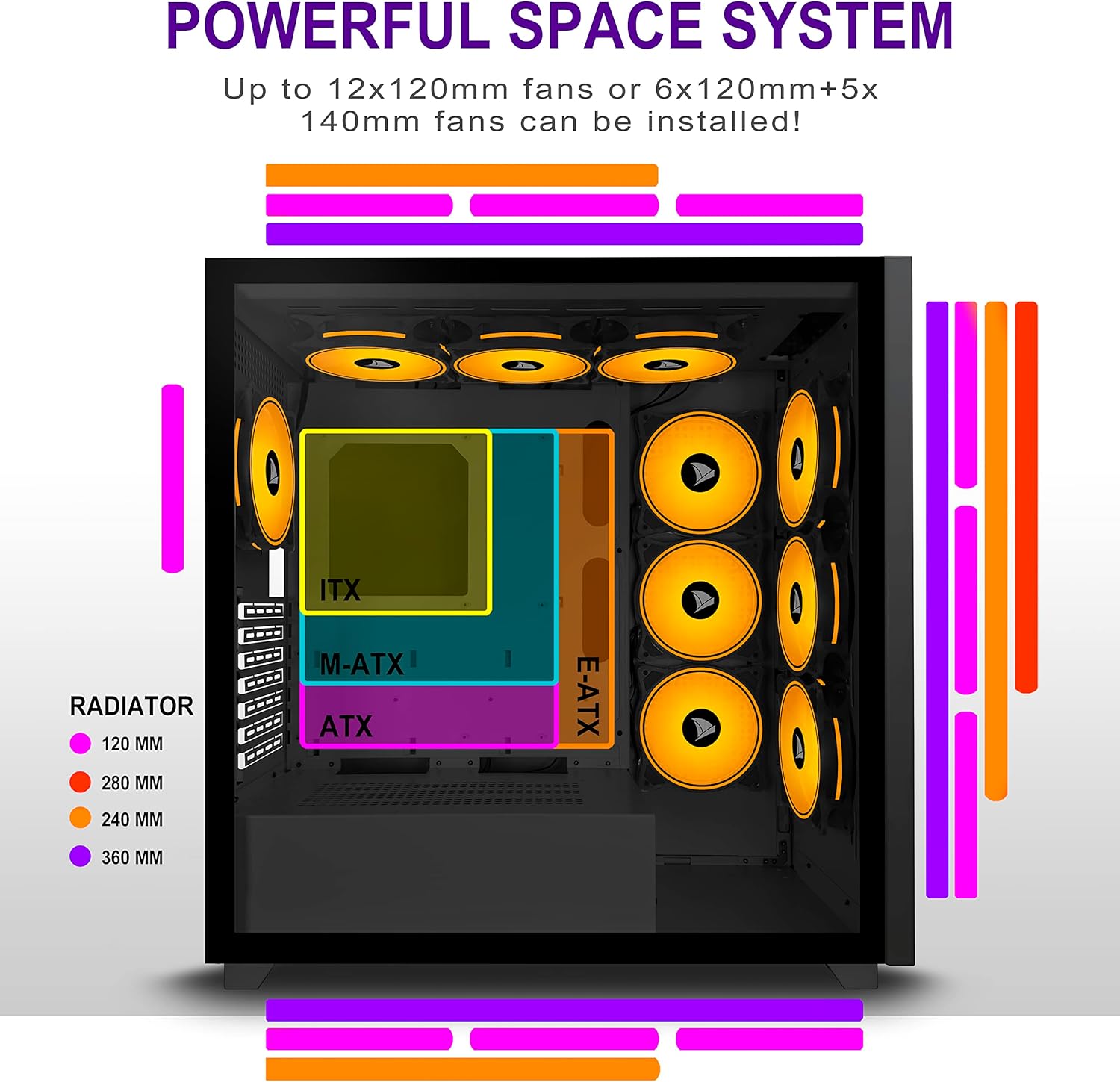
Figure 5.2: Motherboard and cooling component placement options.
5.3. Pemasangan Bekalan Kuasa
Install your power supply unit (PSU) into the dedicated compartment at the bottom rear of the case. Secure it with screws from the rear of the case.
5.4. Pemasangan Peranti Storan
The case provides multiple mounting points for storage devices. Install your 3.5" HDDs and 2.5" SSDs into the designated trays and mounting locations. Refer to the case diagram for specific locations.

Figure 5.3: Storage drive mounting options for HDDs and SSDs.
5.5. Expansion Card (GPU) Installation
Remove the necessary PCI-E slot covers from the rear of the case. Insert your graphics card or other expansion cards into the motherboard's PCI-E slots and secure them with screws.
5.6. Pengurusan Kabel
Utilize the cable routing cutouts and tie-down points behind the motherboard tray to manage cables. This improves airflow and maintains a clean aesthetic.
6. Arahan Operasi
6.1. Menghidupkan/Mematikan
Press the power button located on the top I/O panel to turn on your PC. To shut down, use the operating system's shutdown function or press and hold the power button for several seconds.
6.2. Using Front I/O Ports
Connect USB devices to the USB 2.0 or USB 3.0 ports. Use the audio jacks for headphones, microphones, or speakers.
7. Penyelenggaraan
7.1. Pembersihan
Regularly clean the exterior of the case with a soft, damp cloth. For internal cleaning, use compressed air to remove dust from fans and components. Ensure the PC is powered off and unplugged before cleaning.
7.2. Penapis Habuk
The AMANSON H07 may include removable dust filters. Clean these filters periodically to maintain optimal airflow and cooling performance.
8. Penyelesaian masalah
- PC does not power on: Check all power connections, including the PSU to the wall, the PSU to the motherboard, and the front panel power switch cable to the motherboard.
- Overheating issues: Ensure all fans are properly installed and functioning. Verify that dust filters are clean and not obstructing airflow. Check thermal paste application on CPU cooler.
- Port USB tidak berfungsi: Confirm that the front panel USB cables are correctly connected to the motherboard headers.
- Bicu audio tidak berfungsi: Verify that the front panel audio cable is correctly connected to the motherboard's audio header.
9. Spesifikasi
Below are the technical specifications for the AMANSON H07 PC Case:
| Ciri | Perincian |
|---|---|
| Model | H07 |
| Jenis Kes | Mid Tower |
| Keserasian Papan Induk | E-ATX, ATX, Micro ATX, ITX |
| bahan | Kaca Terbaja |
| Dimensi Produk (LxWxH) | 19.69 x 13.78 x 19.69 inci (500 x 350 x 500 mm) |
| Berat Barang | 24.2 paun |
| Bilangan USB 2.0 Port | 2 |
| Bilangan USB 3.0 Port | 1 |
| Number of Expansion Slots | 8 |
| Kaedah Penyejukan | Udara |
| Jenis Pemasangan Bekalan Kuasa | Pelekap Bawah |

Figure 9.1: AMANSON H07 PC Case dimensions (520mm height, 510mm length, 250mm width).
10. Maklumat Waranti
Please refer to the product packaging or the official AMANSON website for specific warranty terms and conditions. Keep your proof of purchase for warranty claims.
11. Sokongan
For technical assistance or customer support, please visit the official AMANSON website or contact their customer service department. Contact details can typically be found on the product packaging or the brand's webtapak.