
1. Pengenalan
The ZCMMF K18 Anti Spy Detector is a versatile device designed to detect and locate various hidden surveillance equipment. It features capabilities for detecting wireless RF signals, magnetic fields, and hidden camera lenses. This manual provides detailed instructions for the proper setup, operation, and maintenance of your detector to ensure effective use.
The detector operates within a frequency range of 1MHz to 6.5GHz for wireless signals and utilizes laser scanning for hidden camera lenses. It incorporates an upgraded smart chip for enhanced sensitivity and anti-interference, offering multiple detection modes including laser, vibration (mute), beep, and LED display.
2. Kandungan Pakej
- 1 x ZCMMF K18 Anti Spy Detector
- 1 x Kabel Pengecasan
- 1 x Manual Pengguna
3. Spesifikasi
| Ciri | Spesifikasi |
|---|---|
| bahan | Plastik ABS |
| warna | Hitam |
| Wireless Sweep Frequency Range | 1MHz - 6.5GHz |
| Laser Detection Camera Distance | 10cm - 10m (visual identification of red flashing) |
| Radio Detection Range (RF Device Dependent) | 5cm - 10m |
| Bekalan Kuasa | Built-in Lithium Polymer Battery 450mAH |
| Penggunaan Semasa | 8mA |
| Self-shoot Detecting Wavelength | 920nm |
| Terima Julat Kekerapan | 1MHz - 6500MHz |
| Ciri Khas | Optical lens filters, Auto-detecting function, Adjustable sensitivity, Low voltage indication, Built-in compass |
4. Persediaan
4.1 Mengecas Peranti
Before first use, fully charge the ZCMMF K18 detector. Connect the provided charging cable to the device's charging port and a compatible USB power source (5-6V DC). The charging indicator light will show the charging status. Once fully charged, disconnect the cable.
4.2 Attaching Antennas and Probes
The detector comes with an RF antenna and a GS probe for magnetic field detection. Attach the RF antenna to the designated port for wireless signal detection. For magnetic field detection, connect the GS probe to its specific port. Ensure both are securely fastened.
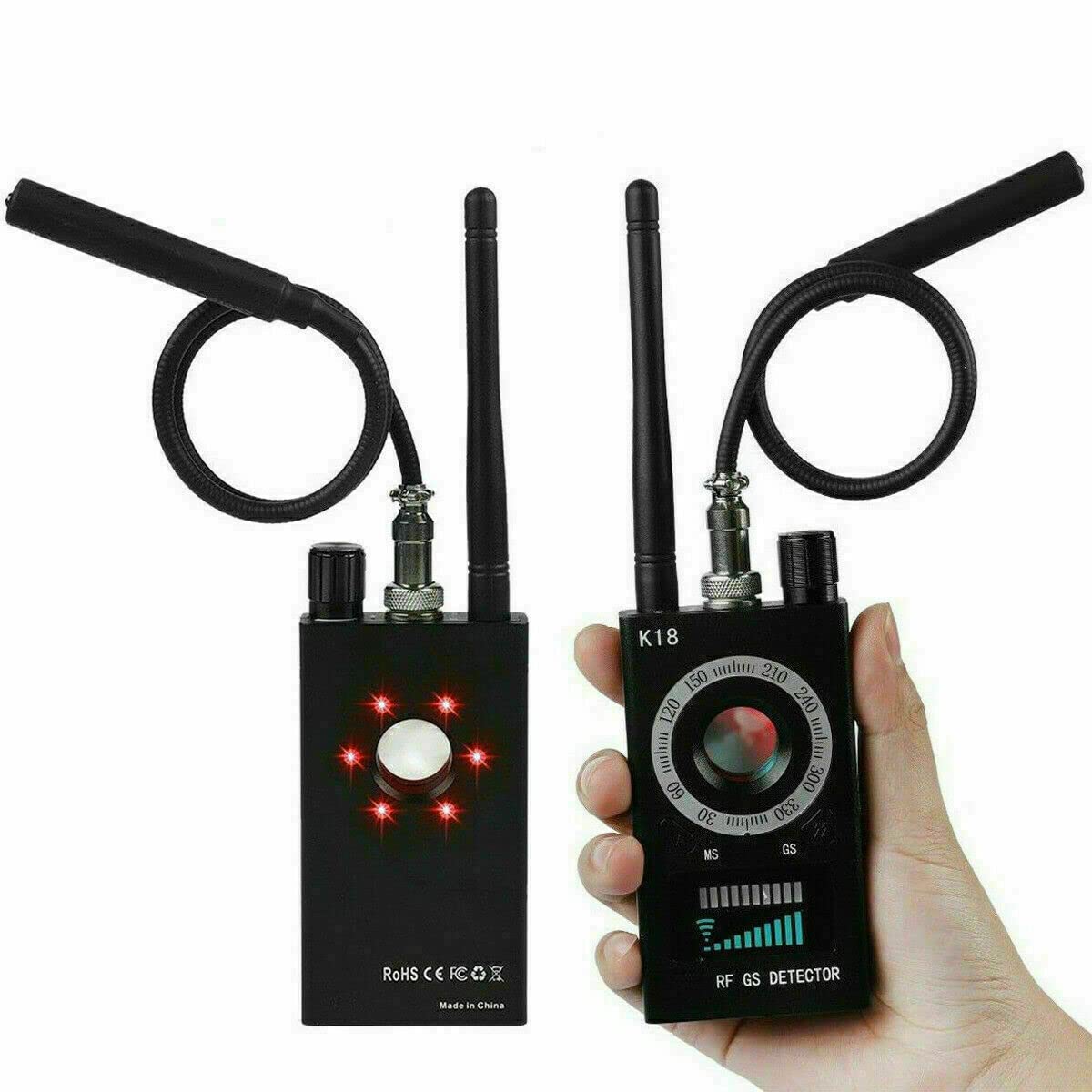
ZCMMF K18 Anti Spy Detector with labeled components including RF antenna, GS probe, power/sensitivity tuner, azimuth dial, detection mode toggle, LED light switch, and signal strength indicators.
A detailed video guide on setting up and operating the ZCMMF K18+ Anti Spy Detector, covering initial steps and usage.
5. Arahan Operasi
5.1 Power On/Off and Sensitivity Adjustment
To power on the device, rotate the Power ON/OFF & Sensitivity Tuner knob clockwise. The device will activate. To adjust sensitivity, continue rotating this knob. Increasing sensitivity widens the detection range, while decreasing it reduces the range, allowing for more precise localization of signals. Rotate counter-clockwise to power off.
5.2 RF Signal Detection
For detecting wireless signals (e.g., from hidden cameras, GPS trackers, GSM bugs), ensure the RF antenna is attached. Turn on the device and adjust the sensitivity. Move the detector around the area of concern. The RF Signal Detection Indicator and Signal Strength Indicator will illuminate, and the device may vibrate or beep, indicating the presence and strength of a wireless signal. A stronger signal indicates closer proximity to the source.

ZCMMF K18 Anti Spy Detector's upgraded smart chip features, including beep detection, LED detection, wider detection range, ultra-high sensitivity, and strong anti-interference, shown detecting various devices like invisible headsets, SIM card bugs, wireless cameras, watch trackers, and radio signals.
This video illustrates the RF signal detection function of a similar detector, providing insight into how the ZCMMF K18 detects wireless signals.
5.3 Magnetic Field Detection
To detect magnetic GPS trackers or other magnetic devices, attach the GS probe. Activate the magnetic detection mode using the Detection Mode Toggle. Sweep the probe over surfaces where magnetic devices might be hidden, such as under vehicles or furniture. The Magnet Detection Indicator will activate upon detecting a magnetic field.
5.4 Hidden Camera Lens Detection (Laser Scanning)
To find hidden camera lenses, activate the laser detection mode. Look through the View Finder on the detector while sweeping the area with the device. Hidden camera lenses will appear as bright red reflection points due to the detector's LED laser technology and special optical lens filters. Adjust the LED Light Switch to control the flashing speed of the infrared light for better visibility.

ZCMMF K18 Anti Spy Detector in use, illustrating how it accurately locates hidden cameras using LED laser technology and special filters, with red laser beams pointing to a camera in a room.
This video demonstrates the professional features of the ZCMMF K18 Anti Spy Detector, focusing on its hidden camera detection capabilities.
5.5 Mod Pengesanan
The ZCMMF K18 offers several alert modes, selectable via the Detection Mode Toggle & Alert Mode Toggle button:
- Pengesanan Laser: For identifying hidden camera lenses.
- Vibration (Mute) Detection: Provides discreet alerts through vibration.
- Beep Detection: Audible alerts for signal detection.
- LED Display Detection: Visual indication of signal strength on the LED panel.
- Mod Fon Kepala: Allows for private audio alerts using a headset (not included).
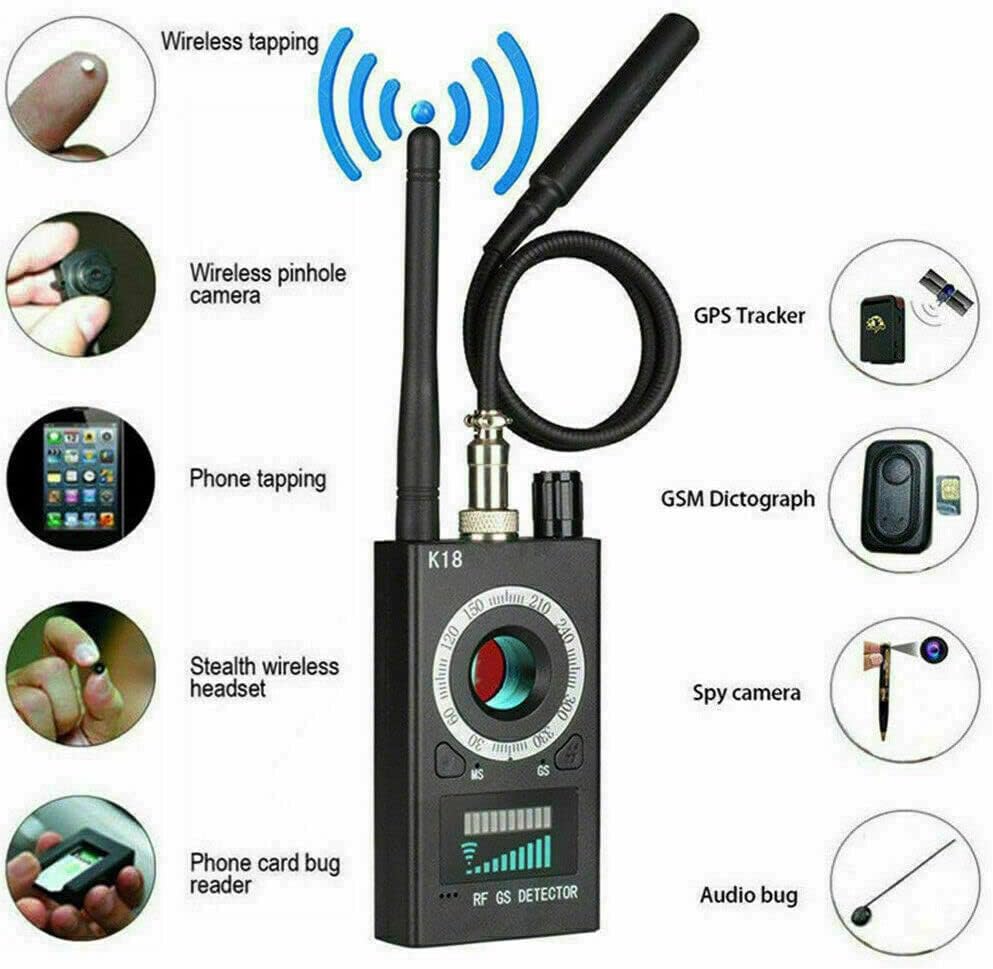
ZCMMF K18 Anti Spy Detector identifying various types of hidden devices it can detect, including wireless tapping, wireless pinhole cameras, phone tapping, GPS trackers, GSM dictographs, stealth wireless headsets, phone card bug readers, spy cameras, and audio bugs.
Video ini memberikan gambaran umumview of the ZCMMF K18 Anti Spy Detector, demonstrating its basic functions and appearance.
This video demonstrates the anti-spy detection features of a similar model (K68+), showcasing its capabilities in identifying various surveillance devices.
6. Penyelenggaraan
- Pembersihan: Use a soft, dry cloth to clean the detector's exterior. Avoid using harsh chemicals or abrasive materials.
- Storan: Simpan peranti di tempat yang sejuk dan kering jauh dari cahaya matahari langsung dan suhu yang melampau.
- Penjagaan Bateri: Untuk memanjangkan hayat bateri, elakkan daripada kerap mencas sepenuhnya bateri. Cas semula peranti dengan kerap, walaupun tidak digunakan untuk tempoh yang lama.
- Pengendalian: Handle the detector with care to prevent damage from drops or impacts.
7. Penyelesaian masalah
- Peranti tidak dihidupkan: Pastikan bateri telah dicas. Sambungkan kabel pengecas dan cuba lagi.
- Tiada pengesanan isyarat: Check if the correct antenna/probe is attached for the desired detection mode. Adjust sensitivity to a higher level. Ensure there are no strong interfering signals nearby.
- Penggera palsu: Reduce the sensitivity to narrow the detection range. Move away from common electronic devices that emit RF signals (e.g., Wi-Fi routers, mobile phones).
- Laser detection not working: Ensure the LED Light Switch is on and the area is sufficiently dark for reflections to be visible.
8. Waranti dan Sokongan
For warranty information or technical support, please refer to the contact details provided with your purchase or visit the official ZCMMF webtapak. Simpan bukti pembelian anda untuk sebarang tuntutan waranti.