
1. Pengenalan
This user manual provides detailed instructions for the installation, operation, and maintenance of your Generic DZ41-CAN Electric Bikes LCD Display. This display is specifically designed for use with M500 and BBS0102 mid-drive motors, offering a high-contrast, large-size color display for essential riding data.
Sila baca manual ini dengan teliti sebelum menggunakan produk ini untuk memastikan fungsi dan keselamatan yang betul.
2. Maklumat Keselamatan
- Always ensure the display is securely mounted before riding.
- Do not attempt to disassemble or modify the display. This may void the warranty and cause damage.
- The display features a waterproof design, but avoid submerging it in water or exposing it to high-pressure water jets.
- Clean the display with a soft, damp kain. Jangan gunakan pembersih atau pelarut yang melelas.
- Pay attention to your surroundings while riding. Do not become overly focused on the display.
3. Kandungan Pakej
Sila semak pakej untuk item berikut:
- 1 x Generic DZ41-CAN Electric Bike Display
4. Produk Lebihview
4.1 Display Components
The DZ41-CAN display features a clear LCD screen and intuitive control buttons for easy operation.

Rajah 1: Depan view of the DZ41-CAN LCD Display.

Figure 2: Close-up of the control buttons.
- Skrin LCD: Displays real-time data such as speed, battery level, assistance level, trip distance, and error messages.
- Butang '+': Increases assistance level, navigates up in menus.
- '-' Butang: Decreases assistance level, navigates down in menus.
- 'M' (Mode) Button: Powers on/off, confirms selections, switches display modes.
4.2 Dimensi
The compact design ensures it fits well on most handlebars.
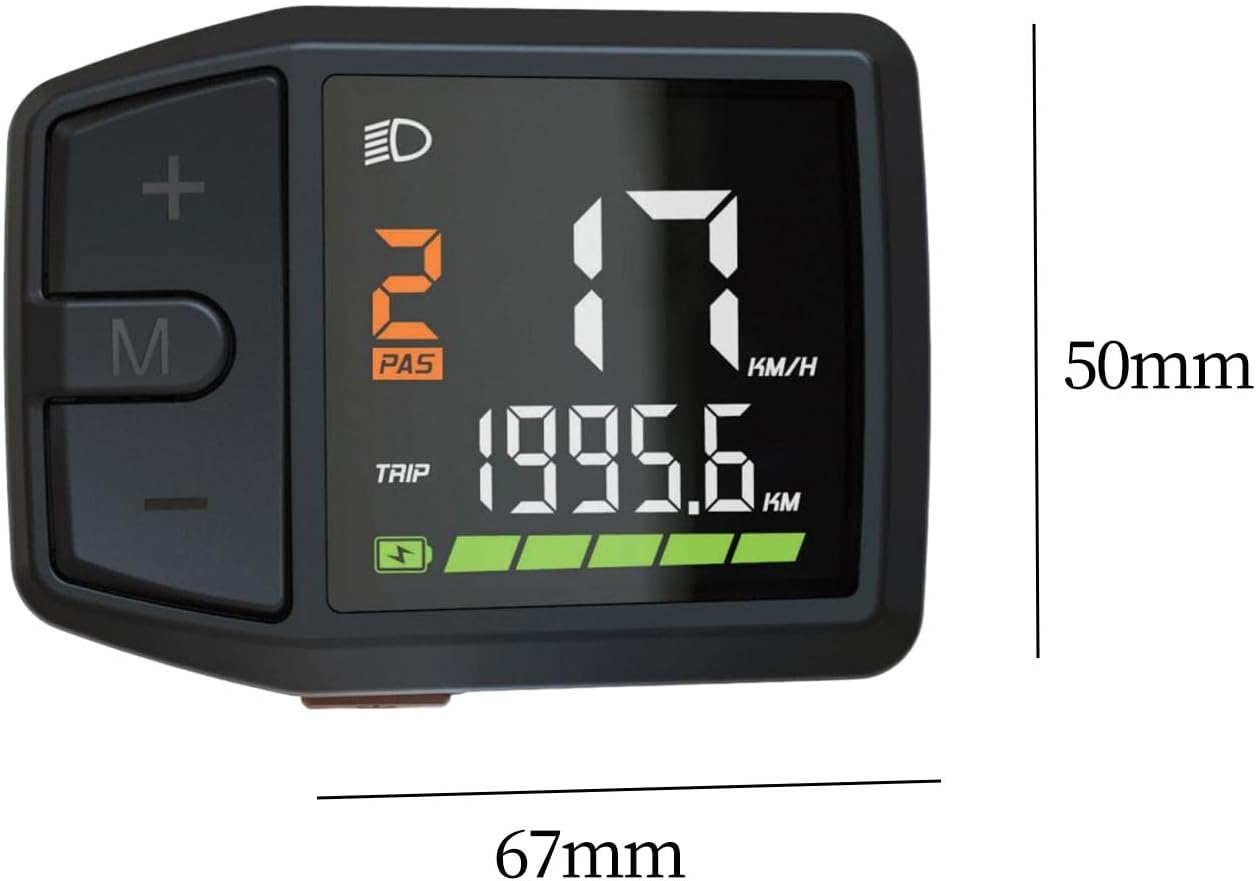
Figure 3: Display dimensions (approx. 67mm x 50mm).
5. Persediaan dan Pemasangan
The DZ41-CAN display is designed for easy integration with M500 and BBS0102 mid-drive motors.
- Pemasangan: Securely attach the display to your e-bike's handlebar using the provided mounting bracket. Ensure it is positioned for clear visibility and easy access to buttons.
- Sambungan Kabel: Connect the display's cable to the corresponding port on your e-bike's motor system (M500 or BBS0102). Ensure the connection is firm and secure.
- Pengurusan Kabel: Route the cable neatly along the bike frame, securing it with cable ties to prevent interference with moving parts.
- Semakan Awal: After installation, perform a quick check to ensure all connections are secure and the display powers on correctly.
6. Arahan Operasi
6.1 Hidupkan/Mati Kuasa
- Untuk Menghidupkan: Press and hold the 'M' button for approximately 2 seconds until the display illuminates.
- Untuk Mematikan: Press and hold the 'M' button for approximately 2 seconds until the display turns off.
6.2 Fungsi Paparan
The display provides comprehensive data for your ride:
- Kelajuan: Current riding speed (KM/H or MPH).
- Tahap Bateri: Real-time battery charge indicator.
- Assistance Level (PAS): Current pedal assist level (e.g., 0-5 or 0-9).
- Jarak Perjalanan: Distance covered during the current ride.
- Total Odometer: Total distance covered by the bike.
- Penunjuk Lampu: Icon illuminates when headlights are active.
- Mesej Ralat: Displays codes or symbols for system malfunctions.
6.3 Fungsi Butang
- Butang '+': Short press to increase pedal assistance level. Long press may activate walk mode or enter settings.
- '-' Butang: Short press to decrease pedal assistance level. Long press may activate walk mode or enter settings.
- Butang 'M': Short press to cycle through display modes (e.g., Trip, Odometer, Max Speed, Avg Speed). Long press to power on/off.
6.4 Pelarasan Tetapan
Specific settings adjustments (e.g., unit conversion, wheel size) may be accessible through a combination of button presses. Refer to your e-bike's main controller manual for detailed instructions on advanced settings, as the display acts as an interface.
7. Penyelenggaraan
- Pembersihan: Regularly wipe the display screen and body with a soft, lint-free, damp cloth. Avoid using harsh chemicals or abrasive materials that could scratch the screen.
- Storan: When not in use for extended periods, store the e-bike and display in a cool, dry place, away from direct sunlight and extreme temperatures.
- Pemeriksaan Kabel: Periodically check the display cable and connectors for any signs of wear, damage, or corrosion. Ensure connections remain secure.
8. Penyelesaian masalah
If you encounter issues with your DZ41-CAN display, refer to the table below for common problems and solutions.
| Masalah | Kemungkinan Punca | Penyelesaian |
|---|---|---|
| Paparan tidak dihidupkan. | Loose cable connection; Low e-bike battery; Faulty display. | Check all cable connections; Charge e-bike battery; Contact support if issue persists. |
| No speed reading. | Speed sensor issue; Loose motor connection. | Check speed sensor alignment and connection; Ensure motor connection is secure. |
| Incorrect data displayed. | Incorrect settings (e.g., wheel size); Sensor malfunction. | Verify settings through the display or e-bike controller; Check sensor for damage. |
| Paparan menunjukkan kod ralat. | System malfunction; Specific component error. | Refer to your e-bike's main controller manual for error code definitions and solutions. |
9. Spesifikasi
| Ciri | Perincian |
|---|---|
| Model | DZ41-CAN |
| Keserasian | Bafang M500, BBS0102 mid-drive motors |
| Jenis Paparan | LCD, High Contrast Color |
| Saiz Skrin | 6.7 Sentimeter |
| bahan | PP and PC |
| Reka Bentuk Kalis Air | ya |
| Jenis Pemasangan | Pelekap Hendal |
| Input Antara Muka Manusia | Butang |
| warna | Hitam |
10. Waranti dan Sokongan
For warranty information and technical support, please refer to the documentation provided with your e-bike or contact the seller directly. Keep your purchase receipt as proof of purchase.