
1. Pengenalan
The PROVISION ISR DAI-340IPEN-28 is a 4MP fixed lens dome camera designed for high-security surveillance in both indoor and outdoor environments. Featuring a 2.8mm fixed lens, it is optimized for short-distance monitoring up to 20 meters. This camera incorporates advanced DDA2 Analytics for object recognition, counting, and detailed classification, significantly reducing false alarms. Its robust IK10 vandal-proof and IP67 waterproof ratings ensure durability and reliable performance in challenging conditions.

Rajah 1: Depan view of the PROVISION ISR DAI-340IPEN-28 Dome Camera, showing the lens and microphone.
2. Ciri-ciri Produk
The DAI-340IPEN-28 camera is equipped with a range of features to enhance security and monitoring capabilities:
- Penderia: 1/3″ CMOS (16:9) with 2592×1520 resolution at 25/30FPS (4MP).
- Kanta: 2.8mm fixed lens providing a 100° viewsudut ing.
- Penglihatan Malam: True Day&Night with ICR and 20m illumination from 3 High-Power IR LEDs.
- Mampatan: Supports H.265+/ H.264+ / H.265 / H.264 / MJPEG.
- Analitis Umum: Kamera Tamppengesanan ering.
- AI (Object Recognition): DDA Sterile Area, DDA Line Crossing, DDA Object Counting (Line), DDA Object Counting (Area), DDA Loitering Detection, DDA Illegal Parking Detection.
- AI (Face Detection): Capable of detecting up to 10 faces per frame.
- Analisis Lanjutan: DDA2 for advanced object classification, including age, color, gender, and vehicle brand.
- Audio: Built-in Microphone and Audio input.
- Peningkatan Imej: True WDR (120dB), BLC, HLC, ROI.
- Storan: SD Card slot for event/schedule recording (Up to 128GB).
- Ketersambungan: Alarm in + Alarm out.
- Ketahanan: IP67 waterproof and IK10 vandal-proof ratings.
- Kuasa: DC12V/~415mA / PoE/~5W.

Figure 2: Key features and specifications represented by icons, including 4MP resolution, IP67, IK10, 20m IR, DC12V/PoE, Audio IN, and SD card support.
3. Kandungan Pakej
Sila sahkan bahawa semua item terdapat dalam pakej:
- PROVISION ISR DAI-340IPEN-28 Camera Body
- Manual Arahan (dokumen ini)
4. Maklumat Keselamatan
Untuk memastikan operasi yang selamat dan mengelakkan kerosakan, sila patuhi garis panduan keselamatan berikut:
- Bekalan Kuasa: Use only the specified power supply (DC12V or PoE). Ensure the power source is stable and meets the camera's requirements.
- Pemasangan: Installation should be performed by qualified personnel. Ensure the mounting surface can support the camera's weight.
- Persekitaran: Do not expose the camera to extreme temperatures, humidity, or corrosive environments beyond its specified operating conditions.
- Pembersihan: Disconnect power before cleaning. Use a soft, dry cloth. Avoid harsh chemicals or abrasive cleaners.
- Pembongkaran: Jangan cuba membuka atau mengubah suai kamera. Ini akan membatalkan jaminan dan boleh menyebabkan kerosakan atau kecederaan.
5. Persediaan dan Pemasangan
The DAI-340IPEN-28 is designed for ceiling mount installation. Follow these steps for proper setup:
5.1 Memasang Kamera
- Choose a suitable ceiling location that provides the desired viewing angle and is within reach of power and network cables.
- Use the provided mounting template (if applicable) to mark drill holes on the ceiling.
- Tebuk lubang pandu dan masukkan sauh yang sesuai jika perlu.
- Secure the camera base to the ceiling using screws.
5.2 Sambungan Pendawaian
Refer to the wiring diagram for proper connections:

Figure 3: Dimensions of the camera (119mm diameter, 87.8mm height) and wiring connections including Power In, RJ-45 (+PoE), Audio In, COM, Alarm Out, Alarm In, and GND.
- Kuasa Masuk: Connect the DC12V power adapter or use Power over Ethernet (PoE) via the RJ-45 port.
- RJ-45 (+PoE): Connect an Ethernet cable from your network switch or NVR. If using PoE, this cable will also provide power.
- Audio Dalam: Connect an external microphone if desired (the camera also has a built-in microphone).
- Alarm In/Out: Connect external alarm devices or sensors as required for integration with security systems.
5.3 Tatarajah Awal
After physical installation and wiring, connect the camera to your NVR or network. Refer to your NVR's manual or PROVISION ISR's software documentation for initial network configuration, IP address assignment, and password setup.
6. Operasi
Once the camera is installed and configured on your network, you can access its features through a compatible NVR or client software.
6.1 Langsung View dan Rakaman
Access the live video feed through your NVR or client software. Configure recording schedules, motion detection recording, or continuous recording as per your surveillance needs. The camera supports SD card recording up to 128GB for local storage.
6.2 DDA2 Analytics
The DAI-340IPEN-28 features advanced DDA2 Analytics. These can be configured via the camera's web interface or compatible NVR software:
- Sterile Area: Define specific zones where any unauthorized entry triggers an alert.
- Melintasi Talian: Set virtual lines, and an alert is triggered when an object crosses the line in a specified direction.
- Object Counting: Count objects (e.g., people, vehicles) crossing a line or entering/exiting an area.
- Loitering Detection: Detect individuals or objects remaining in a defined area for an unusual duration.
- Illegal Parking Detection: Identify vehicles parked in restricted zones.
- Pengesanan Muka: Detect and identify faces within the camera's field of view.
- Advanced Object Classification: Utilize DDA2 to classify objects by age, color, gender, and vehicle brand for more granular analysis.
Proper calibration and definition of detection rules are crucial for accurate analytics and to minimize false alarms.
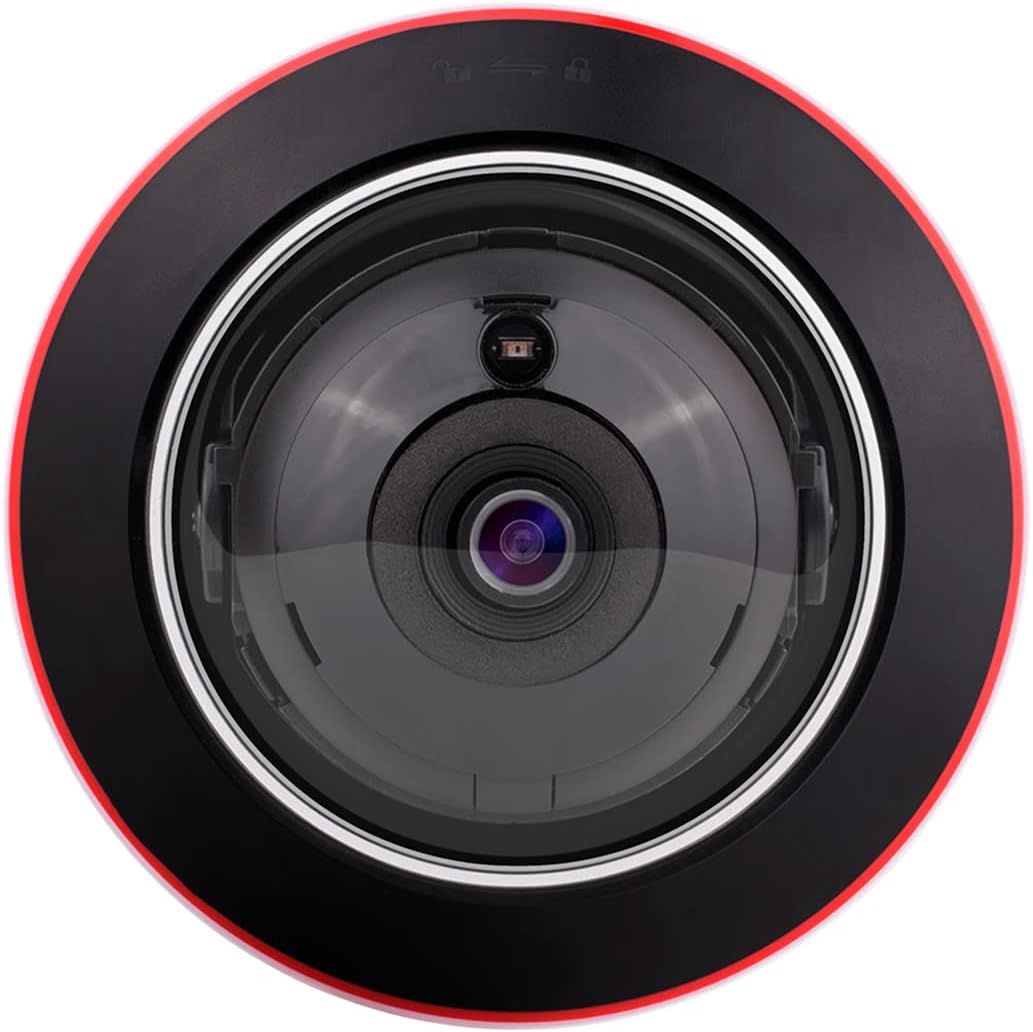
Rajah 4: Atas-bawah view of the camera's lens, showing the IR illuminators and light sensor.
7. Penyelenggaraan
Regular maintenance helps ensure the longevity and optimal performance of your camera:
- Pembersihan Kanta: Gently wipe the lens with a soft, lint-free cloth. For stubborn dirt, use a lens cleaning solution designed for optical surfaces.
- Pembersihan Perumahan: Bersihkan perumahan kamera dengan iklanamp kain. Elakkan bahan kimia yang keras.
- Kemas kini Firmware: Periodically check the PROVISION ISR weblaman web untuk kemas kini perisian tegar. Mengemas kini perisian tegar boleh meningkatkan prestasi, menambah ciri dan mempertingkatkan keselamatan.
- Pemeriksaan Kabel: Regularly inspect all cables for signs of wear or damage. Replace damaged cables immediately.
8. Penyelesaian masalah
Jika anda menghadapi masalah dengan kamera anda, rujuk masalah dan penyelesaian biasa berikut:
- Tiada Kuasa:
- Check power connections (DC12V adapter or PoE).
- Ensure the power source is active and providing the correct voltage.
- Tiada Output Video:
- Verify network cable connection to the RJ-45 port.
- Check network settings (IP address, subnet mask, gateway) on the camera and NVR/client software.
- Ensure the camera is added correctly to the NVR or monitoring software.
- Restart the camera and NVR/client software.
- Kualiti Imej Lemah:
- Bersihkan lensa kamera.
- Check lighting conditions. Ensure IR illumination is active in low light.
- Adjust image settings (brightness, contrast, WDR) in the camera's configuration.
- Analytics Not Triggering:
- Review the analytics rule configurations (sterile areas, lines, sensitivity).
- Pastikan firmware kamera dikemas kini.
- Check for environmental factors (e.g., strong light, moving objects outside the detection zone) that might interfere.
If problems persist, contact PROVISION ISR technical support.
9. Spesifikasi
| Ciri | Spesifikasi |
|---|---|
| Nama Model | DAI-340IPEN-28 |
| Resolusi Tangkapan Video | 4MP (2592x1520) |
| Lensa | 2.8mm Lensa Tetap |
| Viewsudut | 100 Darjah |
| Julat Penglihatan Malam | 20 Meter |
| Teknologi Ketersambungan | Berwayar (Ethernet) |
| Sumber Kuasa | Corded Electric (DC12V) / PoE |
| Penggunaan Dalaman/Luar | Dalaman, Luaran |
| Penilaian Perlindungan Antarabangsa | IP67, IK10 |
| Jenis Pemasangan | Pemasangan Siling |
| Dimensi (L x W x H) | 6.25 x 5.5 x 5.5 inches (119mm x 87.8mm) |
| Komponen yang Disertakan | Camera Body, Instruction Manual |
| Ciri Khas | HD Resolution, Night Vision, Portable, Vandal Proof, Weather Proof, DDA2 Analytics, Built-in Microphone |
10. Waranti dan Sokongan
This product is manufactured by PROVISION ISR. For warranty information, technical support, or service inquiries, please refer to the official PROVISION ISR webtapak atau hubungi pengedar sah anda.
You can visit the official PROVISION ISR store for more information: PROVISION ISR Store on Amazon