
pengenalan
Terima kasih kerana membeliasing the COSTWAY 3-in-1 Portable Air Cooler. This appliance is designed to provide cooling, fan, and humidification functions for your indoor comfort. Please read this manual thoroughly before operation to ensure proper use, maintenance, and safety.
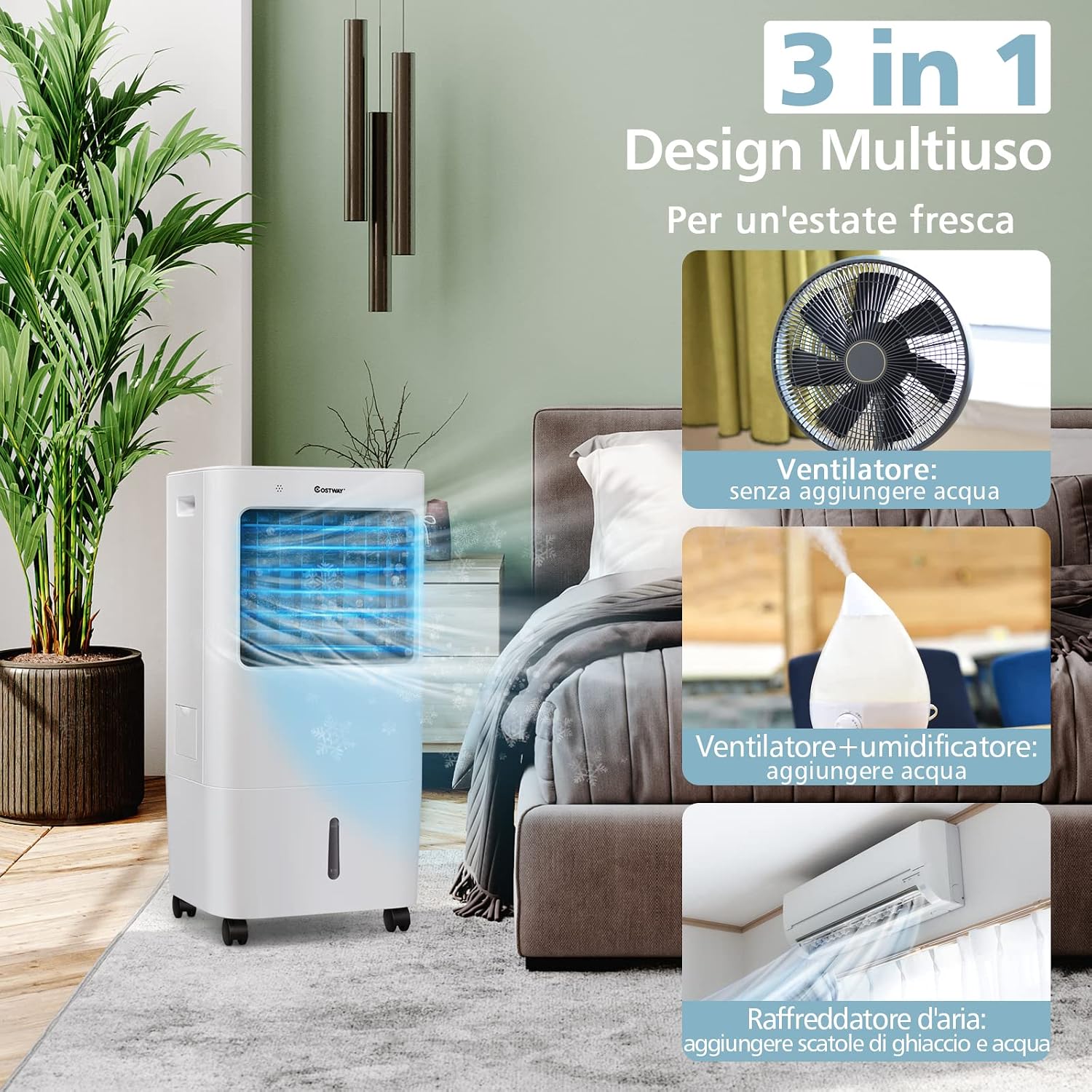
Image: The COSTWAY 3-in-1 Portable Air Cooler in a modern bedroom, showcasing its compact design and air circulation.
Arahan Keselamatan
- Baca semua arahan sebelum menggunakan perkakas.
- Pastikan bekalan kuasa voltage sepadan dengan label penilaian pada perkakas.
- Jangan kendalikan perkakas dengan kord atau palam yang rosak.
- Cabut plag perkakas daripada salur keluar kuasa sebelum pembersihan, penyelenggaraan atau apabila tidak digunakan.
- Jangan rendam perkakas, kord, atau palam ke dalam air atau cecair lain.
- Jauhkan perkakas daripada kanak-kanak.
- Jangan sekat saluran masuk atau alur keluar udara.
- Letakkan perkakas pada permukaan yang stabil dan rata.
- Jangan gunakan perkakas berhampiran bahan mudah terbakar atau dalam persekitaran basah.
- Hanya gunakan lampiran yang disyorkan oleh pengilang.
Produk Selesaiview
Komponen Termasuk:
- Portable Air Cooler Unit
- Alat Kawalan Jauh
- Washable Air Filter (pre-installed)
- Ice Packs (quantity may vary)
Ciri-ciri Utama:
- Fungsi 3-dalam-1: Fan, Humidifier, and Air Cooler.
- Tangki Air 20 Liter: Large capacity for extended operation.
- 4 Kelajuan Kipas: Breeze, Low, Medium, High.
- 3 Mod Pengendalian: Normal, Natural, Sleep.
- Pemasa 7.5 Jam: Programmable shut-off.
- Ayunan Automatik: Wide-angle horizontal air distribution (up to 40°).
- Kawalan Dwi: Touch panel and remote control for convenience.
- Reka Bentuk Mudah Alih: Built-in handle and universal wheels for easy movement.
- Operasi Bunyi Rendah: Less than 60 dB for quiet use.

Image: A detailed diagram highlighting the visible water level indicator, removable and washable dust filter, integrated handle, drainage outlet, and cable organizer for the portable air cooler.
Persediaan
1. Membongkar
Carefully remove the air cooler from its packaging. Retain the packaging for future storage or transport. Inspect the unit for any damage. If damaged, do not operate and contact customer support.
2. Kedudukan Unit
Place the air cooler on a firm, level surface. Ensure there is adequate space around the unit for proper airflow (at least 20 cm from walls or furniture). The unit is equipped with universal wheels for easy relocation.

Image: A person demonstrating the portability of the air cooler, highlighting its integrated handle, universal wheels, 20L water tank, and visible water level indicator.
3. Mengisi Tangki Air
- Tarik keluar tangki air dari bahagian bawah belakang unit.
- Fill the tank with clean water up to the 'MAX' line indicated on the tank. Do not overfill.
- Berhati-hati luncurkan tangki air kembali ke dalam unit sehingga ia berbunyi pada tempatnya.
4. Adding Ice Packs (Optional for Enhanced Cooling)
For a stronger cooling effect, you can use the provided ice packs:
- Fill the ice packs with water and place them in a freezer for several hours until completely frozen.
- Once frozen, place the ice packs directly into the water tank along with the water.

Image: A visual guide demonstrating the process of preparing and adding ice packs to the water tank for rapid cooling.
Arahan Operasi
The air cooler can be controlled via the touch panel on the top of the unit or the included remote control.

Image: A user operating the air cooler with the remote control, illustrating the convenience of dual control options (touch panel and remote).
1. Hidupkan/Mati Kuasa
- Tekan ke Hidup/Mati butang pada panel kawalan atau alat kawalan jauh untuk menghidupkan atau mematikan unit.
2. Memilih Mod Pengendalian
Tekan ke Mod butang untuk melihat mod yang tersedia:
- Mod Biasa: Memberikan aliran udara yang konsisten pada kelajuan yang dipilih.
- Mod Semula Jadi: Simulates natural breeze by varying fan speeds.
- Mod tidur: Operates at a lower speed and noise level for quiet operation, ideal for sleeping.

Image: An illustration detailing the three wind modes and four fan speed settings available on the air cooler.
3. Melaraskan Kelajuan Kipas
Tekan ke Kelajuan button to select one of the four fan speeds:
- angin sepoi-sepoi
- rendah
- Sederhana
- High (Maximum wind speed at air outlet is 10 m/s)
4. Fungsi Pemasa
Tekan ke Pemasa button to set the automatic shut-off time. The timer can be set from 0 to 7.5 hours in increments. The unit operates at a low noise level (less than 60 dB) for undisturbed rest.

Image: The air cooler operating in a quiet environment, emphasizing its low noise output and timer function for comfortable sleep.
5. Fungsi Ayunan
Tekan ke Berayun button to activate or deactivate the automatic horizontal oscillation. This feature distributes air across a wide area (up to 40°). The vertical airflow can be adjusted manually.

Image: A visual representation of the air cooler's wide-angle oscillation, demonstrating how it circulates air throughout a room.
6. Cooling/Humidification Function
Tekan ke Sejuk button to activate the cooling and humidification function. Ensure the water tank is filled before activating this mode. The unit will draw water from the tank to cool and humidify the air.

Image: An illustration explaining the three operational modes: fan-only, fan with humidification, and air cooling with ice.
Penyelenggaraan
Penyelenggaraan tetap memastikan prestasi optimum dan memanjangkan jangka hayat penyejuk udara anda.
1. Membersihkan Penapis Udara
The air cooler is equipped with a washable air filter. It is recommended to clean the filter every two weeks, or more frequently depending on usage and air quality.
- Cabut plag perkakas daripada salur keluar kuasa.
- Keluarkan penapis udara dari bahagian belakang unit.
- Rinse the filter under running water to remove dust and debris. For stubborn dirt, use a soft brush and mild detergent.
- Benarkan penuras kering sepenuhnya sebelum memasangnya semula. Jangan terdedah kepada cahaya matahari langsung.
2. Draining and Cleaning the Water Tank
To prevent mold and mildew growth, regularly drain and clean the water tank, especially if the unit will not be used for an extended period.
- Cabut plag perkakas.
- Tarik keluar tangki air.
- Open the drainage plug at the bottom of the unit to empty any remaining water.
- Clean the inside of the tank with a soft cloth and mild detergent. Rinse thoroughly.
- Allow the tank to dry completely before re-inserting it.
3. Pembersihan Am
Lap bahagian luar unit dengan lembut, damp cloth. Do not use abrasive cleaners or solvents. Ensure no water enters the control panel or other electrical components.
4. Penyimpanan
If storing the unit for a long period, ensure the water tank is empty and clean, and the air filter is dry. Store the unit in a cool, dry place, preferably in its original packaging.
Menyelesaikan masalah
| Masalah | Kemungkinan Punca | Penyelesaian |
|---|---|---|
| Unit tidak dihidupkan | Tiada bekalan kuasa Kord kuasa tidak disambungkan dengan betul | Periksa sama ada unit dipasang pada soket yang berfungsi Pastikan kord kuasa disambungkan dengan selamat |
| Tiada udara sejuk / Kesan penyejukan yang lemah | Tangki air kosong Fungsi penyejukan tidak diaktifkan Penapis udara kotor Ice packs not used or frozen | Isi tangki air Press the 'Cool' button Bersihkan penapis udara Add frozen ice packs to the water tank |
| Aliran udara yang lemah | Kelajuan kipas terlalu rendah Saluran masuk/alur keluar udara disekat Penapis udara kotor | Tingkatkan kelajuan kipas Kosongkan sebarang halangan Bersihkan penapis udara |
| Bunyi yang tidak biasa | Unit bukan pada permukaan yang rata Foreign object inside the unit | Letakkan unit pada permukaan yang rata dan stabil Unplug and inspect for foreign objects (if safe to do so) |
| Alat kawalan jauh tidak berfungsi | Bateri mati atau tidak dimasukkan dengan betul Halangan antara alat kawalan jauh dan unit | Replace batteries; ensure correct polarity Keluarkan sebarang halangan |
Spesifikasi
| Ciri | Spesifikasi |
|---|---|
| Jenama | COSTWAY |
| Nombor Model | 905637 |
| Fungsi | Cooling, Fan, Humidification |
| Kapasiti Tangki Air | 20 Liter |
| Kuasa Penyejukan | 65 Watt |
| Voltage | 240 Volt |
| Tahap Kebisingan | 60 Desibel |
| Dimensi Produk (D x W x H) | 32 cm x 37 cm x 75 cm |
| Berat Barang | 7 Kilogram |
| Jenis Penapis | Penapis Udara Boleh Basuh |
| Kaedah Kawalan | Jauh, Panel Sentuh |
| Pemasa | Sehingga 7.5 Jam |
| Oscillation | Automatic Horizontal (up to 40°) |

Image: Technical specifications and dimensions of the air cooler, including rated voltage, power, water tank capacity, airflow, and power cord length.
Waranti dan Sokongan
This product comes with a limited warranty. For detailed warranty information, please refer to the warranty card included with your purchase or contact COSTWAY customer service.
For technical support, troubleshooting assistance, or replacement parts, please contact COSTWAY customer service through the retailer where the product was purchased or visit the official COSTWAY webtapak.