
TP-Link EAP613
Manual Pengguna Titik Akses Tanpa Wayar TP-Link EAP613 AX1800
Model: EAP613
1. Pengenalan
This manual provides detailed instructions for the installation, configuration, and operation of your TP-Link EAP613 AX1800 Wireless Access Point. The EAP613 is designed to deliver high-speed Wi-Fi 6 connectivity, integrating seamlessly into the Omada Software Defined Networking (SDN) platform for centralized management.

Rajah 1: Titik Akses Tanpa Wayar TP-Link EAP613 AX1800
2. Ciri-ciri Utama
- Ultra-Fast Wi-Fi 6 Speeds: The EAP613 supports dual-band Wi-Fi 6 (802.11ax) technology, offering speeds up to 1800 Mbps (1201 Mbps on 5 GHz and 574 Mbps on 2.4 GHz). This is achieved through technologies like 1024-QAM and Long OFDM Symbol, enhancing throughput for multiple users.
- Reka bentuk Ultra-Slim: Its compact and elegant design allows for discreet installation in various environments such as offices, hotels, classrooms, or cafes.
- Bersepadu dengan Omada SDN: The device is part of the Omada Software Defined Networking (SDN) platform, enabling centralized management of access points, switches, and gateways. Control options include Omada Hardware Controller, Software Controller, or Cloud-based Controller. Standalone mode is also supported.
- Cloud Access & Omada Compatibility: Remote cloud access and the Omada app facilitate centralized network management from any location, at any time.
- Teknologi Tanpa Wayar Termaju: Features include Mesh Wi-Fi, Seamless Roaming (requires Omada SDN controllers), WPA3 encryption for enhanced security, Band Steering, Load Balancing, Airtime Fairness, and Beamforming.
- PoE+ for Easy Installation: Supports 802.3at PoE+ and 48V/0.5A Passive PoE (e.g., TP-Link TL-PoE4824G) for flexible deployment without the need for a separate DC power adapter (DC adapter not included). A 12V/1A DC power supply option is also available.

Figure 2: Wi-Fi 6 Speed Capabilities of EAP613

Figure 3: Seamless Roaming Functionality
3. Kandungan Pakej
Sahkan bahawa pakej anda mengandungi item berikut:
- Titik Akses Tanpa Wayar EAP613
- Kit Pemasangan Siling/Dinding
- Panduan Pemasangan
Nota: A DC power adapter is not included in the package. The EAP613 is primarily designed for Power over Ethernet (PoE+) deployment.
4. Persediaan dan Pemasangan
4.1 Menguasakan Peranti
The EAP613 can be powered using one of the following methods:
- 802.3at PoE+ Switch: Connect an Ethernet cable from an 802.3at compliant PoE+ switch to the EAP613's Ethernet port. This method provides both power and data connectivity.
- 48V/0.5A Passive PoE Adapter: Use a compatible passive PoE adapter (e.g., TP-Link TL-PoE4824G) to supply power through the Ethernet cable.
- 12V/1A DC Power Adapter: If PoE is not available, a 12V/1A DC power adapter (not included) can be connected to the DC power input port.

Figure 4: EAP613 Power and Port Overview
4.2 Memasang Titik Akses
The EAP613 is designed for ceiling or wall mounting. Refer to the included Installation Guide for detailed steps on using the mounting kits.
- Choose a suitable location for optimal Wi-Fi coverage.
- Use the mounting bracket as a template to mark drill holes on the ceiling or wall.
- Install the anchors and screws, then attach the mounting bracket.
- Connect the Ethernet cable (and DC power if not using PoE) to the EAP613.
- Align the EAP613 with the mounting bracket and twist to secure it in place.

Figure 5: Deployment with PoE+ or Mesh
5. Operasi
5.1 Integrasi SDN Omada
The EAP613 can be managed as part of the Omada SDN ecosystem. This allows for centralized control of your network devices.
- Pengawal Perkakasan Omada: Peranti perkakasan khusus untuk mengurus rangkaian Omada anda.
- Pengawal Perisian Omada: Perisian yang boleh dipasang pada PC atau pelayan untuk pengurusan rangkaian.
- Pengawal Berasaskan Awan Omada: Perkhidmatan awan untuk pengurusan jarak jauh (hubungi TP-Link untuk butiran tentang model dan ketersediaan yang serasi).
- Mod Kendiri: The EAP613 can also operate independently without an Omada controller for basic functionality.

Figure 6: Omada SDN Platform Overview
5.2 Remote Management via Omada App
The Omada app provides convenient remote management of your network. Download the app from your device's app store.
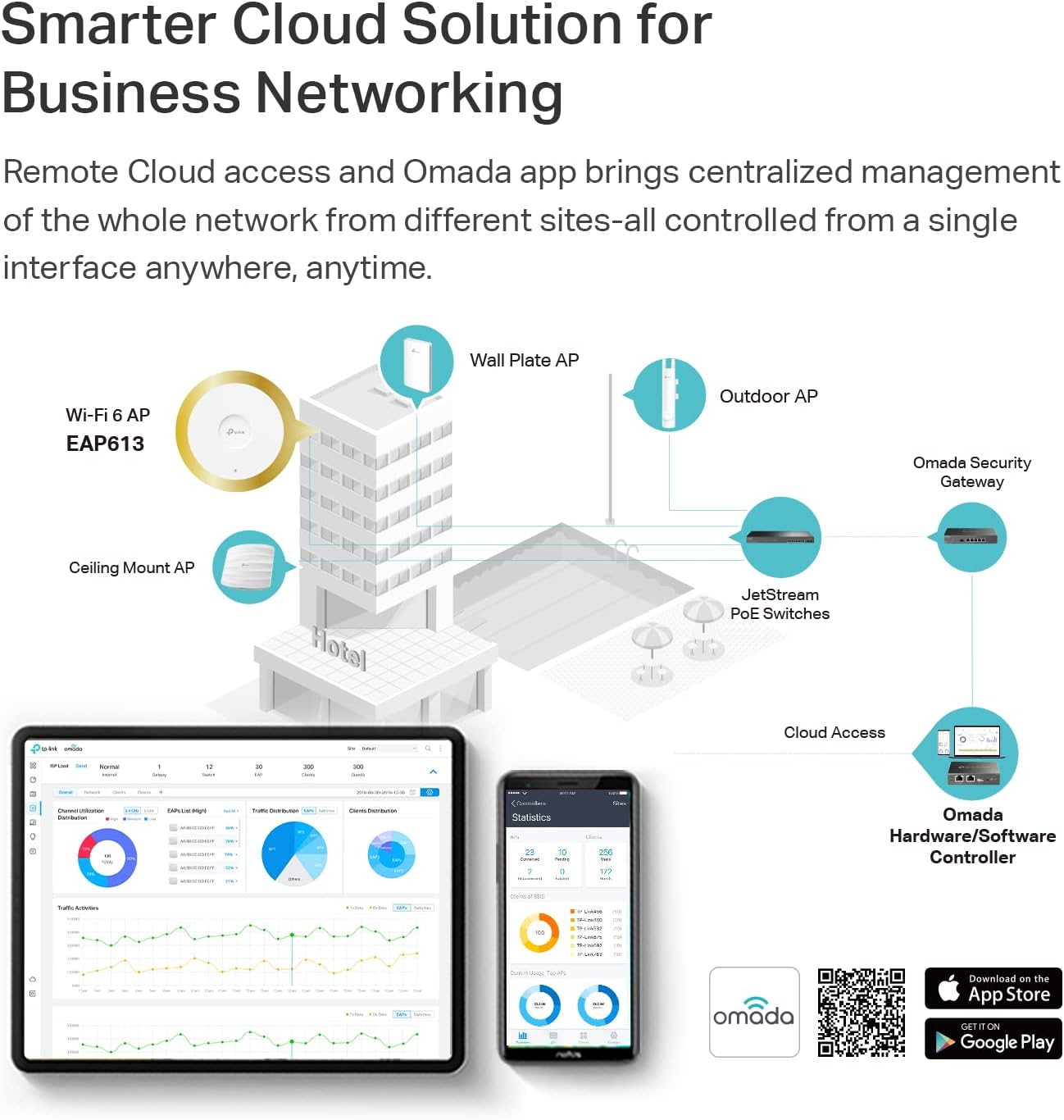
Figure 7: Omada Cloud Solution and App Management
Download the Omada app: tp-link.com/common/app/omada/qrcode.php
5.3 Network Configuration Example
The EAP613 can be deployed in various network configurations, including structured wiring setups for homes or businesses.

Gambar 8: Cthample Omada Structured Wiring Network
6. Penyelenggaraan
- Kemas kini Firmware: Periksa TP-Link secara berkala weblaman web untuk kemas kini perisian tegar terkini bagi memastikan prestasi dan keselamatan yang optimum.
- Pembersihan: Pastikan peranti bersih dan bebas daripada habuk. Gunakan kain lembut dan kering untuk pembersihan.
- Keadaan Persekitaran: Pastikan peranti dikendalikan dalam julat suhu dan kelembapan yang ditetapkan untuk mengelakkan kerosakan.
- Keselamatan: Use strong, unique passwords for your Wi-Fi networks and Omada controller. Enable WPA3 encryption for enhanced security.
7. Penyelesaian masalah
7.1 Isu dan Penyelesaian Biasa
- Tiada Kuasa:
- Ensure the Ethernet cable is securely connected to a PoE+ source or a compatible DC power adapter is used.
- Verify the PoE+ switch or power adapter is functioning correctly.
- Tiada Isyarat Wi-Fi:
- Check if the EAP613 is powered on and its LED indicator is active.
- Confirm that the EAP613 is properly configured via the Omada controller or in standalone mode.
- Ensure your client devices are within range and have the correct Wi-Fi password.
- Kelajuan Wi-Fi Perlahan:
- Check for interference from other wireless devices or obstacles.
- Ensure the EAP613 is connected to a gigabit Ethernet port.
- Update the EAP613 firmware to the latest version.
- Consider adjusting channel settings or enabling features like Band Steering.
- Tidak Boleh Mengakses Pengawal Omada:
- Verify network connectivity between the EAP613 and the controller.
- Ensure the controller software/hardware is running and accessible.
- Check firewall settings on the controller host.
8. Spesifikasi
| Model | EAP613 |
| Piawaian Tanpa Wayar | IEEE 802.11ax/ac/n/g/b/a |
| Kekerapan | 2.4 GHz dan 5 GHz (Dwi-Jalur) |
| Kelajuan Tanpa Wayar | 1201 Mbps (5 GHz), 574 Mbps (2.4 GHz) - Total 1775 Mbps (AX1800) |
| Pelabuhan Ethernet | 1x Gigabit Ethernet Port (RJ-45) |
| Bekalan Kuasa | 802.3at PoE+ or 48V/0.5A Passive PoE or 12V/1A DC (DC adapter not included) |
| Dimensi (W x D x H) | 6.3 x 6.3 x 1.32 inci (160 x 160 x 33.6 mm) |
| Melekap | Ceiling/Wall Mounting (Kits Included) |
| Ciri Wayarles | Mesh Wi-Fi, Seamless Roaming, WPA3, Band Steering, Load Balancing, Airtime Fairness, Beamforming, MU-MIMO, OFDMA |
| Pengurusan | Omada App, Cloud Access, Omada Hardware Controller, Omada Software Controller, Standalone Mode |
9. Waranti dan Sokongan
The TP-Link EAP613 AX1800 Wireless Access Point is backed by a Waranti 5 tahun.
For technical support, warranty claims, and additional product information, please visit the official TP-Link webtapak: www.tp-link.com. You can also find FAQs, firmware updates, and community forums there.
Penafian Undang-undang
1. Kadar penghantaran tanpa wayar maksimum adalah kadar fizikal yang diperoleh daripada spesifikasi IEEE Standard 802.11. Spesifikasi julat dan liputan adalah berdasarkan keputusan ujian di bawah keadaan penggunaan biasa. Kadar penghantaran tanpa wayar sebenar dan liputan tanpa wayar tidak dijamin dan akan berbeza-beza akibat daripada 1) faktor persekitaran, termasuk bahan binaan, objek fizikal dan halangan, 2) keadaan rangkaian, termasuk gangguan tempatan, isipadu dan kepadatan trafik, lokasi produk, kerumitan rangkaian dan overhed rangkaian serta 3) batasan klien, termasuk prestasi yang dinilai, lokasi, kualiti sambungan dan keadaan klien.
2. Kelajuan rangkaian sebenar mungkin dihadkan oleh kadar port Ethernet WAN atau LAN produk, kadar yang disokong oleh kabel rangkaian, faktor penyedia perkhidmatan Internet dan keadaan persekitaran yang lain.
Ask a question about this manual
Ask about setup, troubleshooting, compatibility, parts, safety, or missing instructions. Manuals+ will review the question and use this page’s manual context to help answer it.