
pengenalan
This manual provides detailed instructions for the proper use and maintenance of your Sunny CRS-300AT Android Smart LED TV Remote Control. This remote is designed for compatibility with AXEN LED TVs and features a dedicated Live TV button for convenient access to live broadcasts. Please read this manual carefully before using the remote control to ensure optimal performance and longevity.
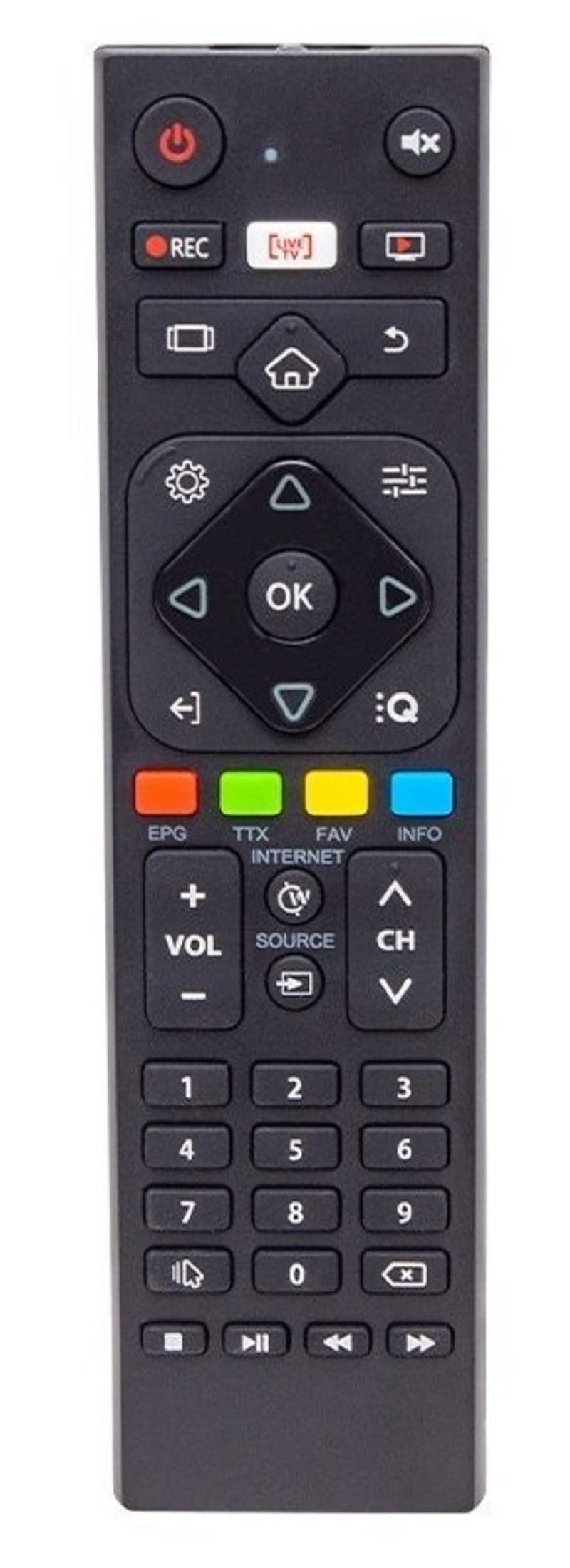
Image of the Sunny CRS-300AT remote control, showing its ergonomic design and button layout, including the dedicated Live TV button.
Persediaan
Pemasangan Bateri
- Cari petak bateri di belakang alat kawalan jauh.
- Luncurkan penutup petak bateri ke bawah atau mengikut arah yang ditunjukkan oleh anak panah untuk membukanya.
- Insert two AAA batteries (not included), ensuring the positive (+) and negative (-) terminals align correctly with the markings inside the compartment. Incorrect battery orientation can prevent the remote from functioning.
- Gantikan penutup petak bateri dengan menggelongsorkannya semula ke tempatnya sehingga ia berbunyi dengan selamat.
The remote control is an infrared (IR) device and does not require pairing. Once batteries are installed, it is ready for use with compatible AXEN LED TVs.
Arahan Operasi
Point the remote control directly at your television's IR receiver. Ensure there are no obstructions between the remote and the TV.
Fungsi Utama
- Butang kuasa (⏻): Menghidupkan atau mematikan TV.
- Kelantangan Naik/Turun (Jilid +/-): Melaraskan kelantangan bunyi.
- Saluran Atas/Bawah (Ch+/-): Menukar saluran TV.
- Bisu (🔇): Membisukan atau menyahredamkan bunyi TV.
- Butang Nombor (0-9): Directly select TV channels or input numbers.
- Butang Navigasi (▲ ▼ ◀ ▶): Navigasi melalui menu dan pilihan.
- Butang OK/Masuk: Mengesahkan pilihan dalam menu.
- Butang Kembali/Kembali: Kembali ke skrin atau menu sebelumnya.
- Butang rumah (🏠): Mengakses skrin utama atau menu utama TV Pintar.
- Butang TV Langsung: Directly switches to live television broadcasting.
- Butang Input/Sumber: Changes the input source (e.g., HDMI 1, HDMI 2, AV).
- Butang Menu: Opens the TV's main settings menu.
Specific button layouts and functions may vary slightly depending on your TV model, but the core functions remain consistent.
Penyelenggaraan
Pembersihan
- Lap alat kawalan jauh dengan kain lembut dan kering.
- Untuk kotoran degil, sedikit dampen the cloth with water or a mild, non-abrasive cleaner. Do not spray liquids directly onto the remote.
- Avoid using harsh chemicals, solvents, or abrasive cleaning materials, as these can damage the remote's surface or internal components.
Penjagaan Bateri
- Gantikan bateri apabila tindak balas alat kawalan jauh menjadi perlahan atau berhenti berfungsi.
- Jika alat kawalan jauh tidak akan digunakan untuk tempoh yang lama, keluarkan bateri untuk mengelakkan kebocoran dan kemungkinan kerosakan.
- Buang bateri terpakai mengikut peraturan tempatan.
Penyimpanan
Simpan alat kawalan jauh di tempat yang sejuk dan kering, jauh daripada cahaya matahari langsung, suhu ekstrem dan kelembapan yang tinggi.
Menyelesaikan masalah
| Masalah | Kemungkinan Punca | Penyelesaian |
|---|---|---|
| Alat kawalan jauh tidak berfungsi. | Bateri mati atau tidak dipasang dengan betul. | Gantikan bateri dengan yang baru, memastikan kekutuban yang betul (+/-). |
| Alat kawalan jauh tidak berfungsi. | Obstruction between remote and TV's IR receiver. | Ensure a clear line of sight between the remote and the TV. Remove any objects blocking the signal. |
| Alat kawalan jauh tidak berfungsi. | Alat kawalan jauh terlalu jauh dari TV. | Move closer to the TV. The effective range for IR remotes is typically up to 7 meters (23 feet). |
| Sesetengah butang tidak bertindak balas. | Kotoran atau serpihan di bawah butang. | Bersihkan alat kawalan jauh seperti yang diterangkan dalam bahagian Penyelenggaraan. |
| TV is not responding to any remote commands. | TV's IR receiver might be faulty or blocked. | Check your TV's user manual for troubleshooting its IR receiver. Try restarting the TV by unplugging it for a few minutes. |
Spesifikasi
- model: Sunny CRS-300AT
- Jenama: Sunny (Compatible with AXEN)
- Peranti Serasi: Televisions (specifically AXEN LED TVs)
- Teknologi Ketersambungan: Inframerah (IR)
- Sumber Kuasa: 2 x Bateri AAA (tidak termasuk)
- ASIN: B0BW4M6SRC
Maklumat Waranti
This product is typically covered by a manufacturer's warranty. For specific details regarding warranty duration, coverage, and claims process, please refer to the documentation provided with your purchase or contact the retailer where the product was acquired. Keep your proof of purchase for warranty purposes.
Sokongan
Jika anda menghadapi masalah yang tidak dapat diselesaikan menggunakan panduan penyelesaian masalah, atau jika anda memerlukan bantuan lanjut, sila hubungi:
- The retailer from whom you purchased the remote control.
- The manufacturer's customer support (refer to product packaging or manufacturer's weblaman web untuk butiran perhubungan).
When contacting support, please have your product model (CRS-300AT) and proof of purchase readily available.