
pengenalan
Thank you for choosing the Rowenta Eole Ultra VU6871 Silent Tower Fan. This manual provides essential information for the safe and efficient use of your appliance. Please read it thoroughly before first use and keep it for future reference.
The Rowenta Eole Ultra VU6871 offers powerful and quiet cooling, designed to provide comfort in your home or office. Its features include a remote control, multiple speed settings, automatic modes, and a timer function.
Arahan Keselamatan Penting
- Baca semua arahan sebelum menggunakan perkakas ini.
- Perkakas ini hanya untuk kegunaan di dalam rumah sahaja. Jangan gunakan di luar rumah atau dalam keadaan basah.
- Pastikan voltage yang ditunjukkan pada perkakas sesuai dengan sumber listrik tempatan andatage sebelum menyambung.
- Do not operate any fan with a damaged cord or plug. If the cord or plug is damaged, it must be replaced by the manufacturer, its service agent, or similarly qualified persons to avoid a hazard.
- Do not place the fan near heat sources such as radiators, heat registers, stoves, or other appliances that produce heat.
- Keep fingers and other objects away from the fan blades and openings during operation.
- Always unplug the fan before cleaning, moving, or performing any maintenance.
- Jangan rendamkan kipas dalam air atau cecair lain.
- Perkakas ini tidak dimaksudkan untuk digunakan oleh orang (termasuk kanak-kanak) yang kurang keupayaan fizikal, deria atau mental, atau kurang pengalaman dan pengetahuan, melainkan mereka telah diberi pengawasan atau arahan mengenai penggunaan perkakas oleh orang yang bertanggungjawab untuk keselamatan mereka.
- Kanak-kanak harus diawasi untuk memastikan bahawa mereka tidak bermain dengan perkakas.
Produk Selesaiview
The Rowenta Eole Ultra VU6871 tower fan is designed for efficient air circulation and cooling. It features a sleek, tall design with an integrated control panel and comes with a remote control for convenience.

Image: The Rowenta Eole Ultra VU6871 tower fan illustrating its airflow capabilities.
Komponen Utama:
- Gril Saluran Udara: Front panel where air is expelled.
- Panel Kawalan: Located on top of the fan for manual operation.
- Pangkalan: Provides stability for the tower fan.
- Kord Kuasa: For connecting to a mains power supply.
- Pemegang Bawa: Integrated at the back for easy transport.
- Kawalan Jauh: Untuk memudahkan operasi dari jauh.
- Storan Alat Kawalan Jauh: Integrated compartment for the remote.
Perhimpunan dan Persediaan
The Rowenta Eole Ultra VU6871 typically comes pre-assembled. If any assembly is required, follow these general steps:
- Bongkar: Keluarkan semua bahan pembungkus dengan berhati-hati dan pastikan semua komponen ada.
- Base Attachment (if separate): If the base is separate, align it with the bottom of the fan body and secure it using the provided screws. Ensure it is stable.
- penempatan: Place the fan on a firm, level surface. Ensure there is adequate space around the fan for optimal air circulation and oscillation. Avoid placing it directly against walls or furniture that might obstruct airflow.
- Sambungan Kuasa: Plug the power cord into a standard electrical outlet (220-240V).

Image: The tower fan positioned in a room, demonstrating its suitability for various living spaces.
Arahan Operasi
Your Rowenta Eole Ultra VU6871 fan can be operated using the control panel on top of the unit or the included remote control.
Fungsi Panel Kawalan:
- Butang kuasa (U): Tekan untuk menghidupkan atau mematikan kipas.
- Pelarasan Kelajuan (+/-): Increase or decrease the fan speed. There are 3 manual speed settings.
- Butang Mod (M): Cycle through the available operating modes: Standard, Night, and Natural Breeze.
- Butang Ayunan (~): Activate or deactivate the 60° horizontal oscillation function.
- Timer Button (L): Set the automatic shut-off timer for 1, 2, 4, or 7 hours.
Kawalan Jauh:
The compact remote control provides full access to all fan functions from a distance.
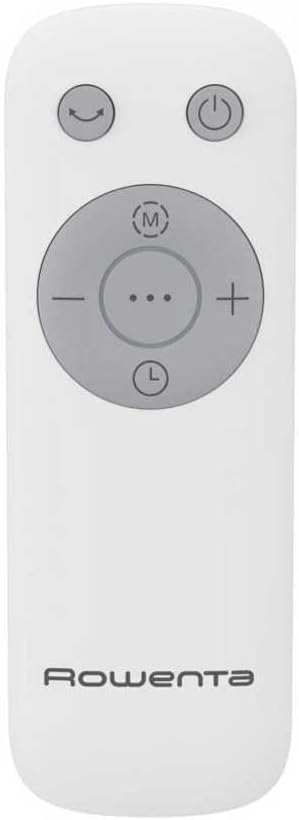
Image: The remote control for the Rowenta Eole Ultra VU6871 tower fan.

Image: A hand operating the fan using the remote control.
- Ensure the remote control has working batteries (typically 2x AAA, not included).
- Point the remote control towards the fan's receiver.
- Butang pada alat kawalan jauh sepadan dengan fungsi pada panel kawalan.
- Store the remote control in its integrated compartment on the fan when not in use.
Mod Pengendalian:
- Mod Standard: Menyediakan aliran udara berterusan pada kelajuan yang anda pilih.
- Mod Malam: Designed for quiet operation during sleep, with reduced noise levels (as low as 52 dB(A)) and gentle airflow.
- Mod Angin Semulajadi: Simulates a natural outdoor breeze by varying the fan speed intermittently.

Image: The fan operating in a bedroom, highlighting its quiet performance for undisturbed sleep.
Penyelenggaraan dan Pembersihan
Regular cleaning helps maintain the performance and longevity of your fan.
- Sebelum Pembersihan: Sentiasa cabut plag kipas dari salur keluar kuasa sebelum membersihkan.
- Pembersihan Luaran: Lap permukaan luar kipas dengan lembut, damp kain. Jangan gunakan pembersih yang kasar, pelarut atau bahan kimia yang keras, kerana ini boleh merosakkan plastik.
- Gril Masuk/Alir Keluar Udara: Use a vacuum cleaner with a brush attachment to remove dust from the air inlet and outlet grilles. This helps prevent dust buildup that can impede airflow.
- Storan: If storing the fan for an extended period, cover it to protect it from dust and store it in a dry place.
Menyelesaikan masalah
Jika anda menghadapi masalah dengan kipas anda, rujuk masalah dan penyelesaian biasa berikut:
| Masalah | Kemungkinan Punca | Penyelesaian |
|---|---|---|
| Kipas tidak dihidupkan. | Tiada bekalan kuasa. Kord kuasa tidak dipasang dengan betul. | Check if the fan is plugged into a working electrical outlet. Pastikan kabel kuasa disambungkan dengan selamat. |
| Aliran udara yang lemah. | Air grilles are blocked by dust. Kelajuan kipas terlalu rendah. | Clean the air inlet and outlet grilles. Tingkatkan tetapan kelajuan kipas. |
| Kipas bising. | Dust buildup inside. Kipas bukan pada permukaan yang rata. | Bersihkan kipas dengan teliti. Ensure the fan is placed on a stable, flat surface. |
| Alat kawalan jauh tidak berfungsi. | Bateri mati atau tidak dimasukkan dengan betul. Halangan antara alat kawalan jauh dan kipas. | Replace batteries (2x AAA). Pastikan garis penglihatan yang jelas ke penerima kipas. |
Jika masalah berterusan selepas mencuba penyelesaian ini, sila hubungi sokongan pelanggan.
Spesifikasi Teknikal
| Ciri | Spesifikasi |
|---|---|
| Nombor Model | VU6871 |
| kuasa | 40 Watt |
| Dimensi (L x W x H) | 30 x 30 x 102.8 cm |
| Berat badan | 3.5 Kilogram |
| Tahap Bunyi (Min) | 52 Desibel (dB(A)) |
| Aliran Udara (Maks) | 3.23 meter padu seminit |
| Tetapan Kelajuan | 3 Manual Speeds |
| Mod Pengendalian | Standard, Night, Natural Breeze |
| Oscillation | 60° Mendatar |
| Tetapan Pemasa | 1j, 2j, 4j, 7j |
| Jenis Kawalan | Electronic Button, Remote Control |
| Sumber Kuasa | Mains Powered (Schuko Plug) |
| bahan | plastik |
| Ciri Keselamatan | Automatic Stop, Indicator Light, TÜV Certified |
Waranti dan Sokongan Pelanggan
Rowenta products are manufactured to high-quality standards. For information regarding warranty coverage, please refer to the warranty card included with your purchase or visit the official Rowenta webtapak.
For technical assistance, spare parts, or any questions not covered in this manual, please contact Rowenta customer support. Contact details can typically be found on the Rowenta webtapak atau pada pembungkusan produk anda.