
1. Pengenalan
Thank you for choosing the JISULIFE FA42 Mini Portable Bladeless Handheld Fan. This device is designed to provide powerful and safe personal cooling with its innovative bladeless design and multiple speed settings. Please read this manual carefully before use to ensure proper operation and maintenance.
2. Arahan Keselamatan Penting
- Do not insert fingers or foreign objects into the fan's air inlet or outlet.
- Jauhkan peranti daripada air dan kelembapan.
- Do not disassemble, repair, or modify the fan. Contact customer support if service is required.
- Jauhkan daripada kanak-kanak kecil tanpa pengawasan orang dewasa.
- Gunakan hanya kabel pengecas yang disediakan atau kabel USB-C yang diperakui untuk pengecasan.
- Avoid exposing the fan to extreme temperatures or direct sunlight for extended periods.
3. Produk Lebihview
The JISULIFE FA42 fan features a compact, bladeless design for enhanced safety and portability. It incorporates a powerful turbo engine and a high-voltage protection chip.
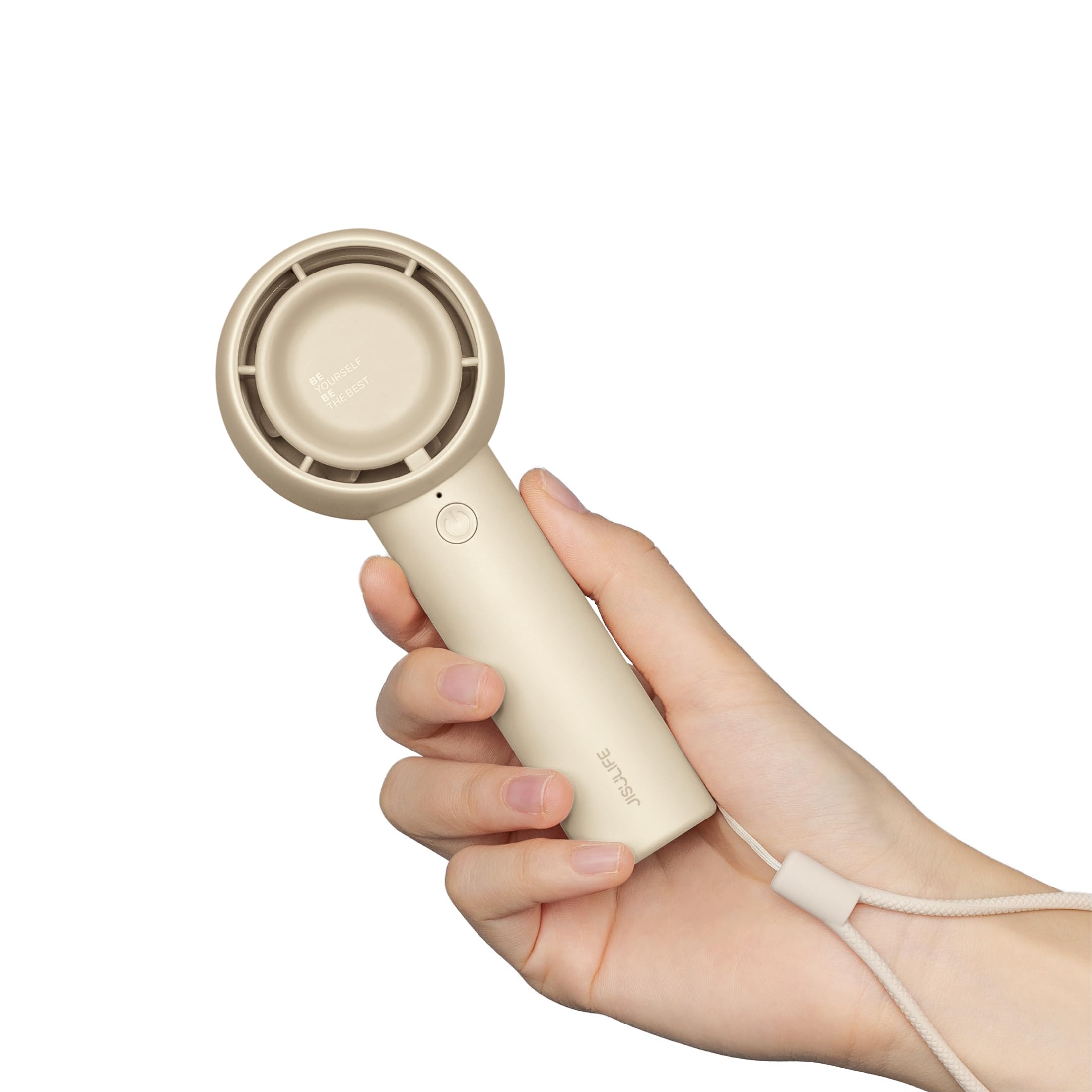
Figure 3.1: JISULIFE FA42 Mini Portable Bladeless Handheld Fan (Brown)

Figure 3.2: Illustration of the fan's gathering air duct technology, demonstrating a larger air outlet area and longer blowing distance.

Gambar 3.3: Dalaman view highlighting the high-performance brushless motor and curved turbo fan designed for reduced noise and comfortable airflow.
4. Persediaan
4.1. Membuka Kotak dan Caj Permulaan
Upon unboxing, ensure all components are present: the fan unit, USB-C charging cable, and lanyard.

Figure 4.1: The JISULIFE FA42 fan, its packaging, USB-C charging cable, and instruction manual.
Before first use, fully charge the fan. Connect the provided USB-C cable to the charging port on the fan and the other end to a USB power adapter (not included) or a computer's USB port. The indicator light will show charging status.

Figure 4.2: The fan's Type-C charging port in use. A full charge takes approximately 4 hours and provides up to 16 hours of cooling time.
4.2. Memasang Tali Gantung
Thread the lanyard through the designated loop at the base of the fan's handle. This allows for convenient carrying on your wrist or attaching to a bag.
5. Arahan Operasi
5.1. Hidup/Mati dan Pelarasan Kelajuan
The fan features a single power button for all operations:
- Untuk Menghidupkan: Press the power button once. The fan will start at Speed 1.
- Untuk Melaraskan Kelajuan: Press the power button repeatedly to cycle through the 5 available speed settings (Speed 1 to Speed 5).
- Untuk Mematikan: After cycling through Speed 5, pressing the button again will turn the fan off. Alternatively, press and hold the power button for 2 seconds to turn off the fan from any speed setting.

Figure 5.1: The fan offers 5 adjustable speeds, ranging from 5000r/min (Low) to 9000r/min (High).
5.2. Battery Life Indication
The indicator light near the power button also provides battery status. Refer to the product's packaging or official website for detailed light patterns (e.g., solid light for full charge, blinking for low battery).

Figure 5.2: The 4500mAh battery provides up to 16 hours of 'Sleep Wind', 8.5 hours of 'Cold Wind', and 5 hours of 'Strong Wind'.
5.3. Senario Penggunaan
The compact and powerful design makes this fan suitable for various activities:
- Aktiviti Luar: Travel, camping, commuting, shopping, music festivals.
- Penggunaan Dalaman: Office, dorm room, makeup application, quick-drying lashes.

Figure 5.3: The fan is versatile for use while walking, in the office, during makeup application, and while camping.
Video 5.1: An official product video from JISULIFE-NA demonstrating the features and use of the Mini Handheld Turbo Fan.
6. Penyelenggaraan
6.1. Pembersihan
To clean the fan, gently wipe the exterior with a soft, dry cloth. Do not use abrasive cleaners, solvents, or immerse the fan in water. Ensure the fan is turned off before cleaning.
6.2. Penyimpanan
Apabila tidak digunakan untuk tempoh yang lama, simpan kipas di tempat yang sejuk dan kering, jauh daripada cahaya matahari langsung dan suhu yang melampau. Adalah disyorkan untuk mengecas kipas setiap 3 bulan untuk mengekalkan kesihatan bateri.
7. Penyelesaian masalah
| Masalah | Kemungkinan Punca | Penyelesaian |
|---|---|---|
| Kipas tidak dihidupkan | Bateri lemah; Butang kuasa tidak ditekan dengan betul | Charge the fan; Press and hold the power button for 2 seconds to ensure it powers on. |
| Aliran udara yang lemah | Low battery; Fan speed set too low | Charge the fan; Increase the fan speed by pressing the power button. |
| Kipas tidak dicas | Faulty cable/adapter; Loose connection | Try a different USB-C cable or power adapter; Ensure the cable is securely connected to both the fan and the power source. |
| Bunyi yang tidak biasa | Obstruction in air duct; Internal issue | Turn off the fan and check for any obstructions in the air inlet/outlet. If the issue persists, contact customer support. |
8. Spesifikasi
| Ciri | Perincian |
|---|---|
| Jenama | JISULIFE |
| Nama Model | FA42 |
| warna | coklat |
| Sumber Kuasa | Dikuasakan Bateri (termasuk 1 bateri Lithium Ion) |
| Kapasiti Bateri | 4500mAh |
| Max Cooling Time | Sehingga 16 jam |
| Masa Mengecas | lebih kurang 4 jam |
| Jenis Penyambung Kuasa Utama | USB-C |
| Bilangan Tahap Kuasa | 5 |
| Dimensi Produk | 1.85"D x 2.44"W x 5.98"H |
| Berat Barang | 148 Gram (5.2 auns) |
| Tahap Kebisingan | 50 Desibel |
| Ciri Khas | Bladeless, Compact, Portable |
9. Waranti dan Sokongan
For warranty information and customer support, please refer to the warranty card included in your product packaging or visit the official JISULIFE website. You can also contact JISULIFE customer service through their Kedai Amazon.