
1. Produk Lebihview
The ENSTER 2K Dual-Lens WiFi PTZ Outdoor Security Camera is designed for comprehensive outdoor surveillance. It features a dual-lens system, 8X hybrid zoom, automatic tracking, human detection, and color night vision to provide detailed monitoring of your property. The camera supports two-way audio and customizable alerts, ensuring effective communication and timely notifications.

Figure 1: ENSTER 2K Dual-Lens WiFi PTZ Outdoor Security Camera
Ciri-ciri Utama:
- Sistem Dwi-Kanta: Equipped with a 12mm telephoto lens for close-up details and a 2.8mm wide-angle lens for panoramic views.
- Resolusi 2K 4MP: Delivers clear and sharp video footage.
- 8X Hybrid Zoom: Combines 4X optical zoom and 4X digital zoom for enhanced detail.
- Sorot 355° & Condong 95°: Provides extensive coverage with remote control.
- Penjejakan Automatik: Automatically follows detected human activity.
- Pengesanan Manusia: Intelligent detection to minimize false alarms.
- Penglihatan Malam Warna: Features 4 infrared LEDs and 4 white lights for clear night vision up to 40 meters, with three available modes.
- Audio Dua hala: Membolehkan komunikasi masa nyata melalui kamera.
- Customizable Voice Alerts: Record personalized messages to deter intruders.
- IP66 Kalis Cuaca: Direka untuk kegunaan luar dalam pelbagai keadaan cuaca.
- Pilihan Storan: Menyokong kad Mikro SD (sehingga 128GB, tidak termasuk) dan storan awan.
- Ketersambungan: 2.4GHz Wi-Fi and Ethernet cable support.
2. Kandungan Pakej
Before installation, please verify that all items listed below are included in your package. If any items are missing or damaged, please contact customer support.
Video 1: Unboxing and Package Contents
Item Termasuk:
- ENSTER 2K Dual-Lens WiFi PTZ Outdoor Security Camera
- Penyesuai Kuasa
- Skru dan Penambat Pemasangan
- Manual Pengguna
- Waterproof Kit for Cable Connections
- Pelekat Amaran
3. Panduan Persediaan
3.1. Memasukkan Kad Mikro SD
- Locate the Micro SD card slot on the camera. This is typically covered by a rubber plug for waterproofing.
- Carefully open the rubber plug.
- Insert a Micro SD card (up to 128GB, not included) into the slot with the contacts facing down until it clicks into place.
- Close the rubber plug securely to maintain waterproofing.
3.2. Menghidupkan Kamera
- Sambungkan penyesuai kuasa ke port input kuasa kamera.
- Palamkan penyesuai kuasa ke dalam salur keluar kuasa yang sesuai.
- The camera will perform a self-check, indicated by movement and a voice prompt stating "System starting up."
3.3. App Installation and Initial Configuration
- Download the recommended mobile application (e.g., iCSee) from your device's app store (App Store for iOS, Google Play Store for Android).
- Buka aplikasi dan buat akaun atau log masuk.
- Ketik ikon "+" untuk menambah peranti baharu.
- Select the appropriate connection method (WiFi Camera or 4G Camera, depending on your model).
- Follow the on-screen instructions to connect the camera to your network.
Video 2: SD Card Insertion, Power On, and WiFi Setup
3.4. WiFi Connection (Wireless Setup)
- Ensure your mobile device's WiFi and Bluetooth are enabled.
- In the app, select "WiFi Camera" and confirm the camera is powered on and ready for configuration.
- Masukkan nama dan kata laluan rangkaian WiFi 2.4GHz anda.
- The app will display a QR code. Position your phone approximately 10-20 cm (4-8 inches) in front of the camera lens.
- The camera will scan the QR code and announce "Connecting." Once connected, it will confirm "Connect to router successfully."
- Set a password for your camera and name the device (e.g., "Living Room", "Balcony").
3.5. Network Cable Connection (Wired Setup)
- Sambungkan kabel Ethernet dari penghala anda ke port Ethernet kamera.
- Pastikan kamera dihidupkan.
- In the app, select "Add Device" and choose the option to scan a QR code.
- Scan the QR code located on the camera's label.
- The camera will automatically connect to the network via the Ethernet cable.
- Set a password for your camera and name the device.
Video 3: Network Cable Setup
4. Arahan Operasi
4.1. Hidup View and Dual Screen Mode
Access the live feed from your camera through the mobile application. The dual-lens system allows for a unique dual-screen mode, displaying both a panoramic view and a zoomed-in close-up simultaneously on one screen.
Figure 2: Dual Screen Mode displaying panoramic and close-up views.
Video 4: PTZ Control and Dual Screen Mode
4.2. PTZ Control and Zoom
Use the directional controls within the app to pan (355°) and tilt (95°) the camera. The 8X hybrid zoom allows you to digitally zoom in on specific areas for more detail. The dual-lens design provides both a wide overview and a magnified view.

Figure 3: Camera's pan and tilt capabilities with 8X hybrid zoom.

Figure 4: Demonstrating the 8X hybrid zoom capability.
4.3. Automatic Tracking and Human Detection
When human activity is detected, the camera can automatically track the subject. Once the subject leaves the area, the camera returns to its original monitoring position. This feature helps focus on relevant events and reduces unnecessary recordings.

Figure 5: Auto tracking and human detection in action.

Figure 6: Automatic tracking of moving subjects.
4.4. Mod Penglihatan Malam
The camera offers three night vision modes: full color, infrared, and dual-light alert. You can switch between these modes in the app to suit your surveillance needs, providing clear visibility even in low-light conditions.

Figure 7: Different night vision modes: Full Color, Infrared, and Dual-Light Alert.
4.5. Two-Way Audio and Customizable Alerts
Engage in two-way conversations through the camera using the app. You can also set up customized voice alerts to play specific messages when motion is detected, such as "You have entered the 24-hour video surveillance area" or "Please leave now."
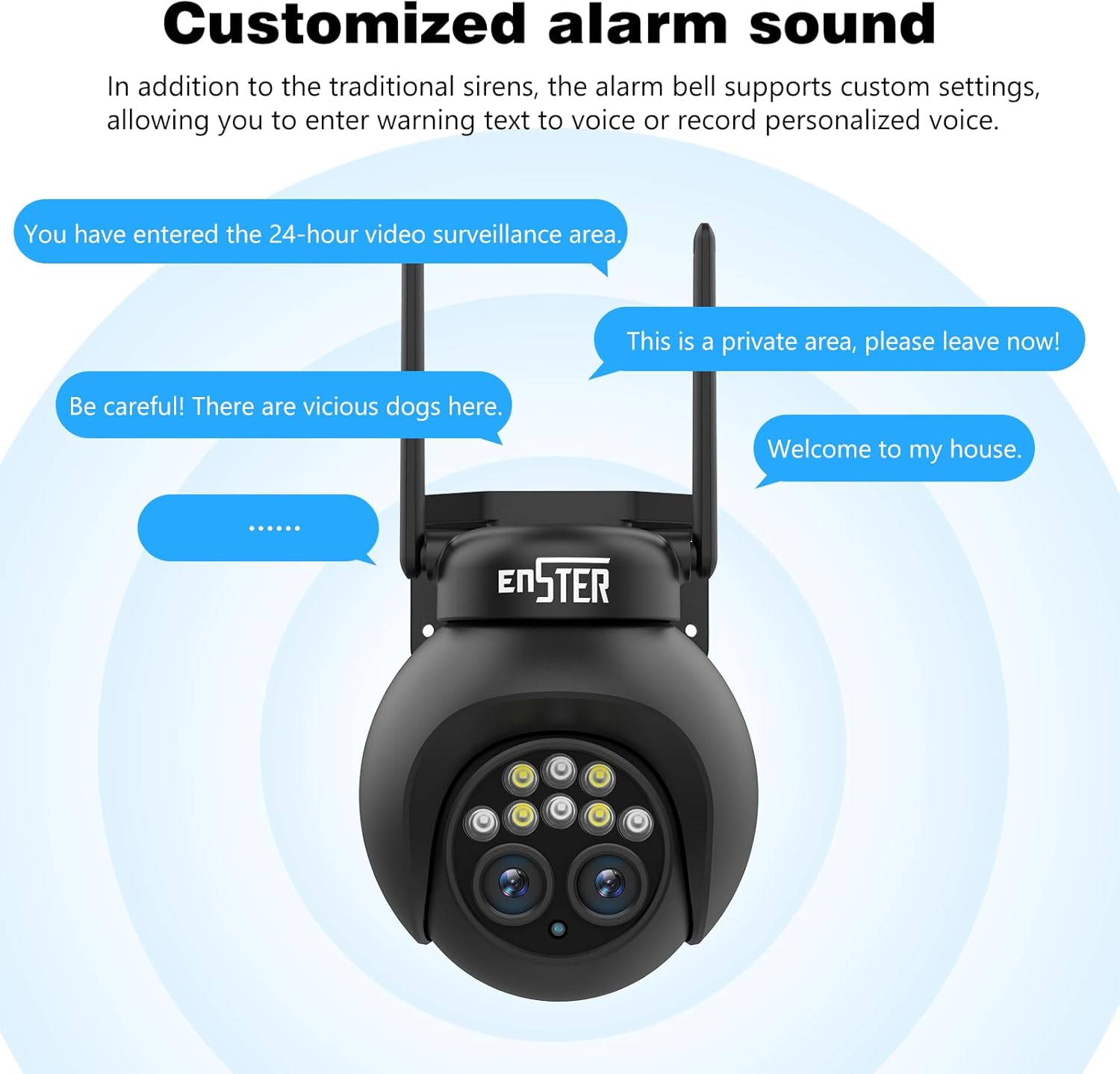
Figure 8: Customizable alarm sound feature.

Figure 9: Humanoid detection triggering real-time alarms and notifications.
4.6. Rakaman dan Penyimpanan
The camera supports 24/7 continuous recording or event-triggered recording to a Micro SD card (up to 128GB) or cloud storage. Review dirakam footage directly from the mobile application.

Figure 10: 24/7 recording capability with app interface.

Figure 11: Continuous recording and app interface for playback.

Figure 12: Micro SD card slot and cloud storage options.
4.7. Pelbagai Pengguna Viewing
Share live streams and recorded footage with family members or trusted individuals through the mobile application, allowing multiple users to monitor the camera simultaneously.

Figure 13: Multiple users viewing camera feeds on their devices.
5. Penyelenggaraan
5.1. Membersihkan Kamera
- Bersihkan lensa kamera dan perumah dengan kerap dengan lembut, damp kain untuk menghilangkan habuk dan kotoran.
- Avoid using harsh chemicals or abrasive materials that could scratch the lens or damage the camera's finish.
- Ensure the rubber plugs covering ports are securely closed after any maintenance to maintain waterproofing.
5.2. Kemas Kini Perisian Tegar
- Check the mobile application periodically for available firmware updates.
- Mengemas kini perisian tegar memastikan prestasi, keselamatan dan akses kepada ciri baharu yang optimum.
- Follow the in-app instructions carefully during the update process and ensure the camera remains powered on.
5.3. Pengurusan Storan
- Kad SD mikro: Kerap membuat sandaran foo pentingtage from the Micro SD card to another storage device. Format the SD card periodically to maintain performance.
- Storan Awan: Manage your cloud storage subscription and review foo disimpantage melalui aplikasi.
6. Penyelesaian masalah
Isu dan Penyelesaian Biasa:
- Kamera tidak bersambung ke WiFi:
- Pastikan rangkaian WiFi anda ialah 2.4GHz. Kamera ini tidak menyokong WiFi 5GHz.
- Sahkan kata laluan WiFi adalah betul.
- Place the camera closer to the WiFi router.
- Reset the camera to factory settings and try connecting again.
- Kualiti imej yang lemah:
- Bersihkan lensa kamera.
- Pastikan tiada halangan dalam bidang kamera view.
- Semak kelajuan sambungan internet anda.
- False alarms or no alerts:
- Laraskan tetapan kepekaan pengesanan gerakan dalam aplikasi.
- Configure detection zones to focus on specific areas.
- Ensure human detection is enabled if you only want alerts for people.
- Kamera luar talian:
- Check the power connection to the camera.
- Verify your WiFi or Ethernet connection is stable.
- Mulakan semula kamera dan penghala anda.
6.1. Menetapkan semula Kamera
To reset the camera to factory settings, locate the reset button (often a small pinhole button) on the camera's cable or body. Press and hold this button for approximately 5-10 seconds until you hear a voice prompt indicating a reset. The camera will then restart and be ready for re-configuration.
7. Spesifikasi
| Ciri | Spesifikasi |
|---|---|
| Resolusi Rakaman | 2K (4MP effective video resolution) |
| warna | Dual Objectif (Dual Lens) |
| Bilangan Item | 1 |
| Teknologi Komunikasi Tanpa Wayar | Wi-Fi (2.4GHz) |
| Faktor Bentuk | Bullet, Box |
| Viewsudut | 352 Darjah (Kuali), 95 Darjah (Sendeng) |
| Jenis Pemasangan | Screw-in (wall_mount/ceiling_mount) |
| Julat Penglihatan Malam | 40 Meter |
| Kadar Bingkai | 25fps |
| bahan | Akrilonitril Butadiena Stirena (ABS) |
| Voltage | 12 Volt |
| Ciri Khas | Audio Dua Hala |
| Penggunaan Produk yang Disyorkan | Pengawasan |
| Teknologi Ketersambungan | Tanpa wayar |
| Penggunaan Dalaman/Luar | Luar |
| Peranti Serasi | Telefon pintar |
| Sumber Kuasa | Kabel Elektrik |
| Protokol Ketersambungan | Wi-Fi |
| Jenis Pengawal | Android |
8. Waranti dan Sokongan
8.1. Jaminan Produk
The manufacturer provides a one-year warranty for this product from the date of purchase. This warranty covers defects in materials and workmanship under normal use. Please retain your proof of purchase for warranty claims.
8.2. Sokongan Pelanggan
For any questions, technical assistance, or warranty claims, please contact our customer support team. We are committed to providing satisfactory solutions.
- Sokongan E-mel: euro@enster.net
- Sokongan dalam talian: Available 7x24 hours. You can also reach out through your Amazon buyer account by finding your order and clicking on "Get help."