
iGear iG-1012
Manual Pengguna Kabel Pengecasan iGear Duo
Model: iG-1012 | Brand: iGear
Produk Selesaiview
The iGear Duo Charging Cable is a versatile 2-in-1 solution designed for efficient charging and data synchronization across a wide range of devices. It features both a Type-C to Type-C connection and a Type-C to iPhone-pin connection, making it compatible with various smartphones, laptops, power banks, and other USB-C and Lightning-enabled devices.
Ciri-ciri utama termasuk:
- Kesambungan Dwi: Offers both Type-C to Type-C and Type-C to iPhone-pin connections in a single cable.
- Pengecasan Cepat: Supports 65W Power Delivery (PD) for Type-C to Type-C connections and 20W fast charging for Type-C to iPhone-pin connections.
- Ketahanan Tinggi: Constructed with a durable nylon braided exterior designed to resist breakage and withstand over 50,000 bends.
- Keserasian Luas: Compatible with a broad range of devices including Android phones, iPhones, laptops, power banks, and speakers.
- Data Sync Capability: Enables high-speed data transfer up to 480Mbps.

Image: The iGear Duo Charging Cable showcasing its Type-C and detachable Lightning connectors, highlighting its dual functionality.
Panduan Persediaan
The iGear Duo Charging Cable is designed for plug-and-play simplicity. No complex setup or software installation is required.
- Identify Device Port: Determine whether your device requires a Type-C connection or an iPhone-pin (Lightning) connection.
- Pilih Penyambung:
- For Type-C devices: Use the integrated Type-C connector.
- For iPhone-pin (Lightning) devices: Attach the Lightning adapter to the Type-C connector. The Lightning adapter is designed to securely fit onto the Type-C end of the cable.
- Connect to Power Source/Device: Plug the appropriate connector into your device (phone, laptop, etc.) and the other Type-C end into a compatible power adapter (wall charger, power bank) or another device for data transfer.
Arahan Operasi
Mengecas Peranti
The iGear Duo Charging Cable supports fast charging for both Type-C and iPhone-pin devices. Ensure your power adapter supports Power Delivery (PD) for optimal charging speeds.
- For Type-C Devices: Connect the Type-C end of the cable to your device and the other Type-C end to a 65W PD compatible power adapter.
- For iPhone-pin Devices: Attach the Lightning adapter to the cable's Type-C end, then connect it to your iPhone-pin device. Plug the other Type-C end into a 20W PD compatible power adapter.
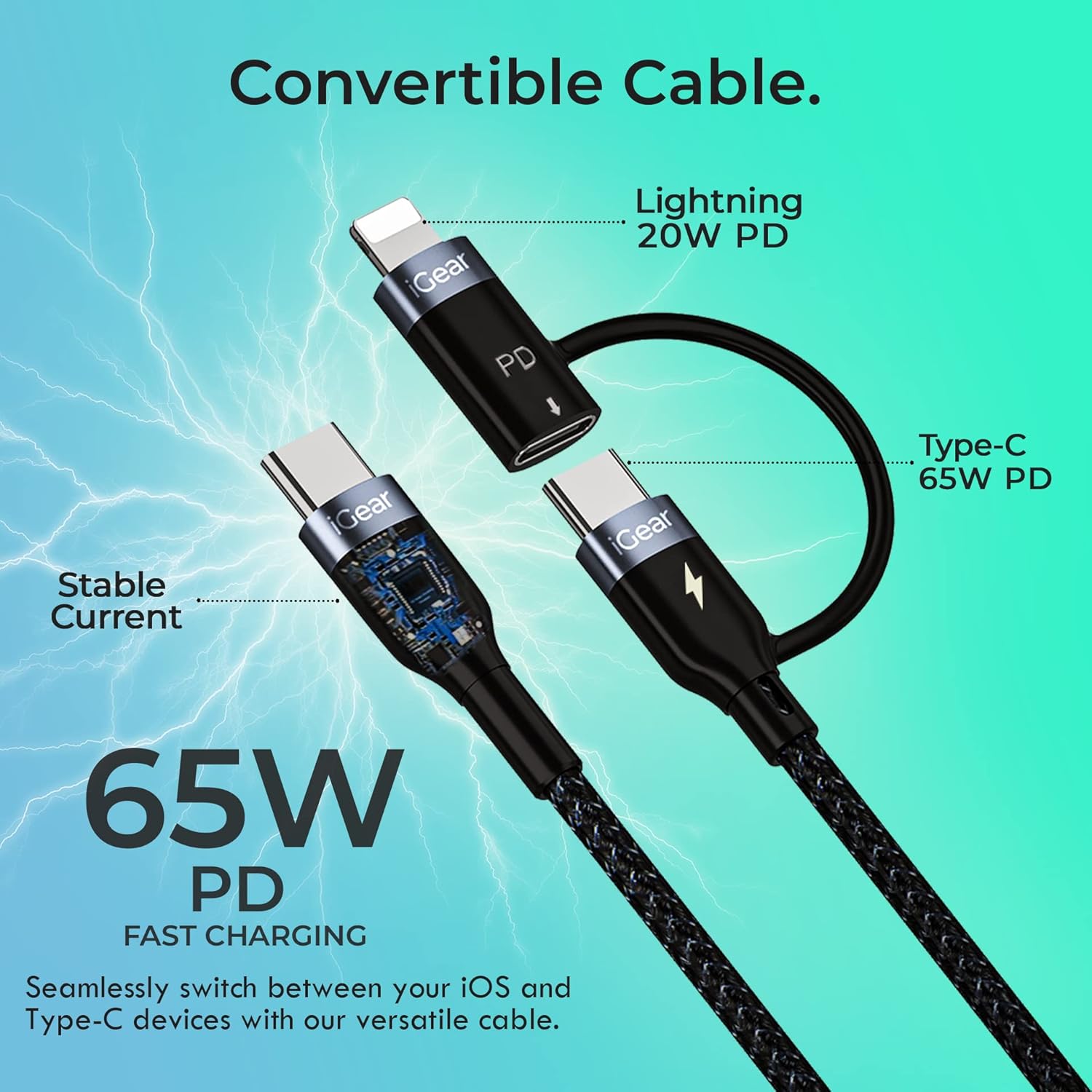
Image: A visual representation of the cable's convertible design, illustrating how the Lightning adapter connects to the Type-C end, and specifying 20W PD for Lightning and 65W PD for Type-C.
Pemindahan Data
The cable facilitates high-speed data transfer between compatible devices, such as a smartphone and a laptop.
- Sambungkan Peranti: Plug one end of the cable into your device (e.g., smartphone) and the other end into the data port of another device (e.g., laptop).
- Mulakan Pemindahan: Follow the prompts on your devices to allow data access and begin transferring files. The cable supports data transfer speeds of up to 480Mbps.

Image: A hand holding a smartphone connected via the iGear Duo Cable, with text overlays indicating "65W Fast Charging" and "Upto 480Mbps Data Transfer," demonstrating its dual capabilities.
Penjagaan dan Penyelenggaraan
Proper care will extend the life of your iGear Duo Charging Cable and ensure optimal performance.
- Elakkan lenturan yang melampau: While the cable is designed to be durable and withstand many bends, avoid sharp or excessive bending, especially near the connectors, to prevent internal wire damage.
- Simpan dengan Betul: When not in use, coil the cable loosely. Avoid tightly wrapping or knotting the cable, which can stress the internal wires and outer braiding.
- Jaga kebersihan: Use a soft, dry cloth to wipe down the cable and connectors. Avoid using harsh chemicals or abrasive materials.
- Lindungi daripada Unsur: Jauhkan kabel daripada suhu ekstrem, cahaya matahari langsung dan kelembapan.
- Kendalikan Penyambung dengan Berhati-hati: Always pull from the connector head, not the cable itself, when unplugging from a device or power source.

Imej: Keratan rentas terperinci view of the cable's construction, highlighting its protective layers: rubber coating for insulation, copper wire for power, aluminum shield for protection, and a nylon braided jacket for durability.
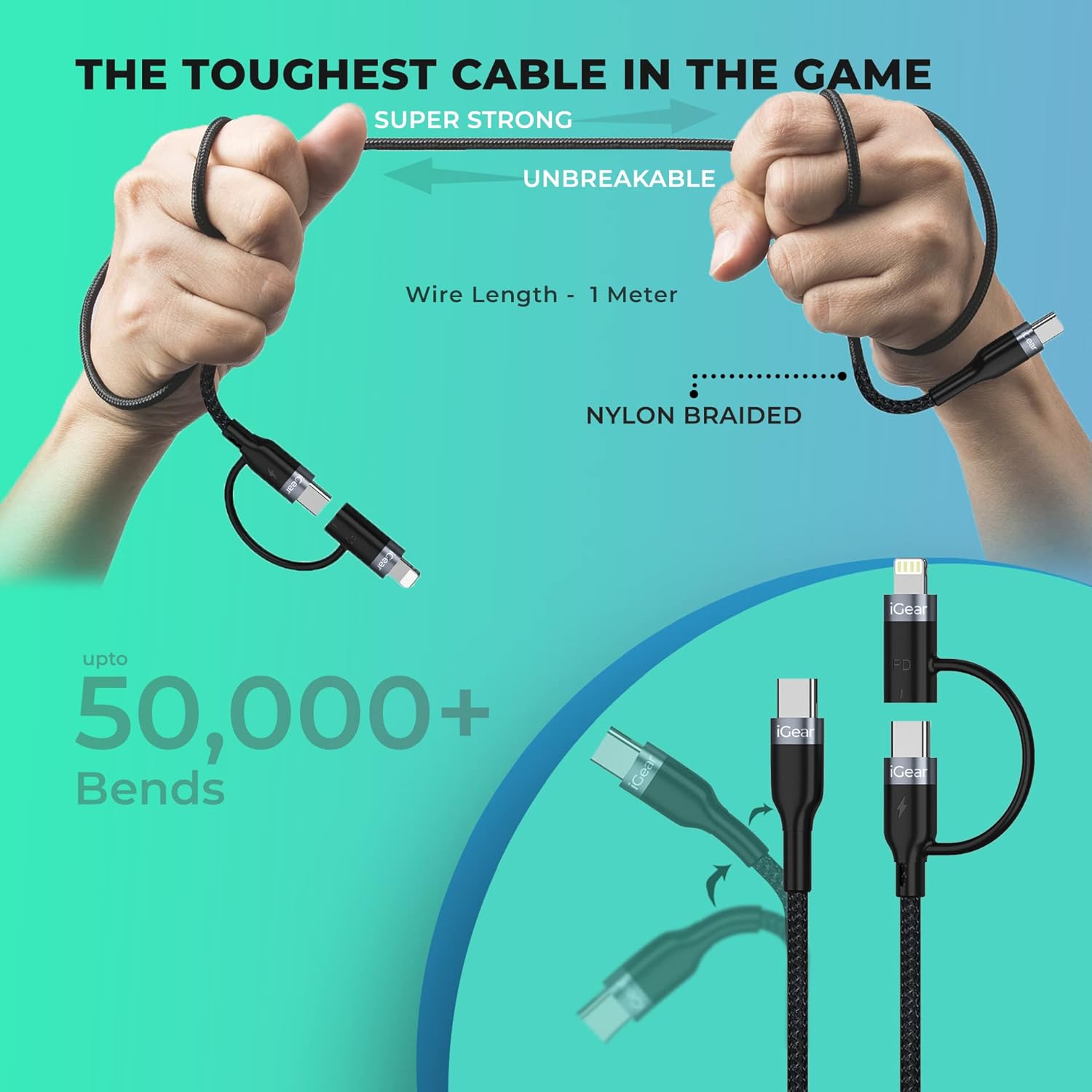
Image: A visual representation of the cable's robust design, showing it being bent and twisted, emphasizing its "Super Strong" and "Unbreakable" nylon braided construction, capable of withstanding over 50,000 bends.
Menyelesaikan masalah
If you encounter issues with your iGear Duo Charging Cable, refer to the following common problems and solutions:
| Masalah | Kemungkinan Punca | Penyelesaian |
|---|---|---|
| Peranti tidak dicas. | Loose connection, incompatible power adapter, dirty port, or damaged cable. |
|
| Kelajuan pengecasan perlahan. | Power adapter not supporting PD, device drawing less power, or background apps consuming power. |
|
| Pemindahan data tidak berfungsi. | Incorrect connection, device settings, or driver issues. |
|
Spesifikasi Teknikal
| Ciri | Spesifikasi |
|---|---|
| Jenama | iGear |
| Nombor Model | iG-1012 |
| Jenis Penyambung | USB Type C, Lightning (via adapter) |
| Jenis Kabel | USB |
| Power Delivery (Type-C to Type-C) | Up to 65W PD |
| Power Delivery (Type-C to iPhone-pin) | Up to 20W PD |
| Kelajuan Pemindahan Data | Sehingga 480Mbps |
| Peranti Serasi | Headphone, Laptop, Power Bank, Smartphone, Speaker (Android & iPhone) |
| Ciri Khas | Braided, Data Transfer, Durable |
| warna | Hitam |
| Bahan Luar | nilon |
| Berat Barang | 40 g |
| Dimensi Pakej | 16.2 x 8.3 x 2.3 cm |
| Komponen yang Disertakan | 1 kabel pengecasan |
Waranti dan Sokongan
Maklumat Waranti
The iGear Duo Charging Cable comes with a Waranti 1 Tahun dari tarikh pembelian. Waranti ini meliputi kecacatan pembuatan dan isu-isu yang timbul daripada penggunaan biasa. Ia tidak meliputi kerosakan yang disebabkan oleh salah guna, kemalangan, pengubahsuaian tanpa kebenaran atau bencana alam.
Sila simpan resit pembelian anda sebagai bukti pembelian untuk tuntutan waranti.
Sokongan Pelanggan
For any product-related inquiries, technical assistance, or warranty claims, please contact iGear customer support:
- Pengeluar: IGEAR TECH PRIVATE LIMITED
- Alamat: Goregaon East, Mumbai 400063
- Nombor Perhubungan: 9327667193
You may also visit the official iGear store on Amazon for more information and product updates: iGear Amazon Store
Ask a question about this manual
Ask about setup, troubleshooting, compatibility, parts, safety, or missing instructions. Manuals+ will review the question and use this page’s manual context to help answer it.