
1. Pengenalan
Thank you for choosing the Chuboor Handheld Vacuum P03. This compact and powerful cordless vacuum cleaner is designed for versatile use in your car, home, or office. With its strong suction, lightweight design, and multiple attachments, it makes quick clean-ups effortless. Please read this manual carefully before use to ensure optimal performance and longevity of your device.

Figure 1: Chuboor Handheld Vacuum P03 highlighting its cordless, rechargeable, and lasting features including 30 min working time, 4*2000mAh battery, 150ml capacity, <75db low noise, 3 hours charging time, and 1.76lb lightweight design.
2. Produk Lebihview & Apa yang ada di dalam Kotak
The Chuboor Handheld Vacuum P03 comes with a main unit and several accessories to enhance your cleaning experience. Ensure all components are present upon unboxing.
Kandungan Pakej:
- Chuboor Handheld Vacuum Main Unit
- Muncung Berus
- Nozel Celah
- Blowing Hose
- Kabel Pengecas USB
- Washable Filter (Pre-installed + Spare)
- Manual Pengguna

Rajah 2: Meletup view of the vacuum, illustrating the 150ml dustbin, card position point for opening, 3-layer filter (stainless steel, HEPA, sponge), power indicator, and one-touch key.

Figure 3: Close-up of the 3-layer filter system, including stainless steel, HEPA, and sponge filters.
3. Persediaan
3.1 Charging the Vacuum
Before first use, fully charge the vacuum. Connect the provided USB charging cable to the charging port on the vacuum and a suitable USB power source. The charging indicator lights will show the charging status. A full charge typically takes about 4 hours.

Figure 4: The Chuboor Handheld Vacuum P03 being charged via its USB port.
3.2 Memasang Aksesori
To attach a nozzle, align it with the suction port and push firmly until it clicks into place. To remove, gently pull the nozzle away from the main unit.
- muncung berus: Ideal for cleaning irregular surfaces, car interiors, and pet hair.
- Muncung Crevice: Perfect for reaching tight spaces, corners, and gaps.
- Blowing Hose: Connect to the exhaust port for blowing dust out of crevices or inflating small items.
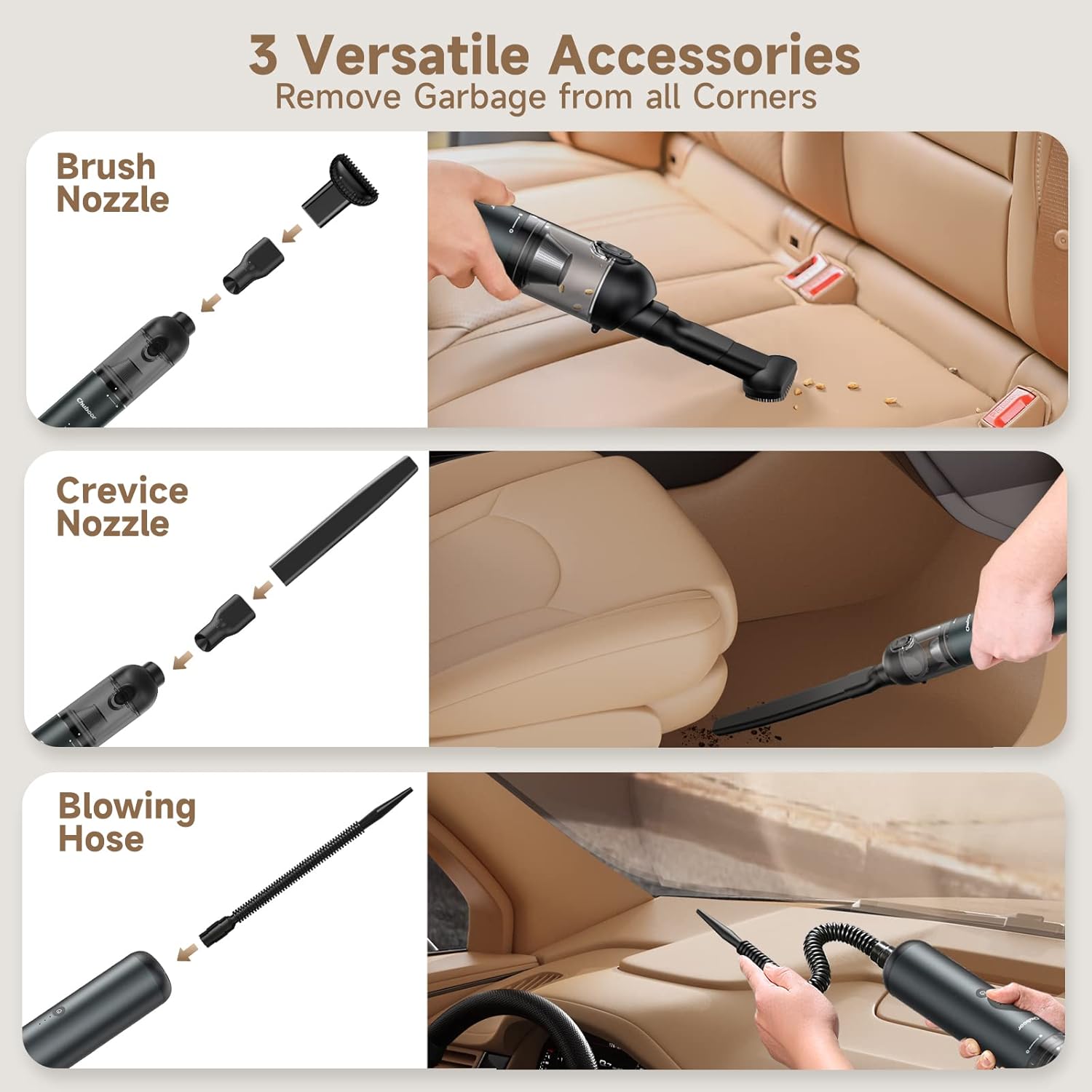
Figure 5: The Chuboor Handheld Vacuum P03 demonstrating the use of brush nozzle, crevice nozzle, and blowing hose for various cleaning scenarios.
4. Arahan Operasi
4.1 Kuasa Hidup/Mati dan Mod Sedutan
- Press the power button once to turn on the vacuum in Standard Mode (10,000Pa suction).
- Press the power button a second time to switch to Powerful Mode (16,000Pa suction).
- Tekan butang kuasa untuk kali ketiga untuk mematikan vakum.

Gambar 6: Dalaman view highlighting the 120W brushless motor and 4-pack long-lasting battery, supporting 2-mode powerful suction (10,000Pa for 30min, 16,000Pa for 15min).
4.2 Fungsi Cahaya
The vacuum also features a built-in light for illuminating dark areas during cleaning. Press the light button to cycle through low, high, and flashing red modes, then off.
4.3 Vacuuming and Blowing
Use the appropriate nozzle for your cleaning task. For vacuuming, attach the desired nozzle to the suction port. For blowing, attach the blowing hose to the exhaust port at the rear of the vacuum.

Figure 7: The vacuum demonstrating 16000Pa high power suction for dust, cat litter, hair, leaf, sand, food residue, and confetti.

Figure 8: Wide application of the vacuum on carpet, hardboard, stairs, shutters, car interior, and office desk.
5. Penyelenggaraan
5.1 Mengosongkan Tong Sampah
To maintain optimal suction, empty the dustbin regularly, especially when it appears full. The one-click design ensures easy and hygienic disposal of debris.
- Pastikan vakum dimatikan.
- Locate the dustbin release button (often near the suction port).
- Press the button to open the dustbin cover.
- Empty the contents into a trash receptacle.

Figure 9: The one-click design allows for easy emptying of the dustbin without getting your hands dirty.
5.2 Membersihkan Penapis
The 3-layer filter system (stainless steel, HEPA, sponge) is washable and reusable. Regular cleaning is crucial for maintaining suction power.
- After emptying the dustbin, twist and pull out the filter assembly.
- Separate the stainless steel filter from the HEPA and sponge filters.
- Rinse all filter components under running water until clean.
- Allow all parts to air dry completely before reassembling and placing back into the vacuum. Do not use the vacuum with wet filters.
Video 1: Official Chuboor video demonstrating the features and cleaning process of the 16000PA Handheld Vacuum, including filter removal and washing.
6. Penyelesaian masalah
If you encounter any issues with your Chuboor Handheld Vacuum P03, please refer to the following common problems and solutions:
| Masalah | Kemungkinan Punca | Penyelesaian |
|---|---|---|
| No power/Doesn't turn on | Bateri habis | Cas vakum sepenuhnya (lebih kurang 4 jam). |
| sedutan lemah | Dustbin is full or filter is clogged | Empty the dustbin and clean the filter thoroughly. Ensure filters are dry before reassembly. |
| Attachments not fitting securely | Incorrect alignment or debris in connection | Pastikan lampiran dijajarkan dengan betul dan tolak dengan kuat sehingga ia berbunyi klik. Periksa sebarang halangan. |
| Hayat bateri pendek | Bateri tidak dicas sepenuhnya atau bateri yang semakin tua | Ensure the vacuum is fully charged. Battery life is approximately 30 minutes in standard mode. If issues persist, contact customer support. |
If the problem persists after trying these solutions, please contact Chuboor customer support for further assistance.
7. Spesifikasi
| Ciri | Perincian |
|---|---|
| Jenama | Chuboor |
| Nombor Model | P03 |
| Ciri Khas | Tanpa beg |
| Komponen yang Disertakan | Berus |
| Adakah Cordless? | ya |
| Kapasiti | 150 mililiter |
| Masa Mengecas | 4 Jam |
| Sedutan Maksimum | 16000Pa |
| Faktor Bentuk | pegang tangan |
| warna | Transparent (Dustbin), Grey (Body) |
| Penerangan Bateri | Lithium-Ion (4 Lithium Ion batteries included) |
| Tahap Kebisingan | 70 Desibel |
| Hayat Bateri | 30 minit |
| Jenis Pengawal | Butang Tekan |
| Kaedah Kawalan | Sentuh |
| Mudah alih | ya |
| Bilangan Tahap Kuasa | 2 |
| Penggunaan Dalaman/Luar | Dalaman |
| Dimensi Produk | 2 x 2 x 11 inci |
| Berat Barang | 1.32 paun |
| Sumber Kuasa | Dikuasakan Bateri |
| Voltage | 12 Volt |
8. Waranti dan Sokongan
Chuboor products are manufactured to the highest quality standards. For warranty information or technical support, please refer to the contact details provided on the product packaging or visit the official Chuboor webtapak. Simpan resit pembelian anda sebagai bukti pembelian.