
1. Pengenalan
This manual provides detailed instructions for the installation, operation, and maintenance of your LUBAIR Remote Controller. This accessory is designed to enhance the usability of compatible LUBAIR dehumidifiers (models DY113, DY120, and DY145) by allowing remote monitoring and adjustment of humidity and temperature settings.
2. Produk Lebihview
The LUBAIR Remote Controller features a large LCD display for clear visibility of current humidity and temperature. It provides intuitive controls for managing your dehumidifier's functions from a convenient location.

Imej 2.1: Depan view of the LUBAIR Remote Controller display, showing humidity and temperature readings, along with control buttons for Timer, Up, Down, and Power.
Ciri-ciri utama termasuk:
- Digital display for humidity and temperature.
- Buttons for Power On/Off, Timer, and Humidity Level Adjustment (Up/Down).
- Integrated sensitive sensor for accurate readings.
- Long cable (39.37 feet / 10 meters) for flexible placement.
3. Kandungan Pakej
Sila sahkan bahawa semua item yang disenaraikan di bawah disertakan dalam pakej anda:

Imej 3.1: All components included in the package: (1) Remote Controller, (2) Four mounting brackets, (3) 39.37ft (10m) connection cable, and (4) Twelve mounting screws.
- LUBAIR Remote Controller (1 unit)
- Connection Cable (39.37 feet / 10 meters)
- Pendakap Pemasangan (4 unit)
- Skru Pemasangan (12 unit)
4. Persediaan dan Pemasangan
Follow these steps to connect and install your remote controller:
4.1 Connecting the Remote Controller to the Dehumidifier
- Ensure your LUBAIR dehumidifier is powered off and unplugged.
- Locate the "Display panel" interface on your dehumidifier.
- Connect one end of the provided 39.37-foot (10-meter) cable to the remote controller.
- Connect the other end of the cable to the "Display panel" interface on your dehumidifier. Ensure a secure connection.
Video 4.1: This video demonstrates the process of connecting the remote controller cable to the LUBAIR dehumidifier and then mounting the controller to a wall. It also shows basic operation of the remote control.
4.2 Wall Mounting the Remote Controller
The remote controller can be conveniently mounted on a wall for easy access. Refer to the dimensions below for proper placement.
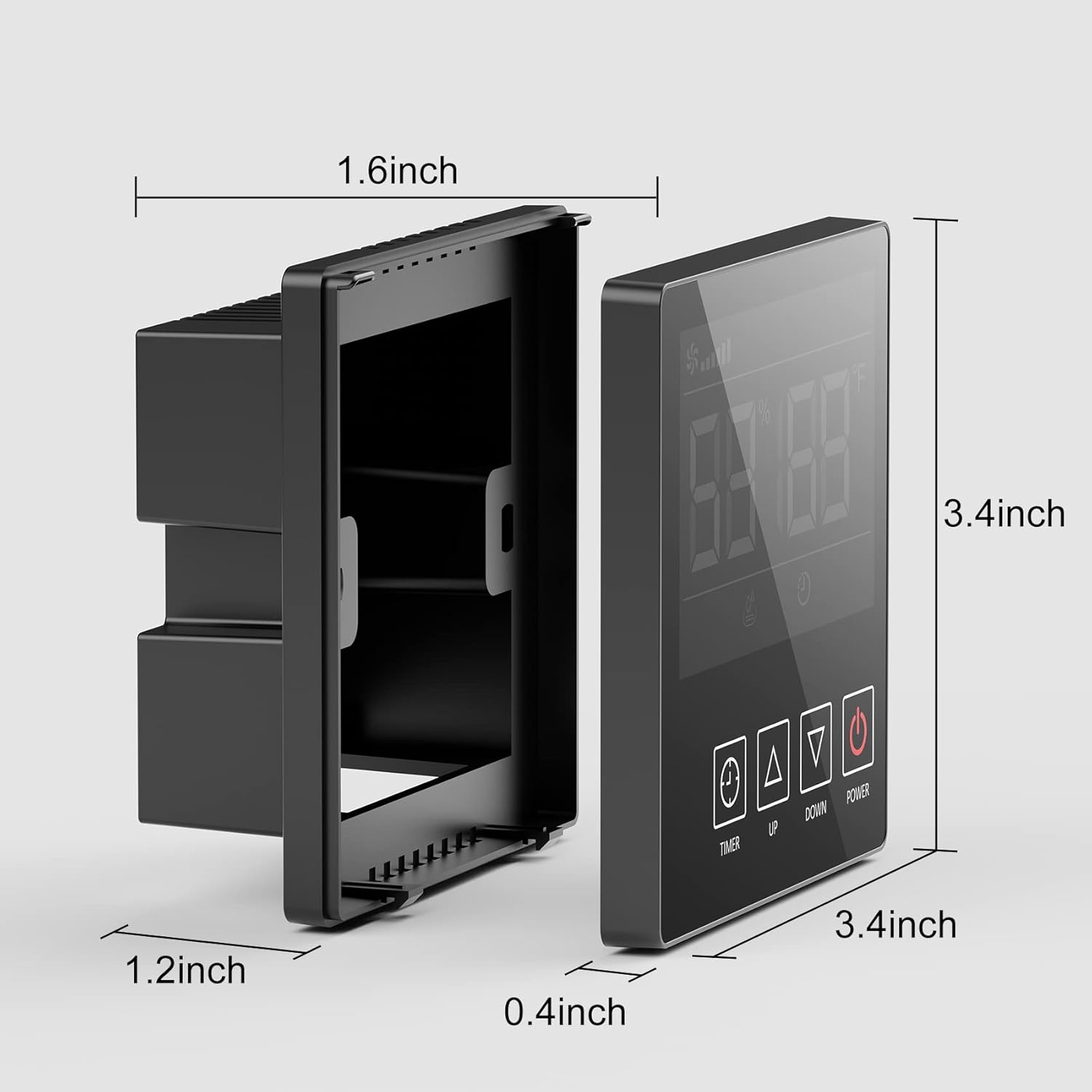
Imej 4.1: Detailed dimensions of the LUBAIR Remote Controller, showing its width (3.4 inches), height (3.4 inches), and depth (1.6 inches for the main unit, 0.4 inches for the display panel, and 1.2 inches for the recessed part).
- Choose a suitable location on a wall within the cable's reach (39.37 feet / 10 meters) from your dehumidifier.
- Use the provided mounting brackets and screws to secure the back plate of the remote controller to the wall. Note: Ensure the mounting surface is appropriate for drilling and securing screws.
- Once the back plate is securely mounted, carefully attach the remote controller display unit to the back plate.
5. Arahan Operasi
After successful installation, you can now operate your dehumidifier remotely. The remote controller mirrors the functions of your dehumidifier's main control panel.
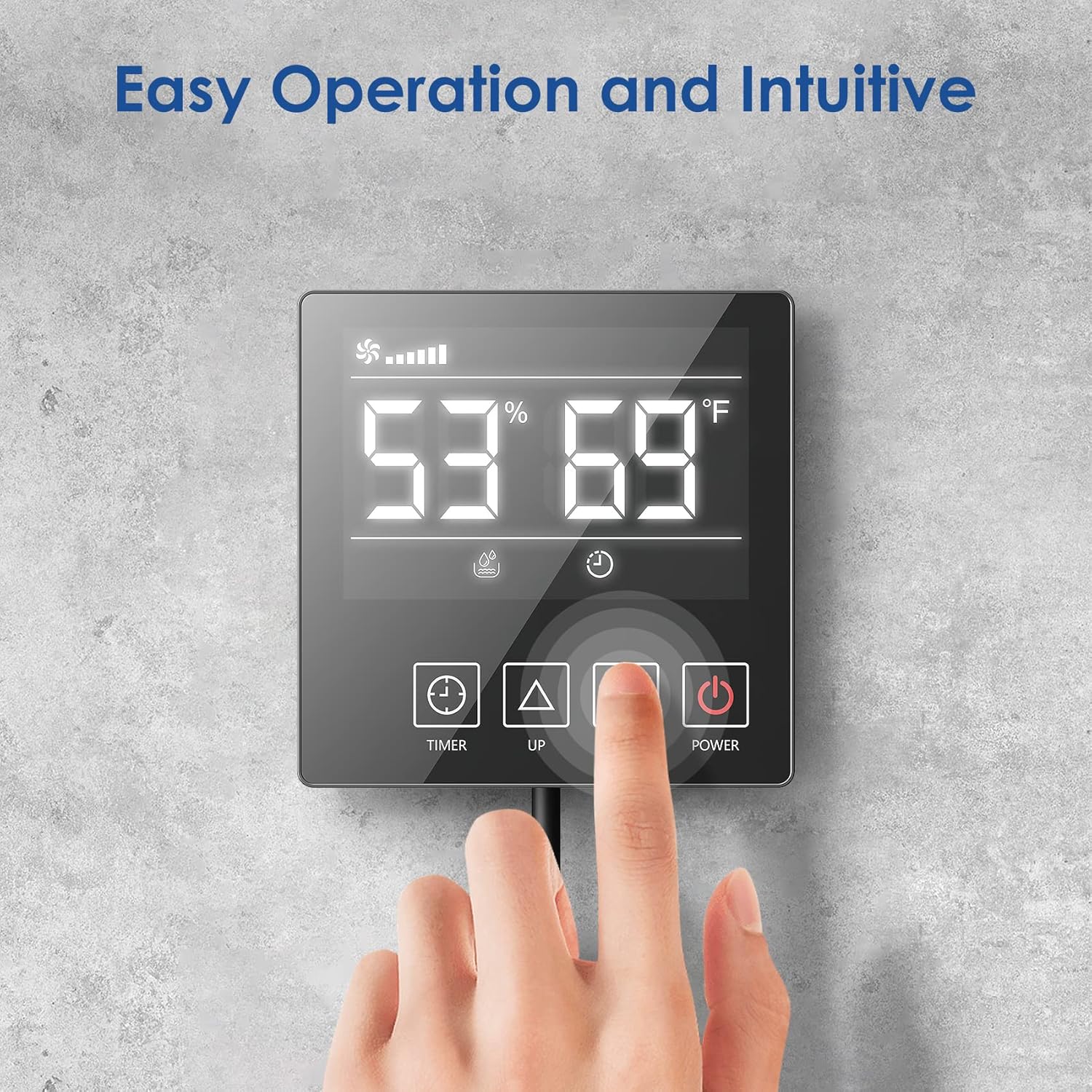
Imej 5.1: A hand pressing the 'Up' button on the LUBAIR Remote Controller, demonstrating easy and intuitive operation.
5.1 Fungsi Asas
- Hidupkan/Mati Kuasa: Tekan ke ⏻ (Power) button to turn the dehumidifier on or off.
- Adjust Humidity Level: Gunakan ▲ (Naik) dan ▼ (Down) buttons to set your desired humidity level. The display will show the target humidity.
- Fungsi Pemasa: Tekan ke ⏱ (Timer) button to set the operating duration (1-24 hours).
- Penukaran Mod: The controller allows switching between dehumidification and pipeline modes, as well as activating continuous mode, depending on your dehumidifier's capabilities.
- Penderia Suhu: The integrated sensor displays the current ambient temperature.
The remote controller is compatible with LUBAIR dehumidifier models DY113, DY120, and DY145.

Imej 5.2: The LUBAIR Remote Controller displayed alongside three different LUBAIR dehumidifier models (DY113, DY120, DY145), illustrating its compatibility.
6. Spesifikasi
| Ciri | Spesifikasi |
|---|---|
| Nombor Model | AIR-1 |
| Dimensi Produk | 3.5 x 14 x 11 inci (Note: Controller unit dimensions are 3.4 x 3.4 x 1.6 inches) |
| Berat Barang | 2.59 paun |
| Panjang Kabel | 39.37 kaki (10 meter) |
| Jenis Paparan | LCD |
| Compatible Dehumidifiers | LUBAIR DY113, DY120, DY145 |
7. Penyelenggaraan
To ensure optimal performance and longevity of your LUBAIR Remote Controller, follow these simple maintenance guidelines:
- Pembersihan: Lap paparan dan casing with a soft, dry cloth. Avoid using abrasive cleaners, solvents, or excessive moisture, as these can damage the unit.
- Penjagaan Kabel: Ensure the connection cable is not kinked, pinched, or exposed to extreme temperatures. Regularly check for any signs of wear or damage.
- Persekitaran: Keep the controller in a dry environment, away from direct sunlight and extreme temperature fluctuations.
8. Penyelesaian masalah
If you encounter issues with your remote controller, please refer to the following common troubleshooting steps:
- Pengawal tidak bertindak balas:
- Check if the dehumidifier is powered on and plugged in.
- Ensure the connection cable between the controller and the dehumidifier is securely attached at both ends.
- Verify there are no visible damages to the cable or the controller.
- Incorrect humidity/temperature readings:
- Ensure the controller's sensor is not obstructed or covered.
- Avoid placing the controller near heat sources, vents, or in direct sunlight, which can affect sensor accuracy.
- Dehumidifier not responding to commands:
- Confirm the dehumidifier model is compatible with this remote controller (DY113, DY120, DY145).
- Try unplugging the dehumidifier for a few minutes and then plugging it back in to reset.
If the problem persists after attempting these steps, please contact LUBAIR customer support for further assistance.
9. Waranti dan Sokongan
For warranty information, technical support, or any questions regarding your LUBAIR Remote Controller, please refer to the warranty card included with your product or visit the official LUBAIR website. The professional customer support team is always ready to help.
Anda juga boleh melawat LUBAIR Store on Amazon untuk mendapatkan lebih banyak maklumat produk dan sumber sokongan.