
pengenalan
Thank you for choosing the iGear Spectrum Mini Bluetooth Speaker. This portable speaker is designed to deliver a rich, immersive audio experience with dynamic lighting. Please read this manual carefully before use to ensure proper operation and to maximize your enjoyment of the product.
Apa yang ada dalam Kotak
- 1 x iGear Spectrum Mini Bluetooth Speaker
- 1 x Kabel AUX
- 1 x Kabel Pengecasan (Jenis-C)
- 1 x Kad Waranti
- 1 x Panduan Pengguna
Ciri-ciri Produk
The iGear Spectrum Mini Bluetooth Speaker offers a range of features designed for an enhanced audio and visual experience:
- 360-Degree Immersive Sound: Experience audio from all directions with powerful 15W output.
- Lampu LED Dinamik: Features 9 light modes and 180-degree pulsating lights to complement your music.
- Masa Main Dilanjutkan: Nikmati sehingga 12 jam main balik muzik berterusan dengan sekali cas.
- Teknologi True Wireless Stereo (TWS): Connect two Spectrum Mini speakers wirelessly for a stereo sound experience.
- Pelbagai Pilihan Kesambungan: Supports Bluetooth, AUX input, USB input, and TF card slot.
- Pengecasan Jenis-C Pantas: Convenient and quick charging via a Type-C port.
- Reka Bentuk Mudah Alih: Lightweight at 650 grams, making it easy to carry.

Image: The iGear Spectrum Mini Bluetooth Speaker showcasing its dynamic lighting effects.

Image: An illustration highlighting the 15W stereo speaker and extra bass feature.
Persediaan
1. Pengecasan Awal
Before first use, fully charge the speaker. Connect the provided Type-C charging cable to the speaker's charging port and the other end to a USB power adapter (not included). The charging indicator will show the charging status. A full charge takes approximately 2 hours.
2. Menghidupkan/Mematikan
Tekan dan tahan butang kuasa (⏻) selama 2-3 saat untuk menghidupkan atau mematikan pembesar suara. Gesaan bunyi akan menunjukkan status kuasa.
Operasi
1. Berpasangan Bluetooth
- Hidupkan pembesar suara. Ia akan memasuki mod gandingan Bluetooth secara automatik, ditunjukkan oleh lampu LED yang berkelip.
- Dayakan Bluetooth pada peranti anda (telefon pintar, tablet, dll.).
- Cari untuk "iGear Spectrum Mini" in your device's Bluetooth list and select it to connect.
- Sebaik sahaja disambungkan, lampu LED akan menjadi pekat dan anda akan mendengar bunyi pengesahan.
2. Kawalan Asas
- Main/Jeda: Tekan butang Main / Jeda (▶‖) sekali.
- Kelantangan: Tekan butang Naik Kelantangan (+).
- Perlahankan suara: Tekan butang Kurangkan Kelantangan (-).
- Lagu Seterusnya: Tekan dan tahan butang Naik Kelantangan (+).
- Trek Sebelumnya: Tekan dan tahan butang Kurangkan Kelantangan (-).
3. Light Mode Control
Tekan butang Mod Cahaya (💡) to cycle through the 9 available light modes. Press and hold to turn the lights off or on.
4. Gandingan True Wireless Stereo (TWS).
To pair two iGear Spectrum Mini speakers for TWS stereo sound:
- Ensure both speakers are turned off and not connected to any Bluetooth device.
- Hidupkan kedua-dua pembesar suara.
- On one speaker (this will be the primary speaker), double-press the Play/Pause button (▶‖). It will search for the secondary speaker.
- Once paired, you will hear a confirmation sound, and the LED indicators on both speakers will synchronize.
- Sambungkan peranti anda ke pembesar suara utama melalui Bluetooth seperti yang diterangkan dalam langkah 1.
Pilihan Kesambungan
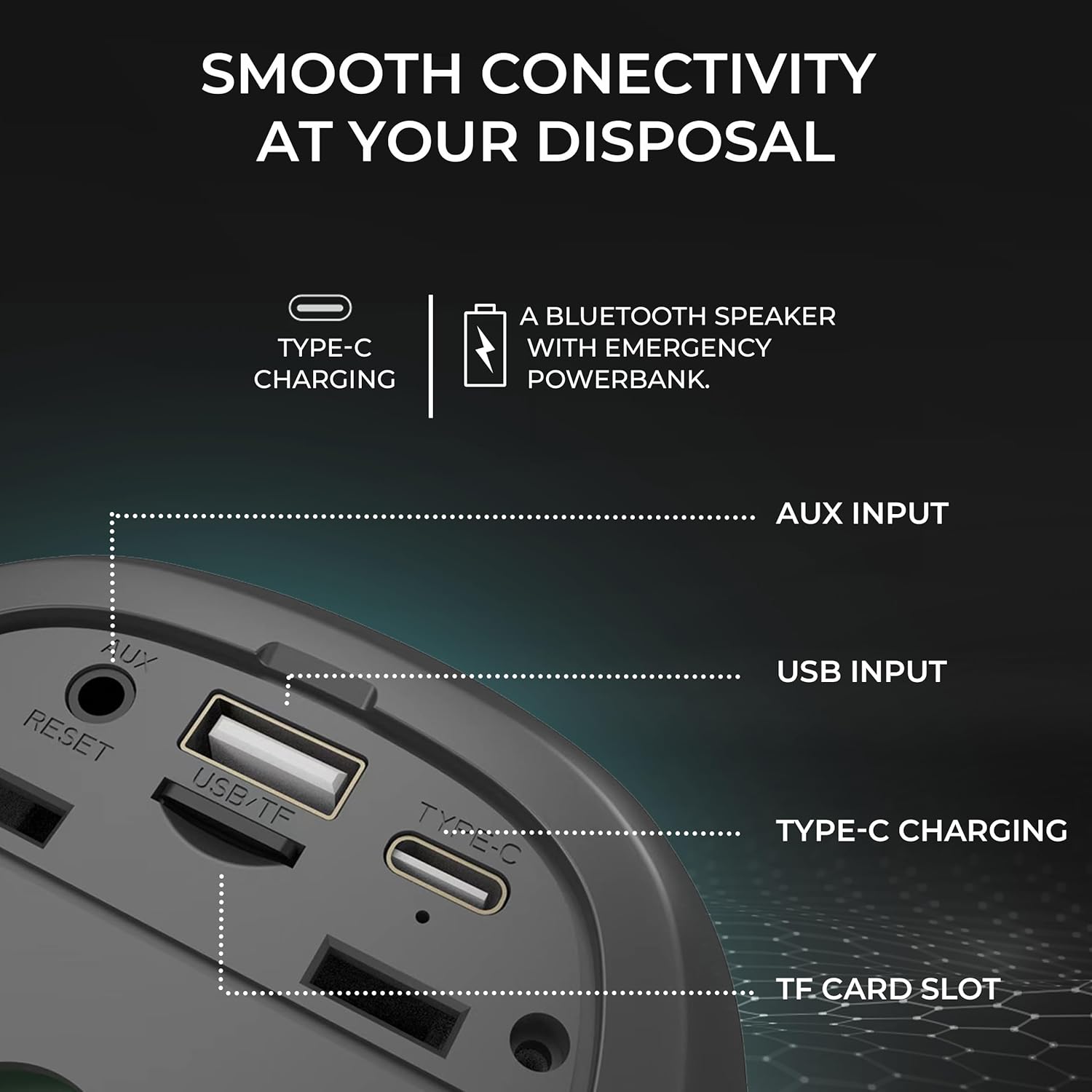
Imej: Terperinci view of the speaker's input ports for various connectivity options.
- Bluetooth: Connect wirelessly to your devices.
- Input AUX: Use the provided AUX cable to connect to devices without Bluetooth capabilities. Insert the 3.5mm jack into the AUX port on the speaker and your audio source.
- Input USB: Masukkan pemacu kilat USB dengan audio files into the USB port to play music directly.
- Slot Kad TF: Masukkan kad TF (MicroSD) dengan audio files into the TF card slot to play music directly.
Mengecas
The iGear Spectrum Mini speaker is powered by a built-in Lithium Ion battery. To charge the speaker:
- Connect the Type-C charging cable to the speaker's Type-C port.
- Connect the other end of the cable to a standard USB power source (e.g., wall adapter, computer USB port).
- Masa pengecasan adalah lebih kurang 2 jam untuk pengecasan penuh.
- A fully charged speaker provides up to 12 hours of playtime, depending on volume and light usage.

Image: The speaker highlighting its 12-hour playtime capability.
Penyelenggaraan
To ensure the longevity and optimal performance of your iGear Spectrum Mini speaker, follow these maintenance guidelines:
- Pembersihan: Gunakan kain lembut dan kering untuk mengelap permukaan pembesar suara. Jangan gunakan pembersih yang kasar, alkohol atau pelarut kimia.
- Storan: Simpan pembesar suara di tempat yang sejuk dan kering jauh dari cahaya matahari langsung dan suhu yang melampau.
- Pendedahan Air: The product is not waterproof. Avoid exposing it to water or high humidity to prevent damage.
- Penjagaan Bateri: Jika tidak digunakan untuk tempoh yang lama, cas pembesar suara sekurang-kurangnya sekali setiap tiga bulan untuk mengekalkan kesihatan bateri.
Menyelesaikan masalah
| Masalah | Penyelesaian yang Mungkin |
|---|---|
| Speaker tidak dihidupkan | Pastikan pembesar suara dicas. Sambungkannya ke sumber kuasa menggunakan kabel Jenis-C. |
| Tiada bunyi | Check volume levels on both the speaker and your connected device. Ensure the device is properly paired via Bluetooth or connected via AUX/USB/TF card. |
| Penggandingan Bluetooth gagal | Ensure the speaker is in pairing mode (flashing LED). Turn off and on Bluetooth on your device. Move the speaker closer to your device. Disconnect from other Bluetooth devices. |
| Gandingan TWS gagal | Ensure both speakers are off and not connected to any device before initiating TWS pairing. Follow TWS pairing steps carefully. |
| Lampu tidak berfungsi | Tekan butang Mod Cahaya (💡) to cycle through modes or turn lights on. |
Spesifikasi
| Ciri | Perincian |
|---|---|
| Nama Model | Spektrum Mini |
| Nombor Model Item | iG-1149 |
| Audio Wattage | 15 Watt |
| Teknologi Ketersambungan | Bluetooth |
| Julat Tanpa Wayar | Sehingga 10 meter |
| Jenis Bateri | Litium Ion |
| Masa bermain | Sehingga 12 Jam |
| Masa Mengecas | Lebih kurang 2 Jam |
| Port Pengecasan | Jenis-C |
| Kaedah Kawalan | Sentuh |
| bahan | ABS + Fabrik |
| Berat Barang | 650 Gram |
| Dimensi Produk | 10D x 10W x 12.3H Sentimeter |
| Kalis air | Tidak |
Waranti dan Sokongan
The iGear Spectrum Mini Bluetooth Speaker comes with a 1 Year Carry-In Warranty. For warranty claims or technical support, please refer to the contact information provided on your warranty card or visit the official iGear webtapak.
Pengilang / Pengimport: iGear Tech Private Limited, Goregaon west, Mumbai 400063, Contact: 9327667193