
pengenalan
Terima kasih kerana membeliasing the JONATHAN Y JYL7111A Rechargeable Integrated LED Table Lamp. This portable and cordless accent light is designed to provide soft, dimmable illumination for various indoor settings. This manual provides essential information for safe and efficient use of your lamp.
Maklumat Keselamatan
- Baca semua arahan sebelum digunakan dan simpan untuk rujukan masa hadapan.
- This product is for indoor use only. Do not expose to moisture or extreme temperatures.
- Jangan cuba membuka atau mengubah suai lamp. This may void the warranty and pose a safety risk.
- Gunakan hanya kabel pengecas yang disediakan atau kabel USB-C yang diperakui untuk pengecasan.
- Simpan lamp jauh dari sumber haba dan cahaya matahari langsung.
- The integrated LED components are not replaceable.
Kandungan Pakej
Sahkan bahawa semua komponen terdapat dalam pakej:
- JONATHAN Y JYL7111A Rechargeable Integrated LED Table Lamp
- Kabel Pengecas USB-C
- Manual Pengguna (dokumen ini)
Persediaan
Your JONATHAN Y JYL7111A lamp comes pre-assembled. No complex setup is required. Simply remove the lamp dari pembungkusannya.

Image: The JYL7111A lamp ready for use on a wooden surface.
Before first use, ensure the lamp is fully charged. Refer to the "Charging" section for instructions.
Video: This video demonstrates the basic setup and assembly of the JYL7111B lamp, which shares similar setup principles with the JYL7111A model.
Arahan Operasi
Hidupkan/Mati Kuasa
Untuk menghidupkan lamp on or off, gently tap the touch sensor located on the base of the lamp.

Image: A hand activating the touch sensor on the lamppangkalan.
Fungsi Peredupan
To adjust the brightness, press and hold the touch sensor. The light will gradually dim or brighten. Release your finger when the desired brightness level is reached.
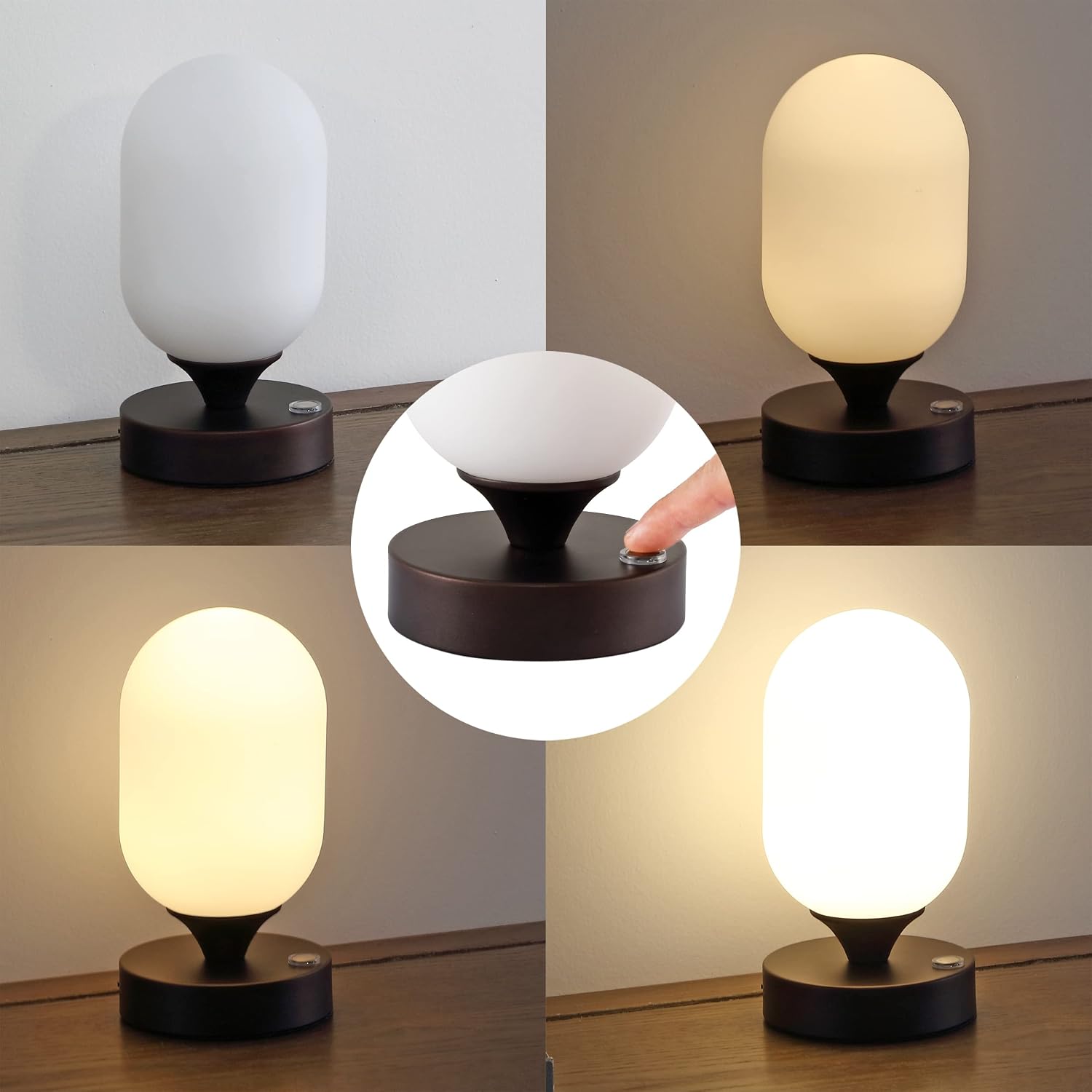
Imej: Perwakilan visual bagi lamp's dimmable feature, showing various light intensities.
Video: This video demonstrates the JYL7111A product features, including the touch sensor and dimming capabilities.
Mengecas
Lamp is equipped with a rechargeable battery. To charge:
- Locate the USB-C charging port on the side of the lamp asas.
- Insert the small end of the USB-C cable into the lampport pengecasan.
- Connect the larger end of the USB-C cable to a compatible USB power adapter (not included) or a powered USB port.
- The charging indicator light will illuminate (typically red) while charging and change color (typically green) when fully charged.
- A full charge provides approximately 11 hours of illumination at maximum brightness.

Image: A close-up of hands connecting the USB-C charging cable to the lamp.
Penyelenggaraan
To ensure the longevity and appearance of your lamp:
- Pembersihan: Putuskan sambungan lamp from any power source before cleaning. Wipe the lamp with a soft, dry cloth. Do not use abrasive cleaners, solvents, or harsh chemicals, as these may damage the finish or glass.
- Storan: Apabila tidak digunakan untuk tempoh yang lama, simpan lamp di tempat yang sejuk dan kering.
Menyelesaikan masalah
| Masalah | Kemungkinan Punca | Penyelesaian |
|---|---|---|
| Lamp tidak menyala. | Bateri habis. | Cas lamp fully using the USB-C cable. |
| Lamp does not dim. | Incorrect operation of touch sensor. | Tekan dan tahan the touch sensor to activate the dimming function. |
| Charging indicator light does not turn green. | Lamp not fully charged or charging cable/adapter issue. | Pastikan lamp is connected to a working USB power source. Try a different USB-C cable or power adapter. Allow sufficient time for charging. |
| Cahaya berkelip atau tidak konsisten. | Bateri lemah atau masalah dalaman. | Cas lamp fully. If the issue persists after charging, contact customer support. |
Spesifikasi
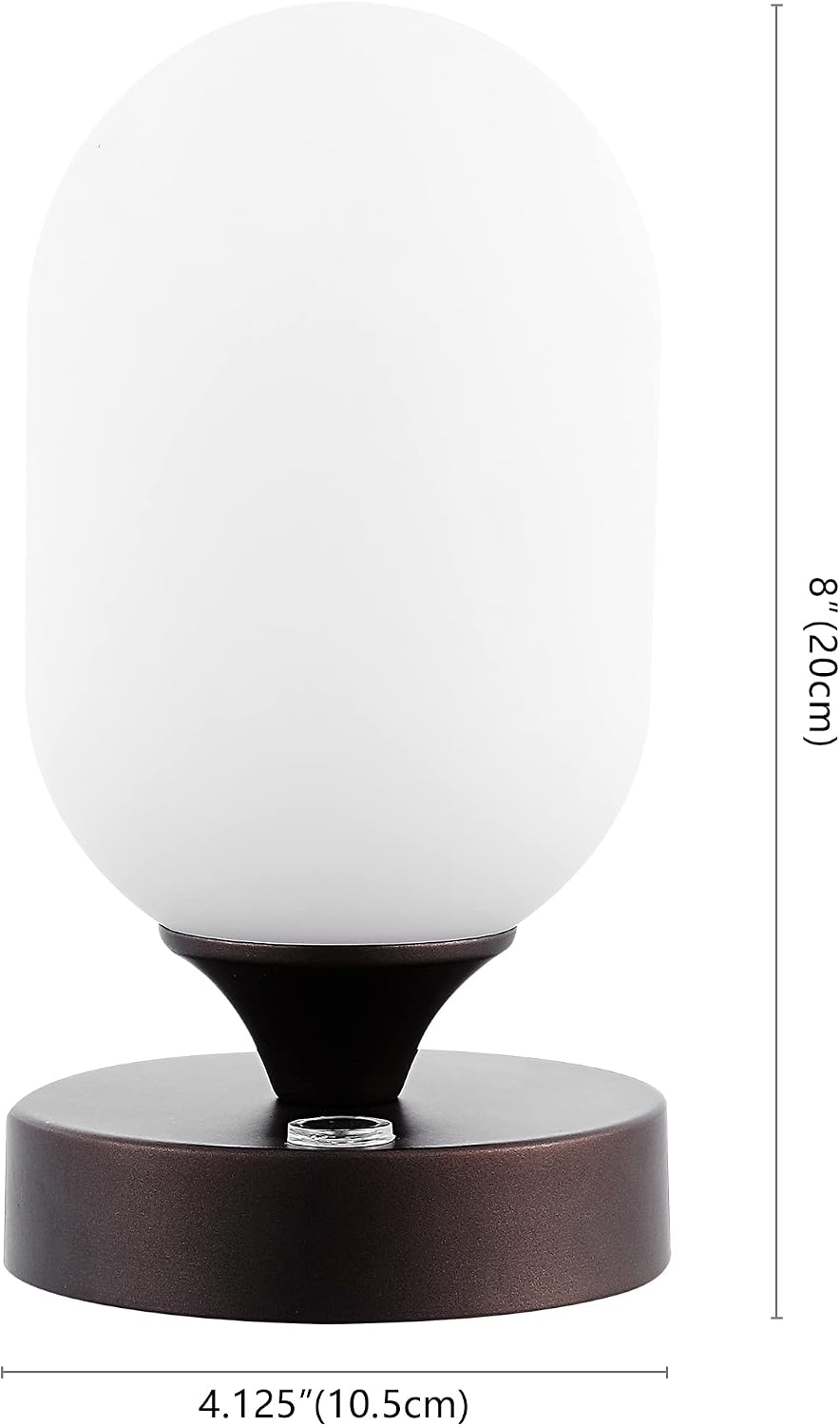
Image: Dimensions of the JYL7111A lamp.
| Ciri | Perincian |
|---|---|
| Nombor Model | JYL7111A |
| Dimensi (D x W x H) | 4.13"D x 4.13"W x 8"H |
| Berat Barang | 1.32 paun |
| Jenis Sumber Cahaya | LED bersepadu |
| Wattage | 2 watt |
| Sumber Kuasa | Bateri Boleh Dicas semula (USB-C) |
| Kaedah Kawalan | Sensor Sentuh |
| Bahan Teduh | Glass (Frosted) |
| Bahan Asas | besi |
| Penggunaan Dalaman/Luar | Dalaman Sahaja |
| Ciri-ciri Tambahan | Cordless, Dimmable, Portable, Rechargeable |
Maklumat Waranti
JONATHAN Y provides a 30-day manufacturer warranty for defects only. This warranty covers manufacturing defects and does not cover normal wear and tear. Visible damages not noted upon delivery will be determined to be customer damage and will not be warranted. All products are inspected upon arrival, and worn, dirty, or stained merchandise will not be accepted for warranty claims.
For warranty information on this product, please contact the internet customer service center.
Sokongan
If you have any questions, require assistance, or encounter issues not covered in this manual, please contact JONATHAN Y customer support. Refer to the product packaging or the official JONATHAN Y webtapak untuk maklumat hubungan semasa.