
pengenalan
This manual provides essential instructions for the safe and efficient use of your Olympia 2298 foldable 4G mobile phone. Please read it thoroughly before operating the device and keep it for future reference.
1. Persediaan
1.1 Kandungan Pakej
- Olympia 2298 Mobile Phone
- Bateri (Litium-ion)
- Kabel Pengecas USB-C
- Charging Cradle (if included)
- Manual Pengguna
1.2 Inserting the Battery and SIM Card
- Open the phone: Gently open the phone to access the battery compartment.
- Tanggalkan penutup belakang: Tanggalkan penutup belakang telefon dengan berhati-hati.
- Masukkan kad SIM: Locate the SIM card slot(s). Insert your 4G compatible SIM card(s) into the designated slot(s) with the gold contacts facing down, ensuring it clicks into place.
- Masukkan bateri: Place the Lithium-ion battery into the battery compartment, aligning the contacts.
- Gantikan penutup belakang: Securely attach the back cover until it clicks.
 Imej: Depan view of the Olympia 2298 foldable phone, showing the main display with time and date.
1.3 Mengecas Bateri
Sebelum penggunaan pertama, cas sepenuhnya bateri telefon.
- Connect charger: Plug the USB-C cable into the phone's USB-C port or place the phone in the charging cradle. Connect the other end of the cable to a suitable power adapter.
- Penunjuk pengecasan: The phone will display a charging indicator on the screen.
- Caj penuh: Allow the phone to charge until the battery indicator shows a full charge. This may take several hours for the initial charge.
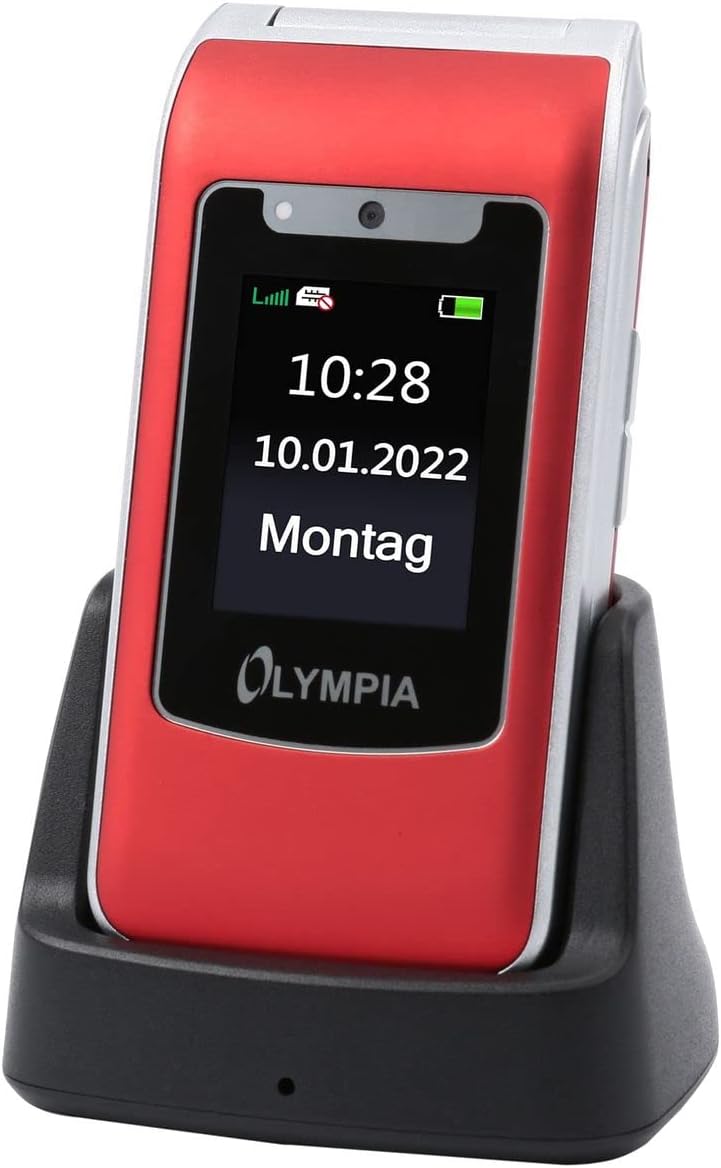 Image: The Olympia 2298 phone placed in its charging cradle, indicating ease of charging.
1.4 Menghidupkan/Mematikan
- Untuk Menghidupkan: Press and hold the Power/End Call button until the screen lights up.
- Untuk Mematikan: Tekan dan tahan butang Kuasa/Tamat Panggilan, kemudian pilih "Matikan" daripada pilihan pada skrin.
2. Arahan Operasi
2.1 Fungsi Panggilan Asas
- Membuat Panggilan: Dial the number using the keypad and press the Green Call button.
- Menjawab Panggilan: When the phone rings, press the Green Call button.
- Menamatkan Panggilan: Press the Red End Call button.
- Melaraskan Kelantangan: Use the volume buttons on the side of the phone during a call.
2.2 Emergency Call Button (SOS)
The Olympia 2298 features a dedicated SOS button for emergencies.
 Imej: Belakang view of the Olympia 2298 phone, highlighting the prominent SOS emergency call button.
- Setup Emergency Contacts: Before using, configure up to 5 emergency contacts in the phone's settings. Refer to the "Settings" section in the menu for details.
- Mengaktifkan SOS: In an emergency, press and hold the SOS button on the back of the phone for several seconds.
- Automatic Dialing: The phone will automatically dial the pre-set emergency contacts one by one until a connection is made. It will also send an emergency SMS message to these contacts.
Penting: Ensure emergency contacts are regularly updated and aware they are listed as such.
2.3 Menu Navigasi
Use the navigation keys (up, down, left, right) and the central "OK" button to browse the phone's menu. The "Back" button typically returns to the previous screen.
- Kenalan: Store and manage phone numbers.
- Mesej: Hantar dan terima mesej SMS.
- Log panggilan: View missed, dialed, and received calls.
- tetapan: Customize phone preferences, including sound, display, and emergency contacts.
- kamera: Access the integrated camera.
- Alatan: Includes features like alarm, calendar, and calculator.
2.4 Sending and Receiving Messages
- To Send: Go to "Messages" -> "Write Message". Enter the recipient's number or select from contacts, type your message, and send.
- Untuk Menerima: New messages will appear as a notification. Go to "Messages" -> "Inbox" to read them.
3. Penyelenggaraan
3.1 Pembersihan
- Gunakan kain lembut dan kering untuk membersihkan bahagian luar telefon.
- Avoid using liquid cleaners, aerosols, or harsh chemicals.
- Keep the USB-C port free from dust and debris.
3.2 Penjagaan Bateri
- Jangan dedahkan bateri kepada suhu yang melampau.
- Elakkan menyahcas sepenuhnya bateri dengan kerap untuk memanjangkan jangka hayatnya.
- If the phone will not be used for an extended period, charge it to about 50% before storing.
4. Penyelesaian masalah
| Masalah | Kemungkinan Punca | Penyelesaian |
|---|---|---|
| Telefon tidak dihidupkan. | Bateri telah dinyahcas atau tidak dipasang dengan betul. | Cas bateri. Pastikan bateri dimasukkan dengan betul. |
| Tidak boleh membuat atau menerima panggilan. | Tiada isyarat rangkaian, kad SIM tidak dimasukkan atau masalah kad SIM. | Periksa kekuatan isyarat rangkaian. Masukkan semula kad SIM. Hubungi pembekal khidmat anda. |
| Butang SOS tidak berfungsi. | Emergency contacts not set up or incorrect. | Verify and update emergency contacts in settings. |
| Kualiti panggilan yang lemah. | Weak network signal or interference. | Bergerak ke kawasan yang mempunyai isyarat yang lebih baik. Elakkan halangan. |
5. Spesifikasi
- Nombor Model: 2298
- Jenama: OLIMPIA
- Saiz Skrin: 2.4 Inci
- Teknologi Selular: 4G (LTE)
- Teknologi Ketersambungan: USB (USB Type C)
- Pembawa Tanpa Wayar: All carriers
- Bateri: 1 Litium-ion (termasuk)
- Berat Barang: 105 Gram
- Masa Berbual: 6 Jam
- Dimensi: 5.3 x 2.1 x 10.5 sentimeter
6. Waranti dan Sokongan
For warranty information and technical support, please refer to the documentation provided with your purchase or visit the official OLYMPIA webtapak. Simpan bukti pembelian anda untuk tuntutan waranti.
Nota: Spare parts availability and software update guarantees are not specified in the product information provided.