
1. Pengenalan
This manual provides essential instructions for the safe operation, maintenance, and troubleshooting of your A-iPower AP3700i Portable Inverter Generator. This generator is designed to provide clean, stable power for various applications, from sensitive electronics to power tools, with 3700 starting watts and 3200 running watts. Please read this manual thoroughly before operating the generator to ensure safe and efficient use.

Image: The A-iPower AP3700i Inverter Generator highlighting its less than 3% Total Harmonic Distortion (THD) for pure power output, suitable for sensitive electronics like phones, laptops, and TVs.
2. Maklumat Keselamatan
AMARAN: Bahaya Karbon Monoksida.
Using a generator indoors CAN KILL YOU IN MINUTES. Generator exhaust contains carbon monoxide (CO), a poisonous gas you cannot see or smell. NEVER use in an enclosed area or partially enclosed area. Always use OUTDOORS and far away from windows, doors, and vents.
AMARAN: Bahaya Kejutan Elektrik.
Do not operate in wet conditions. Ensure all connections are dry and secure. Ground the generator properly to prevent electrical shock.
AMARAN: Bahaya Kebakaran.
Gasoline is highly flammable. Refuel in a well-ventilated area with the engine off and cool. Do not smoke or allow open flames near the generator. Store fuel in approved containers only.
AMARAN: Permukaan Panas.
Enjin penjana dan peredam bunyi menjadi sangat panas semasa operasi dan kekal panas untuk tempoh tertentu selepas dimatikan. Elakkan sentuhan untuk mengelakkan melecur.
Always read and understand the complete safety instructions in the full owner's manual before operating this equipment.
3. Komponen Selesaiview
Familiarize yourself with the key components of your A-iPower AP3700i generator:
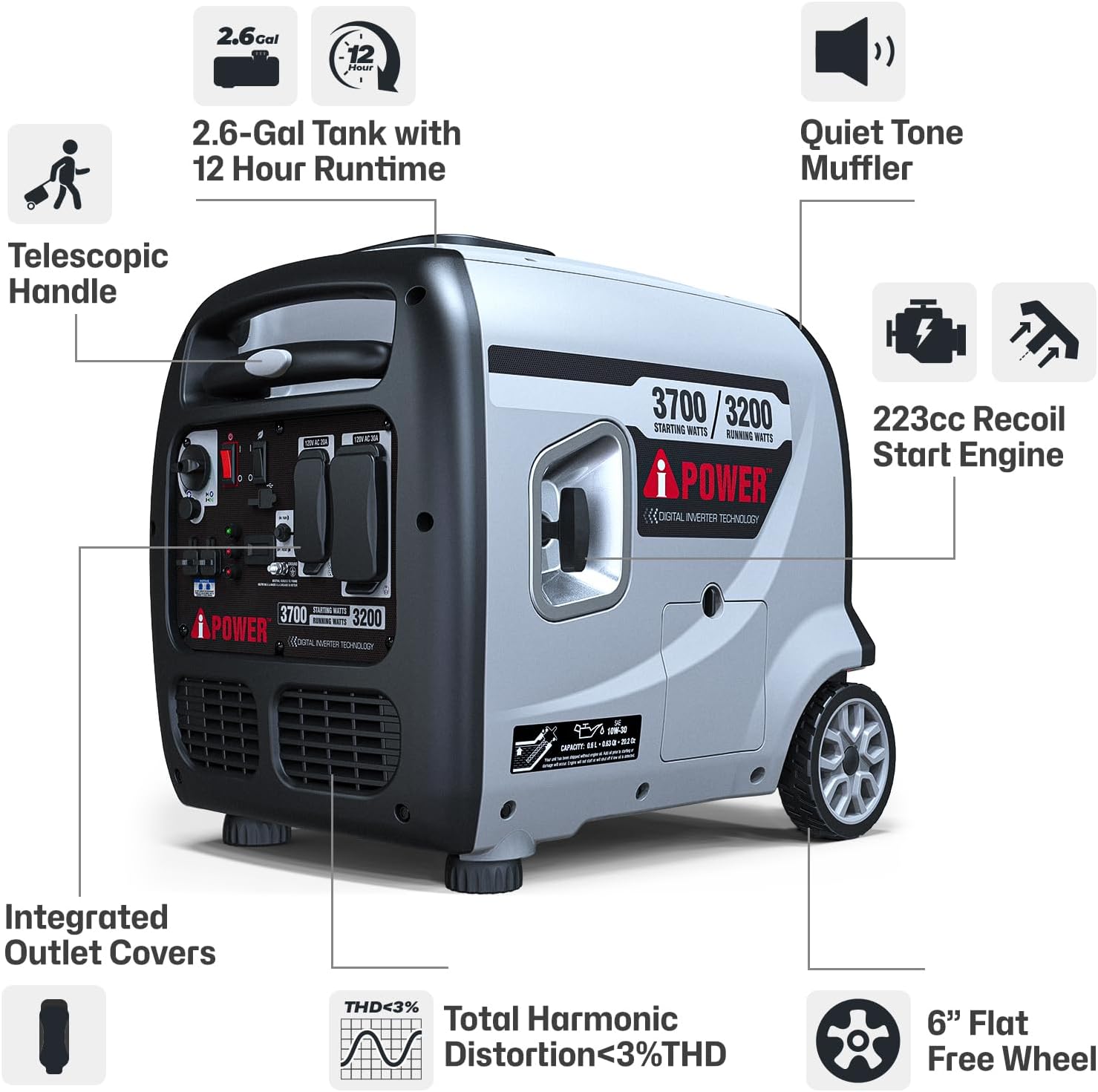
Image: A detailed diagram illustrating the main features and components of the AP3700i generator, such as the telescopic handle, fuel tank, engine, and control panel.
- Enjin: 223cc OHV 4-cycle engine provides reliable power.
- Tangki Bahan Api: 2.6-gallon capacity for extended run times.
- Panel Kawalan: Centralized interface for power outlets, indicator lights, and switches.
- Pemegang & Roda Teleskopik: For easy transport and mobility.
- Peredam: Direka untuk operasi yang senyap.
- Integrated Outlet Covers: Protect outlets from dust and debris.
Butiran Panel Kawalan
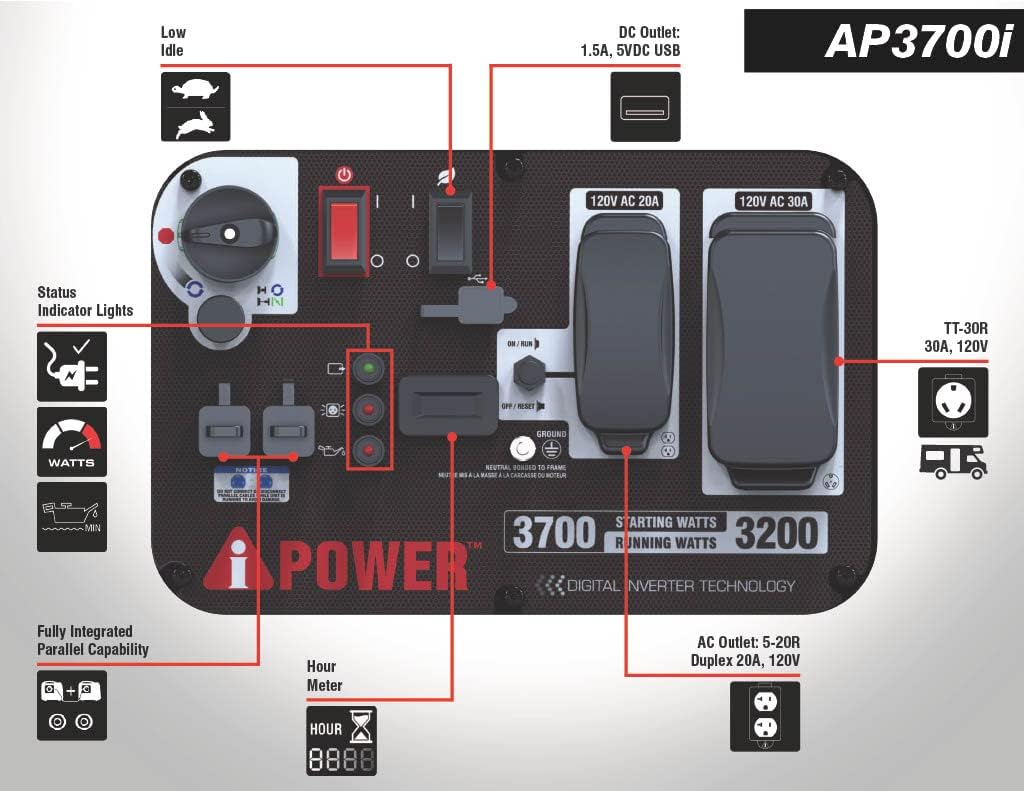
Image: A close-up diagram of the AP3700i control panel, clearly labeling all outlets, switches, and indicator lights for user reference.
- Low Idle Switch (Eco-Mode): Mengurangkan kelajuan enjin untuk muatan yang lebih ringan, menjimatkan bahan api dan mengurangkan bunyi bising.
- Lampu Penunjuk Status: Indicate output, overload, and low oil conditions.
- Meter Jam: Tracks engine run time for maintenance scheduling.
- USB Outlets (2x 2.4A 5VDC): Untuk mengecas peranti elektronik kecil.
- Cawangan AC: 1x Duplex 5-20R 20A 120VAC and 1x L5-30R 30A 120VAC Twist Lock (RV Ready).
- Parallel Connectivity Port: Allows connection of two compatible generators for increased power.
4. Persediaan
Follow these steps for initial setup before operating your generator:
- Membongkar: Carefully remove the generator from its packaging. Inspect for any damage. Ensure all included accessories (oil funnel, spark plug wrench, etc.) are present.
- Tambah Minyak Enjin: The engine is shipped without oil. Place the generator on a level surface. Remove the oil fill cap/dipstick. Using the provided funnel, slowly add 10W-30 engine oil until it reaches the upper mark on the dipstick. Do not overfill. (Capacity: approximately 0.6 quarts).
- Tambah Bahan Api: Ensure the generator is off and cool. Open the fuel tank cap. Slowly add fresh, unleaded gasoline (minimum 87 octane) to the fuel tank. Do not fill above the red indicator ring inside the tank. Securely close the fuel cap. (Tank Volume: 2.6 Gallons).
- Pembumian: Sambungkan wayar pembumian dari terminal pembumian penjana ke sumber pembumian yang sesuai, mengikut kod elektrik tempatan.

Image: A person demonstrating the portability of the A-iPower AP3700i generator, easily moving it with its integrated telescopic handle and wheels.
5. Arahan Operasi
Ikuti langkah-langkah ini untuk menghidupkan dan mengendalikan penjana anda dengan selamat:
- Penyediaan: Ensure the generator is on a level, outdoor surface, away from combustible materials and at least 20 feet from any building openings. Check oil and fuel levels.
- Prosedur Permulaan:
- Putar injap bahan api ke kedudukan 'ON'.
- Putar suis enjin ke kedudukan 'ON'.
- Pull the choke lever to the 'CHOKE' position (if the engine is cold).
- Firmly pull the recoil starter handle until the engine starts. Allow the engine to run for a few seconds.
- Slowly push the choke lever to the 'RUN' position.
- Connecting Electrical Devices: Once the engine is running smoothly and the green 'Output Indicator' light is on, you can connect your electrical devices to the appropriate outlets. Do not exceed the generator's running wattage (3200W).
- Eco-Mode Operation: For lighter loads, activate the 'Eco-Mode' switch. This reduces engine speed, saving fuel and lowering noise levels. The engine will automatically adjust speed based on load demand.
- Operasi selari: This generator is equipped with a parallel connectivity port. Refer to the full manual for instructions on connecting two compatible A-iPower inverter generators for increased power output.
- Tutup:
- Putuskan sambungan semua peranti elektrik.
- Putar suis enjin ke kedudukan 'OFF'.
- Putar injap bahan api ke kedudukan 'MATI'.

Image: The AP3700i generator providing power to a home, illustrating its capability to run essential household appliances.

Image: The AP3700i generator in a camping setting, demonstrating its use for powering outdoor and recreational equipment.

Image: The AP3700i generator providing power for heavy-duty tools, showcasing its versatility for work and DIY projects.
6. Penyelenggaraan
Regular maintenance ensures optimal performance and longevity of your generator. Always perform maintenance with the engine off and cool.
- Minyak Enjin: Check oil level before each use. Change oil after the first 20 hours of operation, then every 100 hours or annually, whichever comes first.
- Penapis Udara: Inspect every 50 hours or monthly. Clean or replace if dirty.
- Palam Pencucuh: Inspect and clean every 100 hours or annually. Replace if worn or damaged.
- Sistem Bahan Api: For long-term storage (over 30 days), drain the fuel tank and carburetor, or use a fuel stabilizer to prevent fuel degradation.
- Pembersihan: Pastikan penjana bersih dan bebas daripada serpihan. Gunakan iklanamp cloth to wipe down exterior surfaces.
Refer to the complete maintenance schedule in the full owner's manual for detailed instructions and additional maintenance tasks.
7. Penyelesaian masalah
Bahagian ini membincangkan isu biasa yang mungkin anda hadapi dengan penjana anda.
| Masalah | Kemungkinan Punca | Penyelesaian |
|---|---|---|
| Enjin tidak akan dihidupkan | Tahap bahan api rendah Paras minyak enjin rendah Suis enjin OFF Injap bahan api OFF Palam pencucuh tercemar Incorrect choke position | Masukkan bahan bakar segar Masukkan minyak enjin Hidupkan suis enjin Turn fuel valve ON Bersihkan atau gantikan palam pencucuh Adjust choke for starting (CHOKE for cold, RUN for warm) |
| Tiada output kuasa | Pemutus litar tersandung Lebihan beban Eco-mode with heavy load | Tetapkan semula pemutus litar Kurangkan beban yang disambungkan Turn off Eco-mode for heavy loads |
| Enjin berjalan kasar | Bahan api basi Penapis udara kotor Palam pencucuh tercemar | Toskan dan isi semula dengan bahan api baharu Bersihkan atau ganti penapis udara Bersihkan atau gantikan palam pencucuh |
For other issues, consult the detailed troubleshooting guide in the full owner's manual or contact customer support.
8. Spesifikasi
Key technical specifications for the A-iPower AP3700i Portable Inverter Generator:

Image: A visual representation of the A-iPower AP3700i generator's dimensions and weight for planning storage and transport.
| Spesifikasi | Nilai |
|---|---|
| Nama Model | AP3700i |
| Jenama | A-iPower |
| Memulakan Wattage | 3700 Watt |
| Lari Wattage | 3200 Watt |
| Jenis Enjin | 223cc OHV 4-Stroke |
| Jenis Bahan Api | petrol |
| Isipadu Tangki | 2.6 gelen |
| Masa Jalan (pada beban 50%) | 7 jam |
| Herotan Harmonik Jumlah (THD) | <3% |
| Outlet | 1x L5-30R 30A 120VAC Twist Lock, 1x Duplex 5-20R 20A 120VAC, 2x USB 2.4A 5VDC |
| Dimensi Produk (L x W x H) | 26" x 21.7" x 23" |
| Berat Barang | 103.6 paun |
| Sistem Pencucuhan | Permulaan Recoil |
9. Waranti dan Sokongan
This A-iPower generator comes with a limited warranty. Please refer to the warranty card included with your product for specific terms and conditions regarding coverage and duration.
For technical assistance, parts, or warranty inquiries, please contact A-iPower Customer Support. Keep your model number (AP3700i) and serial number ready when contacting support for faster service.