
Techmade M350
Techmade Bluetooth Speaker User Manual
Model: M350
1. Pengenalan
Thank you for choosing the Techmade Bluetooth Speaker. This portable wireless speaker is designed to provide high-quality audio and convenient hands-free calling. Its compact and lightweight design makes it perfect for use at home, in the office, or on the go. This manual provides essential information on setting up, operating, and maintaining your speaker.

Image 1.1: The Techmade Bluetooth Speaker in blue, showcasing its compact design and front controls.
2. Produk Lebihview
2.1. Komponen
The Techmade Bluetooth Speaker package includes the following items:
- Techmade Bluetooth Speaker
- Kabel USB (untuk mengecas)
2.2. Kawalan dan Petunjuk
Biasakan diri anda dengan kawalan dan port pembesar suara:

Imej 2.1: Terperinci view of the speaker's intuitive controls, including the power switch, volume controls, and the USB-C charging port located at the bottom.
- Butang Kuasa: Digunakan untuk menghidupkan atau mematikan pembesar suara.
- Butang Turun Kelantangan (-): Mengurangkan kelantangan audio.
- Butang Naik Kelantangan (+): Meningkatkan kelantangan audio.
- Port Pengecasan USB-C: Located at the bottom, used to charge the speaker's internal battery.
3. Persediaan
3.1. Mengisi Speaker
Before first use, fully charge the speaker. Connect the provided USB cable to the speaker's USB-C port and the other end to a USB power adapter (not included) or a computer's USB port. The charging indicator light will show the charging status.
3.2. Berpasangan Bluetooth
Untuk menyambungkan pembesar suara anda ke peranti yang didayakan Bluetooth:
- Pastikan pembesar suara dicas dan dihidupkan.
- Aktifkan Bluetooth pada telefon pintar, tablet atau peranti lain anda.
- Cari untuk available Bluetooth devices. The speaker will appear as "Techmade M350" or similar.
- Pilih pembesar suara daripada senarai untuk dipasangkan. Bunyi pengesahan akan menunjukkan gandingan yang berjaya.
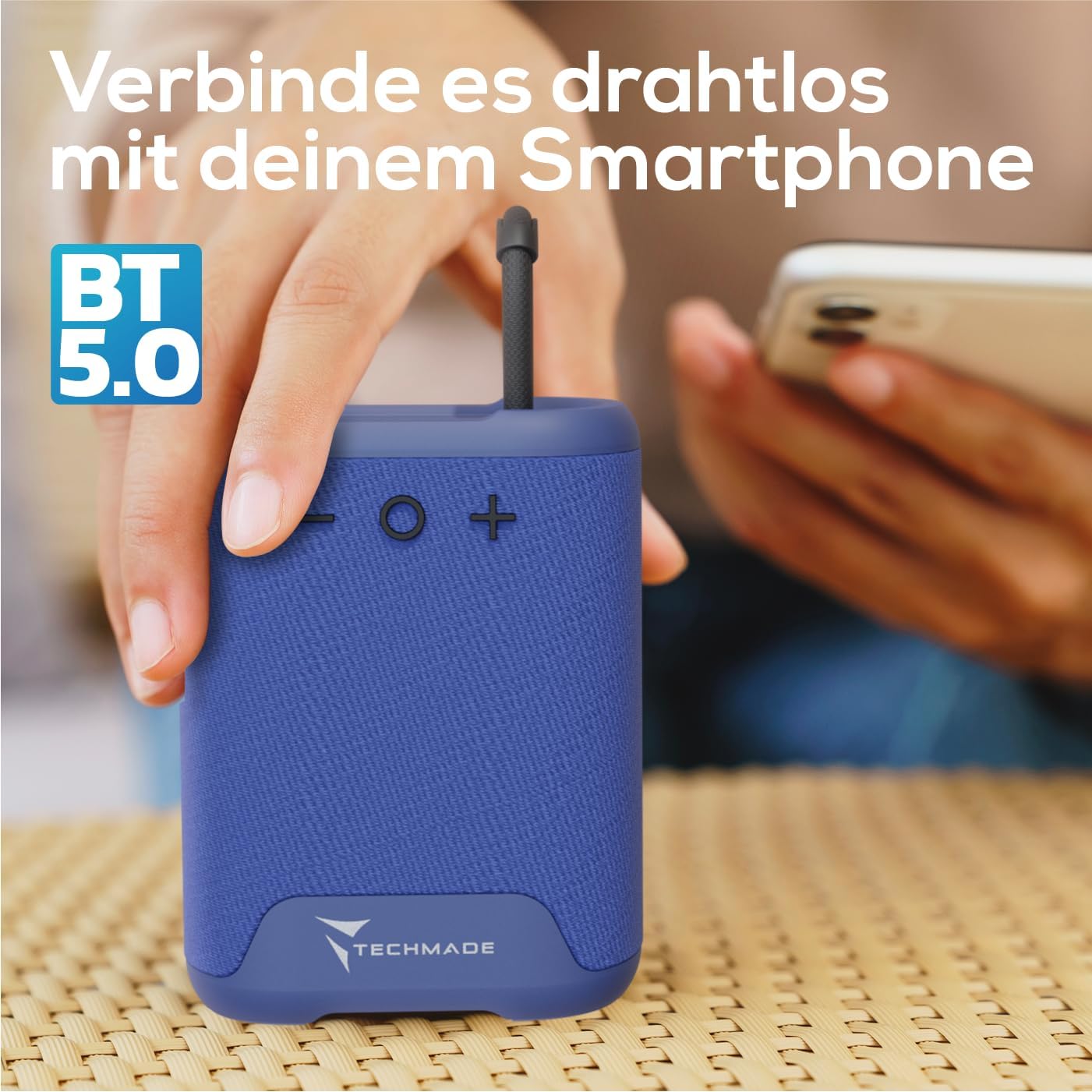
Image 3.1: Demonstrating the wireless connection process between the Techmade speaker and a smartphone via Bluetooth 5.0.
4. Arahan Operasi
4.1. Hidupkan/Mati Kuasa
- Untuk Menghidupkan: Press and hold the Power button until you hear a sound or see an indicator light.
- Untuk Mematikan: Press and hold the Power button again until the speaker shuts down.
4.2. Main balik Audio
- Once paired, audio from your connected device will play through the speaker.
- Use the Volume Up (+) and Volume Down (-) buttons on the speaker to adjust the volume. You can also control volume from your connected device.
4.3. Panggilan Bebas Tangan
The speaker features an integrated microphone for hands-free calls:
- Jawab Panggilan: When a call comes in, press the Power button once to answer.
- Tamatkan Panggilan: During a call, press the Power button once to end the call.
- Tolak Panggilan: Tekan dan tahan butang Kuasa untuk menolak panggilan masuk.
5. Penyelenggaraan
To ensure the longevity and optimal performance of your Techmade Bluetooth Speaker:
- Pembersihan: Lap pembesar suara dengan kain lembut dan kering. Jangan gunakan pembersih atau pelarut yang kasar.
- Storan: Simpan pembesar suara di tempat yang sejuk dan kering jauh dari cahaya matahari langsung dan suhu yang melampau.
- Tahan Air: Pembesar suara ini tidak kalis air. Elakkan pendedahan kepada air atau kelembapan yang tinggi.
- Penjagaan Bateri: Jika tidak digunakan untuk tempoh yang lama, cas pembesar suara sekurang-kurangnya sekali setiap tiga bulan untuk mengekalkan kesihatan bateri.
6. Penyelesaian masalah
If you encounter issues with your speaker, refer to the following table for common problems and solutions:
| Masalah | Kemungkinan Punca | Penyelesaian |
|---|---|---|
| Speaker tidak dihidupkan. | Bateri hampir habis atau habis. | Cas pembesar suara sepenuhnya menggunakan kabel USB yang disediakan. |
| Tidak boleh berpasangan dengan peranti. | Bluetooth is off on device; speaker is not in pairing mode; device is too far. | Ensure Bluetooth is enabled on your device. Make sure the speaker is powered on and discoverable. Move device closer to speaker (within 10m). |
| Tiada bunyi atau kelantangan rendah. | Volume is too low on speaker or device; speaker is not connected. | Increase volume on both the speaker and your connected device. Re-pair the speaker if connection is lost. |
| Kualiti bunyi yang buruk. | Gangguan; peranti terlalu jauh; bateri lemah. | Move speaker closer to device. Avoid obstacles between speaker and device. Charge the speaker. |
7. Spesifikasi
The following are the technical specifications for the Techmade Bluetooth Speaker M350:
| Ciri | Perincian |
|---|---|
| Jenama | Techmade |
| Nama Model | My speaker M350 |
| Nombor Model | M350 |
| Teknologi Ketersambungan | Bluetooth |
| Kuasa Output Maksimum Pembesar Suara | 5 Watt |
| Respons Kekerapan | 9030 Hz |
| Mod Keluaran Audio | Surround-Sound |
| Jenis Pemasangan | Atas meja |
| bahan | plastik |
| Jenis Pembesar Suara | Mudah alih |
| Ciri Khas | Mudah alih |
| Dimensi Produk | 5 x 7 x 10 cm; 300 Gram |
| Bateri | 1 Lithium-Polymer battery required (included) |
| Tarikh Tersedia Pertama | 9 November 2024 |

Image 7.1: Visual representation of the speaker's compact dimensions (10.5 cm height, 7.5 cm width, 5 cm depth) and its lightweight design (194 grams).
8. Waranti dan Sokongan
For warranty information or technical support, please refer to the documentation provided with your purchase or contact Techmade customer service. Keep your proof of purchase for warranty claims.
Ask a question about this manual
Ask about setup, troubleshooting, compatibility, parts, safety, or missing instructions. Manuals+ will review the question and use this page’s manual context to help answer it.