
United LED24HS82A11
Manual Pengguna TV Android Pintar UNITED LED24HS82A11 24-inci Sedia HD
Model: LED24HS82A11
pengenalan
This user manual provides comprehensive instructions for the setup, operation, maintenance, and troubleshooting of your UNITED LED24HS82A11 24-inch HD Ready Smart Android TV. Please read this manual thoroughly before using your television to ensure proper and safe operation.
The UNITED LED24HS82A11 is a versatile 24-inch HD Ready Smart TV powered by Android 11, offering a wide range of entertainment options. It features pre-installed applications, built-in Chromecast and Airplay for seamless content streaming, and full internet connectivity via Wi-Fi and Ethernet. It also supports DVB/T2/S2/C, MPEG-4, and HEVC Main 10 for various broadcasting standards.
Maklumat Keselamatan
Sentiasa patuhi langkah berjaga-jaga keselamatan berikut untuk mengelakkan kebakaran, kejutan elektrik atau kecederaan:
- Jangan dedahkan TV kepada hujan atau lembapan.
- Jangan menyekat bukaan pengudaraan.
- Pastikan kord kuasa tidak tersepit atau berjalan.
- Cabut palam TV semasa ribut petir atau apabila tidak digunakan untuk tempoh yang lama.
- Rujuk semua servis kepada kakitangan perkhidmatan yang berkelayakan.
Persediaan
1. Membuka dan Memasang Pendirian
Carefully remove the TV and all accessories from the packaging. Place the TV face down on a soft, clean surface to prevent screen damage.
Attach the two stand feet to the bottom of the TV using the provided screws. Ensure they are securely fastened.

Rajah 1: Sisi view of the UNITED LED24HS82A11 TV, illustrating its slim profile and potential port locations.
2. Menyambung Kabel
- Kuasa: Sambungkan kord kuasa ke input kuasa TV dan kemudian ke saluran keluar dinding.
- Antena/Kabel: Connect your antenna or cable TV coaxial cable to the "RF In" port.
- Peranti HDMI: Sambungkan peranti luaran seperti pemain Blu-ray, konsol permainan atau kotak set-top ke port HDMI.
- Ethernet (Pilihan): For a wired internet connection, connect an Ethernet cable from your router to the TV's LAN port.
3. Wizard Persediaan Awal
Once powered on, the TV will guide you through the initial setup process. Follow the on-screen prompts to:
- Pilih bahasa pilihan anda.
- Connect to your Wi-Fi network (if not using Ethernet).
- Sign in with your Google account (optional, but recommended for full Smart TV features).
- Imbas saluran TV yang tersedia (Antena/Kabel).
Beroperasi
Kawalan Jauh Lebihview
Familiarize yourself with the buttons on the remote control for easy navigation and control of your TV's functions.
Fungsi TV Asas
- Hidupkan/Mati Kuasa: Tekan butang kuasa pada alat kawalan jauh atau TV.
- Kawalan Kelantangan: Gunakan butang Kelantangan Naik/Turun.
- Pemilihan Saluran: Gunakan butang Saluran Atas/Bawah atau pad nombor.
- Sumber Input: Press the "Source" or "Input" button to switch between HDMI, TV, and other inputs.
Smart TV Features (Android 11)
Your TV runs on Android 11, providing access to a vast ecosystem of apps and services.

Figure 2: The UNITED LED24HS82A11 TV showcasing its Android TV home screen, featuring popular streaming applications like YouTube, Prime Video, and Netflix.
- Skrin Utama: Navigate the home screen to access pre-installed apps (Netflix, YouTube, Prime Video), recommended content, and settings.
- Gedung Google Play: Download additional apps, games, and content from the Google Play Store.
- Chromecast Terbina dalam: Cast content directly from your compatible smartphone, tablet, or computer to the TV. Look for the Cast icon in supported apps.
- Airplay: For Apple devices, use Airplay to stream videos, photos, and music from your iPhone, iPad, or Mac to the TV.
- Kesambungan Internet:
- Wi-Fi: Go to Settings > Network & Internet to connect to your wireless network.
- Ethernet: If an Ethernet cable is connected, the TV will automatically use the wired connection.
Penyelenggaraan
Membersihkan TV
- Sentiasa cabut plag TV sebelum membersihkan.
- Gunakan kain lembut dan tidak berbulu untuk mengelap skrin dengan lembut. Untuk kesan degil,ampLap kain sedikit dengan air atau pembersih skrin yang direka khas untuk elektronik.
- Lap TV casindengan kain lembut dan kering. Elakkan menggunakan pembersih atau pelarut yang kasar.
Kemas Kini Perisian
Your TV may receive software updates to improve performance and add new features. You can check for updates via Settings > Device Preferences > About > System update.
Menyelesaikan masalah
Jika anda menghadapi masalah dengan TV anda, rujuk masalah dan penyelesaian biasa berikut:
| Masalah | Kemungkinan Punca / Penyelesaian |
|---|---|
| Tiada Kuasa | Periksa sama ada kord kuasa dipasang dengan selamat ke dalam TV dan alur keluar dinding. Cuba kedai lain. |
| Tiada Gambar / Tiada Bunyi | Ensure the correct input source is selected (e.g., HDMI 1, TV). Check cable connections. For TV channels, perform a channel scan. |
| Tidak Dapat Menyambung ke Wi-Fi | Sahkan kata laluan Wi-Fi anda. Mulakan semula penghala anda dan TV. Pastikan TV berada dalam julat isyarat Wi-Fi anda. |
| Alat Kawalan Jauh Tidak Berfungsi | Periksa dan gantikan bateri. Pastikan tiada halangan antara alat kawalan jauh dan sensor IR TV. |
| Aplikasi Tidak Memuatkan / Prestasi Perlahan | Check your internet connection speed. Clear app cache (Settings > Apps > [App Name] > Clear cache). Restart the TV. |
Spesifikasi
Below are the technical specifications for the UNITED LED24HS82A11 TV:
| Ciri | Spesifikasi |
|---|---|
| Jenama | Bersatu |
| Nombor Model | LED24HS82A11 |
| Saiz Skrin | 24 Inci |
| Teknologi Paparan | LED |
| Resolusi | 768p (1366 x 768 piksel) |
| Kadar Segar Semula | 60 Hz |
| Sistem Operasi | Android 11 |
| Ketersambungan | Wi-Fi, Ethernet, HDMI, RF, USB |
| Ciri Khas | Flat Screen, Chromecast Built-in, Airplay, Pre-installed Apps (Netflix, YouTube, Prime Video) |
| Nisbah Aspek | 16:9 |
| Dimensi Produk (L x W x H) | 12D x 60.5W x 43.2H sentimeter |
| Komponen yang Disertakan | 1 mini AV adapter cable, 1 remote control with 2 AAA 1.5V batteries |
| Kelas Kecekapan Tenaga | F |
| Penggunaan Kuasa (SDR) | 21.0 W |
| Penggunaan Kuasa (HDR) | 21.0 W |
| Penggunaan Kuasa (Bersedia) | 0.3 W |

Figure 3: The energy efficiency label for the UNITED LED24HS82A11 TV, indicating an 'F' energy class rating and 21 kWh per 1000 hours of operation.
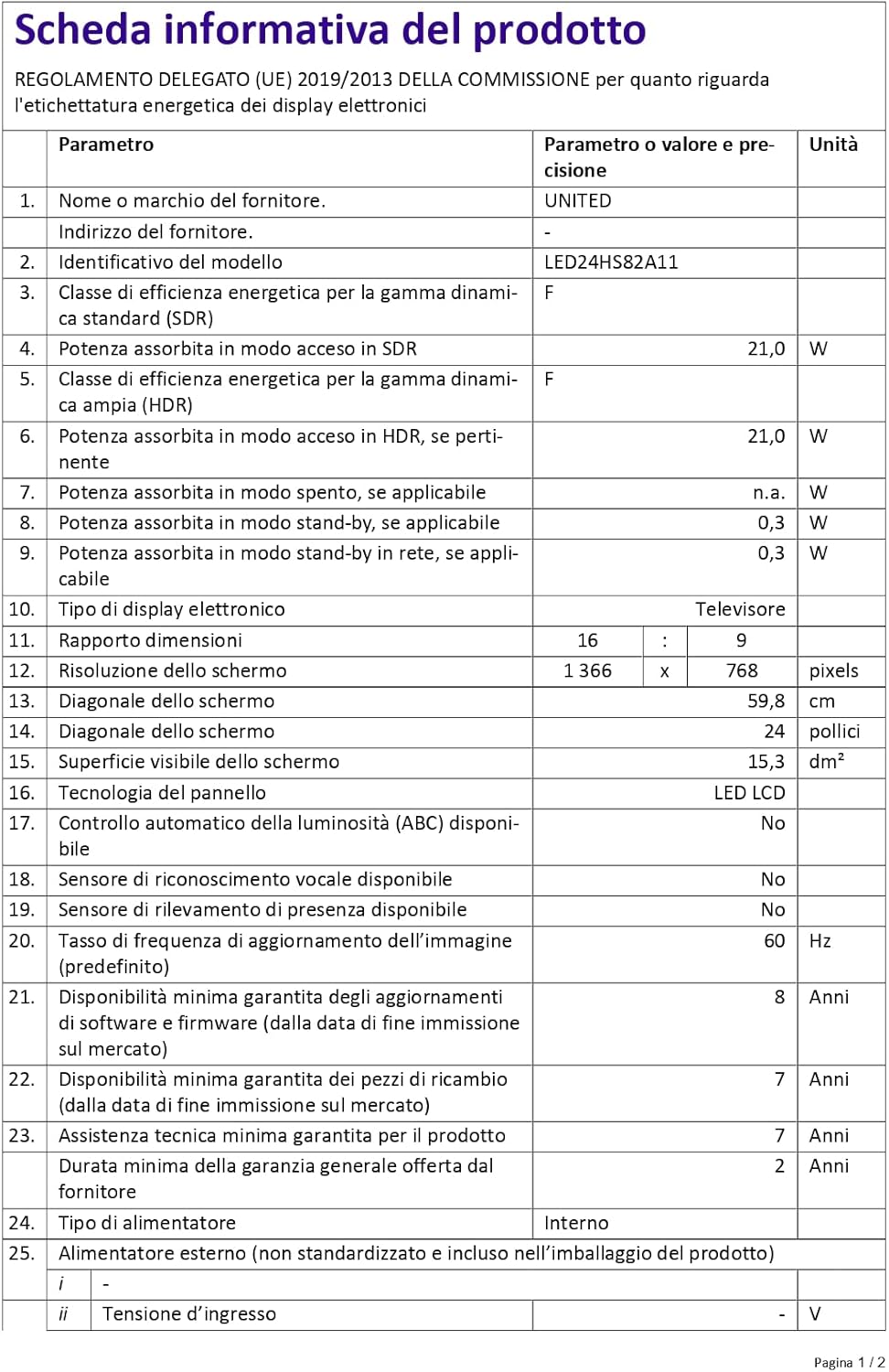
Figure 4: A detailed product information sheet for the UNITED LED24HS82A11 TV, providing comprehensive technical specifications and compliance details.
Untuk maklumat lebih terperinci, sila rujuk pangkalan data rasmi EPREL: https://eprel.ec.europa.eu/qr/1087921
Waranti dan Sokongan
Your UNITED LED24HS82A11 TV comes with the following support and warranty provisions:
- Minimum General Warranty: 2 Tahun
- Technical Assistance Availability: 7 Tahun
- Kemas Kini Perisian Dijamin Sehingga: 8 Years from market placement date
- Ketersediaan Alat Ganti: 7 Years from market placement date
For technical support or warranty claims, please contact your retailer or the manufacturer's authorized service center. Keep your proof of purchase for warranty validation.
Ask a question about this manual
Ask about setup, troubleshooting, compatibility, parts, safety, or missing instructions. Manuals+ will review the question and use this page’s manual context to help answer it.