

1. Pengenalan
This manual provides essential information for the safe and efficient operation of your Sygonix Built-in Thermostat SY-5044424. This device is designed as a built-in solution for regulating and monitoring heat generators within heating, climate, and ventilation technology systems. Please read these instructions thoroughly before installation and use, and retain them for future reference.
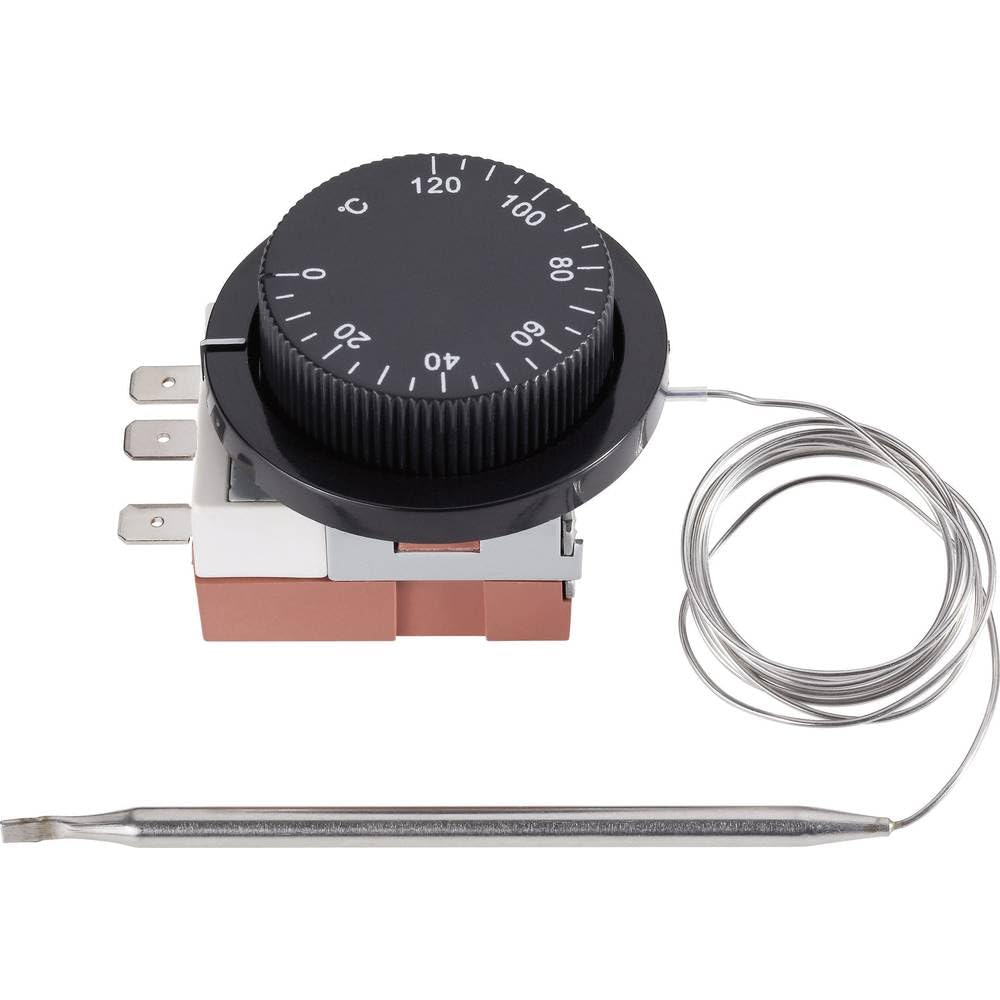
Image 1.1: The Sygonix Built-in Thermostat SY-5044424. This image shows the compact design of the thermostat, ready for integration into a control panel or wall unit.
2. Arahan Keselamatan
Amaran: Kegagalan mematuhi arahan keselamatan ini boleh mengakibatkan kebakaran, kejutan elektrik, kecederaan atau kerosakan pada produk atau harta benda.
- Pemasangan mesti dilakukan oleh juruelektrik bertauliah mengikut semua kod elektrik tempatan dan nasional.
- Ensure the power supply is disconnected before installation, maintenance, or troubleshooting.
- Jangan dedahkan peranti kepada kelembapan, suhu melampau atau cahaya matahari langsung.
- Jangan cuba mengubah suai atau membaiki peranti sendiri. Hubungi kakitangan perkhidmatan yang berkelayakan.
- Jauhkan bahan pembungkusan daripada kanak-kanak.
3. Ciri-ciri Produk
- Setting range: 0 - 120 °C
- Switching differential: 3 ± 1.5 °C
- Reka bentuk terbina dalam untuk penyepaduan yang lancar
- Suitable for heating, climate, and ventilation systems
- Remote control capability (via RF connectivity)
4. Persediaan dan Pemasangan
The Sygonix Built-in Thermostat is designed for integration into existing control systems or panels. Professional installation is highly recommended.
4.1. Pemeriksaan Prapemasangan
- Verify that the power supply matches the thermostat's requirements (230V).
- Ensure the installation location is free from excessive vibration, moisture, and direct heat sources.
- Confirm that all necessary mounting hardware is available.
4.2. Pendawaian
- Putuskan Kuasa: Turn off the main power supply to the circuit where the thermostat will be installed. Use a voltagpenguji e untuk mengesahkan bahawa kuasa telah dimatikan.
- Pemasangan: Secure the thermostat in its designated built-in location using the provided mounting hardware.
- Sambung wayar: Follow the wiring diagram provided with the product packaging. Connect the power input, load output, and sensor wires to the appropriate terminals. Ensure all connections are secure.
- Peletakan Sensor: Position the temperature sensor in an area that accurately reflects the ambient temperature to be controlled, away from drafts or direct heat sources.
- Pulihkan Kuasa: Once all connections are secure and verified, restore power to the circuit.
5. Arahan Operasi
The Sygonix Built-in Thermostat is designed for straightforward temperature control. Specific operation details may vary based on the integrated system and any connected remote control unit.
5.1. Hidupkan Kuasa Awal
- Upon first power-on, the thermostat may display a default temperature or enter a calibration mode. Refer to the specific display indicators in your product packaging.
5.2. Menetapkan Suhu
- Use the integrated controls (if any) or a compatible remote control unit to adjust the desired temperature. The setting range is 0 to 120 °C.
- The thermostat will activate or deactivate the connected heating/cooling device to maintain the set temperature within the specified switching differential.
5.3. Fungsi Kawalan Jauh
- The thermostat supports RF connectivity for remote control. Pair your compatible remote control or smart system according to its specific instructions.
- Ensure the remote control unit is within the effective range and has fresh batteries (if applicable).
6. Penyelenggaraan
The Sygonix Built-in Thermostat requires minimal maintenance.
- Pembersihan: Gently wipe the surface of the thermostat with a soft, dry cloth. Do not use abrasive cleaners, solvents, or excessive moisture.
- Pemeriksaan biasa: Periodically inspect the wiring connections for any signs of wear or damage. Ensure the temperature sensor is clean and unobstructed.
- Kitaran Kuasa: If the device behaves unexpectedly, try disconnecting and reconnecting the power supply for a few minutes.
7. Penyelesaian masalah
Jika anda menghadapi masalah dengan termostat anda, rujuk masalah dan penyelesaian biasa berikut:
| Masalah | Kemungkinan Punca | Penyelesaian |
|---|---|---|
| Termostat tidak dihidupkan | Tiada bekalan kuasa; pendawaian yang salah | Check circuit breaker; verify wiring connections (ensure power is off first). |
| Bacaan suhu tidak betul | Sensor obstructed or misplaced; faulty sensor | Ensure sensor is clean and in an appropriate location; contact support if suspected faulty. |
| Heating/cooling device not responding | Incorrect wiring; thermostat setting issue; device malfunction | Verify wiring; check thermostat settings; test the heating/cooling device independently. |
| Alat kawalan jauh tidak berfungsi | Remote not paired; batteries low; out of range | Pair remote as per its instructions; replace batteries; ensure remote is within RF range. |
Jika masalah berterusan selepas mencuba penyelesaian ini, sila hubungi sokongan pelanggan.
8. Spesifikasi
| Ciri | Perincian |
|---|---|
| Jenama | Sygonix |
| Nombor Model | SY-5044424 |
| warna | Hitam |
| Dimensi Produk | 7 x 5 x 18 cm; 14 kg (or 17D x 6W x 5H cm) |
| Kapasiti | 10 Liter |
| Kuasa / Voltage | 280 |
| Voltage | 230 V |
| Tahap Kebisingan | 1 desibel |
| Ciri Khas | Alat Kawalan Jauh |
| Pengeluar | Sygonix |
| Nombor Item | SY-5044424 |
| ASIN | B0BPX282HB |
| Jenis Pengawal | Pengawal Pegang Tangan |
| Kegunaan Produk Khusus | Building heating and air conditioning |
| Jenis Kawalan Suhu | Smart/Remote Control |
| Teknologi Ketersambungan | RF |
| Komponen yang Disertakan | Perkakasan Pemasangan |
| Julat Tetapan | 0 - 120 °C |
| Bertukar Pembezaan | 3 ± 1.5 °C |
9. Waranti dan Sokongan
For warranty information and technical support, please refer to the documentation included with your purchase or visit the official Sygonix webtapak. Simpan bukti pembelian anda untuk tuntutan waranti.