
1. Pengenalan
This manual provides detailed instructions for the BAISHUN C57 Aux Bluetooth Adapter. This device allows you to wirelessly stream audio from your Bluetooth-enabled devices to non-Bluetooth audio systems, such as car stereos, home stereos, wired speakers, and headphones, using a 3.5mm auxiliary input. It supports Bluetooth 5.3 for stable connections, hands-free calling, and True Wireless Stereo (TWS) functionality.
2. Produk Lebihview
2.1 Kandungan Pakej
- BAISHUN C57 Aux Bluetooth Adapter
- Kabel Pengecas USB
- Manual Pengguna (dokumen ini)
2.2 Ciri-ciri Utama
- Teknologi Bluetooth 5.3: Provides a stable connection, faster pairing speed, and higher sound quality compared to older Bluetooth versions.
- Input AUX 3.5mm: Serasi dengan pelbagai peranti audio.
- Mikrofon terbina dalam: Membolehkan panggilan bebas tangan.
- True Wireless Stereo (TWS) Support: Allows pairing two adapters for a stereo sound experience.
- Sokongan Pembantu Suara: Activate Siri or other voice assistants.
- Reka bentuk padat dan mudah alih: Mudah dibawa dan digunakan dalam pelbagai tetapan.
- Dikuasakan Bateri: Offers wireless freedom with a working range of up to 33 feet (10 meters).
2.3 Rajah Produk
Imej 1: BAISHUN C57 Aux Bluetooth Adapter with labeled components. This image shows the 3.5mm AUX port, Multifunction key, Microphone, Previous song/Volume- button, Next song/Volume+ button, TWS function key, LED indicator light, and DC/5V charging port.

Imej 2: Key features of the adapter. This image highlights the LED indicator, support for hands-free calling, and the portable design of the device.
3. Persediaan dan Berpasangan
3.1 Menghidupkan/Mematikan
- Untuk Menghidupkan: Long press the Multifunction (MFB) button until the LED indicator flashes. The device will automatically enter pairing mode.
- Untuk Mematikan: Long press the Multifunction (MFB) button until the LED indicator turns off.
3.2 Menyambung ke Sistem Audio
Insert the 3.5mm AUX plug of the adapter into the auxiliary input port of your car stereo, home stereo, wired speaker, or headphones.
3.3 Berpasangan Bluetooth
- Ensure the BAISHUN C57 adapter is powered on and in pairing mode (LED indicator flashing).
- Pada telefon pintar anda atau peranti berdaya Bluetooth lain, pergi ke tetapan Bluetooth.
- Cari untuk available devices and select "C57" from the list.
- Once connected, the LED indicator on the adapter will stop flashing and remain solid blue.

Imej 3: Visual guide for initial setup. This image illustrates the steps: 1) Long press the button to power on, 2) Plug into the audio system, and 3) Enable Bluetooth on your phone, search for 'C57' and pair.

Imej 4: Compatibility diagram. This image shows the adapter connecting to a wired speaker, home stereo, car audio system, phone, tablet, and computer, demonstrating its wide range of applications.
4. Arahan Operasi
4.1 Main balik Muzik
- Main/Jeda: Short press the Multifunction (MFB) button.
- Lagu Seterusnya: Short press the "Next song" button.
- Trek Sebelumnya: Short press the "Previous song" button.
- Kelantangan: Long press the "Next song" button.
- Perlahankan suara: Long press the "Previous song" button.
4.2 Panggilan Bebas Tangan
- Jawab Panggilan: Short press the Multifunction (MFB) button when an incoming call rings.
- Tamatkan Panggilan: Short press the Multifunction (MFB) button during a call.
- Tolak Panggilan: Long press the Multifunction (MFB) button when an incoming call rings.
- Dail Semula Nombor Terakhir: Double press the Multifunction (MFB) button.
4.3 Pengaktifan Pembantu Suara
To activate your device's voice assistant (e.g., Siri), short press the Multifunction (MFB) button three times.

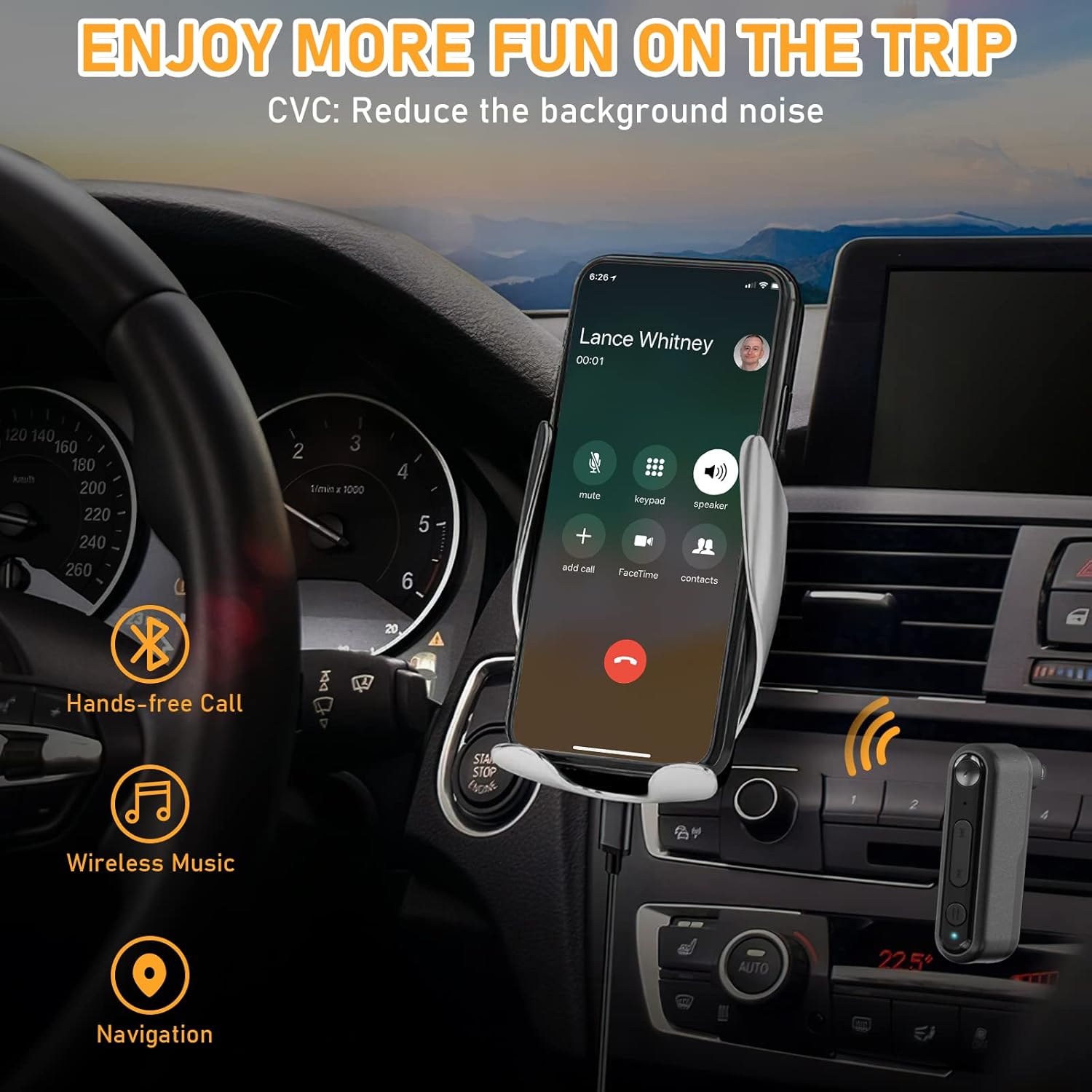
Imej 5: Hands-free communication and navigation. This image shows the adapter being used in a car for hands-free calls, wireless music, and navigation, enhancing driving safety.
5. Gandingan True Wireless Stereo (TWS).
The BAISHUN C57 adapter supports True Wireless Stereo (TWS), allowing you to pair two adapters together to create a left and right stereo channel for an immersive audio experience. This feature is ideal for parties, movies, or music listening with two separate speakers.
5.1 TWS Pairing Steps
- Ensure both BAISHUN C57 adapters are powered on and not connected to any other Bluetooth device.
- Short press the TWS function key on one adapter. This adapter will become the primary unit (e.g., Right channel).
- Short press the TWS function key on the second adapter. This adapter will become the secondary unit (e.g., Left channel).
- The two adapters will automatically pair with each other. Once paired, the LED indicators will change to indicate a successful TWS connection.
- Now, connect your Bluetooth-enabled device (e.g., smartphone) to the primary BAISHUN C57 adapter via Bluetooth (search for "C57").
- Audio will now be streamed in true stereo through both connected speakers.

Imej 6: True Wireless Stereo (TWS) setup. This image illustrates how two adapters can be paired to deliver separate left and right audio channels to two speakers, controlled by a single smartphone.
6. Mengecas
When the battery is low, the LED indicator will flash red. To charge the BAISHUN C57 adapter:
- Connect the provided USB charging cable to the DC/5V charging port on the adapter.
- Plug the other end of the USB cable into a standard USB power source (e.g., wall adapter, computer USB port, car charger).
- Penunjuk LED akan menunjukkan lampu merah padu semasa mengecas.
- Once fully charged, the LED indicator will turn off or change to blue (depending on the model).
A full charge typically takes 3-5 hours and provides several hours of operation, though actual battery life may vary based on usage and volume levels.
7. Penyelenggaraan
- Keep the device dry. Avoid exposure to moisture, rain, or liquids.
- Jangan dedahkan peranti kepada suhu yang melampau (panas atau sejuk).
- Bersihkan peranti dengan kain lembut dan kering. Jangan gunakan bahan kimia yang keras atau pembersih yang kasar.
- Simpan peranti dalam persekitaran yang bersih dan bebas habuk apabila tidak digunakan.
- Elakkan daripada menjatuhkan atau meletakkan peranti kepada kesan yang kuat.
8. Penyelesaian masalah
| Masalah | Kemungkinan Punca | Penyelesaian |
|---|---|---|
| Peranti tidak dihidupkan. | Bateri habis. | Cas peranti sepenuhnya menggunakan kabel USB yang disediakan. |
| Cannot pair with my Bluetooth device. | Adapter is not in pairing mode. Bluetooth telah dilumpuhkan pada peranti anda. Adapter is too far from your device. | Long press MFB to enter pairing mode (flashing LED). Pastikan Bluetooth didayakan pada telefon/tablet anda. Move the adapter closer to your Bluetooth device (within 33ft/10m). |
| Tiada bunyi selepas berpasangan. | Kelantangan terlalu rendah. 3.5mm AUX cable is not fully inserted. Incorrect audio input selected on your stereo. | Increase volume on both the adapter and your audio system. Ensure the 3.5mm plug is securely connected. Select the correct AUX input on your car/home stereo. |
| Kualiti audio yang lemah atau terputus sambungan. | Gangguan atau jarak. Bateri lemah. | Move closer to the adapter and away from potential interference sources. Charge the adapter fully. |
| Gandingan TWS gagal. | Adapters are already paired to another device. Incorrect TWS pairing steps. | Ensure both adapters are disconnected from other Bluetooth devices before TWS pairing. Follow the TWS pairing steps precisely as outlined in Section 5.1. |
9. Spesifikasi
- model: C57
- Versi Bluetooth: 5.3
- Ketersambungan: 3.5mm AUX Input, Bluetooth
- Sumber Kuasa: Bateri Litium Ion Boleh Dicas semula
- Julat Kerja: Sehingga 33 kaki (10 meter)
- Dimensi Produk: 2.12 x 1.87 x 0.55 inci (lebih kurang)
- Berat Barang: 1.44 auns (lebih kurang)
- Ciri Khas: Built-In Microphone, Hands-Free Calls, True Wireless Stereo (TWS)

Imej 7: Bluetooth 5.3 advantages. This image highlights the benefits of Bluetooth 5.3, including 2X more stable connection, 2X faster transmission, and higher sound quality compared to Bluetooth 5.0.
10. Maklumat Waranti
For specific warranty terms and conditions, please refer to the product packaging or contact BAISHUN customer support directly. Warranty coverage typically includes manufacturing defects for a specified period from the date of purchase.
11. Sokongan Pelanggan
If you encounter any issues or have questions not covered in this manual, please contact BAISHUN customer support through your purchase platform or visit the official BAISHUN website for assistance. Please have your product model (C57) and purchase details ready when contacting support.