pengenalan
This manual provides essential instructions for the setup, operation, and maintenance of your Generic Replacement Remote Control. This remote is designed to function as a replacement for various TD Systems LCD HDTV TV models. Please read this manual carefully to ensure proper use and to maximize the lifespan of your remote control.
Persediaan
1. Pemasangan Bateri
Alat kawalan jauh memerlukan dua (2) bateri AAA (tidak termasuk) untuk operasi. Ikuti langkah ini untuk memasang bateri:
- Cari penutup petak bateri di belakang alat kawalan jauh.
- Luncurkan penutup ke bawah atau tekan selak dan angkat untuk membuka petak.
- Masukkan dua bateri AAA, pastikan terminal positif (+) dan negatif (-) sejajar dengan tanda di dalam petak.
- Gantikan penutup petak bateri dengan menggelongsorkannya semula ke tempatnya sehingga ia berbunyi dengan selamat.

Image: Back of the remote control with the battery compartment open, illustrating the correct orientation for AAA battery insertion.
2. Penggunaan Awal
Once batteries are installed, the remote control is ready for use. No programming is typically required for this replacement remote. Point the remote directly at your TD Systems TV and press the Power button to test functionality.
Nota Penting: This replacement remote may not support all advanced functions or specific smart TV features found on your original remote. Basic TV functions such as power, volume, channel, and menu navigation are generally supported.
Arahan Operasi
Familiarize yourself with the button layout and their primary functions:
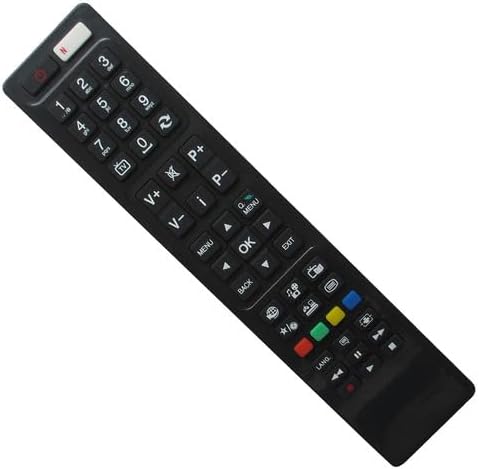
Imej: Depan view of the remote control, displaying the layout of all operational buttons.
- Butang kuasa (⏻): Menghidupkan atau mematikan TV.
- Butang Nombor (0-9): Terus pilih saluran.
- Kelantangan Naik/Turun (V+/V-): Melaraskan tahap kelantangan TV.
- Saluran Atas/Bawah (P+/P-): Changes the TV channel sequentially.
- Bisu (🔇): Membisukan atau menyahredamkan audio TV.
- Menu: Accesses the TV's main menu for settings and options.
- Butang Navigasi (Atas, Bawah, Kiri, Kanan): Navigasi melalui menu dan pilihan.
- Butang OK: Mengesahkan pilihan dalam menu.
- Belakang: Kembali ke menu atau skrin sebelumnya.
- Keluar: Keluar dari menu atau aplikasi semasa.
- Source/Input (📺): Memilih sumber input (HDMI, AV, dsb.).
- Butang Warna (Merah, Hijau, Kuning, Biru): Used for specific functions within certain TV menus or applications, if supported by your TV model.
- Media Control Buttons (Play, Pause, Stop, Rewind, Fast Forward): Controls media playback if your TV supports it.
Penyelenggaraan
Penggantian Bateri
Replace batteries when the remote's response becomes sluggish or stops working. Always replace both batteries at the same time with new AAA batteries. Do not mix old and new batteries, or different types of batteries.
Pembersihan
Untuk membersihkan alat kawalan jauh, lap permukaannya dengan lembut dengan kain kering yang lembut. Untuk kotoran degil, sedikit dampen kain dengan air. Elakkan menggunakan bahan kimia yang keras, pembersih yang melelas, atau kelembapan berlebihan, kerana ini boleh merosakkan alat kawalan jauh.
Penyimpanan
Simpan alat kawalan jauh di tempat yang sejuk dan kering jauh dari cahaya matahari langsung dan suhu yang melampau. Jika alat kawalan jauh tidak akan digunakan untuk tempoh yang lama, adalah disyorkan untuk mengeluarkan bateri untuk mengelakkan kebocoran.
Menyelesaikan masalah
- Jauh tidak bertindak balas:
- Pastikan bateri dimasukkan dengan betul dengan polariti yang betul (+/-).
- Gantikan bateri lama dengan bateri AAA baharu.
- Make sure there are no obstructions between the remote control and the TV's infrared sensor.
- Pastikan anda berada dalam julat berkesan dan halakan alat kawalan jauh terus ke TV.
- Some functions do not work:
- As a replacement remote, it may not support all specific or advanced functions of your original TV remote. This is normal for universal or replacement remotes.
- Verify that your TV model is listed as compatible. If your model is not listed, full functionality cannot be guaranteed.
Spesifikasi
| Jenama | Generik |
| Peranti Serasi | Television (TD Systems F40D101, XF40D101, K40DLV3F, RC4846, RC4860, 48FHD1, 40DLV1FSM) |
| Sumber Kuasa | 2 x Bateri AAA (tidak termasuk) |
| Bilangan Maks Peranti yang Disokong | 1 |
| warna | Random (typically Black) |
| Pengeluar | SZHKHXD |
| ASIN | B0BP9GVFXH |
Sokongan dan Waranti
As a generic replacement product, specific warranty information may vary. For any issues, questions, or support regarding this remote control, please contact the seller directly through your purchase platform. Ensure you provide your order details for efficient assistance.


