
1. Pengenalan
This manual provides essential instructions for the safe and efficient operation of your Rigol DHO1074 Digital Oscilloscope. The DHO1074 is a 4-channel, 70 MHz digital oscilloscope featuring a 12-bit resolution and a 2 GSa/s real-time sample rate, designed for precise signal analysis in various applications. Please read this manual thoroughly before using the device to ensure proper functionality and to prevent damage.
2. Maklumat Keselamatan
Observe the following safety precautions to prevent injury and damage to the instrument:
- Use only the power cord specified for this instrument.
- Pastikan instrumen dibumikan dengan betul untuk mengelakkan kejutan elektrik.
- Do not operate the instrument in wet or damp syarat.
- Elakkan beroperasi dalam suasana meletup.
- Do not remove the instrument cover. Refer servicing to qualified personnel.
- Use appropriate probes and accessories.
- Putuskan sambungan kuasa sebelum membersihkan.
3. Kandungan Pakej
Sahkan bahawa semua item yang disenaraikan di bawah disertakan dalam pakej anda:
- Rigol DHO1074 Digital Oscilloscope (1 unit)
- Kord Kuasa (1 unit)
- Passive Probes (4 units, one for each channel)
- Kabel USB (1 unit)
- Quick Guide (1 unit)
- Resource CD (1 unit)
4. Persediaan
4.1 Kuasa Penyambung
- Pastikan suis kuasa osiloskop berada dalam kedudukan MATI.
- Connect the provided power cord to the AC power input on the rear panel of the oscilloscope.
- Pasangkan hujung kord kuasa yang satu lagi ke dalam soket kuasa AC yang dibumikan.
4.2 Menyambung Probe
- Connect the BNC connector of a passive probe to one of the input channels (CH1, CH2, CH3, or CH4) on the front panel.
- Attach the probe ground clip to a common ground point in your circuit.
- Sambungkan hujung prob ke titik ujian dalam litar anda.
- For accurate measurements, compensate the probe before use. Refer to the "Probe Compensation" section in the full user manual for detailed instructions.
4.3 Hidupkan Kuasa Awal
- Press the power switch on the front panel to turn on the oscilloscope.
- The instrument will perform a self-test and display the startup screen.
- Once the main interface appears, the oscilloscope is ready for use.
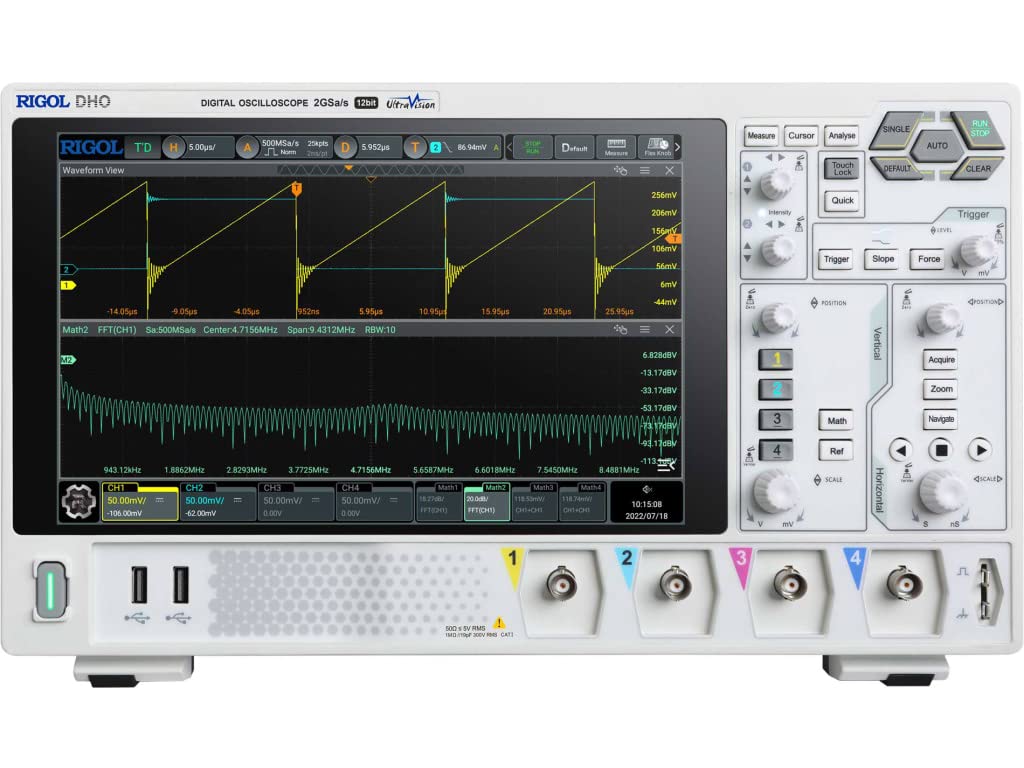
Rajah 4.1: Depan view of the Rigol DHO1074 Digital Oscilloscope, showing the display, control panel, and input channels.
5. Mengendalikan Osiloskop
The Rigol DHO1074 offers a user-friendly interface for capturing and analyzing waveforms. Key features include 4 analog channels, 70 MHz bandwidth, and a 12-bit vertical resolution for enhanced signal fidelity.
5.1 Basic Waveform Acquisition
- Hidupkan kuasa: Ensure the oscilloscope is powered on as described in Section 4.3.
- Sambungkan Isyarat: Connect your signal source to an input channel using a compensated probe.
- Persediaan Auto: Tekan ke AUTO button on the front panel. The oscilloscope will automatically adjust vertical, horizontal, and trigger settings to display a stable waveform.
- Pelarasan Manual:
- Gunakan VERTIKAL knobs (VOLTS/DIV) to adjust the vertical scale (voltage per division) for each channel.
- Gunakan MENDATAR knob (SEC/DIV) to adjust the horizontal scale (time per division).
- Gunakan PENCETUS controls to set the trigger level and mode for stable waveform capture.
5.2 Ciri Lanjutan
- Resolusi Tinggi: Benefit from the 12-bit vertical resolution, providing 16 times more quantization levels than standard 8-bit oscilloscopes, which improves measurement accuracy and reduces quantization noise.
- Deep Memory: The DHO1074 features a 50 Mpts maximum memory depth (expandable to 100 Mpts with option DHO1000-RLU-01), allowing for longer waveform captures at high sampkadar le.
- Serial Decoding: Standard serial decoding capabilities include SPI, I2C, RS232/UART, CAN, and LIN, simplifying the analysis of common serial bus communications.
- Fungsi Pengukuran: Access various automatic measurement functions (e.g., Vpp, Vrms, Frequency, Period) via the MENGUKUR menu.
- Fungsi Matematik: Utilize built-in math functions (e.g., Add, Subtract, Multiply, Divide, FFT) to perform waveform analysis.
6. Penyelenggaraan
6.1 Membersihkan Instrumen
- Sentiasa cabut kabel kuasa sebelum membersihkan.
- Gunakan kain lembut dampened with a mild detergent solution to clean the exterior surfaces.
- Do not use abrasive cleaners or solvents that could damage the plastic parts.
- Avoid spraying liquids directly onto the instrument.
6.2 Penyimpanan
- Store the oscilloscope in a clean, dry environment, away from direct sunlight and extreme temperatures.
- Protect the screen from scratches.
6.3 Penentukuran
For optimal performance and measurement accuracy, periodic calibration by qualified service personnel is recommended. Refer to Rigol's official support channels for calibration services.
7. Penyelesaian masalah
| Masalah | Kemungkinan Punca | Penyelesaian |
|---|---|---|
| Tiada kuasa apabila dihidupkan. | Power cord not connected; power outlet faulty; instrument fuse blown. | Check power cord connection; test power outlet; contact service for fuse replacement. |
| Tiada bentuk gelombang dipaparkan. | Probe not connected; signal source off; vertical/horizontal scale incorrect; trigger not set correctly. | Verify probe connection; check signal source; adjust VOLTS/DIV and SEC/DIV; adjust trigger level or use AUTO button. |
| Unstable waveform. | Trigger settings incorrect; noisy signal. | Adjust trigger mode, source, and level; ensure proper grounding of the probe. |
| Incorrect measurements. | Probe compensation incorrect; wrong measurement settings. | Compensate probes; verify measurement parameters. |
If the problem persists after attempting these solutions, please contact Rigol customer support.
8. Spesifikasi
| Parameter | Nilai |
|---|---|
| Model | DHO1074 |
| Lebar jalur | 70 MHz |
| Saluran Analog | 4 |
| Resolusi menegak | 12-bit |
| Max Sample kadar | 2 GSa/s (real-time) |
| Kedalaman Memori | 50 Mpts (100 Mpts with DHO1000-RLU-01 option) |
| Serial Decoding | SPI, I2C, RS232/UART, CAN, LIN |
| Dimensi Produk | 18 x 11 x 12 inci |
| Berat Barang | 12 paun |
| Pengeluar | RIGOL TECHNOLOGIES USA INC |
9. Waranti dan Sokongan
Rigol products are designed for reliability and performance. This instrument is covered by a standard manufacturer's warranty. For specific warranty terms and conditions, please refer to the warranty card included with your product or visit the official Rigol webtapak.
For technical support, service, or inquiries regarding your Rigol DHO1074 Digital Oscilloscope, please contact Rigol Technologies USA Inc. customer service through their official webtapak atau maklumat hubungan yang diberikan dalam dokumentasi produk anda.
Online resources and additional documentation may be available on the Rigol webtapak.