
1. Pengenalan
This manual provides comprehensive instructions for the Angrox MR21GA Magic Remote Control, designed as a replacement for various LG Smart TV models. It details the remote's features, setup, operation, maintenance, and troubleshooting to ensure optimal performance and user experience.

Imej: Depan, sisi, dan belakang views of the Angrox MR21GA Magic Remote Control, highlighting its ergonomic design and button layout.
2. Keserasian
The Angrox MR21GA Magic Remote Control is compatible with the following LG Smart TV series:
- LG 2021 OLED Series: A1, B1, C1, G1
- LG 2021 QNED TV Series: QNED91, QNED99
- LG 2021 NanoCell TV Series: NANO75, NANO80, NANO81, NANO86, NANO88, NANO91, NANO96
- LG 2021 UHD TV Series: UP76-78, UP80, UP81
Nota Penting:
The voice, magic pointer, and shortcut key functions of this remote control require your LG TV to inherently support these features and have Bluetooth connectivity enabled for proper operation.

Image: Visual representation of the MR21GA Magic Remote Control's compatibility with LG UHD, OLED, QNED, and NanoCell 4K/8K Smart TVs.
3. Ciri-ciri
3.1. Pointer and Wheel Control (Air Mouse)
The remote features a pointing and scrolling function, similar to a computer mouse. You can easily select functions by moving and clicking the cursor on the screen. To activate the pointer, gently shake the remote left or right, or press the Home, Input, or Settings buttons. If the pointer is not responding smoothly, reset it by moving it to the edge of the screen.

Image: Demonstration of the remote's mouse-like pointing and wheel control, allowing for intuitive navigation on the TV screen.
3.2. Kawalan Suara
The remote is equipped with a voice control function, allowing you to search for content or control your TV using voice commands. Simply press the microphone button and speak your command. Ensure your TV has a stable network connection for optimal voice recognition performance.

Image: Illustration of the voice remote control feature, demonstrating how to use voice commands to quickly access content.
3.3. Kekunci Pintasan
The remote includes 6 dedicated shortcut keys for quick access to popular streaming services and functions. These include Netflix, Prime Video, Disney+, Rakuten TV, LG Channels, and Google Assistant/Alexa, allowing you to find your content faster.

Imej: Selesaiview of the 6 hot-keys (Netflix, Prime Video, Disney+, Rakuten TV, LG Channels, Google Assistant/Alexa) for instant access to services.
4. Persediaan
4.1. Pemasangan Bateri
The remote requires 2 AA batteries (not included). To install, open the battery compartment cover on the back of the remote. Insert the batteries, ensuring correct polarity (+/-). Close the cover securely.

Imej: Terperinci view of the remote's battery compartment and the process of inserting AA batteries.
4.2. Arahan Berpasangan
There are two methods to pair your Angrox MR21GA Magic Remote Control with your LG Smart TV:
- Kaedah Pertama:
Turn on your TV. After approximately 20 seconds, point the remote towards the TV and press the Roda (OK) button. The remote control will automatically register, and a pairing completion message will appear on your TV screen. - Kaedah Kedua:
If the first method does not work, press and hold the Rumah butang dan belakang button simultaneously for 5 seconds. Then, press the Roda (OK) button. The remote should then pair with your TV.

Image: Step-by-step guide on how to pair the remote control with your LG Smart TV using two different methods.
5. Arahan Operasi
5.1. Butang Berfungsi Berakhirview
Familiarize yourself with the functions of each button on your remote control:
| Butang/Ikon | Fungsi |
|---|---|
| kuasa | Menghidupkan atau mematikan TV. |
| Butang Nombor (0-9) | Pemilihan saluran langsung. |
| LIST / GUIDE | Launches the TV guide or channel list. |
| QUICK ACCESS (0) | Accesses or edits Quick Access settings. |
| Kelantangan (+/-) | Melaraskan tahap kelantangan. |
| bisu | Membisukan atau menyahredamkan bunyi TV. |
| Microphone / Voice | Activates voice recognition function (press and hold while speaking). |
| Rumah | Memaparkan menu Laman Utama. |
| belakang | Moves to the previous step or closes the menu. |
| Input | Memilih sumber input. |
| tetapan | Enters the Quick Settings menu. Long press for All Settings menu. |
| Roda (OK) | Confirms selection, scrolls through content. |
| Netflix, Prime Video, Disney+, Rakuten TV | Direct access to respective streaming services. |
| LG Channels / Google Assistant / Alexa | Direct access to LG Channels or voice assistant. |
Note: For buttons marked with a circle (O) in some diagrams, a long-press (holding for more than a second) may activate additional functions.
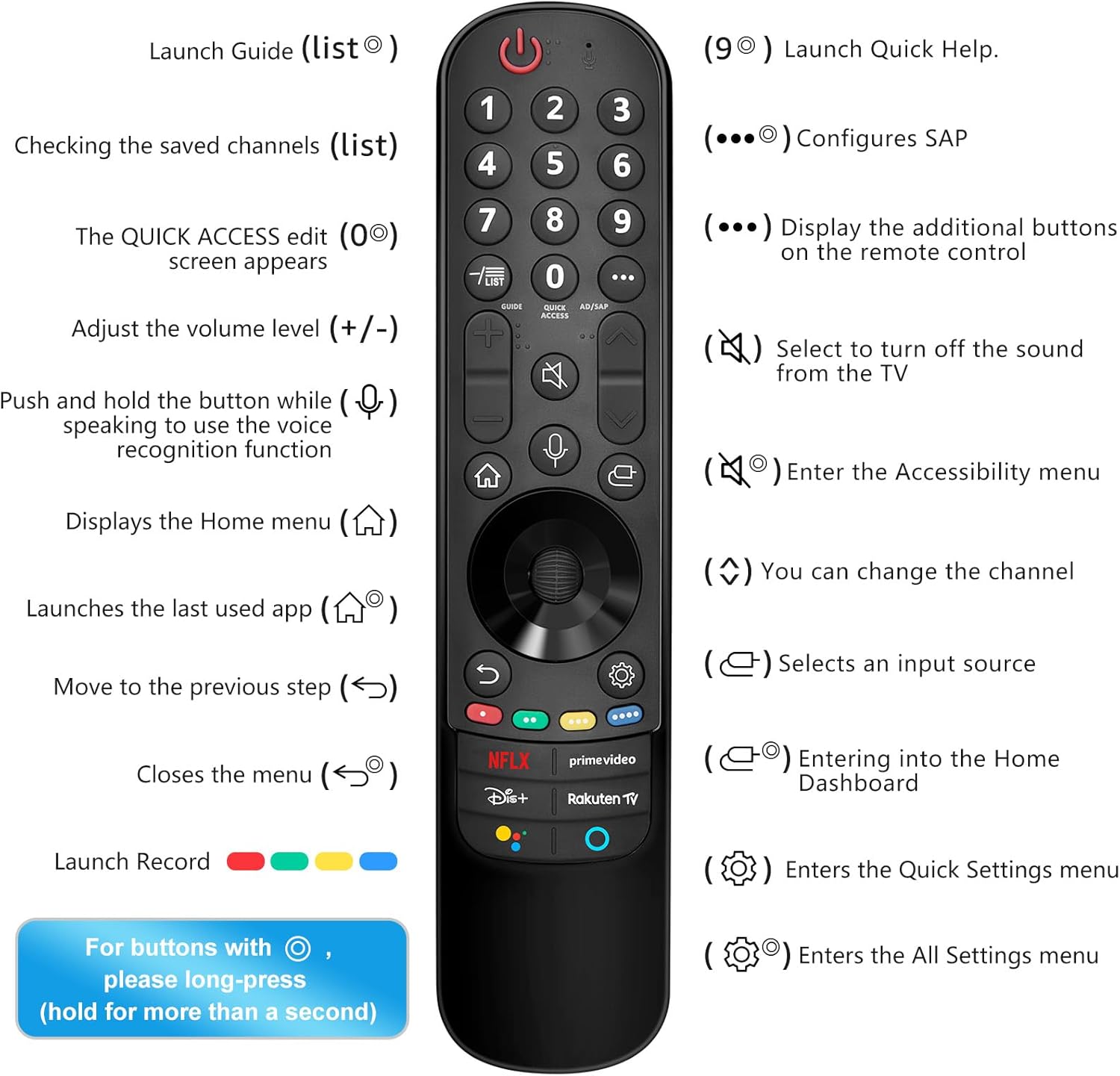
Image: Comprehensive guide to the remote control's buttons and their corresponding functions, including long-press actions.
6. Penyelenggaraan
Untuk memastikan jangka hayat dan fungsi alat kawalan jauh anda dengan betul, ikut garis panduan penyelenggaraan ini:
- Pembersihan: Lap alat kawalan jauh dengan kain lembut dan kering. Untuk kotoran degil, lap sedikitampen kain dengan air atau pembersih yang lembut dan tidak melelas. Jangan gunakan bahan kimia yang keras atau bahan yang melelas.
- Penggantian Bateri: Replace batteries when the remote's responsiveness decreases or it stops functioning. Always replace both batteries at the same time with new AA alkaline batteries.
- Storan: Simpan alat kawalan jauh di tempat yang sejuk dan kering jauh dari cahaya matahari langsung, suhu yang melampau dan kelembapan yang tinggi.
- Elakkan Titisan: Lindungi alat kawalan jauh daripada kesan fizikal, kerana titisan boleh merosakkan komponen dalaman.
7. Penyelesaian masalah
If you encounter issues with your Angrox MR21GA Magic Remote Control, refer to the following troubleshooting tips:
| Masalah | Penyelesaian yang Mungkin |
|---|---|
| Jauh tidak bertindak balas. | Check battery installation and replace with fresh AA batteries. Ensure there are no obstructions between the remote and the TV. |
| Pointer not appearing or moving smoothly. | Ensure your TV supports the pointer function. Try shaking the remote gently. If the pointer is erratic, move it to the edge of the screen to reset its position. Re-pair the remote if necessary. |
| Kawalan suara tidak berfungsi. | Verify your TV's network connection. Ensure your TV supports voice control. Speak clearly and hold the microphone button while speaking. |
| Remote not pairing. | Ensure TV is on. Try both pairing methods described in Section 4.2. Make sure your TV's Bluetooth is enabled. If issues persist, try restarting the TV. |
| Specific shortcut keys not working. | Ensure your TV's software is up to date. Verify that the corresponding app is installed and accessible on your TV. |
8. Spesifikasi
| Atribut | Perincian |
|---|---|
| Jenama | Angrox |
| Nama Model | MR21GA |
| Peranti Serasi | Television (LG Smart TVs) |
| Ciri Khas | Voice control, pointer function, dedicated streaming service shortcut keys |
| Sumber Kuasa | Dikuasakan Bateri |
| Jenis Bateri | AA (2 required, not included) |
| Komposisi Bateri | Beralkali |
| Teknologi Ketersambungan | Voice Control (Bluetooth dependent on TV) |
| Bilangan Butang | 37 |
| Julat Maksimum | 9 Meter (lebih kurang 30 kaki) |
| Dimensi Produk | 23.8 x 7.6 x 4.8 cm (lebih kurang 9.37 x 2.99 x 1.89 inci) |
| Berat Produk | 60 g (lebih kurang 2.12 oz) |
9. Waranti dan Sokongan
Information regarding specific warranty terms and customer support for the Angrox MR21GA Magic Remote Control is typically provided at the point of purchase or within the product packaging. Please refer to any included documentation or contact the seller directly for details on warranty coverage and technical assistance.