
ALLPOWERS AP-SS-008
Manual Pengguna Stesen Janakuasa Mudah Alih ALLPOWERS S1500
Model: AP-SS-008 | Brand: ALLPOWERS
1. Pengenalan
The ALLPOWERS S1500 Portable Power Station is a versatile and high-capacity solar generator designed to provide reliable power for a wide range of applications, from outdoor adventures like camping and RV travel to emergency home backup during power outages. This manual provides essential information on the setup, operation, maintenance, and troubleshooting of your S1500 power station.

Figure 1: ALLPOWERS S1500 Portable Power Station overview.
2. Apa yang ada di dalam Kotak
Upon unboxing your ALLPOWERS S1500, please ensure all the following components are present:
- ALLPOWERS S1500 Portable Power Station (1500W/1092Wh)
- Penyesuai Pengecasan AC
- Welcome Guide (User Manual)
3. Produk Lebihview
The S1500 is equipped with multiple ports to meet diverse power needs simultaneously.
3.1. Pelabuhan dan Penunjuk
- 4 Cawangan AC: 1500W rated power (3000W peak) for household appliances.
- 3 USB-A Ports: Untuk mengecas telefon pintar, tablet dan peranti berkuasa USB yang lain.
- 1 USB-C Port (PD 100W): Fast charging for laptops and compatible devices.
- 2 DC Ports (13V/5.5A): Untuk peranti berkuasa DC.
- 1 Car Outlet (12V/10A): Untuk peralatan kereta.
- Paparan LCD: Menunjukkan paras bateri, wat input/outputtage, dan baki masa jalan.
- Lampu LED: Integrated lights for illumination in low-light conditions.

Rajah 2: Terperinci view of the 11 output ports on the S1500.

Figure 3: Close-up of the LCD display showing battery status and power information.
4. Persediaan dan Pengecasan Awal
Before first use, it is recommended to fully charge the ALLPOWERS S1500.
- Bongkar: Remove the power station and all accessories from the packaging.
- penempatan: Place the power station on a flat, stable surface in a well-ventilated area, away from direct sunlight or heat sources.
- Initial Charge (AC): Connect the included AC charging adapter to the input port on the power station and then plug it into a standard wall outlet. The LCD display will indicate charging status.
- Caj Penuh: The unit is fully charged when the battery indicator on the LCD display shows 100%. This typically takes about 3 hours with combined AC and PD 100W USB-C input.
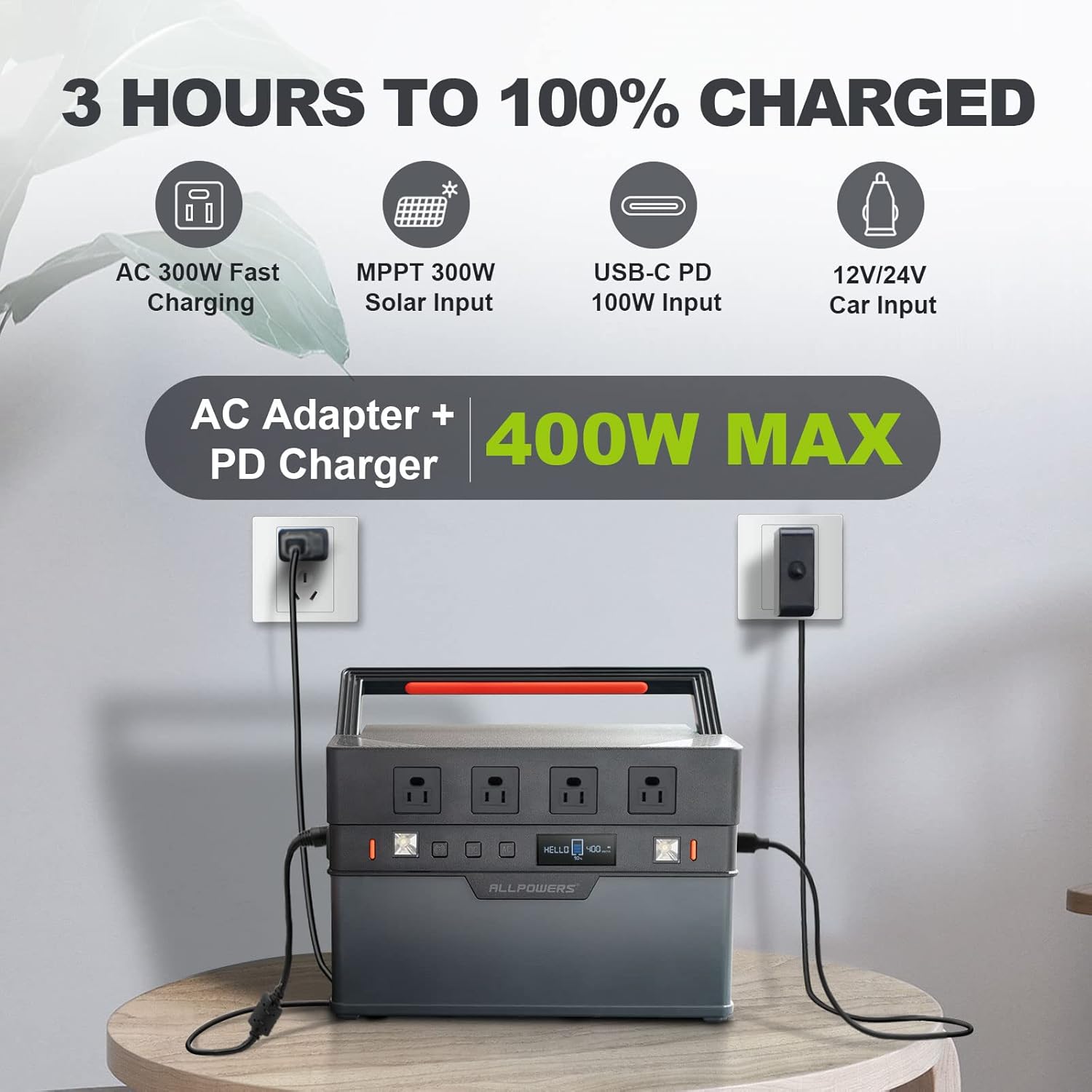
Figure 4: S1500 being charged using both AC adapter and PD USB-C input for fast charging.
5. Arahan Operasi
The ALLPOWERS S1500 offers various output options for different devices.
5.1. Menghidupkan/Mematikan
- To turn on the power station, press and hold the main power button until the LCD screen illuminates.
- To turn off, press and hold the main power button again until the LCD screen turns off.
5.2. Keluaran AC
- Press the "AC" button to enable or disable the AC outlets. The AC indicator on the display will light up when active.
- Plug your AC-powered devices into the 4 AC outlets. Ensure the total wattage does not exceed 1500W (or 3000W peak).
5.3. DC and USB Output
- Press the "DC" button to enable or disable the DC and Car outlets. The DC indicator will light up when active.
- Plug your DC-powered devices or car appliances into the respective ports.
- USB-A and USB-C ports are typically always active when the unit is on.
5.4. Lampu LED
- Press the dedicated LED light button to cycle through different lighting modes (e.g., low, high, SOS).

Figure 5: S1500 with its integrated LED lights activated.
5.5. Kawalan Jauh APP
The ALLPOWERS S1500 can be controlled via a mobile application for convenient remote operation.
- Download the "ALLPOWERS" app from your smartphone's app store.
- Enable Bluetooth on your power station by long-pressing the Bluetooth button.
- Open the app and follow the on-screen instructions to connect to your S1500.
- Through the app, you can monitor battery status, control AC/DC output, and manage LED lights.

Figure 6: Controlling the S1500 power station remotely using the ALLPOWERS mobile application.
6. Kaedah Mengecas
The ALLPOWERS S1500 supports multiple charging methods:
6.1. Pengecasan Soket Dinding AC
- Connect the AC charging adapter to the power station's input port and then to a standard wall outlet.
- The unit supports 300W AC input for rapid charging.
6.2. USB-C PD 100W Charging
- Use a compatible USB-C PD 100W charger and cable to connect to the USB-C input port.
- This method can be used independently or in conjunction with AC charging for even faster recharge times (0-100% in 3 hours).
6.3. Pengecasan Panel Suria
- Connect compatible solar panels (up to 300W with MPPT optimization) to the power station's solar input port.
- Ensure the solar panels are placed in direct sunlight for optimal charging efficiency.
6.4. Car Outlet Charging
- Connect the power station to your vehicle's 12V/24V car outlet using the appropriate cable.
- This method is ideal for charging while on the go.
7. Penyelenggaraan dan Penyimpanan
Proper maintenance ensures the longevity and optimal performance of your ALLPOWERS S1500.
- Pembersihan: Use a dry, soft cloth to wipe the exterior of the power station. Avoid using harsh chemicals or abrasive materials.
- Storan: Store the unit in a cool, dry place, away from direct sunlight, moisture, and corrosive substances.
- Penjagaan Bateri: For prolonged storage, charge the battery to 50-80% every 3-6 months to maintain battery health. Avoid completely depleting the battery for extended periods.
- Suhu: Operate and store the unit within the recommended temperature range (-4°F to 140°F / -20°C to 60°C). Best working temperature is around 77°F (25°C).

Gambar 7: Dalaman view of the S1500 battery cells, highlighting the robust BMS technology for safety and longevity.
8. Penyelesaian masalah
Jika anda menghadapi masalah dengan ALLPOWERS S1500 anda, rujuk masalah dan penyelesaian biasa berikut:
| Masalah | Kemungkinan Punca | Penyelesaian |
|---|---|---|
| Unit tidak dihidupkan | Battery fully depleted; Power button not pressed long enough. | Charge the unit immediately; Press and hold the power button for 3-5 seconds. |
| Output AC tidak berfungsi | AC output disabled; Overload protection activated. | Press the "AC" button to enable; Reduce the connected load. |
| Pengecasan perlahan melalui solar | Cahaya matahari tidak mencukupi; Panel tidak bersudut optimum; Panel tidak serasi. | Ensure direct sunlight; Adjust panel angle; Verify panel compatibility and wattage. |
| Peminat bising | Normal operation during high load/charging; Resonating with case. | This is normal for cooling; Ensure unit is on a stable surface. |
9. Spesifikasi
| Ciri | Perincian |
|---|---|
| Nama Model | AP-SS-008 |
| Kapasiti | 1092Wj |
| Output AC | 1500W (Rated), 3000W (Peak) |
| Vol. ACtage | 110 Volt |
| Keluaran USB-A | 3 ports, 5V/2.4A |
| Output USB-C | 1 port, PD 100W |
| Keluaran DC | 2 ports, 13V/5.5A |
| Outlet Kereta | 1 port, 12V/10A |
| Input AC | Maksimum 300W |
| Input Suria | Maks 300W (MPPT) |
| Recharge Time (0-100%) | Approx. 3 hours (AC + USB-C PD) |
| Jenis Bateri | Lithium-ion (implied from 3.7V, 1000+ cycles) |
| Siklus Hidup | Capacity remains 80% over 1000+ cycles |
| Berat badan | 22.05 paun (10 kg) |
| Dimensi (L x W x H) | 12.6" x 8.7" x 7.5" |
| Suhu Operasi | -4°F hingga 140°F (-20°C hingga 60°C) |
| Waranti | 5 Tahun |
10. Waranti dan Sokongan
ALLPOWERS provides an exclusive 5-year warranty for the S1500 Portable Power Station, ensuring a guaranteed, worry-free experience.
- Tempoh Waranti: 5 Tahun dari tarikh pembelian.
- Perkhidmatan Pelanggan: For any inquiries, technical support, or warranty claims, please contact ALLPOWERS customer service. Refer to the contact information provided in your Welcome Guide or visit the official ALLPOWERS webtapak.
Ask a question about this manual
Ask about setup, troubleshooting, compatibility, parts, safety, or missing instructions. Manuals+ will review the question and use this page’s manual context to help answer it.