
pengenalan
This manual provides detailed instructions for the assembly, installation, operation, and maintenance of your Tecmojo Elite Collection 6U Wall Mount Server Cabinet. Please read these instructions carefully before beginning assembly or use to ensure proper functionality and safety. This server cabinet is designed for housing IT, AV, audio, and data equipment in various environments such as studios, homes, and offices.
Komponen Produk
The Tecmojo Elite Collection 6U Wall Mount Server Cabinet is shipped flat-packed and requires assembly. Please verify that all components listed below are present before beginning assembly.

Rajah 1: Included components for the Tecmojo 6U Wall Mount Server Cabinet. This includes the instruction manual, M6 cross screws (10), M6 cage nuts (10), keys (2), and two cooling fans.
- Cabinet Frame Components (Side Frames, Front/Back Brackets, Top/Bottom Panels)
- Panel Sisi (2)
- Front Glass Door (1)
- Pendakap Pelekap Dinding (1)
- M6 Cross Screws (10)
- M6 Cage Nuts (10)
- Kekunci (2)
- Cooling Fans (2)
- Manual Arahan
Pemasangan dan Pemasangan
Follow these steps to assemble and install your Tecmojo 6U Wall Mount Server Cabinet. It is recommended to have assistance for wall mounting due to the cabinet's weight and size.
Video 1: This video demonstrates the step-by-step assembly and wall mounting process for the Tecmojo Elite Wall Mount Server Cabinet. It covers assembling the frame, attaching panels, and securing the cabinet to a wall bracket.
Langkah Perhimpunan:
- Assemble Rack Rails: Symmetrically place the side frames.
- Fix L Bracket: Secure the L brackets using screws and cage nuts.
- Fix Front and Back Brackets: Attach the front and back brackets to complete the main frame structure.
- Assemble Bottom and Top Panels: Install the bottom panel, then the top panel, securing them with screws.
- Fix Back Plate: Attach the back plate to the rear of the cabinet frame.
Langkah Pemasangan Dinding:
- Install Wall Mount Bracket: Securely install the wall mount bracket on the desired wall location. Ensure it is level and capable of supporting the cabinet's weight (up to 176 lbs / 80 kg) plus equipment.
- Hang and Fix Cabinet: Carefully hang the assembled cabinet onto the installed wall mount bracket. Secure the cabinet to the bracket using the provided screws.
Perhimpunan Akhir:
- Pasang Panel Sisi: Attach the two side panels to the cabinet. These panels are detachable for convenient access.
- Pasang Pintu Kaca Hadapan: Install the front glass door. The door is reversible, allowing it to be opened from either the right or left side.

Rajah 2: The interior of the cabinet features a 360mm mountable depth and clearly marked square rack holes for easy equipment installation.

Rajah 3: The cabinet is designed with 16-inch mounting holes to accommodate standard stud placement, and features removable side panels for easy access.
Arahan Operasi
Security and Access:
- The server cabinet is equipped with keys to lock the front door and side panels, preventing unauthorized access and protecting your equipment.
- Detachable side panels and a reversible front door allow for convenient inspection and replacement of equipment from various directions.
Cooling and Cable Management:
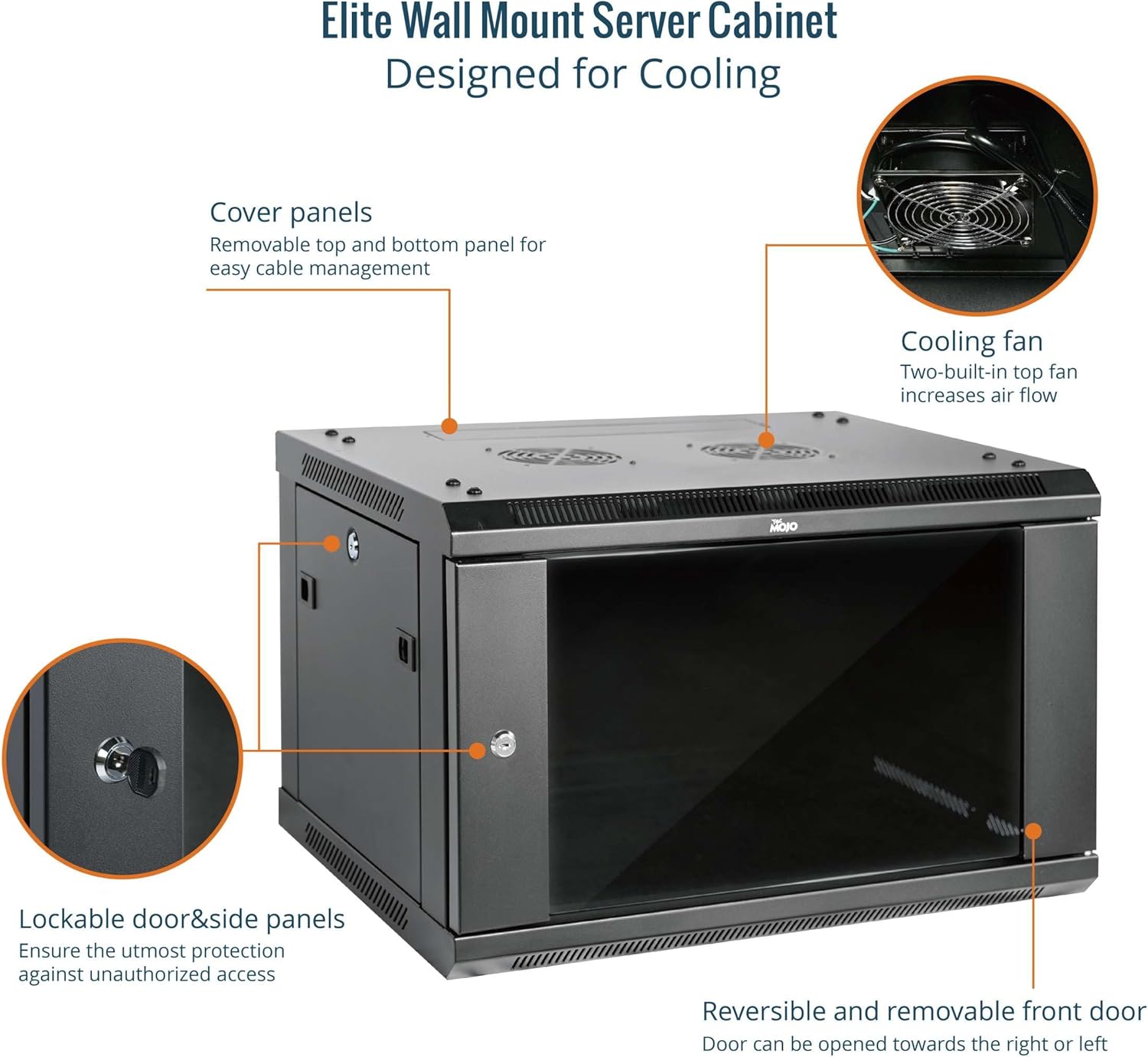
Rajah 4: The cabinet features two built-in top fans for enhanced cooling and removable cover panels for efficient cable management.
- Two built-in cooling fans are located on the top panel to ensure dependable heat dissipation and maintain internal temperature equilibrium.
- Removable covers at the top and bottom of the cabinet allow for organized cable routing and management.
Penyelenggaraan
Regular maintenance ensures the longevity and optimal performance of your server cabinet.
- Pembersihan: Lap permukaan luar secara berkala dengan kain lembutamp kain. Elakkan pembersih yang kasar.
- Pemeriksaan Kipas: Check the cooling fans regularly for dust accumulation. Clean them gently with compressed air or a soft brush to ensure proper airflow.
- Pemeriksaan perkakasan: Periodically inspect all screws and fasteners to ensure they remain tight. Retighten as necessary.
- Door and Panel Operation: Ensure the front door and side panels open and close smoothly. Lubricate hinges if needed.
Menyelesaikan masalah
If you encounter issues with your server cabinet, consider the following common solutions:
- Peralatan Pemanasan Terlalu Panas: Ensure the cooling fans are operational and not obstructed. Verify that the cabinet is not placed in an area with poor ventilation.
- Difficulty with Cable Routing: Utilize the removable top and bottom covers for easier cable access. Consider using cable management accessories if needed.
- Door/Panel Not Closing Properly: Check for any obstructions or misalignment. Ensure hinges are properly secured and lubricated.
- Ketidakstabilan Kabinet: Verify that the wall mount bracket is securely fastened to the wall and that all cabinet assembly screws are tightened.
Spesifikasi
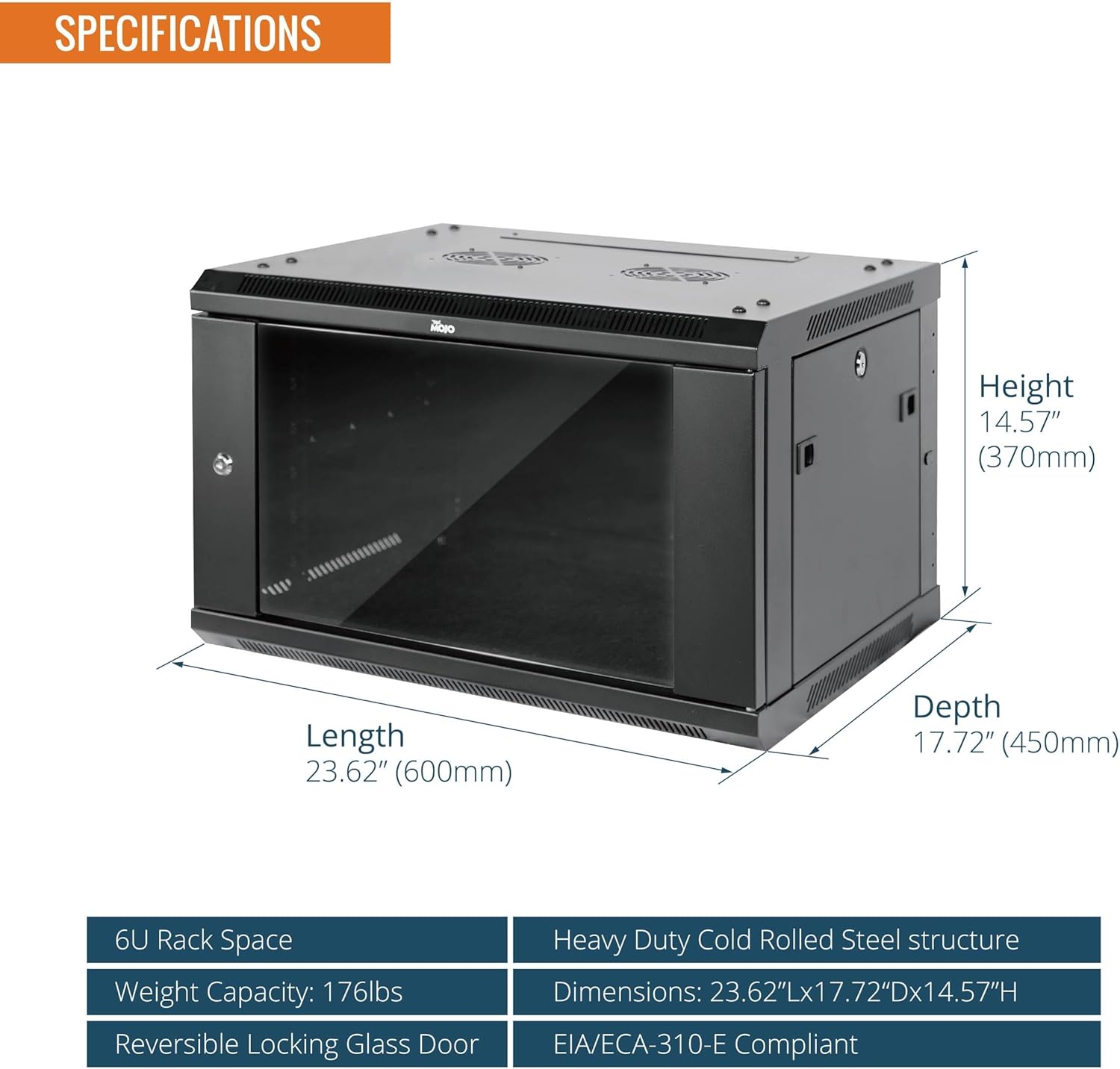
Rajah 5: Detailed dimensions and key specifications of the Tecmojo 6U Wall Mount Server Cabinet.
| Spesifikasi | Perincian |
|---|---|
| Dimensi Produk | 17.72 x 23.62 x 14.57 inches (450mm D x 600mm W x 370mm H) |
| Berat Barang | 44.4 paun (20.14 kg) |
| bahan | Heavy Duty Cold Rolled Steel |
| Unit Rak | 6U |
| Mountable Depth | 14.2 inci (360 mm) |
| Kapasiti Berat | 176 paun (80 kg) |
| Jenis Pintu | Reversible Locking Glass Door |
| Peranti Serasi | Server, CPU, IT/AV/Audio/Data Equipment |
| Pengeluar | Tecmojo |
Waranti dan Sokongan
For warranty information and technical support, please refer to the contact details provided with your purchase documentation or visit the official Tecmojo webtapak. Simpan bukti pembelian anda untuk sebarang tuntutan waranti.