
1. Pengenalan
This manual provides detailed instructions for the setup, operation, and maintenance of your MageGee Star98 Mechanical Keyboard. Designed for gaming and daily use, this 98-key wired keyboard features blue mechanical switches, customizable backlighting, and a hot-swappable design for personalized key switch replacement.
2. Kandungan Pakej
- MageGee Star98 Mechanical Keyboard
- Kabel USB
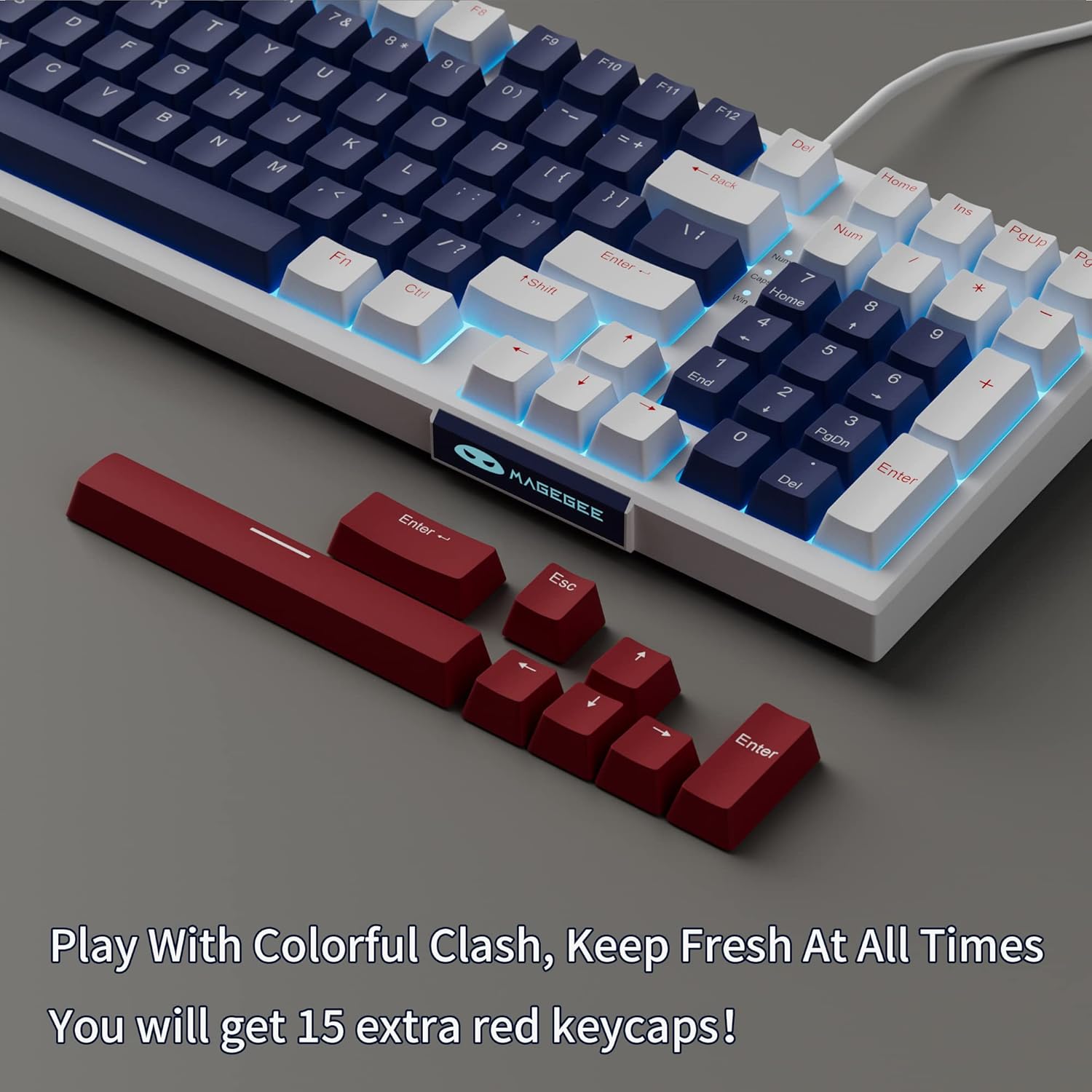
- Additional Red Keycaps (15 pieces)

Image: The MageGee Star98 keyboard displayed with a set of 15 additional red keycaps, highlighting the customization option.
3. Ciri-ciri Produk
- Pengalaman Menaip yang Selesa: Equipped with blue mechanical switches for tactile feedback and a stepped layout for ergonomic typing.
- 98-Kunci Anti-Ghosting: All 98 keys can be pressed simultaneously without conflict, ensuring fast and accurate input.
- Mixed Keycaps & Adjustable Tilt Legs: Features 3-color mixed double injection keycaps for clear backlighting and foldable brackets for adjustable typing angles.
- Reka Bentuk Boleh Tukar Panas: Compatible with most 3-pin and 5-pin mechanical switches, allowing for easy customization and replacement.
- Solid Sea Blue Backlight: Multiple backlight modes with a solid sea blue color, which can also be turned off.
- Keserasian Luas: Supports Win2000, Win XP, Win ME, Vista, Win7, Win8, Win10, Android, Linux, Mac operating systems. Plug and play functionality via USB.

Image: A diagram illustrating the compact 98-key layout of the MageGee Star98 keyboard, highlighting its space-saving design while retaining full functionality.
4. Arahan Persediaan
- Sambungkan Papan Kekunci: Locate the USB cable provided in the package. Plug one end into the USB port on the back of the keyboard and the other end into an available USB port on your computer.
- Pengecaman Sistem: Your operating system should automatically detect and install the necessary drivers for the keyboard. This is a plug-and-play device, so no additional software installation is typically required.
- Adjust Tilt Legs: For ergonomic comfort, unfold the adjustable tilt legs located on the underside of the keyboard to achieve your preferred typing angle.

Image: The MageGee Star98 keyboard connected to a laptop, demonstrating the USB connection point and overall setup.
5. Arahan Operasi
5.1 Kawalan Lampu Latar
The keyboard features a solid sea blue backlight with multiple operating modes. Use the following key combinations to control the backlighting:
- Fn + [Key]: Specific key combinations for changing backlight modes are typically indicated on the keycaps themselves (e.g., Fn + Ins, Fn + Home, Fn + PgUp, Fn + Del, Fn + End, Fn + PgDn). Refer to the keycap legends for exact functions.
- Fn + Up/Down Arrow: Laraskan kecerahan lampu latar.
- Fn + Left/Right Arrow: Adjust backlight speed (for dynamic modes).
- Fn + Menang: Locks the Windows key to prevent accidental presses during gaming.
5.2 Suis Boleh Tukar Panas
The MageGee Star98 keyboard supports hot-swappable mechanical switches, allowing you to change switches without soldering. This feature is compatible with most 3-pin and 5-pin mechanical switches on the market.
- Alih keluar Keycap: Use a keycap puller (not included) to gently remove the desired keycap.
- Alih Keluar Suis: Use a switch puller (not included) to carefully grip the switch and pull it straight up.
- Masukkan Suis Baharu: Sejajarkan pin suis baharu dengan lubang pada PCB. Tekan dengan kuat sehingga suis berbunyi klik pada tempatnya. Pastikan pin tidak bengkok.
- Gantikan Kekunci: Place the keycap onto the new switch stem and press down.
Imej: Dari dekat view of the keyboard demonstrating the hot-swappable switch feature, with several keycaps and switches removed to show the underlying mechanism.
Video: An official video demonstrating the features of the MageGee Sky98 Mechanical Gaming Keyboard, including its hot-swappable switches and design.
6. Penyelenggaraan
- Membersihkan Kap Kunci: Gunakan yang lembut, damp cloth to wipe down keycaps. For deeper cleaning, keycaps can be removed using a keycap puller (not included) and washed with mild soap and water. Ensure they are completely dry before reattaching.
- Suis Pembersihan: Use compressed air to remove dust and debris from between the switches. Avoid spraying liquids directly into the switches.
- Penjagaan Kabel: Elakkan selekoh tajam atau lekukan pada kabel USB untuk mengelakkan kerosakan.
- Storan: Simpan papan kekunci di persekitaran yang bersih dan kering, jauh daripada suhu ekstrem dan cahaya matahari langsung.
7. Penyelesaian masalah
- Papan Kekunci Tidak Membalas:
Ensure the USB cable is securely connected to both the keyboard and the computer. Try plugging the keyboard into a different USB port or a different computer to rule out port issues.
- Kunci Tidak Berfungsi:
If individual keys are not responding, check if any debris is lodged under the keycap or switch. For hot-swappable switches, try removing and re-inserting the switch, or replacing it with a known working switch.
- Lampu Latar Tidak Berfungsi/Berkelip-kelip:
Ensure the backlight is not turned off (check Fn key combinations). Try adjusting brightness. If flickering persists, ensure the keyboard is connected to a stable USB port providing sufficient power.
- Windows Key Locked:
Tekan Fn + Menang to toggle the Windows key lock function.
8. Spesifikasi
| Ciri | Perincian |
|---|---|
| Jenama | MageGee |
| Nombor Model | Bintang98 |
| Penerangan Papan Kekunci | mekanikal |
| Bilangan Kunci | 98 |
| Jenis Suis | Tactile (Blue Switches) |
| Teknologi Ketersambungan | Berwayar (USB) |
| Pencahayaan latar | Single Color (Sea Blue), Multiple Modes |
| Panas-Boleh Tukar | Yes (3-pin and 5-pin switches) |
| Peranti Serasi | PC, Laptop |
| OS yang serasi | Win2000, WinXP, WinME, Vista, Win7, Win8, Win10, Android, Linux, Mac |
| bahan | Akrilonitril Butadiena Stirena (ABS) |
| Ciri Khas | Ergonomic, Anti-Ghosting |
9. Waranti dan Sokongan
The MageGee Star98 Mechanical Keyboard comes with a Waranti 1 tahun dari tarikh pembelian. Waranti ini meliputi kecacatan pembuatan dan isu-isu yang timbul daripada penggunaan biasa.
For technical support, warranty claims, or any questions regarding your product, please contact MageGee customer service through the retailer's platform or the official MageGee website. Please have your purchase receipt and product model number (Star98) ready when contacting support.